Note
Access to this page requires authorization. You can try signing in or changing directories.
Access to this page requires authorization. You can try changing directories.
A group in Azure Device Registry is a query-defined set of homogeneous resources that you use to target fleet-scale operations, such as software updates. In the current preview, a group targets IoT Hub-connected devices. Instead of managing individual resources, you define a filter once and reuse the resulting group wherever you need to act on that set of resources.
Important
Azure Device Registry groups are currently in preview.
Service applicability
| Feature | Azure IoT Operations | Azure IoT Hub |
|---|---|---|
| Groups | Not supported in this preview | Preview |
In this preview, groups support IoT Hub-connected devices in an Azure Device Registry namespace.
Query-defined membership
You create a group by defining a filter against supported resource properties, such as manufacturer or software revision. In the preview, the only supported Azure resource type is RegistryDevice. Azure Device Registry evaluates the filter within the namespace and populates the group with every matching resource.
For RegistryDevice groups, use query-language property names in the query definition. For example:
WHERE manufacturer = 'Contoso' AND model = 'Sensor-v2'
A device can belong to more than one group at the same time. For example, a device might match both a "firmware version 2.1" group and a "building 12" group. Membership isn't exclusive, so you can compose groups around different operational needs without duplicating devices.
RegistryDevice supported properties and operators
The following table shows the supported properties and operators for RegistryDevice filter queries:
| User terminology | Property path | Literal type | Operators |
|---|---|---|---|
| namespace UUID | namespaceUuid |
string | =, !=, <> |
| name | name |
string | =, !=, <>, IN, NIN |
| resource type | resourceType |
string | =, !=, <> |
| location | location |
string | =, !=, <>, IN, NIN |
| device UUID | uuid |
string | =, !=, <>, IN, NIN |
| provisioning state | provisioningState |
string | =, !=, <>, IN, NIN |
| external device ID | externalDeviceId |
string | =, !=, <>, IN, NIN |
| enabled, disabled | enabled |
string enum | =, !=, <>; values are 'Enabled' and 'Disabled' |
| manufacturer | manufacturer |
string | =, !=, <> |
| model | model |
string | =, !=, <> |
| software revision | softwareRevision |
string | =, !=, <> |
| tag key | tags.<key> |
string | =, !=, <>; maximum path depth is 4 |
RegistryDevice supported update properties and operators
The following table shows the supported properties and operators for RegistryDevice filter queries within the attributes.update scope:
| Property path | Literal type | Operators |
|---|---|---|
attributes.update.deviceClassId |
string | =, !=, <>, IN, NIN |
attributes.update.installedUpdateId.provider |
string | =, !=, <>, IN, NIN |
attributes.update.installedUpdateId.name |
string | =, !=, <>, IN, NIN |
attributes.update.installedUpdateId.version |
string | =, !=, <>, IN, NIN |
attributes.update.latestUpdateJobInfo.state |
string | =, !=, <>, IN, NIN |
attributes.update.latestUpdateJobInfo.updateId.provider |
string | =, !=, <>, IN, NIN |
attributes.update.latestUpdateJobInfo.updateId.name |
string | =, !=, <>, IN, NIN |
attributes.update.latestUpdateJobInfo.updateId.version |
string | =, !=, <>, IN, NIN |
attributes.update.agentInfo.compatibilityProperties.<key> |
string | =, !=, <>; maximum path depth is 5 |
attributes.update.agentInfo.agentProfile |
integer | =, !=, <>, IN, NIN |
You can combine conditions with AND, OR, NOT, parentheses, and comparisons to null. Scalar functions such as STARTSWITH, CONTAINS, IS_NULL, and IS_DEFINED, field-to-field comparisons, and arbitrary properties.* or attributes.* paths aren't supported.
Cached membership and refresh
Group membership is calculated and cached at refresh time—it isn't evaluated in real time. When you create a group, or when you refresh an existing one, Azure Device Registry re-evaluates the filter and updates the cached member list.
You trigger a group refresh through the RefreshMembers operation. Refresh is asynchronous, and a group can have Creating, RefreshingMembers, or Ready status. You can list members once the group reaches Ready status.
Because membership is cached, a group's member list can be stale between refreshes. If a resource's properties change, or a new resource starts matching the filter, that change isn't reflected in a manual-refresh group's member list until the next refresh completes. The service enforces a minimum one-hour interval between manual refreshes.
Immutable filters and lifecycle
You can edit a group's name and description. The filter is fixed at creation; to target a different set of devices, create or clone a group with a new filter.
To target a different or adjusted set of resources, create a separate group with the new filter. Deleting a group removes only the group; its member devices remain.
Manage groups in the Azure portal (preview)
In this preview, the Groups (preview) page in the namespace navigation lists your groups and opens a group detail view. The detail view shows the group's essentials, a read-only query filter definition, and the current member count and last-updated time. Because the filter is set at creation and can't be edited, use the detail view to confirm which devices a group targets. The member list previews up to 10 devices, so treat it as a spot check rather than a complete listing of a large group.
From the groups list or the group detail view, you can take the following actions:
- Create a group from the list view by providing a required name, an optional description, and a query filter.
- Clone an existing group from the list or detail view. Cloning is the practical way to start from a group's definition when you need adjusted membership criteria, because you can't edit the original filter.
- Edit a group's name and description from the detail view. The query filter remains immutable.
- Refresh a group's cached membership on the list or detail view, subject to the refresh limits described in Cached membership and refresh.
- Delete a group from the list or detail view. You confirm the deletion by entering the group name.
Relationship to jobs and software updates
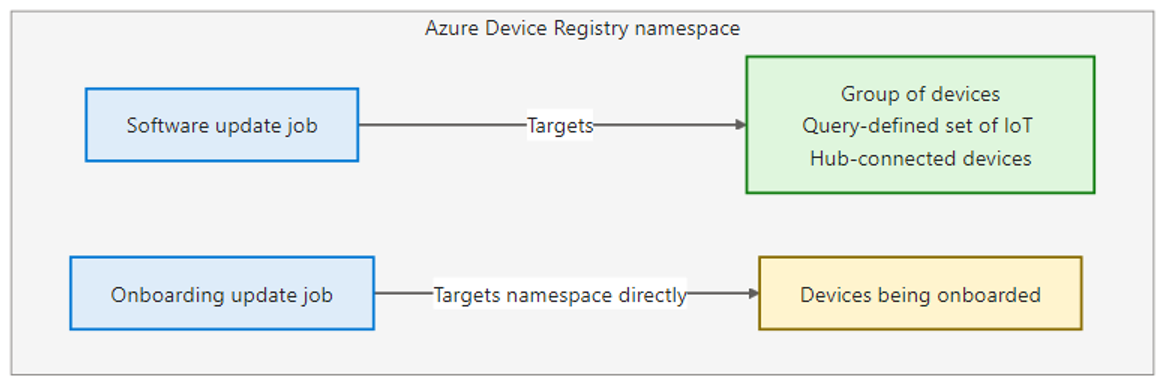
Groups exist independently of any single capability that consumes them. A group is a reusable fleet-management resource that you can reference from multiple places. For example, a Job uses a group as the target for a standard software update operation.
Because a group can be referenced by more than one job or workflow, deleting a group or otherwise changing its availability can affect anything that depends on it. Plan group lifecycle changes with that dependency in mind.
Limits and preview restrictions
The following limits currently apply to groups:
- Up to 100 groups per subscription.
- A minimum one-hour interval between manual refreshes.
ListMemberspage size of 1,000, with no filtering or sorting in this preview.