Note
Access to this page requires authorization. You can try signing in or changing directories.
Access to this page requires authorization. You can try changing directories.
Use Jobs to define and run actions on devices at fleet scale. An Azure Device Registry job runs against a collection of devices that can span multiple IoT hubs in the same Azure Device Registry namespace.
Important
Azure Device Registry jobs are currently in preview. The current preview is scoped to IoT Hub-connected devices. For more information, see Supplemental Terms of Use for Microsoft Azure Previews.
Job scope
Azure Device Registry jobs are a namespace-level resource. A job doesn't belong to an individual IoT Hub—it applies to devices across every hub in the namespace that the job's target group selects. This removes the individual hub as the unit of fleet management and lets you operate on devices consistently regardless of which hub they're connected through.
Relationship to groups and software updates
A job definition identifies:
- The task to run.
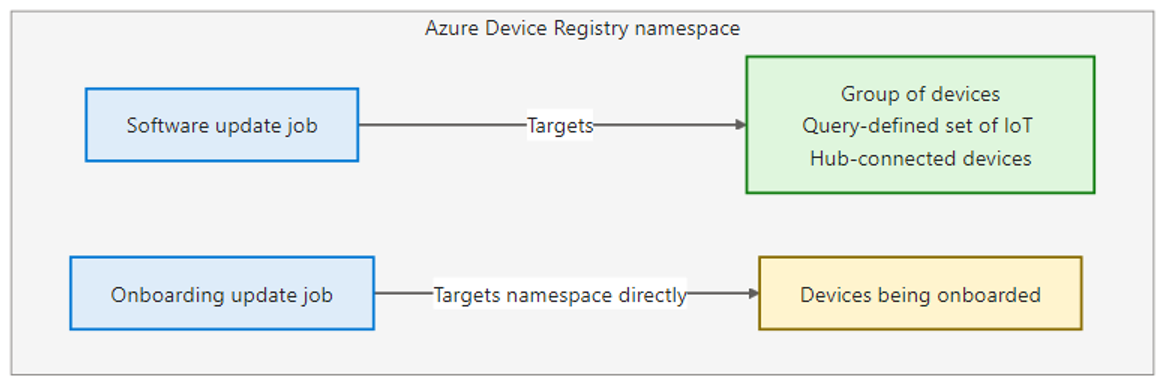
- The target: either a group (for a software update job) or the namespace itself (for an onboarding update job).
- The update configuration: the software update to apply.
The target group and the software update that a job references must already exist before you create a software update job. For more information about defining a target, see Groups concepts (preview). For more information about importing a software update, see Software updates concepts (preview).
Supported job types
This preview supports two software update job types:
| Job type | Target | Description |
|---|---|---|
| Software update | An Azure Device Registry group | Applies a software update to every compatible device in the target group. |
| Onboarding update | An Azure Device Registry namespace | Applies a software update to compatible devices when they check for updates during onboarding, before they register and start operating. Such devices initially connect to the update endpoint rather than to IoT Hub. |
Execution model
- You can run a job on demand or schedule it to run later.
- In this preview, you can start each job definition once. A continuous software update rollout can remain active after it starts and continue processing eligible devices.
- You can end a running job. After a job ends, it doesn't apply the update to more devices.
- Job definition states are:
Ready,Failed, andCreating. - Job run states:
Scheduled,Running,Canceled, andFailed. - Individual device states within a job are:
Succeeded,Failed, andIn progress.
Dynamic rollouts
A software update job remains active and continues progressing as devices transition to the target version. The rollout automatically includes:
- Devices that are offline during the initial rollout when they reconnect.
- Devices that are added to the target group.
- Devices that become eligible for the update.
Retry
In this preview, you can't retry a job for the devices that failed. To retry the update on those devices, create a new job that targets them.
Monitoring
Both the Azure portal and Azure CLI support managing and monitoring jobs. Monitoring includes:
- Device-level results for each device targeted by the job.
- Counts of successful and failed updates.
Limits
- The initial limit is 50 concurrent job definitions and 50 concurrent job executions.