Note
Access to this page requires authorization. You can try signing in or changing directories.
Access to this page requires authorization. You can try changing directories.
This article series provides practical guidance for architects and engineers planning a move from on-premises environments to Azure. It references real-world migration projects to highlight recurring challenges, clarify differences between on-premises and cloud operations, and help teams adapt successfully.
Many common assumptions about physical servers, redundancy, security, and networking don't translate directly to Azure or don't work as expected. This guide helps you find those differences early, clarify and resolve preconceptions before they become migration blockers, and make the migration process smoother and more predictable.
It covers the following concepts:
For a general introduction and migration strategy guidance, see Migrate to Azure.
Select a service model
On-premises teams typically own the full stack. You buy the hardware, install the operating system, patch the runtime, back up the data, and troubleshoot the application. In Azure and the broader Microsoft cloud, you can choose how much of that stack you want to manage. This choice matters early in the migration process because it affects operating cost, team responsibilities, security controls, and how much modernization you take on during migration.
Think of the service models as levels of operational handoff instead of a rigid maturity ladder. Azure Virtual Machines is an infrastructure as a service (IaaS) offering, so you still manage the guest operating system and the application. Azure App Service and Azure SQL Database are platform as a service (PaaS) offerings. You focus on code, configuration, and data while Microsoft runs the platform. Microsoft 365 is a software as a service (SaaS) offering. You configure the service and govern access, but you don't operate the underlying application platform. Azure Functions is a function as a service (FaaS) offering. You write function code and triggers, and Azure handles the infrastructure, runtime hosting, and scale behavior.
The following table summarizes who manages specific areas of migration and typical migration targets for each service model.
| Area | On-premises | IaaS | PaaS | SaaS | FaaS |
|---|---|---|---|---|---|
| Infrastructure, hardware, and physical networking | You manage it | Azure manages it | Azure manages it | Microsoft manages it | Azure manages it |
| Operating system and runtime | You manage it | You manage most of it | Azure manages most of it | Microsoft manages it | Azure manages it |
| Application code and business logic | You manage it | You manage it | You manage it | Microsoft manages the application, you configure it | You manage the function code |
| Data, access, and configuration | You manage it | You manage it | You manage it | You manage tenant configuration, identity, and data governance | You manage bindings, secrets, and data access |
| Typical migration target | Existing datacenter apps | Lift-and-shift virtual machines (VMs) | Modernized web apps and databases | Business capabilities such as email and collaboration | Event-driven tasks, integrations, and background jobs |
Most first-wave migrations follow an IaaS model because it's the shortest path from a physical or virtual server to Azure. That approach is often the right first step. But using an IaaS model also means that your team assumes two responsibilities. They continue the management work that they already do, like OS patching, backup strategy, antivirus protection, and runtime updates, and simultaneously learn Azure networking, monitoring, identity, and cost management. The operational load doesn't decrease when you use IaaS. The load shifts, and your team needs to learn the new platform while they continue familiar tasks. The operational and cost benefits typically improve as you move suitable components to PaaS or SaaS because you stop paying for work that your team no longer needs to do. Factor Azure training into your migration timeline. Don't plan to conduct training after cutover.
You choose a service model for each workload. The Cloud Adoption Framework for Azure calls this step rationalization. It defines the retire, retain, rehost, replatform, refactor, rearchitect, rebuild, and replace strategies. The right model depends on the workload's business value, dependencies, and how much change it can absorb during migration. For more information, see Migration strategies.
For an introductory article about service models, see Overview of IaaS, PaaS, and SaaS in cloud computing.
Understand shared responsibility in the cloud
As an on-premises architect, you might expect to own the same design decisions in Azure as you did on-premises. That expectation doesn't align with how the cloud works. When you buy a cloud service, you buy a service-level agreement (SLA) instead of hardware specifications, so you can trust the design decisions that Microsoft makes for you.
Focus on the SLA that you sign up for. Make design decisions relative to the cost in that SLA and your ability to recover that service.
A common example is a customer who asks why an Azure service has a single network interface controller (NIC). The customer might argue that it creates a redundancy risk. But Microsoft is responsible for the underlying redundancy mechanism for NICs. The Azure service provides an availability SLA, not hardware specifications.
The following table shows where ownership shifts in an IaaS deployment.
| On-premises: You own | IaaS in Azure: Microsoft owns | What you still own in Azure |
|---|---|---|
| Physical servers, hardware, power, cooling | Datacenter physical infrastructure, hypervisor layer, network infrastructure | Operating system, applications, data |
| Network hardware like switches, routers, and cables | Physical network, Virtual Extensible LAN (VXLAN) fabric, routing infrastructure | Virtual networks, subnets, network security group (NSG) rules, routing tables |
| Storage arrays, redundant array of independent disks (RAID) controllers, disk replacement | Storage and replication infrastructure | Storage accounts, access controls, data |
| Security perimeter hardware | Physical host and hypervisor-level isolation | Identity configuration, NSGs, firewall rules, access policies |
| Monitoring and management tools | Platform health, hardware diagnostics | Application health, security monitoring, cost management |
Consider what you're no longer responsible for. You no longer patch hypervisor firmware, replace failed drives, or troubleshoot NIC failures. You still own OS patches on IaaS VMs, application security, NSG configuration, and identity management. The platform SLA covers the infrastructure layer, and your design and configuration decisions cover everything above it. For more information about the shared responsibility model, see Shared responsibility in the cloud.
The PaaS ownership shift
The IaaS table describes the changes that occur when you move to Azure VMs. For PaaS services, the ownership shifts further. Most migrations include a mix of IaaS and PaaS services. Notice how much more responsibility transfers to Microsoft when you move a workload from a VM to a managed service.
| On-premises: you own | PaaS in Azure: Microsoft owns | What you still own in Azure |
|---|---|---|
| SQL Server OS patching, storage provisioning, high availability (HA) clustering | SQL Database engine updates, storage redundancy, built-in HA | Connection security, firewall rules, query performance, data backups (point-in-time restore is automatic; long-term retention is your decision) |
| Web server OS, Internet Information Services (IIS) installation, Transport Layer Security (TLS) certificate renewal | App Service runtime, OS patches, scaling infrastructure | Application code, deployment pipeline and orchestration, custom domain TLS, access configuration |
| Simple Mail Transfer Protocol (SMTP) server hardware, message transfer agent (MTA) software, spam filtering appliances | Exchange Online infrastructure, spam filtering engine | Mailbox security policies, conditional access rules, data retention policy |
What disappears from your ticketing queue
The shared responsibility matrix shows you who owns specific components. It doesn't list items that disappear from your ticketing queue. On-premises engineers work from a clear mental model. They expect hardware alerts to come from the storage team, they escalate NIC failures to the network team, and they send disk replacements to the facilities ticket queue. In Azure, those categories don't generate customer tickets.
Storage array alerts, disk replacement processes, RAID rebuild monitoring, and SAN capacity planning spreadsheets don't exist for Azure Storage or SQL Database.
Firmware update cycles for hypervisors don't exist on IaaS VMs. On PaaS services, you own nothing below the application layer.
Your change advisory board (CAB) process needs to account for changes, such as Azure service updates and underlying host migrations, that happen without a ticket in your system. Azure Service Health typically provides advance notice, but you probably didn't design your CAB process for supplier-initiated changes with no customer approval gate.
The operational responsibility shift
Shared responsibility isn't just about hardware. It includes the operating model, which comprises who has access, who monitors, and who responds.
On-premises operations teams manage physical infrastructure. Cloud operations teams manage services through the portal and APIs. The responsibilities shift in a specific direction.
You no longer manage physical servers, VMware hypervisors, network hardware, storage arrays, power and cooling, and hardware vendor support cases.
You now manage role-based access control (RBAC) policies, Azure Monitor dashboards, cost budgets, cloud-native logging pipelines, access reviews, and policy compliance.
This change is a shift in responsibility, not a reduction. Some teams have level 1 helpdesk staff whose job is partly hardware coordination. They might verify physical cabling, confirm NIC seating, and manage vendor dispatch. Your team doesn't need to do this work anymore, but you still need the people who did it. Address this explicitly in your team's transition plan.
During migration, you run a hybrid workload for weeks or months. You need to decide which monitoring tools stay on-premises, which tools move to Azure, and which tools run in both places. Base these decisions on the shared responsibility model.
Phased responsibility: From lift-and-shift to managed services
Shared responsibility isn't static. It shifts as workloads modernize.
On day one of lift-and-shift, you still own infrastructure management for your IaaS VMs. You patch the OS, manage the storage configuration, and handle VM-level scaling. On day two (modernization), you move workloads to PaaS services like SQL Database, App Service, or Azure Cosmos DB, and Microsoft takes on infrastructure operation. Your responsibility shifts from infrastructure operation to service configuration and optimization.
Plan for both phases. The responsibility boundary on day one is different from the boundary six months later, after the first wave of modernization. Document which phase each workload is in, and update your team's accountability model as services move from IaaS to PaaS.
Incident response boundaries
You need to learn what steps to take when Azure has a service outage, including when Microsoft contacts you and when you should contact Microsoft. The shared responsibility model implies different escalation paths at different layers.
Some teams expect Microsoft to notify them proactively about service problems. By default, that notification doesn't happen. Configure Azure Service Health alerts to receive notifications about planned maintenance and unplanned outages. Without these alerts, your team might not know about an Azure incident until users report problems.
For IaaS VM failures, you're responsible for the OS and application layers. You open a Microsoft support ticket for suspected infrastructure problems and investigate the application layer yourself. For PaaS service availability problems, such as when SQL Database is unavailable or App Service health checks fail, you open a support ticket with Microsoft. Don't call your database admin to check the SQL Server service because there's no SQL Server service to check. Your escalation chain is shorter, but the control you have is also different.
Design your incident response runbooks to reflect these boundaries before cutover. Engineers who don't internalize the PaaS ownership model spend time troubleshooting at a layer they no longer own, which delays actual resolution. Before go-live, make sure that your team has an Azure support plan in place and understands how to file support requests, assign severity levels, and manage the escalation process. On-premises teams have long-standing vendor support contracts. Azure support is a separate relationship that needs to be set up and tested before cutover. Don't wait to discover it during the first outage.
Platform governance ownership
Microsoft defines platform guardrails. These policies enforce no-public-IP rules, required encryption, isolation boundaries, and allowed regions. Your responsibility is to understand those policies, work within them, and justify exceptions through a formal process.
Tip
Guardrails that only state not to use public IP addresses are insufficient. You also need to explain why those guardrails exist.
Public IP addresses expose resources directly to internet traffic, which makes them a target for scanning, brute force attempts, and DDoS attacks. On-premises, a firewall at the network perimeter handles security. In Azure, the equivalent protection comes from removing the public endpoint entirely. Private endpoints, virtual network integration, and Azure Private Link keep service-to-service traffic on the Azure backbone without public network exposure. The no-public-IP guardrail exists because the Azure private connectivity model makes public endpoints unnecessary for most internal communication.
On-premises environments typically accumulate policy exceptions over time. For example, a rule exists, and a server needs an exception. You document the exception in a ticket, but no one updates the policy when the ticket closes. Azure Policy enforces cloud platform guardrails. Exceptions require explicit policy exemptions with documented justification. Treat policy compliance as an ongoing ownership responsibility that requires regular reviews, not a one-time cutover task.
Talk about this shift with your team early, well before planning is complete. If engineers keep thinking in terms of physical hardware, then they might build for the wrong risks, overprovision resources, and fail to benefit from the automation that makes cloud migration worthwhile. Pets vs. cattle focuses on the compute mindset, but this shared responsibility model applies to every component of your workload.
For the complete shared responsibility matrix across IaaS, PaaS, and SaaS, see Shared responsibility in the cloud. For team-level responsibility alignment, see responsible, accountable, consulted, and informed (RACI) alignment. For advance notice about Azure-initiated changes, monitor Azure Service Health.
Assessment responsibility
You own the dependency mapping before any migration planning begins. Azure Migrate can assess individual VMs and their configurations. It doesn't know which applications depend on each other across your estate.
If you don't map dependencies, the first migration wave breaks the second wave. Applications that share a database, a service account, or a network dependency must move together. This knowledge is organizational; it doesn't come from tools. Assign a team member to own dependency discovery before migration planning begins.
Treat your configuration management database (CMDB) as a starting point instead of the source of truth. Even a well-maintained CMDB that has high confidence ratings requires full re-verification. If you trust 80% of the data, you still have to verify 100% of it, because you don't know which 20% is wrong. Verify every workload classification through interviews with application and platform owners before the migration wave begins, not after.
Note
Don't trust workload criticality classifications without verification. A database labeled non-production might have had production workloads silently added to it over time without any CMDB update.
To learn more about how to use Azure Migrate for assessment, see Overview of assessment.
Rethink your approach to servers
Many on-premises teams manage servers as unique, long-lived machines that have individual names, histories, and specific configurations. When a server breaks, teams diagnose and repair it in place. This approach is the pets model in which every server matters. But this approach isn't a requirement. Hardware procurement cycles and operational complexity often impose it as a constraint.
To maximize the benefits that Azure provides, adopt a cattle model. In this model, you treat servers as interchangeable and disposable. If a VM has a problem, terminate it and spin up a replacement from a template. This approach eliminates manual repair, configuration drift, and attachment to individual machines. It shifts your operational thinking from individual server maintenance to management of infrastructure as a system of identical, replaceable units.
Even if your current on-premises environment relies on the pets model, Azure gives you the opportunity to rethink this practice. The following table shows how this mindset shift affects key operational areas.
| Practice | On-premises | Azure |
|---|---|---|
| Patching | Patch servers in place, and schedule downtime around each machine. | Replace a patched image across a scale set in minutes. |
| Scaling | Buy hardware weeks or months in advance. | Change a number in a configuration file. |
| Disaster recovery | Keep a warm standby in a second rack. | Redeploy from templates in a secondary region. |
If your team still thinks of servers as pets after you migrate, they overprovision, resist automation, and avoid the elasticity that makes the cloud cost-effective. Address this mindset shift early, before the first VM lands in Azure.
Use a scale-on-demand approach to capacity
On-premises capacity planning is a risk management exercise. Hardware lead times take weeks or months. Procurement approvals happen on annual budget cycles. Overprovisioning is cheaper than emergency procurement, so it's the rational response to those constraints. But the result is that a server that runs at 8% average CPU utilization is probably correctly sized for its environment. The right-sized Azure equivalent might be a fraction of the size of the physical machine.
The cloud value proposition isn't primarily cost savings. It's the agility that the pay-as-you-go or pay-as-you-use models provide. You can scale and turn things on and off more quickly than you can on-premises.
This shift means that instead of buying for peak usage by predicting the biggest load, purchasing hardware up front, and running it for years, you pay for what you use. You measure real load, adjust scaling as needed, and only pay for resources that you actually consume. If you size your Azure resources by planning for the highest possible demand the way you do on-premises, you likely end up overprovisioned and not benefitting from the lower costs and flexibility of the cloud.
Don't treat the physical server specification as your sizing baseline. On-premises hardware is often inherited from another workload through deprecation cycles. For example, a server originally provisioned for a memory-intensive batch product is passed to a lower-demand team when the product upgrades hardware, and suddenly a workload that needs 100 GB of RAM runs on a 2 TB machine. Blindly accepting the hardware specification produces an overprovisioned Azure VM size that sometimes isn't available at that scale.
To right-size correctly, combine these three data points:
The hardware specifications
Historical CPU and memory utilization data. Collect as much historical data as is available, ideally spanning at least two annual budget cycles for industries that have annual procurement patterns.
A direct conversation with the people who operate the workload.
Utilization data reveals patterns, but only the application owners can tell you about the workload characteristics that the data doesn't capture. Microsoft or partner migration specialists can guide this analysis as part of your planning process to help you interpret metrics and align sizing decisions with Azure best practices.
How capacity thinking differs in Azure
| On-premises approach | Azure approach | What changes |
|---|---|---|
| Provision for peak load and run underutilized at average | Provision for average load and scale out at peak | You pay for what you use instead of for what you might need |
| Hardware refresh on a three-year to five-year cycle | VM resizing and SKU changes on demand | Scale up or down without a procurement cycle |
| Vertical scaling only (bigger physical server) | Horizontal scaling (more instances) and vertical scaling (larger VM SKU) | Stateless workloads distribute load across many small instances |
| Capacity planning is a quarterly or annual exercise | Autoscaling rules respond to metrics in near real time | Manual capacity decisions become policy decisions about thresholds |
| Regional capacity is predictable (you own the hardware) | Regional capacity is shared across all Azure customers | High-demand regions might require capacity reservations for predictable availability |
Horizontal vs. vertical scaling
Vertical scaling means that you resize the VM to a larger SKU that provides more CPU and memory. This option is the on-premises instinct. When a server is constrained, you buy a bigger one. Vertical scaling works in Azure but has a ceiling, and every VM resize requires a brief restart. When you choose a VM SKU, aim to keep sustained utilization at 60% to 80% of the SKU's capacity to reserve space for bursts.
Horizontal scaling means that you add more instances behind a load balancer and distribute traffic across them. Azure Virtual Machine Scale Sets, App Service scale-out, and Azure Kubernetes Service (AKS) node scaling use this pattern. When load drops, instances are removed, and you stop paying for them.
Horizontal scaling requires workloads to be stateless or to externalize state. For example, session state goes to Azure Managed Redis and file uploads go to Azure Blob Storage. Applications that write to local disks or maintain in-memory session state can't benefit from horizontal scaling without application changes. Identify these workloads during the assessment phase. They rely on vertical scaling, which is more expensive at the high end and can't respond as quickly.
Some Azure services measure capacity in units that have no on-premises equivalent. Azure Cosmos DB uses request units (RUs), a synthetic metric that combines CPU, memory, and input/output (I/O) into a single number. Azure Key Vault throttles by request count per second. These abstract metrics require a learning step during migration because you can't derive them from your existing server specifications. Start with the service's sizing calculator or baseline measurements in a test environment, and adjust after you observe real workload behavior.
Lift-and-shift is the first step to a running workload in Azure. The next step is to add load balancing and autoscaling rules tied to metrics. Many organizations stop at lift-and-shift, which is valid for stabilization. Plan to return to scaling configuration after the migration wave settles.
Capacity reservations and regional availability
Tip
Ensure that you check the availability of your required resources in the selected region.
Use Azure reservations to reserve capacity in a specific region and availability zone so that you don't have to wait for resources if demand spikes. VMs and other specific resource types are eligible for reservations. Use this feature for production workloads that might need to restart without warning or when you move several servers at once and need to bring them online quickly.
For predictable base load, Azure Reserved Virtual Machine Instances (with one-year or three-year commitments) reduce compute costs. Finance teams from a CapEx procurement background often find Azure Reserved Virtual Machine Instances easier to budget for. You commit to a defined capacity level, you get a discount, and the capacity is yours for the term. The underlying logic is different because you buy a discount on consumption instead of owning hardware, but the commitment model is familiar. Azure savings plans provide more flexibility at a slightly lower discount for workloads that vary across instance types.
For Cloud Adoption Framework guidance about right-sizing and workload assessment, see Assess workloads. For Azure Well-Architected Framework scaling strategy, see Design a reliable scaling strategy and Optimize scaling and partitioning. For cost commitment options, see Azure Reservations overview and Azure savings plans overview.
Rethink resources vs. roles
On-premises infrastructure is capital. You buy servers, cables, switches, and storage arrays. You name them and assign them to teams. You track them in a CMDB. Each asset has an owner, a support contract, and a decommission date. That model is coherent and correct for on-premises environments.
In Azure, infrastructure is consumption. You don't buy a server. Instead, you describe what you need, and Azure provides a service with an SKU and a configuration. There's no physical identity and no DB-PROD-01 to rack, log into, patch, or restart. Instead, you have a SQL Database instance with a connection string.
This difference isn't a minor difference in tooling. It's a different mental model for what infrastructure is and how you relate to it. You reduce infrastructure responsibilities and can focus solely on the service.
The operating model transition
The ownership changes section covers the responsibilities that you stop owning and the responsibilities that you start owning. This section covers the practical side, like what your operations team actually does differently on a workday.
Before migration, choose the right Azure support plan for your organization. Azure offers several support tiers that provide different response times and service levels. These levels range from basic developer self-help to Premier with dedicated technical account management. Ensure that your team understands how to open a support case, how to set severity levels, and what each severity level means in practice. A Severity A (critical) case means that Microsoft works continuously until the problem is resolved. Identify who in your organization has permission to open support cases before migration begins, and verify that access before cutover. Don't wait until an incident occurs.
Ensure that your operations team is familiar with the Azure portal, RBAC management, and Azure Monitor before you go live. Sometimes a migration goes smoothly, but then something breaks overnight, and the on-call team can't access the portal to troubleshoot.
An on-premises server role becomes an Azure service
On a typical on-premises file server, the infrastructure team manages the physical box, the NIC, the disk array, the operating system patches, the backup agent, and the antivirus software. The storage team manages SAN volumes and expansion planning. The server is a permanent asset that has a name, a location, and a support case history.
The equivalent in Azure is Azure Files or Blob Storage, depending on protocol requirements, because they're services that you configure and consume. You don't have a physical box. You choose the redundancy level, like locally redundant, zone-redundant, or geo-redundant storage. You also configure access control by using private endpoint or storage firewall rules and define a backup policy through Azure Backup.
On-premises, hardware like RAID controllers, replicated SAN shelves, and tape backups in a second building provide redundancy. In Azure, you configure redundancy by using a dropdown menu. Each choice presents cost and availability trade-offs that you need to understand before migration. You also set the access tier, like hot, cool, or archive, to manage storage costs. Microsoft owns the disks, the hardware redundancy, and the storage infrastructure. You own the configuration, the access permissions, and the backup policy decisions.
The operations team doesn't manage fewer components. They manage different components. The hardware operational tasks disappear. The configuration, governance, and policy tasks increase. Communicate this change to team members before migration.
CMDB, naming conventions, and ownership in Azure
On-premises CMDBs track physical assets, including the asset ID, rack location, serial number, and support contract details. Azure resources don't have serial numbers or rack locations. The governance layer in Azure includes Azure Resource Manager, Azure Policy, and tags. A few things don't translate directly:
CMDB: Your on-premises CMDB tracks hardware assets by physical properties. The Azure equivalent includes subscriptions, resource groups, tags, and policy assignments tracked through Resource Manager and Azure Policy. Don't try to maintain a parallel on-premises CMDB for cloud resources because the data models are incompatible. Rebuild your governance model in Azure before migration starts.
Naming conventions: On-premises naming conventions typically encode location, environment, and function (EUDC-SQL-PROD-01). Azure naming conventions serve different purposes because location and environment are properties of the resource instead of its name. Follow Cloud Adoption Framework naming and tagging conventions and express environment, owner, and workload context in tags rather than in the resource name.
Ownership: On-premises asset ownership is often physical. You have a budget line and sometimes a physical key. In Azure, ownership splits into two distinct concepts. Business ownership, including accountability, cost allocation, and escalation contact, is expressed through resource tags. Tag names like
owner,cost-center, andbusiness-unitare a naming convention that your organization defines for itself. They're not built-in platform fields. For a recommended standard, see Cloud Adoption Framework naming and tagging conventions.Access control is handled through RBAC role assignments, which control who can read, modify, or delete resources. Note that a person with the RBAC
ownerrole has management permissions over a resource but isn't necessarily accountable for the workload's budget or business outcomes. These are separate concerns that you should track separately. Define both layers before cutover: tag standards for accountability and RBAC assignments for access control.
Decision example: Domain controllers as a role transition
Questions about domain controllers are among the most common questions during migration planning. On-premises, you manage physical or virtual domain controller servers by using Sites and Services configuration. In Azure, you have three options, depending on workload requirements:
Microsoft Entra ID (cloud-only) suits greenfield environments or workloads that don't have on-premises Active Directory dependencies. This identity service isn't Active Directory in the cloud. It's a different, cloud-native identity service that uses a different object model.
Microsoft Entra Domain Services bridges Microsoft Entra ID into the domain world. A managed service provides Kerberos, New Technology LAN Manager (NTLM), Lightweight Directory Access Protocol (LDAP), and Group Policy for legacy workloads. Microsoft manages domain controller VMs.
Active Directory Domain Services (AD DS) on Windows Server VMs in Azure is the full on-premises Active Directory product, hosted in Azure IaaS VMs. You still manage patching, replication, and site topology. Use this option when workloads have deep domain dependencies that Domain Services can't satisfy.
For service selection across other workload types, use the Azure compute decision tree. For resource organization guidance, see Define your naming convention and Build a cloud governance team. The Identity section later in this article describes the identity transition in depth.
Resource organization: Subscriptions, resource groups, and management groups
Many organizational constructs in Azure don't have an on-premises equivalent. On-premises teams organize by physical location, department, or service, like a rack, a VLAN, or a storage array. Azure uses three concepts that you need to understand before you deploy anything. The following list starts with what you interact with on a daily basis and works up to organization-wide governance:
Resource groups are containers for resources that share the same lifecycle. Group resources that you deploy, manage, and decommission together. Delete the resource group, and you delete everything in it. Resource groups aren't network boundaries. Two VMs in different resource groups can communicate freely if they share the same virtual network. Two VMs in the same resource group don't communicate at all if they're in separate virtual networks with no peering. Resource groups don't work like VLANs or subnets.
Subscriptions are billing and isolation boundaries. Use one subscription for each workload as a starting point. This approach provides cost tracking for free, governance clarity, and a natural boundary for access control. You don't need tags to track cost by workload if every workload has its own subscription.
Management groups are governance containers that apply policies across multiple subscriptions. They sit at the top of the hierarchy and are where your organization's nonnegotiable rules, like no public IP addresses, required tagging, and allowed regions, are enforced.
The most common mistake is to create one large subscription and rely on tags for everything. Tags are useful, but they're an opt-in feature and easy to skip. Subscription boundaries are structural. Get the subscription structure right first. Then layer tags on top for fine-grained cost center, owner, and application tracking.
It's important to design this structure correctly because moving resources between subscriptions or resource groups after deployment is difficult. Some resource types can't be moved at all, and others have significant limitations or downtime during the move. On-premises teams typically can migrate VMs between hosts without consequence, but Azure resource moves aren't equivalent. Use Azure landing zones to design your subscription and management group structure before migration begins.
For Cloud Adoption Framework guidance about subscription design, see Subscription considerations and recommendations. For naming and tagging conventions, see Define your naming convention.
Shift identity to Microsoft Entra ID
On-premises identity is built on Active Directory. Users are in a domain, and machines are domain-joined. Applications authenticate via Kerberos or NTLM. The network perimeter is the actual access boundary. If you're inside the network and have a domain account, you can reach resources.
This model doesn't work in Azure. The network isn't a boundary that you can trust. By default, you can access resources via the internet. Users and services connect from locations and devices outside any perimeter you control. Identity becomes the security perimeter.
The perimeter model doesn't work for identity
On-premises, the network perimeter acts as an implicit trust boundary. If a request comes from inside the firewall, it's probably safe. That assumption isn't true in Azure. You can't use a request's network position to determine whether you can trust the request.
For identity, depending on the network perimeter results in specific consequences:
You might retain a storage account with public access enabled because you assume it's behind the firewall, but it's not.
You might write NSG rules that trust the entire virtual network the way an on-premises engineer trusts the internal LAN. The virtual network isn't a trusted perimeter.
You might carry service accounts from on-premises into Azure VMs with unchanged passwords, unchanged permissions, and no rotation schedule because your mental model is "the credential is safe because it's on an internal machine." The machine is now in a shared cloud environment.
The shift to identity-first security means that every access request requires verification, regardless of network location. Users must authenticate and meet policy conditions. Services must use managed identities or workload identities instead of stored credentials. No network position confers implicit trust. The Security section later in this article covers the broader Zero Trust model and how it applies beyond identity.
Determine who gets anytime access
Identity isn't only an architecture decision. It's an operational decision.
Define your operations team's Azure role-based access control (Azure RBAC) roles before migration cutover. Set the Contributor, Owner, and Reader role boundaries, and test the identity chain, including the Microsoft Entra ID account, role assignment, and conditional access policy, before the workload goes live.
We recommend just-in-time (JIT) access for privileged operations, but this approach requires careful planning. Design your JIT policies and approval workflows to match your operational reality. Identify which teams need immediate access during incidents and which roles can tolerate approval delays.
Service accounts and managed identities
On-premises environments commonly use service accounts with passwords that don't change for years. They're set to never expire, used by multiple services, and stored in configuration files. The engineers who originally set up the accounts might be the only team members who know about them. This approach works for service accounts in long-lived on-premises environments.
Azure uses many managed identities. Azure resources get an identity in Microsoft Entra ID without a password, a secret to rotate, or a human account. A VM can use its managed identity to access a Key Vault instance or a storage account without any credentials in the application code or configuration files. An App Service instance can pull secrets from Key Vault by using its managed identity without a service account at all.
Replace service account credentials with managed identity assignments. This change removes an entire category of operational risk that most on-premises engineers don't consider risky because they manage it manually. Most Azure services support managed identities, but coverage isn't universal. Verify support for the specific services in your architecture before you remove service accounts. For containerized workloads on AKS and for continuous integration and continuous delivery (CI/CD) pipelines in Azure DevOps and GitHub Actions, workload identity federation serves a similar purpose with a different implementation.
Group Policy vs. Azure Policy
On-premises teams enforce configuration standards, such as screen saver lockout, USB device disablement, software installation restrictions, and browser settings, by using Group Policy Objects (GPOs).
Server-specific configurations that GPOs typically manage include security baselines, firewall rules, audit policy configuration, and system services startup options. GPOs apply through Active Directory. Microsoft Entra ID doesn't support GPOs.
For Azure resources, Azure Policy becomes the primary policy management mechanism.
Clarify which VMs remain domain-joined and which move to Microsoft Entra ID-joined before migration. On-premises teams might want to use GPOs for everything, but the correct approach depends on the workload's category.
The operational shift in conditional access
On-premises access control follows the logic that if you're on the network and you have an account, you can access resources. Conditional access inverts this logic. Every access request must satisfy policy conditions, like device compliance, MFA requirements, location restrictions, and risk level, regardless of network position.
This change isn't a configuration change. It's a different security model. Some on-premises teams implement similar access control by using Network Access Protection (NAP) or 802.1X. You need to plan for a policy transition. Document your current access control rules, map them to conditional access policies, and test them before you enforce them.
Identity assessment checklist
Answer these questions during the discovery phase, before you plan the identity architecture:
Are domain-joined machines in scope for this migration wave?
Which Group Policy Objects apply to the in-scope workloads?
Which applications have Active Directory-dependent authentication (Kerberos, NTLM, LDAP)?
Do you need Domain Services (managed hybrid) or can workloads use cloud-only Microsoft Entra ID?
What service accounts exist for application-to-application authentication?
Who needs Azure RBAC access for operations, and at what role level?
What conditional access policies govern user access to Azure workloads?
Hybrid identity connects environments
For most migrations, the transition from on-premises Active Directory to Microsoft Entra ID isn't a one-step cutover. Microsoft Entra Connect syncs users, groups, and credentials from on-premises AD DS to Microsoft Entra ID. This sync creates a hybrid state in which users have a single identity that works in both environments. Microsoft Entra Connect cloud sync is a lighter-weight alternative for simpler synchronization scenarios.
The hybrid identity state is a bridge, not a destination. During migration, you run in hybrid mode. On-premises AD DS is the primary directory, and Microsoft Entra ID syncs from it. After migration completes and you decommission workloads from the on-premises domain, you can move toward cloud-only identity and retire on-premises domain controllers for those workloads.
For more information, see the following resources:
For Cloud Adoption Framework identity design guidance, see Identity and access management design area and Hybrid identity with AD DS and Microsoft Entra ID.
For reference architectures, see Identity architecture design.
For product documentation, see Microsoft Entra overview, Domain Services overview, and Conditional access overview.
For managed identities, see Managed identities for Azure resources.
Shift networking to SDN
Shift networking from physical infrastructure to software-defined networking (SDN). On-premises networking and Azure networking appear similar at the architectural level because they both use the hub-and-spoke model, but the underlying technologies are completely different. Azure uses VXLAN.
Tip
Schedule networking training before migration to address these important differences with your on-premises team and prevent misunderstandings that can result in security incidents. Consider this analogy: If on-premises networking is string theory, Azure VXLAN is quantum physics. The two concepts are incompatible.
The following table compares on-premises constructs to their equivalent component in Azure. Ensure that your network engineers understand the differences.
| On-premises construct | Azure equivalent | Key difference |
|---|---|---|
| Physical network segment | Virtual network | Software-defined, no physical boundary |
| VLAN | Subnet | Logical segmentation within a virtual network |
| Access control list (ACL) on a switch | NSG | Stateful, rule-based, applied at subnet or NIC level |
| Physical firewall | Azure Firewall or partner network virtual appliance (NVA) in a hub virtual network | Deployed as a service, not hardware |
| Spanning tree, trunks, cable runs | Handled by Azure platform | Invisible to you; no configuration needed |
| Static routes | User-defined routes (UDRs) | Applied to subnets to override default routing |
| Open Shortest Path First (OSPF), Border Gateway Protocol (BGP) routing (internal) | Azure handles internal routing within virtual networks | BGP only surfaces for Azure ExpressRoute and VPN peering |
Virtual networks don't have spanning tree, physical broadcast domains, or hardware topology. Network segmentation in Azure is logical. This difference makes SDN faster and more flexible than physical switching. You can't see the wire, but you don't need to.
Azure assigns and manages IP addresses as properties of resources, not as fixed physical assignments tied to a port or a NIC. Some behaviors are familiar. For example, IP address ranges matter for routing, NSG rules reference Classless Inter-Domain Routing (CIDR), and subnet sizing requires planning. But the underlying implementation is fully virtual. On-premises networking concepts like broadcast domains, spanning tree, and Address Resolution Protocol (ARP) tables don't apply. If your network engineers use physical networking mental models to reason about Azure IP addressing, they'll make incorrect assumptions about how traffic flows.
In Azure, IP addresses are abstractions that the SDN layer manages. They're not fixed infrastructure properties like they are on-premises. This difference means that operations you might consider straightforward in on-premises networking can behave unexpectedly. For example, Private Link private endpoints have service-specific limitations on where they can connect. For more information, see Private endpoint limitations.
DNS in a hybrid migration
DNS is one of the most common causes of migration failures, and the model in Azure is different from on-premises. On-premises, you manage your DNS servers. You configure zones and update records manually or through Dynamic Host Configuration Protocol (DHCP) integration. In Azure, private DNS zones replace internal DNS for Azure-hosted resources. Private endpoints that use Private Link also require private DNS zone integration to resolve correctly. Without it, applications resolve public IP addresses instead of the private endpoint address, and traffic routes incorrectly or fails entirely.
During the hybrid state, when you have workloads in both locations, you need a DNS resolution plan that allows on-premises machines to resolve Azure-hosted names and Azure resources to resolve on-premises names. Azure DNS Private Resolver provides conditional forwarding between the two environments. Implement this plan before cutover. For Cloud Adoption Framework DNS design guidance, see DNS for on-premises and Azure resources.
Requirements drive network architecture
Before you design subnets or select connectivity options, collect your network security requirements. This step is the first actual planning conversation for any workload migration.
Answer the following questions:
What regulatory constraints apply to network traffic, data egress, or cross-boundary flows?
Should the web, application, and database application tiers be isolated from each other by a firewall?
Should each application be isolated from every other application, or are classes of applications acceptable in shared network segments?
What region constraints exist? Do data sovereignty requirements restrict which Azure regions you can use?
Your answers drive the subnet design, the firewall placement, and the UDR configuration. If you design the network before you answer these questions, you might need to rework your architecture after the security team reviews it. Fulfill requirements first, and the architecture follows.
When you need private connectivity to a PaaS service, the available mechanism depends on the service. Virtual network integration provides outbound connectivity from App Service into your virtual network, but this capability is specific to App Service. To restrict inbound access to a PaaS service from specific subnets, many services (including SQL Database and Azure Cosmos DB) support virtual network service endpoints. For full private connectivity with a private IP address in your virtual network, Private Link projects a private endpoint into your virtual network. Use Private Link for production workloads because traffic stays entirely on the Microsoft backbone. The PaaS service itself remains on Microsoft infrastructure in all cases.
Make an explicit decision about internet access
Before you finalize the network design, make an explicit decision about internet access for each workload component. Some workloads are fully private, including the patch servers, Active Directory, audit collectors, and internal tooling. Web-facing applications need both inbound and outbound paths. This decision drives which Azure services you deploy, such as Azure Firewall, Azure Application Gateway, or Azure NAT Gateway, and where they sit in the hub-and-spoke topology.
Consider whether you need internet access. You might have patch servers or another component where everything is private. But in many cases, if it's a web app, it's facing the internet. So those workloads might need internet connectivity.
Document the internet access decision for each workload component before you deploy any network infrastructure. If you change this decision after you build the network, you need to redesign subnets, UDRs, and firewall rules.
For internet-facing workloads, plan for DDoS protection and edge security. Azure provides a baseline level of DDoS protection for all resources, but Azure DDoS Protection adds traffic monitoring, automatic attack mitigation, and cost protection for workloads that receive public traffic. Azure Front Door and Application Gateway provide a web application firewall (WAF), with TLS termination and application-layer protection. On-premises teams handle these concerns by using physical appliances. In Azure, these services are configured as part of the network design. They're not added after deployment.
For comprehensive Cloud Adoption Framework guidance on Azure network topology, see Define an Azure network topology and Network topology and connectivity design. For hub-and-spoke options, see Traditional Azure networking topology.
The next step is to complete your network security requirements documentation before the Prepare phase begins.
Shift security to Zero Trust
Public cloud security requires a mindset shift that the team must internalize before migration. Any misconfiguration, such as a public IP address on a VM or an overly permissive NSG rule, can result in exposure. On-premises, a misconfigured server is behind the perimeter. In Azure, it's directly reachable. You must shift your approach to security from perimeter defense to Zero Trust.
Warning
You're moving to a public cloud. Any misconfiguration can lead to a data leak. Ensure that the team understands that cloud security operates on different assumptions than on-premises security.
If your team runs non-Microsoft security tools on-premises, the migration creates a practical decision point. These tools include security information and event management (SIEM), vulnerability scanners, and endpoint protection. You need security coverage across both environments during the hybrid phase, and running two parallel stacks long-term increases cost and creates blind spots at the boundary between them. Microsoft Defender for Cloud provides vulnerability assessment and workload protection across Azure resources. It extends to on-premises machines through Azure Arc. Microsoft Sentinel collects security logs from both environments during the hybrid phase and becomes the primary SIEM after migration completes. If a non-Microsoft security tool contract is approaching renewal, evaluate whether you should consolidate onto Azure-native tooling before you renew.
The perimeter network doesn't exist in Azure
On-premises applications often sit behind a perimeter network (also known as DMZ, demilitarized zone, and screened subnet) for security. Whether this concept translates directly to Azure is a frequently asked question during migration planning. But Azure doesn't use perimeter networks for security.
Note
You don't need a perimeter network in Azure. Azure uses different security constructs to achieve the same goals.
In on-premises environments, a perimeter network typically uses a separate network segment between two firewalls to isolate public-facing services from internal networks. In Azure, you achieve equivalent isolation through the following services:
NSGs control inbound and outbound traffic at the subnet and NIC level.
Application Gateway with Azure Web Application Firewall provides Layer 7 protection for web applications and replaces the role of a perimeter network for HTTP(S) traffic.
Azure Firewall or a partner NVA inspects and filters traffic between network segments, similar to the internal firewall in a perimeter network architecture.
Azure Bastion provides secure Remote Desktop Protocol (RDP) or Secure Shell Protocol (SSH) access without exposing management ports to the internet.
Private endpoints keep data-plane traffic bound for other Azure services on the Azure backbone and remove the need for public network exposure.
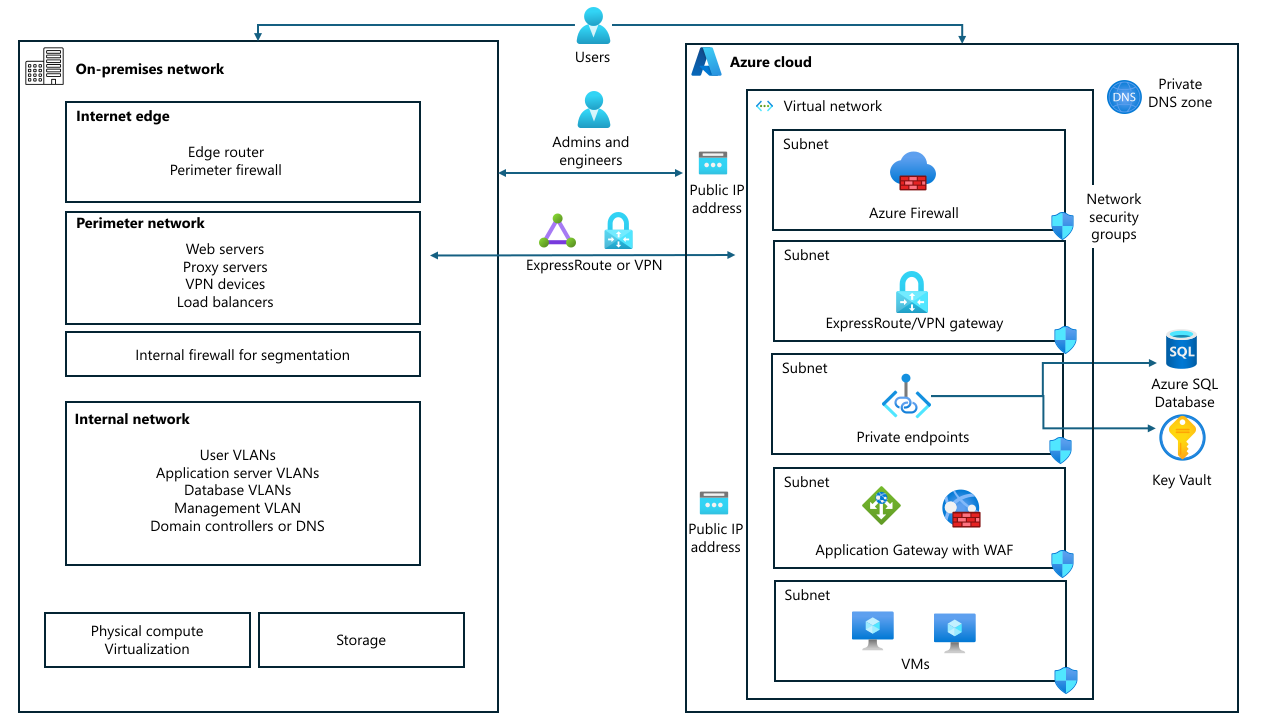
Cloud Adoption Framework replaces the perimeter network model entirely. The Cloud Adoption Framework uses Zero Trust principles and a Corp/Online management group separation to control network exposure. It doesn't use the term perimeter network or explain the transition for engineers familiar with traditional perimeter-based security. An Azure equivalent to perimeter networks doesn't exist. The preceding list shows how each perimeter network function maps to Azure-native security controls. For the Cloud Adoption Framework approach to network security, see Security design area.
Important
If you publish an application on-premises by using a perimeter network, you shouldn't move a perimeter network to the cloud. Rethink the security architecture by using Azure-native constructs rather than replicating on-premises network topology.
When you migrate an application that currently sits in a perimeter network, map each perimeter network function to its Azure equivalent. Don't attempt to recreate a perimeter network segment in Azure. Apply the cloud-native security controls that serve the same purpose instead.
The perimeter security model doesn't work in the public cloud
The perimeter model assumes that you can define an inside environment and an outside environment. In a public cloud, that boundary doesn't exist. A storage account configured with public access is directly reachable from the internet. A VM with an overly permissive NSG rule is exposed. You can't assume that everything inside the network is trusted. The Identity section covers why this concept is important for authentication and access control specifically. This section covers the broader security implications.
Service tags are predefined sets of IP address ranges that Azure maintains for various services and resources. For example, the VirtualNetwork service tag represents all IP address ranges associated with the virtual network. The AzureCloud tag represents all Azure datacenters. Many Azure services also publish their own service tags for the IP addresses they use. When you use service tags in NSG rules, Azure automatically updates the underlying IP addresses as services scale, so you don't have to manually maintain long lists of IP address ranges.
Caution
The VirtualNetwork service tag in NSGs doesn't refer only to the local virtual network. It includes every network that can route to or from it. Review your NSG rules carefully.
The replacement model is Zero Trust. In this model, you assume breach, verify explicitly, and use least-privilege access. Identity, not network location, is the control plane.
The security surface area in Azure is larger than on-premises and harder to reason about holistically. On-premises, you secure the perimeter and operate with relative trust inside of it. In Azure, everything is the perimeter. Services consistently use Azure RBAC for control plane access control, but data plane access is a mixture across services. Every service has its own access control model. VMs, Azure SQL, API Management, and integration services use different RBAC configurations. A straightforward multitier application can involve five distinct RBAC mechanisms across its components. That complexity is manageable, but it requires deliberate planning. Map every service's access control requirements explicitly before migration, and design identity configuration alongside your network and compute design. Don't wait until workloads are already running.
For more information, see the following resources:
For Cloud Adoption Framework security methodology and Zero Trust adoption guidance, see Secure overview.
For the Well-Architected Framework Security pillar, see Security.
For detailed Zero Trust guidance, see Zero Trust security in Azure.
To learn more about service tags, see Azure service tags.
Shift reliability to an SLA-based design
On-premises architects implement physical redundancy. They use two NICs, redundant switches, dedicated hardware for each application, and a warm standby in a second rack. In Azure, reliability is a shared effort. Microsoft provides platform-level guarantees, documented as per-service SLAs, and a suite of optional capabilities. These capabilities include availability zones, geo-redundant storage, replication across multiple regions, and automatic failover at various service tiers. You're responsible for enabling those capabilities.
SLAs describe what the platform commits to for a single service instance. They don't account for application design, dependencies between services, or multiple-region topology. A solution built from three services that each provide a 99.9% SLA doesn't automatically inherit a 99.9% combined availability. Composite reliability depends on the architecture. Use SLAs as a starting point to understand platform behavior instead of as a substitute for your own reliability design.
Your design needs to account for the fact that the service might not be available all the time. For example, during a service's lifecycle, the service might not be available for eight minutes each month because of its SLA. But that eight minutes might manifest as eight separate reboots.
Not all Azure services provide redundancy automatically. Some services, like SQL Database, include built-in HA at specific tiers. Other services require you to explicitly enable zone redundancy or design your own failover. Redundancy behavior varies by service and SKU. Check the Azure reliability documentation for per-service requirements to ensure that your workload is protected.
For comprehensive guidance about how to design for reliability in Azure, including right-sizing reliability to actual criticality, deployments in multiple regions, testing strategies, and SLA-driven design decisions, see the Well-Architected Framework Reliability pillar. For Cloud Adoption Framework management and protection guidance, see Protect cloud workloads.
Prioritize automation by using IaC
You build on-premises infrastructure by clicking through management consoles, manually applying patches, and configuring security rules, one machine at a time. In Azure, prioritize automation by using infrastructure as code (IaC), like Bicep or Terraform. You define the code once, deploy it repeatably, version it in source control, and review changes like any other code contribution.
Teams that build handcrafted servers in Azure encounter the same unique problems that they encounter on-premises, but on Azure, these problems are harder to diagnose and more expensive to unwind. If two engineers make manual changes to the same VM over six months, nobody knows what the actual configuration state is. IaC solves this problem by making the intended state the source of truth.
To put this mindset into practice, start capturing infrastructure definitions from day one of the migration. Every resource deployed as part of the migration should have a corresponding template or script. Standard practice for repeatable migration patterns is to capture IaC and runbooks for each workload so that the next wave requires less effort. Migration projects create the window for this investment so that you don't carry unique infrastructure into the cloud.
For Cloud Adoption Framework guidance about platform automation and DevOps practices, see Platform automation and DevOps.
Shift monitoring to telemetry-driven observability
On-premises teams use System Center Operations Manager (SCOM) or similar agent-based, management-pack-driven tools. Monitoring in Azure requires a different approach. Azure Monitor is consumption-priced. Instead of paying a fixed infrastructure cost tied to management server capacity, you pay for what you ingest and retain. Monitoring is no longer a capital expense.
This shift is more than a tool swap. SCOM management packs don't port to Azure Monitor. You must rewrite alert logic for Windows performance counters as Kusto queries in Log Analytics. Teams that try to maintain SCOM against Azure-hosted workloads have visibility gaps because SCOM isn't designed for the Azure resource model.
Before migration, document where your current monitoring data goes, like SIEM feeds, alerting pipelines, or Network Operations Center (NOC) dashboards, and plan the equivalent Azure Monitor setup. The operational tooling audit is a planning-phase task, not a post-migration cleanup. For each tool, decide whether to migrate it to Azure, replace it with an Azure-native equivalent, or run it in a hybrid environment during a transition period. Teams that defer this decision often keep on-premises SIEM and log collectors running long past their planned decommission date.
For Cloud Adoption Framework guidance about operational monitoring, see Monitor your Azure cloud workload. For the Well-Architected Framework Operational Excellence pillar, see Architecture strategies for designing a monitoring system.
Next steps
Discuss these concepts during the migration kickoff. Involve architects, networking, security, identity, and operations teams to identify and address assumptions rooted in on-premises practices.
Audit current practices against the shared responsibility model. Identify responsibilities that your team retains, responsibilities that Microsoft manages, and processes that require adjustment during hybrid operations.
Identify any remaining on-premises mental models, such as server-centric operations, perimeter network-based security, network trust boundaries, peak-capacity sizing, and hardware-focused reliability planning.