Note
Access to this page requires authorization. You can try signing in or changing directories.
Access to this page requires authorization. You can try changing directories.
This series of articles provides prescriptive, actionable guidance for architects and engineers migrating single workloads from on-premises to Azure. The series covers the full migration lifecycle: Plan, Prepare, Execute, Evaluate, and Decommission.
Migrating a workload from on-premises is a strategic initiative that requires careful planning and stakeholder alignment. You need a solid migration plan and proper preparation to avoid introducing unplanned disruptions that can erode confidence in your workload.
If the migration team is unfamiliar with Azure operating concepts, they should read Azure fundamentals for on-premises engineers before starting the workload migration. Allow time for the team to build, discard, and rebuild non-production environments while they learn.
Note
Throughout this series, source refers to the on-premises workload environment and its components, dependencies, data, and supporting infrastructure. Target refers to the Azure environment and services that host the migrated workload.
Reference workload
This guide focuses on a moderately complex n-tier reference workload whose components are mostly independent from other organizational workloads. The guide doesn't cover mission-critical workloads.
In the reference workload, an on-premises datacenter and network host a multitier enterprise application. The workload includes the following components:
- Two to four web servers behind a load balancer with a local or shared session state
- A Microsoft SQL Server database server with a replica
- A file server
- Directory-integrated identity
- Hybrid connectivity between the on-premises network and Azure
The following diagram shows the on-premises reference workload before the workload migration.
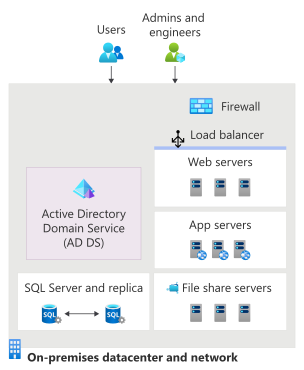
At the top of the diagram, a User icon and an Admins and engineers icon point down to an On-premises datacenter and network box that contains the rest of the diagram components. A firewall is at the top. Below that, Active Directory Domain Services (AD DS) is on the left, above a SQL Server and replica connected by bidirectional arrows. On the right, a load balancer spans three web servers, with three application servers below them, and three file share servers below those.
In the preceding diagram:
External users connect to the environment through a network path, while admins and engineers access and manage the environment from outside the datacenter boundary.
Inside the datacenter, traffic passes through a firewall and then through a load balancer that distributes requests across three web servers.
Below the web tier, three application servers host business logic and application services, and three file share servers provide shared storage for applications and users.
Active Directory Domain Services (AD DS) provides authentication, identity, and directory services.
A SQL Server deployment consists of a primary database and a replica connected by a bidirectional synchronization link.
Together, these components form a traditional on-premises application architecture with separate networking, identity, compute, database, and storage layers. This workload represents the n-tier architecture style.
This guide covers reference workload migration from first assessment to the source hardware retirement. At the end of the process, Azure serves the workload and the operations team can support it.
Although this series uses an n-tier web workload as its reference, you can apply the same Plan, Prepare, Execute, Evaluate, and Decommission steps to other workload types. Adapt the technical steps and validation criteria to the workload.
Workload migration strategy
A like-for-like migration strategy minimizes risk and is typically the safest path to Azure. In this approach, the workload continues to use existing architecture and operational patterns. Migrations are most successful when they avoid scope creep like paying existing technical debt or introducing optimizations during the workload hosting transition. The goal is for the migrated workload to meet its approved key performance indicators (KPIs) and service-level objectives (SLOs).
Review the published service-level agreements (SLAs) for the selected Azure services as design inputs, including their configuration requirements and exclusions. The workload's SLO can be stricter than an individual service SLA and depends on the complete architecture and operating practices. For more information, see Architecture strategies for defining reliability targets.
The underlying business driver rather than technical preference alone usually shapes how strictly the team holds to a like-for-like scope. An organization moving a workload to meet a datacenter exit deadline or avoid hardware end-of-life typically wants no surprises: Move it as is, confirm that it works, and optimize later. A migration prompted by a new cloud strategy or leadership directive might have more tolerance for parallel improvements. Clarifying the business driver early prevents scope creep and disagreements as design decisions accumulate.
Set expectations that a like-for-like migration establishes a stable Azure baseline rather than completing modernization. Cost reduction, operational simplification, autoscaling, and other performance improvements typically require separate assessment and planned changes after the migrated workload is stable.
Tip
Minimize changes during migration by default. Consider a larger change when it has a clear benefit and you validate its compatibility, performance, migration method, operational responsibilities, and recovery implications before cutover.
For example, moving to Azure SQL Managed Instance changes the hosting and operational model more than rehosting SQL Server on Azure Virtual Machines. However, SQL Managed Instance is a fully managed service that handles most database management functions, including upgrades, patching, backups, and monitoring.
Those benefits can justify the change when assessment confirms feature compatibility, performance, recovery requirements, and operational fit. Confirm that custom backup and restore processes and business restrictions on patching or upgrade timing can work with the managed service. If those processes need redesign, include that work in the approved scope before choosing the target.
Expect both environments to coexist through migration and evaluation. Connectivity, identity, replication, monitoring, backup, Domain Name System (DNS), and support paths often remain hybrid longer than the application traffic does. Keep one recorded write authority for every stateful component throughout that period.
Recommended tools
Start with Azure Migrate for discovery, assessment, dependency analysis, and supported server migration paths. The following table lists tools that serve defined purposes or are service-specific:
| Need | Tool or assessment | Reference workload role |
|---|---|---|
| Discovery, assessment, and server movement | Azure Migrate | Provides default starting point for configuration and performance discovery, dependency analysis, sizing, and supported test and final migrations. |
| Migration and platform readiness | Strategic Migration Assessment and Azure landing zone guidance | Assess readiness work before the build. Azure landing zones for on-premises experts owns the landing-zone design. |
| Azure inventory after deployment | Azure Resource Inventory (ARI) | Provides optional read-only export of Azure resources and topology. Doesn't discover on-premises dependencies or replace Azure Migrate. |
| Management of servers that remain outside Azure | Azure Arc-enabled servers | Brings supported on-premises servers into Azure management and monitoring during coexistence. Not a workload migration path. |
| Database assessment and movement | Azure database migration guides, Azure Database Migration Service, and SQL Server migration in Azure Arc | Help select a migration path after approving the database target. Confirm current source and target support, online or offline requirements, downtime, encryption, authentication handling, regional availability, and operational prerequisites. |
| File shares and synchronization | Azure Files and Azure File Sync | Provide the approved managed file-share target. For supported Windows Server scenarios, synchronize with the on-premises file server. |
| Offline data seed | Azure Data Box | Move an initial data set without relying on the network when a supported device and region fit the plan. |
| Workload observability | Azure Monitor | Collect and act on workload metrics, logs, traces, events, and alerts across Azure and hybrid paths. |
| Backup and recovery | Azure Backup | Protect and restore supported workload components. The tested restore path, not a successful job, supplies migration evidence. |
Migration phases overview and timeline
The full workload migration from Plan through Decommission can take several weeks or months. This period includes assessment, preparation, validation, and source retirement, not just the production cutover window. The duration depends on the complexity of the workload and your migration and cutover strategy.
The following table shows a typical workload migration timeline using a like-for-like approach for a moderately complex n-tier workload. The workload includes multiple components and dependencies, but isn't mission-critical and doesn't integrate deeply with other systems.
| Phase | Planning estimate | Reference workload activities | Exit criteria |
|---|---|---|---|
| Plan | 4 to 8 weeks | Discover every tier, choose supported targets, examine physical dependencies, and write the migration and recovery approach. | The design, support checks, failure analysis, and runbook cover the entire workload. |
| Prepare | 2 to 4 weeks | Deploy the approved Azure environment and configure coexistence. Complete functional, regression, load, and migration testing in nonproduction. | The web, database, file, identity, session, network, monitoring, and recovery paths work together in an isolated test. |
| Execute | 1 to 2 weeks | Confirm the approved database configuration and recovery readiness, run final readiness checks, cut over, and validate production. | Azure is the recorded production authority and the workload passes release-blocking tests. |
| Evaluate | 4 to 8 weeks | Observe production behavior, close migration-era access, prove recovery, and remove hidden source dependence. | Azure meets the accepted baselines, source components are either no longer required or are deliberately retained, and any retained shared identity or session dependency follows the recorded path. |
| Decommission | 2 to 4 weeks | Archive required records, approve destructive actions, retire hardware and access, and close contracts and licenses. | Every source asset and obligation has a final disposition, including chain-of-custody evidence where required. |
The schedule expands under the following conditions:
- The team or platform needs more time to get ready or upskill.
- Procurement takes longer.
- System owners need more time to install migration appliances, configure tools, or approve and provision access.
- The amount of data increases the time for initial transfer or synchronization.
- Unsupported systems need an upgrade or rebuild.
- Discovery exposes hidden dependencies.
- The migration needs more rehearsals.
The following requirements also add time:
- Support, security, and architecture reviews
- Formal approval cycles
- Change control windows
- Physical decommissioning duties such as retention, contract notice, sanitization, and chain of custody
Apply extra scrutiny before the following key milestones that have especially high impact:
When Azure accepts its first production write, the recovery path for stateful data changes.
Wiping, returning, or destroying source hardware can remove the physical recovery option.
Workload team responsibility
The same team that manages the workload on-premises often manages the workload in Azure, so they should remain closely involved in the migration. If ownership changes, involve both the source and the receiving operations teams in migration and handover, and agree on when to transfer responsibility.
Migration is often a shared effort across the workload team, operations, platform, networking, security, and a partner or cloud center of excellence team with migration experience. Including the workload team promotes the following outcomes:
- A well-trained team
- An increased sense of ownership
- Less risk of unexpected discoveries late in the process
In many cases, you can engage Microsoft or Microsoft partners who have Azure expertise to support migration. They can lead planning and preparation, while the workload team carries out the production cutover by using partner-developed runbooks and automation.
Ask Microsoft or your partner whether Cloud Accelerate Factory can support your workload migration. Confirm the current eligibility requirements, available assistance, and delivery responsibilities before including it in the plan.
Regardless of the delivery model, validate the delivered architecture against the Cloud Adoption Framework (CAF) and Azure Well-Architected Framework. To ensure that the workload team can deploy, troubleshoot, recover, and change the system without relying on undocumented knowledge or access, require source code and configuration, automation, documentation, access, and an operational handover.
Moving to Azure changes how teams design for reliability. Microsoft provides resilient infrastructure and defines reliability commitments for individual Azure services. The workload team remains responsible for the application architecture, service configuration, dependencies, monitoring, testing, recovery procedures, and operational response needed to meet the workload's reliability requirements.
Include the workload owner and representatives from the operations, platform, networking, identity, security, and database or data teams. Involve procurement or finance teams when costs, purchases, licenses, or contracts could affect the schedule. Include the owners of the source facility and its contracts so the migration plan accounts for shared assets, notice periods, retention, and final exit authority.
Prerequisites
Before you plan the migration, ensure that you have the following prerequisites in place:
Prior experience: You need prior experience with core cloud concepts and a basic understanding of Azure services and cloud migration processes.
Stakeholder alignment: Agree on timelines, budget estimates, and project milestones with stakeholders. Define who is responsible, accountable, consulted, and informed (RACI) for delivery, approvals, cutover decisions, and operational handover across the customer, partner, and Microsoft teams involved. Align these responsibilities and decision authority with any partner statements of work.
Organizational process readiness: Identify required architecture, security, risk, procurement, and change-control reviews. Determine lead times, approval owners, and available maintenance windows. Include them in the migration schedule before committing to phase dates.
Platform strategy: Ensure that your platform foundation is in place. Assume a defined, CAF-aligned migration strategy. As part of this strategy, establish a platform landing zone. Your migrated workload is the workload landing zone and is part of your Azure landing zone topology. The workload must exist under a management group hierarchy, connect to specific networks or remains isolated from them, and follow required governance policies.
Hybrid connectivity: Confirm the required connectivity path between Azure and the on-premises environment. Validate routing, firewall rules, bandwidth, name resolution, ownership, and end-to-end connectivity for the workload's dependencies. Don't move workload components until connection tests pass.
Support strategy: Purchase a Microsoft support plan sized for production use. Unlike free or community support options, a paid support plan provides the fast, reliable escalation path a production migration needs.
Investment in training or partner support: Assess your team's Azure skills and plan for training or partner support as needed.
You should also do a migration readiness assessment. This assessment scores your readiness to migrate across different dimensions. After the assessment, hold a kickoff workshop that includes all stakeholders to gather requirements and constraints and ensure buy-in.
To help you plan and successfully migrate your workload, proceed through the five phases in the following order:
- Plan
- Prepare
- Execute
- Evaluate
- Decommission
Each phase includes detailed steps and checklists that guide you through the migration process.
Important
To address operational readiness, involve your operations team throughout each phase. Plan a formal handoff to prepare them for managing the workload in Azure. For example, set up Azure Monitor dashboards and alerts for their workload monitoring and alerting and health dashboard implementation tasks.