Note
Access to this page requires authorization. You can try signing in or changing directories.
Access to this page requires authorization. You can try changing directories.
This article is part of a series about how to migrate an n-tier workload from on-premises to Azure.
Migration phases: Plan > Prepare > Execute > Evaluate > Decommission
This article is the longest in the series, because planning represents a substantial share of the migration work. Planning involves the following concerns:
- Workload discovery
- Target architecture
- Migration sequencing
- Recovery controls
- Approvals
- Evidence required before implementation begins
The planning phase consists of these steps:
 The goal of the planning phase is to understand your existing workload well enough to choose a supported Azure architecture and a migration approach that the team can document and execute in the next phases.
Important
Take your time in the planning phase and follow the steps in order. Incomplete discovery or unclear migration objectives risk misaligned expectations and missed dependencies.
Assess your on-premises workload
You need to fully understand your current system to be able to build a comparable system in Azure. Evaluate your system from user, operator, developer, regulator, and business stakeholder perspectives to ensure that your designed Azure implementation fulfills their needs.
Document current environment
Document the existing workload architecture: Fully document and verify your workload architecture. Include workload dependencies like network configurations, data flows, and external integrations. Interview business-process owners and application and operations owners about monthly jobs, dormant listeners, partner callbacks, rarely used reports, local scripts, and recovery procedures. Include dependencies and activities that a point-in-time inventory might miss.
Document authentication and authorization: Assess identity and access management configurations. Provide comprehensive documentation about authentication and authorization in your on-premises workload so you can design a secure and functional Azure equivalent.
Confirm the identity model: Document domain controllers, Domain Name System (DNS), trusts, Group Policy, service accounts, certificates, and replication requirements. Don't assume that the source identity design can be replaced with Microsoft Entra ID. Preserve the existing model unless the migration scope explicitly includes identity modernization.
Identify critical flows: Map out essential user and system interactions and workflows. This information helps you prioritize reliability and protect the most important components against failure when you design the target architecture.
Document expected and actual performance: Record approved service-level objectives (SLOs) and any other performance commitments. Collect actual throughput, latency, error rates, availability, and resource utilization across representative business cycles. If there's no approved SLO, measure current behavior as the migration baseline instead of creating a new target. In the Evaluate phase, compare Azure against both the approved commitments and the actual on-premises baseline.
Map dependencies before choosing the migration order: Map application calls, database connections, file shares, scheduled jobs, authentication paths, monitoring, backup, and integrations that might not appear in normal usage. Validate the map with workload owners and with evidence from different business cycles, because an unmapped dependency can block cutover.
Assess your existing service-level agreements (SLAs): Find out if the workload has any SLAs or SLOs. These commitments to users or stakeholders don't change based on platform. For example, if your on-premises recovery time objective (RTO) is 45 minutes, you must design the Azure workload to also have a 45-minute RTO.
Record log retention requirements: Identify which logs must remain on-premises during coexistence, which logs can move to Azure, and how long you must retain each log. Determine which team owns the log storage, access, and monitoring path. Include application, security, and compliance logs.
Identify workload location and data residency requirements: Record where the workload can run and where it can store or process its data. Use these locations and each service's data-handling behavior to assess global or regional services and candidate regions.
Use discovery tooling and owner evidence
Use discovery tooling: You can use Azure Migrate to collect configuration, performance, installed software, and observed dependency data. Review metadata that an Azure Migrate appliance discovers to see what the inventory can show.
Collect owner evidence: Discovery tools and observed traffic show only activity captured and retained during the observation. Quarterly, annual, and rarely used jobs or listeners can be overlooked. An ignored monthly process or disconnected recovery appliance can block the migration. Use owner interviews and business-cycle evidence to find and validate all data.
Tip
Treat the configuration management database (CMDB), spreadsheets, and observed connections as starting evidence, not as an approved inventory. Errors can exist in known records, and omitted items remain outside the list. A system labeled non-production can carry unrecorded production use. Verify every record with its owner and operating evidence. Ask owners what breaks and what discovery might miss, and confirm the criticality of every workload component.
Assess team readiness
Assess your team's skills: Focus on like-for-like capability mapping. Identify the skills that your team already uses and align them with equivalent Azure services and tools. Include Azure training in your project timeline to prepare your workload and operations teams. This approach reduces friction and builds confidence.
Assess Azure operating-model readiness: Assess the team's familiarity with Azure operating models before choosing the target architecture. If the team mainly manages infrastructure and virtual machines (VMs), a managed service might require extra training and a different operating model. Record the skills gap and include time for hands-on practice before relying on the target in production.
Build a source inventory
Build one source inventory for the reference workload. Record facts that affect target selection, cite the evidence, and identify the personnel who can confirm each entry.
| Source component or concern | Items to record | Evidence to attach and owners | Effect on the Azure target |
|---|---|---|---|
| Hypervisor, hosts, appliances, and physical hardware | Platform and host versions, cluster features, storage and network mappings, appliance roles, passthrough devices, and dependencies on dedicated hardware. | Platform exports, rack or cabling records, and current vendor support evidence. Infrastructure, appliance, and facilities owners. |
Whether each role can move to a VM or needs an approved appliance, hardware, or support exception. |
| Operating systems and installed software | Editions, versions, patch levels, boot mode, installed agents, drivers, kernel modules, and vendor support status. | Configuration exports, patch reports, software inventory, and vendor certification. Server and application owners. |
Whether the recommended VM target is supported or requires an upgrade, rebuild, or other exception. |
| Database | Engine, version, edition, features, jobs, linked servers, encryption, extensions, replication, latency needs, and vendor certification. | Database assessments, configuration exports, job history, encryption records, and vendor confirmation. Database and application owners. |
Whether the recommended managed target fits or compatibility requires a database VM or other approved target. |
| Identity and local automation | Identity protocols, service accounts, certificates, secrets, trusts, Group Policy, scheduled tasks, account dependencies, and renewal or rotation ownership. | Directory and task exports, certificate inventories, secret references, and sign-in or service logs. Identity, security, and application owners. |
Whether the migration-first identity target preserves authentication and authorization or needs an approved exception. |
| Network path and external access | Layer 3 and layer 4 paths and controls, including routes, virtual private network (VPN) devices, network address translation (NAT), network firewalls and appliances, layer 4 load balancers, protocols, ports, bandwidth, latency, and client-address requirements. Layer 7 paths and controls, including DNS setup, proxies, HTTP gateways, web application firewalls, layer 7 load balancers, transport layer security (TLS) termination, host and path routing, and partner allow lists. | Device exports, flow and DNS logs, diagrams, circuit records, and partner confirmation. Network, provider, and integration owners. |
Ingress, connectivity, routing, and coexistence choices, including whether measured requirements justify an exception. |
| Shared data and mutable state | File shares, access control lists (ACLs), locks, paths, active sessions, queues, schedulers, uploads, local files, every other writable store, data classification, encryption, and key ownership. | Share and permission exports, path traces, queue or scheduler records, encryption records, and usage evidence across business cycles. Business and data owners, state owner, key owner, and write authority. |
Storage, session, and cutover targets. Unsupported behavior or unowned state blocks the affected choice. |
| Recovery and data protection | Backup and restore methods, retention, replication, RTO, recovery point objective (RPO), archives, archive media, legal holds, deletion evidence, and recovery ownership. | Job history, restore-test results, replication status, retention policy, archive-media records, and recovery runbooks. Data, recovery, and approval owners. |
Target resilience, migration method, coexistence period, and whether the design meets existing recovery commitments. |
| Operations and security tooling | Monitoring, logging, alerting, endpoint protection, vulnerability scanning, security tooling, data destinations, retention, and response ownership. | Coverage reports, alert history, agent inventory, log-flow evidence, and operating procedures. Operations and security owners. |
Whether the target can be operated and protected without losing required coverage or evidence. |
| Commercial, facility, and service obligations | Licensing, contracts, vendor support, colocation terms, facility dependencies, circuits, notice periods, and operational ownership. | Entitlements, contracts, support statements, invoices, and service records. Procurement, vendor, facility, finance, and workload owners. |
Target eligibility, schedule, cost, supportability, and which source services must remain during coexistence. |
Confirm data and compliance constraints
Before approving the Azure target and region, confirm the following constraints:
Permitted regions and residency boundaries
Cross-border transfer restrictions
Azure region eligibility: Confirm that each candidate region supports the required services and features and satisfies data residency, cross-border transfer, compliance, organizational policy, and workload requirements. For more information, see Select Azure regions.
Subscription quota: Record required service limits, current allocations, and the quota needed for overlapping test and production deployments. Assign an owner to each increase request and obtain approval before dependent work begins. For VMs, check both regional and VM-family vCPU quotas.
Regional capacity: Confirm service, feature, and SKU availability in the selected region and zones separately from quota approval. Quota doesn't guarantee available capacity. Record an approved alternative size, zone, or region that still meets workload and compliance requirements, or revise the target decision if there's no suitable option.
Encryption and key-ownership requirements
Retention and legal holds for migration, test, rollback, backup, log, and archive copies
Required deletion evidence and the named approver
For each requirement, record the evidence, owner, and approver. An unresolved requirement blocks the affected target or migration-method decision. For the broader governance process, see Document cloud governance policies.
Design a like-for-like architecture in Azure
Use the approved source inventory, workload requirements, and Azure platform availability and constraints to define the target migration-first Azure architecture. Trace each target choice to workload dependencies, performance baseline, resilience requirements, operating model, and support obligations.
Reference workload architecture
The following diagram shows the on-premises source next to the migration-first target for the reference workload. A like-for-like migration architecture transitions the traditional n-tier on-premises application environment to Azure, including web and application tiers, database and file services, session state, directory-integrated identity, and site-to-site VPN connectivity.
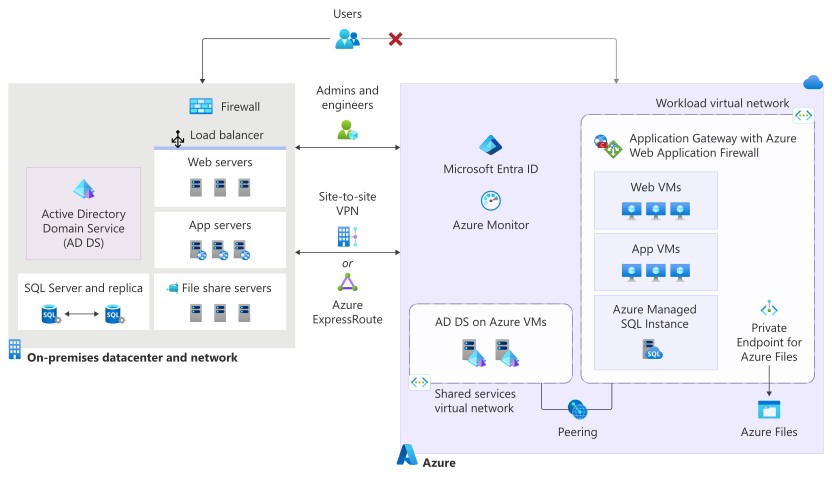
The preceding diagram shows a migration path extending from the on-premises environment to Azure, indicating the movement of workloads and services to cloud-based equivalents. Users can access the application through the on-premises environment, while administrators and engineers manage the infrastructure.
The like-for-like approach keeps the workload architecture intact during migration. You preserve its existing roles and tier boundaries, and defer containers, scale sets, identity conversion, session redesign, and other modernizations until after the migration. During coexistence, the on-premises load balancer, web servers, application servers, relational database and replica, shared file server, existing session mechanism, and directory-integrated identity remain connected to Azure through a site-to-site tunnel between the on-premises VPN endpoint and Azure VPN Gateway.
In the migrated environment, Azure infrastructure networking, security controls, monitoring, identity, compute, database, and storage services provide cloud-based replacements for the original on-premises resources while preserving the application's existing architecture and functionality. User traffic flows through Azure networking and load balancing services before reaching migrated VMs that host the web and application tiers.
Microsoft Entra ID and Azure Active Directory integration provide identity services. Azure Monitor and other Azure management services provide security, monitoring, and management capabilities. Database workloads migrate to Azure SQL services, while file shares migrate to Azure storage services.
In the workload virtual network, Azure Application Gateway v2 with Azure Web Application Firewall routes HTTP and HTTPS traffic to separate web and application VMs. The existing session mechanism runs on VMs without redesign. Azure Files is the shared-file target. The database target is Azure SQL Managed Instance if discovery confirms a supported SQL Server workload. SQL Server on Azure VMs is the compatibility exception. In the shared services virtual network, AD DS domain controllers run on Azure VMs after discovery confirms the source identity model and its DNS, trusts, Group Policy, service accounts, and replication requirements. The virtual networks are peered.
Migration-first targets and exceptions
Use individual Azure VMs for the migration-first targets when preserving existing topology, server roles, state model, and deployment behavior is the priority. Consider Azure Virtual Machine Scale Sets for stateless front-end or back-end tiers when approved requirements call for autoscaling, replaceable instances, repeatable automated deployment, and integration with a load balancer. Treat Virtual Machine Scale Sets as a separately assessed optimization or modernization choice, not as the default target for rehost.
The following table lists workload concerns, recommended default targets, and conditions requiring exceptions. Every exception must have an owner, compatibility evidence, and approval before the next phase begins.
| Workload concern | Recommended target | Conditions requiring an approved exception |
|---|---|---|
| Web and application servers | Rehosting on Azure VMs. Preserve server roles and tier boundaries. | Unsupported operating systems, physical hardware dependencies, incompatible agents, or vendor restrictions. |
| Database | A managed database service that matches your source engine where discovery confirms compatibility: Azure SQL Managed Instance, Azure Database for PostgreSQL, or Azure Database for MySQL. Use the corresponding VM-hosted option if compatibility blocks the managed target. | Unsupported features, jobs, linked servers, encryption, latency, or vendor requirements. |
| Shared files | Azure Files. During coexistence, you can use Azure File Sync if you have a supported Windows Server endpoint. Otherwise, use an approved migration method. | Incompatible ACLs, locking, paths, performance, clients, endpoint support, or file-system behavior. |
| Identity | AD DS on domain controllers on Azure VMs as the migration-first default. Confirm the actual source identity model before applying this target. Don't convert the application to Microsoft Entra ID during migration. | DNS, trusts, Group Policy, service accounts, replication, or a different source identity model. |
| Session state | Rehosting the existing mechanism on Azure VMs without redesign. Add affinity only if testing shows that the mechanism requires it. | Discovery or compatibility evidence shows that the existing mechanism can't operate correctly on Azure VMs. |
| Load balancing and ingress | Application Gateway v2 with Azure Web Application Firewall for HTTP or HTTPS ingress. | Non-HTTP protocols, incompatible persistence or appliance behavior, certificate constraints, or client-address requirements. |
| Connectivity | Azure VPN Gateway during coexistence and cutover. | Measured throughput, latency, availability, routing, or policy requirements that justify using Azure ExpressRoute. |
Target resilience and recovery requirements
Match resilience to workload requirements and business impact: A small workload might use shared infrastructure instead of using a dedicated cluster. A critical workload might require stronger isolation, redundancy, or recovery options. Match the design to the workload's accepted availability and recovery commitments instead of applying the same topology to every application.
Define the recovery strategy: Treat recovery as an integral part of the target selection decision. Decide whether the workload needs continuous replication, a secondary region, or another recovery approach, and confirm that the selected Azure services support the required recovery time and RPOs.
Choose the backup model for each target service: Determine whether the target supports service-native automated backups, Azure Backup operational backup, Azure Backup vaulted backup, or a supported combination. Compare retention limits, restore granularity and destination, isolation from the source, recovery time, regional availability, and operational ownership. Don't assume that one backup model or feature set applies to every Azure service.
Application and session architecture design
Design session architecture: For web applications that use local or sticky sessions, decide whether the current session model can remain in place for a like-for-like migration. Externalizing sessions to a shared store is an application change, not a universal migration prerequisite. If you retain the existing model, document affinity, session expiry, and rollback behavior. If you externalize sessions, test serialization, latency, recovery, and ownership.
Verify machine key configuration: If the application uses ASP.NET machine keys, verify that the target instances use the required shared or consistent key configuration. Using different keys can prevent one server from reading sessions or protected values created by another server.
Validate resource sizing: Don't size Azure resources from on-premises hardware specifications alone. Compare the configured CPU and memory with sustained utilization data across representative business cycles, including peak periods, and investigate whether the source system was oversized, constrained, or throttled. Use measured workload behavior to choose the initial Azure size, and then validate it with performance testing.
Hybrid connectivity planning
Treat hybrid connectivity as an early planning dependency. Test the path before migration work depends on it, because a migrated VM that can't connect to its dependencies can stop the migration. A single point of failure in the network path can take down the entire migrated workload even if all other components succeed. Before moving a workload component, document the required routes, bandwidth, firewall rules, DNS behavior, and owners for the Azure-to-on-premises path. Treat the resiliency of that connection as a first-class requirement.
When you assess application dependencies, check whether any external endpoint enforces IP-based allow lists, such as a partner API that only accepts traffic from known source addresses. If so, determine the public and private IP addresses for your migrated workload in Azure before cutover, and confirm that the partner approves and loads those addresses. Discovering this requirement late can stall cutover until a third party updates their firewall rules.
Important
If discovery shows that ExpressRoute is the correct target, request provisioning as soon as possible. ExpressRoute provisioning can have a lead time of several months. Starting it late is a common cause of migration schedule slips.
While ExpressRoute is being provisioned, use an approved site-to-site VPN for discovery, testing, or migration if it meets the workload's bandwidth, latency, availability, and security requirements.
Identity architecture design
Identity architecture and implementation normally belong to the platform or identity team. The workload team must document the identity, DNS, certificate, and service-account dependencies that the application uses, including its expected behavior if the source site is unavailable.
Before you move to the next phase, the identity or platform owner must approve the chosen identity approach, and the workload owner must approve the planned authentication and authorization tests. For implementation guidance, see Architecture strategies for identity and access management and Deploy AD DS in an Azure virtual network.
Database target and migration method
Before you move to the Prepare phase, the database owner, application owner, and operations owner must approve the selected database target and migration method.
Choose a database target
Assess a managed database service before choosing a VM-hosted target. A managed service can improve operational consistency after migration by reducing the team's responsibility for patching, upgrades, backups, infrastructure maintenance, and some licensing tasks.
Treat database choice as a target-selection decision, not an automatic modernization requirement. Evaluate the following criteria:
- Engine compatibility
- Features
- Jobs
- Encryption
- Latency
- Performance
- Recovery
- Vendor support
- The team's ability to operate the service
Check custom backup and restore processes, external automation, and business restrictions on patching and upgrade timing against supported managed service controls. Test any required process changes and obtain approval for their scope and operational ownership before approving the target.
Prefer an appropriate managed Azure database service when it meets the workload's requirements and supports the required features, performance, security, recovery, and operating model. For a SQL Server workload, use SQL Server on Azure VMs when workload requirements, vendor support, unsupported features, or the need for infrastructure control make a managed service unsuitable.
Don't approve a target if a required capability is unsupported or untested. Base the decision on workload evidence rather than using the same target for every database. Record the impact, owner, and approver for any accepted limitation.
Select the database migration path
Choose the migration experience after you approve the database target. Check the current source-to-target migration guide rather than automatically selecting a tool based on its name.
The following table lists tools, guidance, and checks for various database migration tasks.
| Task | Starting guidance | Selection checks |
|---|---|---|
| Assess a SQL Server estate and compare Azure SQL targets | SQL Server migration in Azure Arc | Confirm source-version support, target and migration-scenario support, preview status, assessment results, recommendations, and required remediation. This SQL Server-specific assessment and database migration experience requires SQL Server enabled by Azure Arc. It can assess readiness and can run portal-managed database migrations to Azure SQL Database, Azure SQL Managed Instance, or SQL Server on Azure VMs for currently supported targets and scenarios. This SQL Server database migration path doesn't make Azure Arc-enabled servers a general server or workload migration path. |
| Migrate SQL Server to Azure SQL Managed Instance or SQL Server on Azure VMs | The migration method that the current target-specific guide identifies | Confirm source and target support, online or offline mode, downtime, regional availability, encryption, logins, jobs, and recovery requirements. |
| Use Azure Database Migration Service | Azure Database Migration Service overview | Confirm that current Azure Database Migration Service capabilities support the source, target, migration mode, encryption, and objects that must move. Plan separate handling for unsupported items. |
| Migrate a different database engine | Azure database migration guides | Follow the current guide for the specific source and Azure target. Confirm feature compatibility, vendor support, migration tooling, and operational ownership. |
Record the selected path, its prerequisites and limitations, and evidence that it meets the workload's downtime and recovery requirements. If current product guidance doesn't support the required source-to-target path, select another supported method or revise the target decision.
Develop and document a migration plan and create a runbook
Develop a migration plan and create a runbook for your on-premises to Azure migration. Choose a cutover strategy, select data migration approaches based on your RPO requirements, and document procedures in a detailed runbook. Create a comprehensive, stakeholder-approved plan that minimizes risk and ensures a controlled transition.
Choose a cutover strategy
Plan how to cut over production traffic from the on-premises environment to the Azure environment. The following approaches are the most common ones:
- Blue-green migration (recommended): Two environments run in parallel and you switch over traffic after validation.
- Phased migration: You migrate workload components incrementally.
- Big Bang migration: You migrate and switch everything at the same time during a maintenance window.
Key differences at a glance
| Strategy | Downtime | Risk level | Cost impact | Rollback ease |
|---|---|---|---|---|
| Blue-green | Low | Low | High | Conditional |
| Phased | Low | Medium | Medium | Moderate |
| Big Bang | High | High | Low | Difficult |
To reduce cutover risk and keep a traffic-reversal option available before production state changes in Azure, choose a blue-green approach. In this scenario, you maintain two environments. Blue is the current on-premises environment and green is the new Azure environment.
In the blue-green scenario, you plan a migration window, run your workload on-premises during migration, and move traffic to Azure after a successful dry run. Both environments run in parallel throughout migration, so you can shift traffic back on-premises if problems arise in the Azure environment.
Blue-green migration lowers routing risk by keeping both environments available during cutover, but rollback remains conditional when production state can change. You need a rollback strategy for state that might change. Consider databases and less obvious state, like unprocessed items in message queues. Use the following cutover-state table to determine the available recovery path at each stage.
If your workload is more complex and you want to minimize risk, you can combine the blue-green strategy with a canary approach to switch over traffic. The canary approach routes a small percentage of traffic to the new environment and then increases it incrementally. The canary approach increases migration complexity because live state must exist both on-premises and on Azure during the transition.
If any on-premises components coexist with Azure components, consider applying patterns like the Strangler Fig pattern as part of a controlled cutover strategy. You implement these extra layers of indirection in the next migration phase.
Plan for the trade-offs. You pay to operate both environments during the coexistence period, and you need a maintenance window to complete final synchronization and transfer write authority.
Cutover controls
Record these cutover controls in the migration plan:
| Cutover state | Write authority | Required control | Recovery position |
|---|---|---|---|
| Before cutover | On-premises | Replicate state one way to Azure. Keep Azure production writes blocked. | On-premises remains the production system of record. |
| Transfer gate | On-premises, while both environments block production writes | Fence source writes, complete final synchronization, and pass consistency checks. Authority transfers only when the approved runbook step enables the first Azure production write. | Before the first Azure production write, traffic can return to on-premises only if the runbook confirms that Azure created no production state. Remove the source write fence before resuming on-premises writes. |
| Azure serving validation or read traffic before its first production write | On-premises | Keep Azure production writes blocked while validating production routing and service health. | Traffic can return to on-premises only if the runbook confirms that Azure created no production state. |
| After the first Azure production write | Azure | Treat Azure as authoritative. Track and reconcile any state that must return to on-premises. | DNS or routing reversal alone isn't rollback. Use tested reconciliation or reverse synchronization when available. Otherwise, roll forward in Azure by correcting the problem there while Azure remains authoritative. |
The first Azure production write is the recovery boundary. Don't cross it until final synchronization and consistency checks succeed. After that boundary, restore service by using the tested data reconciliation path or by fixing the problem in Azure, not by treating a traffic reversal as a complete rollback.
Maintenance window
Negotiate a generous maintenance window during the planning phase for the cutover strategy you use. Include time for a possible rollback and DNS switch. A sufficient window respects the sensitive nature of migration activities and accounts for functionality loss during migration.
Document and communicate the window to your stakeholders before you start migration. Also agree on one or more alternative maintenance windows in case you must postpone or stop the migration before completion.
Use the planned downtime to implement plans that reduce the risk of data loss, data corruption, or inconsistent user experiences. If your workload has an outage budget, consider excluding the migration window from that budget and reserving it for post-migration problems. Consider how this decision affects contractual SLAs.
Choose your data migration strategy
Your data migration strategy depends on the amount of data, type of data storage, and usage requirements. Decide between offline migration using backup and restore, or live replication.
Align the strategy with your workload's RPO
Your workload's RPO defines the maximum amount of data loss you can accept in the cutover. For example, an RPO might allow no more than five minutes of data loss during the cutover. Use the RPO to guide your decisions when you choose a database migration strategy and during the Decommission phase.
The lower the RPO, the more you need to consider continuous replication or recent backups and maintenance windows to migrate your data. Lower RPOs can also increase cost and effort. You can minimize data loss risk by shutting down state change operations within the workload before you cut over.
Define data-movement decisions and assign owners for stateful components
Define the data-movement decisions and assign an owner for each stateful component.
Database: Define the seeding and replication approach, the point to move write authority to Azure, and the reconciliation path or steps to roll forward in Azure after that point.
Files and sessions: Document the synchronization method, consistency criteria, and controls that maintain one write authority.
Queues, jobs, and integrations: Select the cutover strategy. Establish processing ownership. Define the recovery boundary for unfinished work.
Plan initial seeding or replication early enough to validate the target, and then reserve time for final synchronization and consistency checks before write authority moves. Record the approval needed to cross the first-Azure-write recovery boundary, evidence that proves the target meets the workload's RPO, and the runbook action if validation fails.
The following table lists components, recommended tools and guidance, and items to confirm during the Plan phase.
| Component | Recommended tool | Confirm during the Plan phase |
|---|---|---|
| SQL Server to Azure SQL Managed Instance | SQL Server migration in Azure Arc overview for assessment and SQL Server migration in Azure Arc for the migration. | Feature and application compatibility, target sizing, Managed Instance link or Log Replay Service support for the required online migration, expected downtime, RPO, and reconciliation path or steps to roll forward after Azure accepts writes. |
| Shared files to Azure Files | Azure File Sync deployment for coexistence with supported Windows Server endpoints. Migrate to Azure Files using Azure Storage Mover for other supported Server Message Block (SMB) or Network File System (NFS) sources. | Source and target protocol, ACL and metadata fidelity, locking behavior, capacity, throughput, namespace and share-address handling, final synchronization, cutover timing, and control that preserves one write authority. |
| Web and application servers on Azure VMs | Azure Migrate for discovery, dependency and readiness assessment, test migration, and migration planning. | Discovered dependencies, target VM fit and sizing, test-migration scope and isolation, validation evidence, downtime, and the recovery boundary. Don't treat Azure Migrate as a post-cutover failback mechanism. |
| Sessions, queues, jobs, and integrations | Application-specific runbooks, validation and reconciliation tooling, and existing platform-native capabilities if discovery confirms that they apply. | System of record, processing and write ownership, fencing controls, active session and unfinished or duplicate work handling, validation evidence, and recovery boundary and the steps to roll forward in Azure. |
Document information in a runbook
Document the following information in a runbook to share with all teams and stakeholders involved in the migration.
Sequence of steps: Document the sequence of steps at a high level. Define the exact steps, their sequence, and the migration timing. Include the planned maintenance window in your documentation. Consider including a dry run, especially for complex cutovers. Document your rollback strategy and how to test success metrics.
Before finalizing the runbook, plan how to take the application offline during the maintenance window. Define what users see, how traffic reaches the offline experience, and which background processes or jobs must pause before final synchronization. Document these decisions in the runbook.
Security and networking configuration: Map existing on-premises network controls, such as firewall rules, virtual local area network (VLAN) or subnet access control lists, and hardware firewall or appliance policies, to their Azure equivalents. Include all required port openings and updates to network security groups (NSGs) or application security groups (ASGs) needed to support Azure connectivity. Document any temporary exceptions or overrides required during cutover and ensure that rollback procedures account for these changes.
Sign-off acceptance criteria: Define what a stable operation means and make it measurable. For example, agree that after cutover, Azure must run for a specific number of minutes or hours without errors and that the workload passes all predefined tests.
Rollback trigger criteria and steps: Define measurable recovery triggers, such as critical functionality being unavailable or performance remaining a specified percentage below baseline for a set number of minutes. Before the first Azure production write, the runbook can permit a traffic reversal to the still-current on-premises environment only after confirming that Azure created no production state.
After the first Azure production write, don't describe a DNS or routing reversal as rollback. Require the tested reverse-synchronization or reconciliation procedure for every affected stateful component. If that procedure is unavailable or unsafe, roll forward in Azure by correcting the problem there while Azure remains authoritative.
Depending on state changes, rollbacks can be more complex than mitigating the problem in Azure. Failed mitigation attempts might also complicate a rollback. Understand when you should fix a problem and when you should roll back changes to help reduce risk during migration.
Client configuration changes: Identify and document all client-facing configuration items that the workload migration affects. These items include DNS endpoints, authentication flows, and connection strings. Involve the client teams early and communicate the upcoming changes, timelines, and responsibilities.
Traffic and routing changes: Plan and document your traffic routing changes in detail. Define exactly how to update DNS records, load balancer configuration, and routing rules to direct traffic to Azure. Consider any time-to-live (TTL) value that you configure because it determines how long DNS changes take to propagate.
Many applications and scripts reference fully qualified domain names (FQDNs) for endpoints, APIs, and services. If FQDNs change unexpectedly during migration, integrations can break. As part of your routing and cutover planning, inventory all FQDNs that your workload uses. Decide whether to retain existing names via DNS forwarding or update application configurations to use new Azure FQDNs. For public-facing services, plan DNS cutover carefully to minimize downtime and ensure a smooth transition.
Important
Neglecting to explicitly plan traffic routing is a common pitfall that can lead to unexpected downtime or an aborted migration.
Review the plan with stakeholders and reconcile differing expectations. Include IT security and risk management teams from the start and ensure that they approve the plan. A joint workshop at this stage can help minimize delays in later stages.
After stakeholders and decision-makers review and agree on the plan and runbook, move to the Prepare phase.
Outputs and artifacts
At the end of the planning phase, you should have the following items in place:
- Target architecture diagram
- Architecture decision records (ADRs) that document each architecture decision, the options considered, the associated deliberations, and the approved outcome
- Budget and cost estimates
- Migration runbook and timeline
- Stakeholder approval of the migration plan
Reference workload criteria
The web tier has a supported target and health test.
The database has a candidate topology that names the intended primary and write authority, high-availability and recovery path, replication direction where applicable, and source database and replica disposition, but doesn't have final approval.
The file, identity, job, integration, and connectivity paths have owners and tests.
The selected session model records its authority, active-user treatment, and rollback implications.
Every retained source dependency has a reason and planned end state.
Decision and handoff
The Prepare phase receives the design, exceptions, test plan, and runbook. The workload owners decide whether the design is ready to build. If the answer is no, record the missing evidence.
Checklist
| Deliverable tasks | |
|---|---|
| ☐ | Document the workload architecture, dependencies, identity, state, and operational obligations. |
| ☐ | Establish performance, availability, recovery, and log-retention baselines. |
| ☐ | Confirm region, residency, encryption, retention, and compliance constraints. |
| ☐ | Approve the like-for-like Azure architecture and record owned exceptions. |
| ☐ | Approve the identity, hybrid connectivity, resilience, and sizing decisions. |
| ☐ | Approve the database target and supported migration method. |
| ☐ | Choose the cutover strategy and maintenance window. |
| ☐ | Define migration, synchronization, write-authority, and recovery controls for each stateful component. |
| ☐ | Document routing, client configuration, offline-page, and background-process changes. |
| ☐ | Complete the migration runbook with acceptance criteria, recovery triggers, owners, and escalation paths. |
| ☐ | Obtain stakeholder, security, risk, and workload-owner approval. |