Note
Access to this page requires authorization. You can try signing in or changing directories.
Access to this page requires authorization. You can try changing directories.
The Microsoft Quantum Development Kit (QDK) extension for Visual Studio Code (VS Code) includes QDK Learning, a collection of self-paced courses for quantum computing and quantum development. Each course combines explanations with interactive programming activities that you complete in VS Code.
Use QDK Learning to:
- Choose a course based on your interests and experience.
- Work through course units and activities at your own pace.
- Track and save your progress for each course.
- Ask the QDK Learning agent in GitHub Copilot for hints, explanations, and guidance.
- Keep your course code and notebooks.
Available courses
QDK Learning includes these courses.
| Course | What you learn | Course format |
|---|---|---|
| Quantum Katas | Quantum computing fundamentals and quantum programming with Q# | Guided lessons and Q# coding exercises |
| Ground-State Molecular Energies with QPE | How to estimate the ground-state energy of a molecule from classical chemistry methods and quantum phase estimation (QPE) | Python activities in Jupyter notebooks that use QDK/Chemistry and Q# |
Start with the Quantum Katas if you're new to quantum computing or the Q# language. Choose the quantum chemistry course if you already know the basics of quantum chemistry and quantum computing.
Prerequisites
To use QDK Learning, you need:
- The latest version of VS Code.
- The QDK extension for VS Code.
- A folder where QDK Learning can store your course files and progress.
To use AI-assisted learning, sign in to GitHub Copilot in VS Code. Check the prerequisites for each course for additional software requirements.
Start QDK Learning
To start QDK Learning for the first time, follow these steps.
- Open VS Code.
- Open the folder where you want to save your learning progress and course files.
- On the Activity Bar, select the Microsoft Quantum icon.
- In the QDK Learning view, select Start learning.
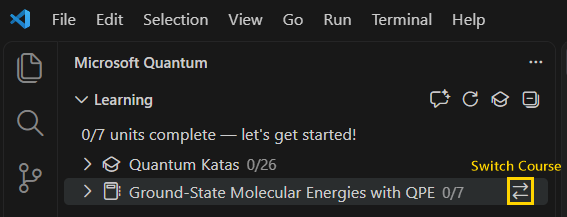
- In the Learning view, select Switch Course for the course that you want to start. Or, tell the QDK Learning agent what course you want to open.
QDK Learning creates these items in your workspace.
- A
qdk-learningfolder that contains the files you use in the courses. - A
qdk-learning.jsonfile that stores your current position and course progress.
To continue your progress in a later VS Code session, open the same workspace folder.
Move through QDK Learning
The Learning view organizes content into three levels:
- Course: A full learning experience, like the Quantum Katas or the quantum chemistry course.
- Unit: A group of related lessons and exercises.
- Activity: An single lesson, example, exercise, or notebook code cell.
Expand a course or unit to see its contents. The progress indicator for each course shows the number of completed units. Completed activities and units have a check mark.
Select a unit or activity to open it. Each course opens activities differently.
- The Quantum Katas open lessons in a Lesson tab and exercises in Q# files.
- Notebook courses open an editable Jupyter notebook for the selected unit.
Switch courses
QDK Learning saves your progress when you switch courses.
- In the Learning view, find the course that you want to open.
- Select Switch Course for the course.
QDK Learning opens your current position in that course. For a new course, QDK Learning opens the first unit.
Use Copilot to support your learning
When you start QDK Learning, the QDK Learning agent opens in Copilot Chat. The agent uses the context of your active course and activity to help you learn.
Ask the agent to:
- Explain a concept in more detail.
- Give you a hint for an exercise.
- Help you understand why a solution doesn't work.
- Answer questions about quantum computing, Q#, or QDK/Chemistry.
For example, try these prompts.
What courses are available?
Take me to the content about Grover's algorithm.
Explain quantum phase estimation in a different way.
Course activities also include buttons that send the relevant lesson or exercise context to the QDK Learning agent.