Note
Access to this page requires authorization. You can try signing in or changing directories.
Access to this page requires authorization. You can try changing directories.
For the Microsoft Sentinel solution for SAP applications to operate correctly, you must first get your SAP data into Microsoft Sentinel. Do this by connecting the Microsoft Sentinel agentless data connector for SAP.
Before following this article, make sure you've completed the earlier deployment steps: installing the SAP solution in your workspace and preparing your SAP system. For the full list of prerequisites, see the Prerequisites section.

Content in this article is relevant for your security team.
Prerequisites
Before you connect your SAP system to Microsoft Sentinel:
Make sure that all of the deployment prerequisites are in place. For more information, see Prerequisites for deploying Microsoft Sentinel solution for SAP applications.
Important
You need the Entra ID Application Developer role or higher to successfully deploy the relevant Azure resources. If you don't have this permission, work with a colleague that has the permission to complete the process. For the full procedure, see the Connect your agentless data connector section.
Make sure that you have the Microsoft Sentinel solution for SAP applications deployed in your Microsoft Sentinel workspace. For more information, see Deploy the Microsoft Sentinel solution for SAP applications
Make sure that your SAP system is fully prepared. For more information, see Prepare your SAP system for the Microsoft Sentinel solution.
Watch the connector onboarding video
Use the onboarding video to support the deployment and configuration of the Microsoft Sentinel Solution for SAP - agentless data connector described in this documentation.
Connect your agentless data connector
In Microsoft Sentinel, go to the Configuration > Data connectors page and locate the Microsoft Sentinel for SAP - agentless data connector.
In the Configuration area, expand step 1. Trigger automatic deployment of required Azure resources / SOC Engineer, and select Deploy required Azure resources.
Important
If you don't have the Entra ID Application Developer role or higher, and you select deploy required Azure resources, an error message is displayed, for example: "Deploy required Azure resources" (errors may vary). This means that the data collection rule (DCR) and data collection endpoint (DCE) were created, but you need to ensure that your Entra ID app registration is authorized. Continue to set up the correct authorization.
Note
When deploying the required Azure resources for the Microsoft Sentinel solution for SAP applications (agentless), Azure Resource Manager (ARM) may take up to 45 seconds to complete resource provider operations. During this time, the deployment might appear delayed. This behavior is expected. Wait for the operation to complete before retrying or redeploying.
Do one of the following:
- If you have the Entra ID Application Developer role or higher, continue to the next step.
- If you don't have the Entra ID Application Developer role or higher:
- Share the DCR ID with your Entra ID administrator or colleague with the required permissions.
- Ensure that the Monitoring Metrics Publisher role is assigned on the DCR, with the service principal assignment, using the client ID from the Entra ID app registration.
- Retrieve the client ID and client secret from the Entra ID app registration to use for authorization on the DCR. The SAP admin uses the client ID and client secret information to post to the DCR.
Scroll down and select Add SAP client.
In the Connect to an SAP Client side pane, enter the following details:
Field Description RFC destination name The name of the RFC destination, taken from your BTP destination. SAP Agentless Client ID The clientid value taken from the Process Integration Runtime service key JSON file. SAP Agentless Client Secret The clientsecret value taken from the Process Integration Runtime service key JSON file. Authorization server URL The tokenurl value taken from the Process Integration Runtime service key JSON file. For example: https://your-tenant.authentication.region.hana.ondemand.com/oauth/tokenIntegration Suite Endpoint The url value taken from the Process Integration Runtime service key JSON file. For example: https://your-tenant.it-account-rt.cfapps.region.hana.ondemand.comSelect Connect.
Important
There may be some wait time on initial connect. For more details, see Verify the codeless connector.
Mass-Onboard SAP systems at scale
To onboard SAP systems to the Sentinel Solution for SAP applications at scale, API and CLI based approaches are recommended. Get started with the SAP Integration Suite tools for Microsoft Sentinel.
Rotate the BTP client secret
We recommend that you periodically rotate the BTP subaccount client secrets used by the data connector. For an automated, platform-based approach, see our Automatic SAP BTP trust store certificate renewal with Azure Key Vault – or how to stop thinking about expiry dates once and for all (SAP blog).
The SAP Integration Suite tools for Microsoft Sentinel demonstrate the automatic process of updating an existing data connector with a new secret.
Customize data connector behavior (optional)
If you have an SAP agentless data connector for Microsoft Sentinel, you can use the SAP Integration Suite to customize how the agentless data connector ingests data from your SAP system into Microsoft Sentinel.
This procedure is only relevant when you want to customize the SAP agentless data connector behavior. Skip this procedure if you're satisfied with the default functionality. For example, if you're using Sybase, we recommend that you turn off ingestion for Change Docs logs in your SAP Integration Suite integration flow by configuring the collect-changedocs-logs parameter. Due to database performance issues, ingesting Change Docs logs Sybase isn't supported.
Tip
See this blog for more insights on the implications of overriding the defaults.
Prerequisites for customizing data connector behavior
Before you customize data connector behavior, make sure the following prerequisites are met:
- You must have access to the SAP Integration Suite, with permissions to create and edit value mappings.
- A separate SAP integration package, either existing or new, that is dedicated to hosting the value mapping artifact. The Microsoft Sentinel for SAP integration package installed from the marketplace is in configure-only mode, so you can't add it there.
Create the value mapping artifact and customize settings
Create a value mapping artifact in your SAP Integration Suite tenant and add only the parameters you want to override. Any parameter you don't define keeps its default value.
You have two options for getting the artifact in place:
Option 1 (recommended): Import the prebuilt Key Value Map from the Microsoft Sentinel for SAP community repository. The repository ships a Data Collector Customizing (Key Value Map) pre-populated blueprint for customizing. Download the latest base package from the releases page and import it into your SAP Integration Suite tenant. Then continue with the customization steps below.
Tip
The Microsoft Sentinel for SAP community repository also hosts other Microsoft-provided integration recipes you can adopt alongside the agentless data connector, such as SAP Ariba, SAP S/4HANA Cloud public edition (GROW), SAP User block, and SAP Table Reader. Browse the integration-artifacts folder for the full and up-to-date list. Community contributions are welcome.
Option 2: Create the artifact manually. In your dedicated package, create a new Value Mapping artifact. For more information, see the SAP documentation on creating a value mapping.
After the value mapping artifact is in place, customize and activate it:
Add the entries that customize your data connector behavior. Use one of the following approaches:
- To customize settings across all SAP systems, add value mappings under the global bi-directional mapping agency, using the parameter name as the source key and your override as the target value.
- To customize settings for specific SAP systems, create a separate bi-directional mapping agency for each SAP system. Name each agency to exactly match the name of the RFC destination that you want to customize (for example,
myRfc, key, myRfc, value), and add the parameter entries under that agency.
For more information, see the SAP documentation on configuring value mappings.
Save and deploy the value mapping artifact to activate the updated settings.
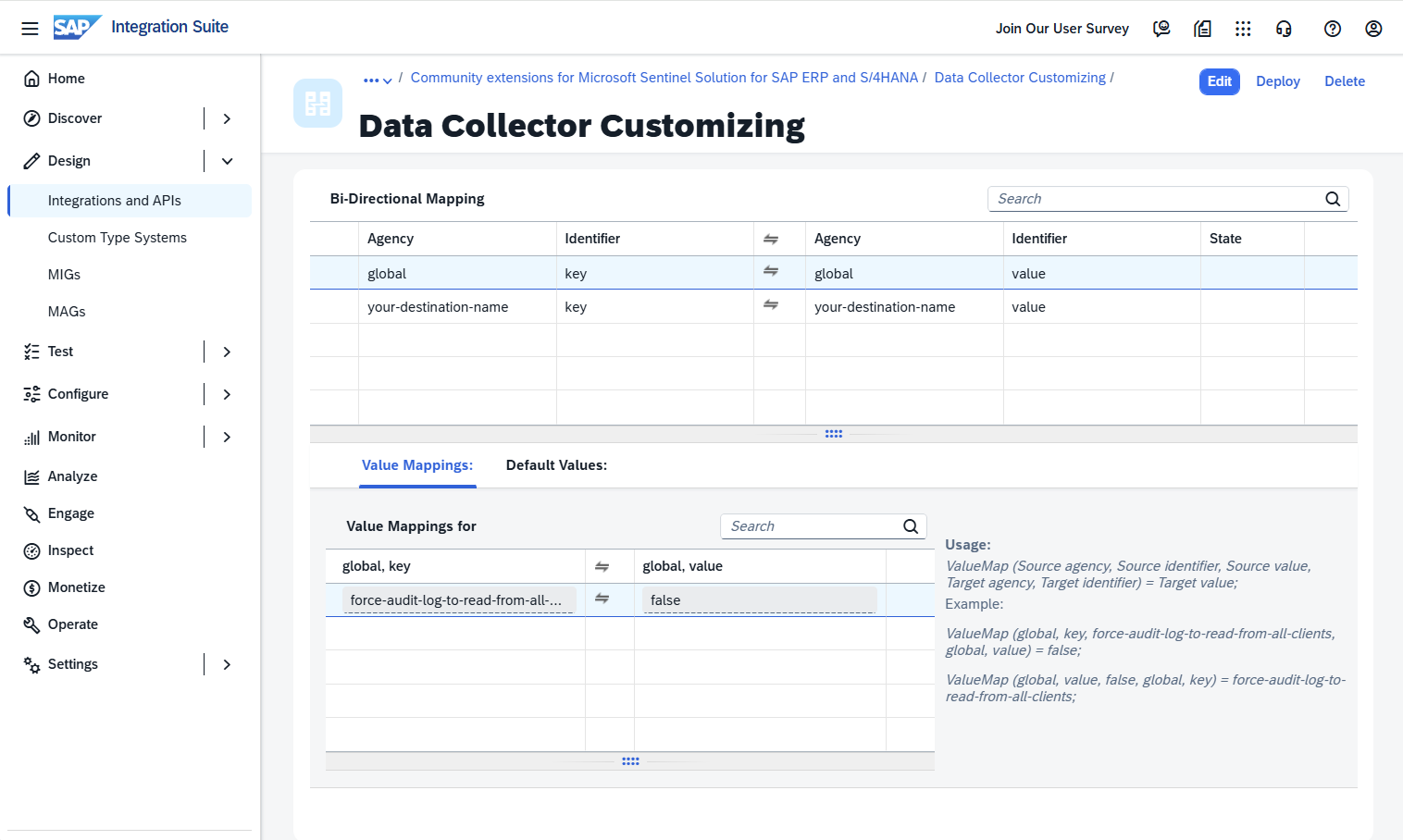
Use the following table as a guide for what to enter in the value mapping artifact. Add only the rows for the parameters you want to override:
| Field in the value mapping artifact | What to enter |
|---|---|
| Agency (source and target) | global for all SAP systems, or the RFC destination name (for example, myRfc) to scope the override to a specific SAP system. |
| Identifier (source and target) | key as the source identifier and value as the target identifier. |
| Source value | The parameter name from the customizable parameters table (for example, collect-changedocs-logs). |
| Target value | The override value for that parameter (for example, false). |
The following table lists the customizable parameters for the SAP agentless data connector for Microsoft Sentinel:
General collection controls
The following parameters control overall data collection behavior for the agentless connector.
| Parameter | Description | Allowed values | Default value |
|---|---|---|---|
| changedocs-object-classes | List of object classes that are ingested from Change Docs logs. | Comma separated list of object classes | BANK, CLEARING, IBAN, IDENTITY, KERBEROS, OA2_CLIENT, PCA_BLOCK, PCA_MASTER, PFCG, SECM, SU_USOBT_C, SECURITY_POLICY, STATUS, SU22_USOBT, SU22_USOBX, SUSR_PROF, SU_USOBX_C, USER_CUA |
| collect-audit-logs | Determines whether Audit Log data is ingested or not to the table ABAPAuditLog. |
true: Ingested false: Not ingested |
true |
| collect-changedocs-logs | Determines whether Change Docs logs are ingested or not into the table ABAPChangeDocsLog. |
true: Ingested false: Not ingested |
true |
| force-audit-log-to-read-from-all-clients | Determines whether the Audit Log is read from all clients. | true: Read from all clients false: Not read from all clients |
false |
| ingestion-cycle-days | Time, in days, given to ingest the full User Master data, including all roles and users. This parameter doesn't affect the ingestion of changes to User Master data. | Integer, between 1-14 | 7 |
| collect-user-master-data-users | Determines whether User Details data is ingested or not to the tables ABAPUserDetails. |
true: Ingested, false: Not ingested | true |
| collect-user-master-data-roles | Determines whether Role Authorization data is ingested or not to the tables ABAPAuthorizationDetails. |
true: Ingested, false: Not ingested | true |
| offset-in-seconds | Determines the offset, in seconds, for both the start and end times of a data collection window. Use this parameter to delay data collection by the configured number of seconds. | Integer, between 1-600 | 60 |
Audit Log parameters
The following parameters control Audit Log collection behavior.
| Parameter | Description | Allowed values | Default value |
|---|---|---|---|
| force-audit-log-to-read-from-all-clients | Determines whether the Audit Log is read from all clients. | true: Read from all clients, false: Not read from all clients | false |
| force-sal-filesystem | Enables Security Audit Log filesystem-only optimization. When set to true, the connector uses both ID_FILESYSTEM_SEL_ONLY and ID_FILE_SEL_SIMPLE for retrieval. |
true: Enabled, false: Disabled | false |
| max-rows | Acts as a safeguard that limits the number of Audit Log records processed in a single data collection window. This parameter no longer applies to Change Docs collection. | Integer, between 1-1000000 | 150000 |
Change Docs parameters
The following parameters control Change Docs log collection.
| Parameter | Description | Allowed values | Default value |
|---|---|---|---|
| changedocs-object-classes | List of object classes that are ingested from Change Docs logs. | Comma separated list of object classes | BANK, CLEARING, IBAN, IDENTITY, KERBEROS, OA2_CLIENT, PCA_BLOCK, PCA_MASTER, PFCG, SECM, SU_USOBT_C, SECURITY_POLICY, STATUS, SU22_USOBT, SU22_USOBX, SUSR_PROF, SU_USOBX_C, USER_CUA |
| max-changedocs-headers | Acts as a safeguard that limits the number of Change Docs header records (CDHDR records) processed in a single data collection window. Use this parameter to reduce runtime and memory pressure during spikes in header volume. | Integer, between 1-1000000 | 1000 |
| max-changedocs-details | Acts as a safeguard that limits the number of Change Docs detail records (CDPOS records) processed in a single data collection window. Use this parameter to tune throughput versus memory usage. | Integer, between 1-1000000 | 10000 |
| change-docs-batch-size | Number of Change Docs header records used per detail-fetch call. Reduce this value if RFC calls time out. | Integer, between 1-1000 | 1000 |
User Details parameters
The following parameters control User Details collection.
| Parameter | Description | Allowed values | Default value |
|---|---|---|---|
| max-users | Acts as a safeguard that limits the number of unique users processed in a single collection cycle. | Integer, between 1-1000000 | 125 |
| user-batch-size | Number of users processed per batch when retrieving active user data. Reduce this value if RFC calls time out. | Integer, between 1-1000 | 125 |
| role-profiles-max | Determines the maximum combined number of profiles and roles that can be emitted for a user before the connector writes a wildcard truncation marker instead of the full list. | Integer, between 1-10000 | 1000 |
| role-profiles-batch-size | Number of profiles or roles written per output row. Users with more profiles or roles than this value are split across multiple rows. | Integer, between 1-1000 | 14 |
Role Authorization parameters
The following parameters control Role Authorization data collection.
| Parameter | Description | Allowed values | Default value |
|---|---|---|---|
| max-roles | Acts as a safeguard that limits the number of roles processed in a single collection cycle. | Integer, between 1-1000000 | 50 |
| max-roles-authz-overall | Acts as a safeguard that limits the cumulative number of role authorization records fetched across all roles in a single collection cycle. | Integer, between 1-1000000 | 25000 |
| max-roles-authz-individual | Acts as a safeguard that limits the number of authorization records fetched for an individual role. Roles that exceed this limit are skipped. | Integer, between 1-1000000 | 5000 |
| role-authz-batch-size | Number of records fetched per batch when retrieving role authorization data. Reduce this value if RFC calls time out. | Integer, between 1-1000 | 100 |
Truncation behavior of the safeguards
When either limit is reached, a marker record is written to the output with a descriptive message indicating which limit was hit, the actual record count, and the collection time window. The two limits produce distinct markers (TRUNCATED_HEADERS and TRUNCATED_DETAILS) so they can be distinguished in Sentinel.
Check connectivity and health
After you deploy the SAP data connector, check the connector's health and connectivity. For more information, see Monitor the health and role of your SAP systems.
Once the connector is deployed, proceed to configure the Microsoft Sentinel solution for SAP applications content. Specifically, configuring details in the watchlists is an essential step in enabling detections and threat protection.