Note
Access to this page requires authorization. You can try signing in or changing directories.
Access to this page requires authorization. You can try changing directories.
This article describes an advanced Virtual WAN design that combines Azure Firewall in the virtual hub with a network virtual appliance in a spoke virtual network for different traffic inspection paths.
Scenario overview
Note
This architecture doesn't support double-inspection scenarios. Double-inspection scenarios are use cases where packets are routed to and inspected by Azure Firewall in the Virtual WAN hub and then forwarded to an NVA in a spoke virtual network. The double-inspection architecture is supported with Virtual WAN hubs that use routing intent together with static routes on virtual network connections and Propagate static route set to true.
This design pattern uses a combination of static routes to send private traffic, such as traffic between on-premises networks and virtual networks, to Azure Firewall for inspection. At the same time, internet-bound traffic is sent to a network virtual appliance (NVA) deployed in a spoke virtual network for inspection and breakout.
This design pattern is most common in network topologies where Azure Firewall is used for traffic inspection between Azure and on-premises workloads, while internet access is controlled by a third-party network virtual appliance (NVA) or secure web gateway (SWG) service.
Network diagram
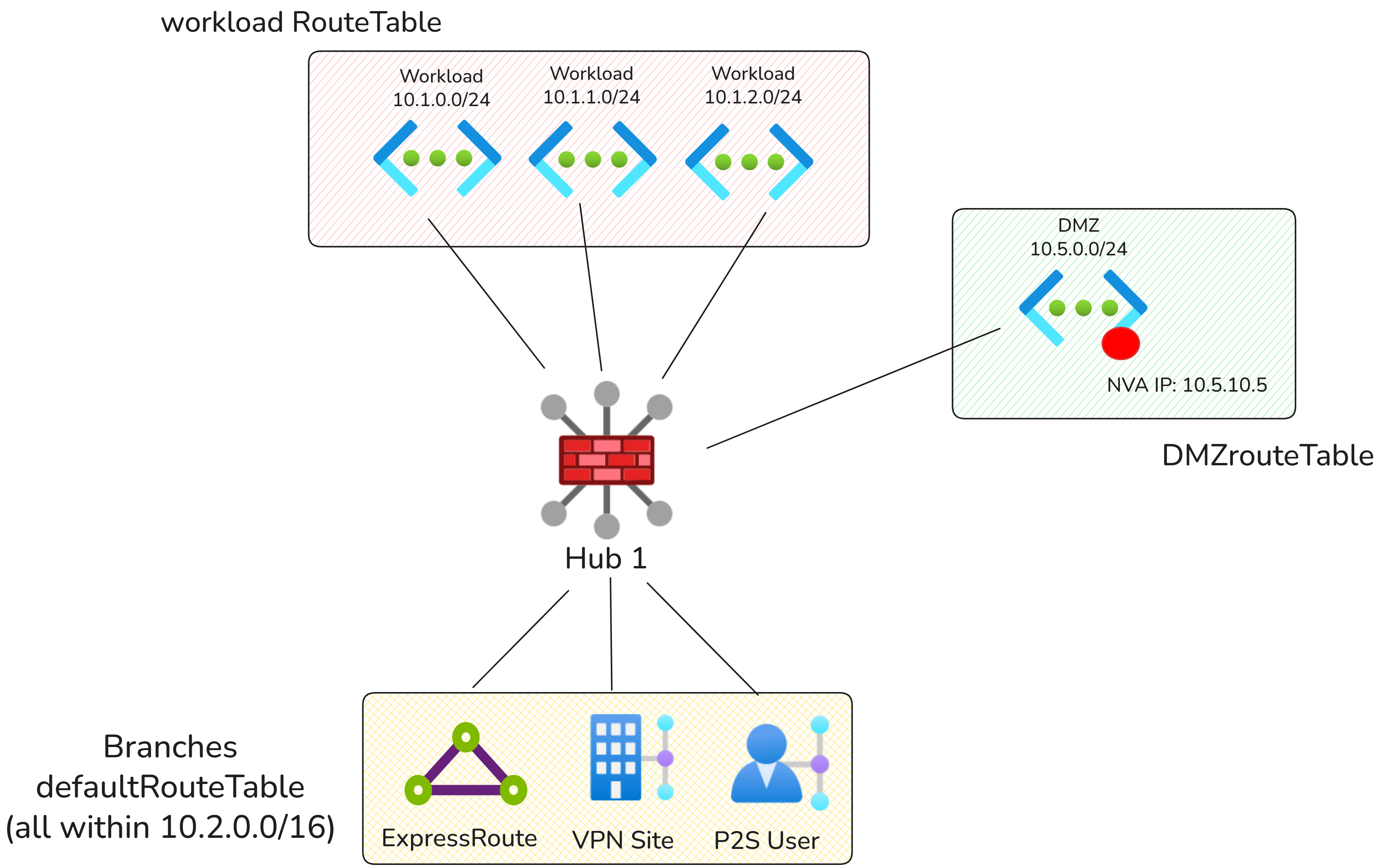
In the above diagram, there are two types of Virtual Networks:
- DMZ Virtual Network: Hosts the NVA or SWG service used for Internet egress.
- Workload Virtual Networks: All other Virtual Networks connected to the Virtual WAN hub.
Traffic flows
The following connectivity matrix summarizes the traffic flows in this scenario.
| Source | Workload Virtual Network | DMZ Virtual Network | On-premises | Internet |
|---|---|---|---|---|
| Workload Virtual Network | Via Azure Firewall | Via Azure Firewall | Via Azure Firewall | Via DMZ NVA |
| DMZ Virtual Network | Direct | Direct | Direct | Direct |
| On-premises | Via Azure Firewall | Via Azure Firewall | Direct | Via DMZ NVA |
Configuration
Virtual WAN route tables
| Route table name | Associated connections | Reasoning |
|---|---|---|
| defaultRouteTable | branches | Used for branch connectivity and to ensure on-premises traffic is steered to Azure Firewall for private traffic inspection and to the DMZ NVA for internet egress. |
| workloadRouteTable | Workload virtual networks | Used by workload virtual networks to route private traffic to Azure Firewall and internet-bound traffic to the DMZ virtual network. |
| dmzRouteTable | DMZ virtual network | Used by the DMZ virtual network to learn branch and workload prefixes so the NVA can directly return traffic after inspection and breakout. |
Virtual WAN routing configuration
| Connection | Associated route table | Propagated route table | Reasoning |
|---|---|---|---|
| On-premises connections | defaultRouteTable | defaultRouteTable, dmzRouteTable | On-premises prefixes must be sent to the DMZ route table so the DMZ NVA can route traffic directly back to on-premises networks. |
| Workload virtual networks | workloadRouteTable | workloadRouteTable, dmzRouteTable | Workload prefixes must be visible to both other workloads and dmzRouteTable. Propagating to DMZ ensures the DMZ NVA can route traffic directly back to workload virtual networks. |
| DMZ virtual network | dmzRouteTable | dmzRouteTable, defaultRouteTable, workloadRouteTable | The DMZ virtual network propagates to all route tables. This ensures all other connections can access the DMZ virtual network directly for egress. |
Static routes
The following static routes are configured by adding the static routes directly on the NVA virtual network connection, with Propagate static route set to true (Option 1 static routing model). Static routes are automatically injected into the appropriate route tables (defaultRouteTable and workloadRouteTable).
| Virtual network connection | Address prefix | Next hop IP address | Reasoning |
|---|---|---|---|
| DMZ | 0.0.0.0/0 | 10.5.10.5 | Sends internet-bound traffic to the NVA or SWG deployed in the DMZ virtual network for inspection and breakout. |
The following static routes are needed to route traffic from on-premises networks and virtual networks to Azure Firewall:
| Route Table | Address prefix | Next hop | Reasoning |
|---|---|---|---|
| workloadRouteTable | 10.0.0.0/8, 192.168.0.0/16, 172.16.0.0/12 | Azure Firewall | Sends virtual network traffic destined for on-premises networks to Azure Firewall for inspection. The 0.0.0.0/0 route is not required as the 0.0.0.0/0 route is automatically propagated because of the propagate static route setting on the NVA virtual network connection. |
| defaultRouteTable | 10.0.0.0/8, 192.168.0.0/16, 172.16.0.0/12 | Azure Firewall | Sends on-premises traffic destined for workload virtual networks to Azure Firewall for inspection. The 0.0.0.0/0 route is not required as the 0.0.0.0/0 route is automatically propagated because of the propagate static route setting on the NVA virtual network connection. |
If using Option 2 static routing model, add additional static routes in the route tables:
| Route Table | Address prefix | Next hop | Reasoning |
|---|---|---|---|
| workloadRouteTable | 0.0.0.0/0 | DMZ Virtual Network connection | Sends Virtual Network to internet traffic to DMZ NVA. |
| defaultRouteTable | 0.0.0.0/0 | DMZ Virtual Network connection | Sends on-premises to internet traffic to DMZ NVA. |
Additional considerations
- If static routes overlap with the NVA virtual network address space, make sure the bypass next hop IP for workloads within this VNet setting is configured correctly on the virtual network connection. Toggling this setting to "true" is often required for scenarios where direct access to the management interface of the NVA is required. For more information, see Bypass next hop IP for workloads within this VNet.
- To ensure a connection learns the 0.0.0.0/0 route from Virtual WAN, ensure the Propagate default route or Enable Internet Security setting is set to On for the connection.