Note
Access to this page requires authorization. You can try signing in or changing directories.
Access to this page requires authorization. You can try changing directories.
Important
Using an Azure Virtual WAN hub in Azure Virtual Network Manager hub-and-spoke connectivity configurations is currently in preview. While in preview, functionality, availability, and other aspects of this feature might change in response to feedback.
This preview version is provided without a service level agreement, and isn't recommended for production workloads. Certain features might not be supported or can have constrained capabilities.
For more information, see Supplemental Terms of Use for Microsoft Azure Previews.
Overview
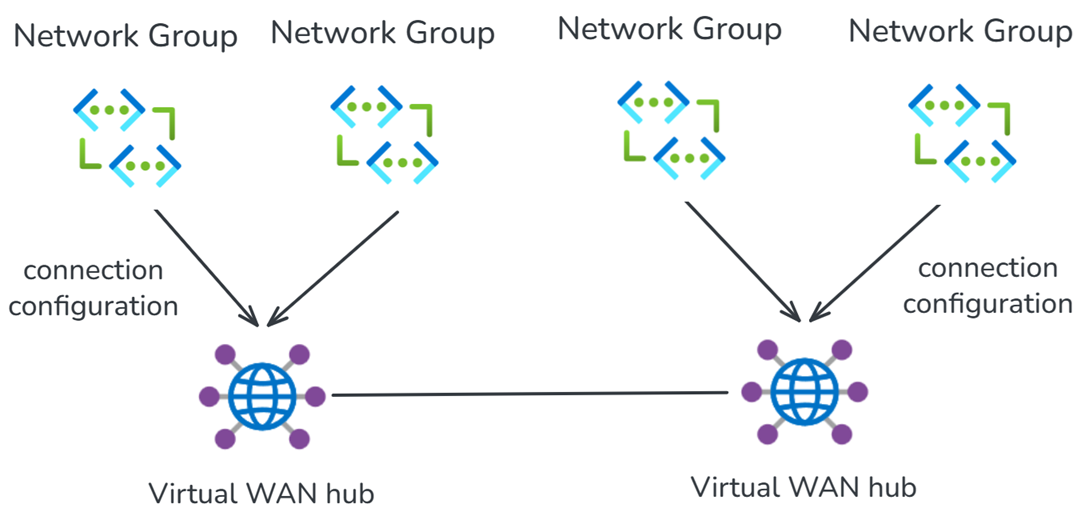
Azure Virtual Network Manager can utilize a Virtual WAN hub as the hub for hub-spoke network topologies. This allows you to dynamically group your Azure Virtual Networks into Network Groups and deploy connection configurations to connect Network Groups to a Virtual WAN hub.
Virtual Network Manager connection configurations also assign your network groups to a Virtual WAN hub connection policy, ensuring all connections to the Virtual WAN hub have the same routing configuration. Connection policies manage the following Virtual Network connection settings:
- Enable internet security: when Virtual WAN is configured to route Internet traffic via a Firewall or Network Virtual Appliance (NVA), control whether the default route (0.0.0.0/0) is advertised to the spoke Virtual Networks.
- Route maps: assign which route maps are applied to Virtual Network connections.
- Routing configuration: specify which Virtual WAN route table the Virtual Network connection learns routes from and which route tables the Virtual Network propagates to.
For detailed instructions on how to use this integration, reference Configure Virtual WAN hub for Network Manager.
Key considerations for Virtual WAN and Network Manager interactions
The following table summarizes important behaviors and limitations to consider when using Azure Virtual Network Manager with Virtual WAN.
| Area | Consideration | Guidance |
|---|---|---|
| Hub scope | A single Virtual Network Manager network group and connection policy can only be applied to a single Virtual WAN hub. | To manage connectivity to multiple Virtual WAN hubs, create separate network groups and connection policies for each hub. |
| Connection policy updates | Virtual Network Manager allows you to update the Virtual WAN connection policy used by a connectivity configuration. | Edit the currently associated connection policy to apply routing changes immediately to all virtual networks in the network group, or associate a different connection policy to stage and deploy changes incrementally. |
| Removing network group members | Removing a virtual network from a network group connected to Virtual WAN disconnects the virtual network from the Virtual WAN hub. | Before removing a virtual network from the network group, confirm whether the hub connection should also be removed. |
| Existing user-created connections | If an existing user-created Virtual WAN virtual network connection is added to a network group connected to a Virtual WAN hub, Virtual Network Manager preserves the user-created connection. Removing the virtual network from the network group doesn't remove the original user-created connection. | Remove user-created connections manually if they need to be removed. |
| Direct connectivity | Virtual Network Manager can enable direct connectivity between virtual networks in a network group connected to a Virtual WAN hub, forming a connected group or mesh. When enabled, virtual network-to-virtual network traffic within the network group routes directly between virtual networks instead of transiting the Virtual WAN hub. | Connected group and mesh configurations are prioritized over routing intent or routing configurations that send virtual network-to-virtual network traffic to a security solution deployed in the Virtual WAN hub. |
| Connection policy Virtual WAN routing attributes | Properties managed by connection policies override conflicting settings configured directly on individual Virtual WAN connections. | See connection policy for more information. |
| Connectivity enforcement | Virtual Network Manager connectivity configurations don't enforce peering or connectivity to the Virtual WAN hub. Virtual Network connections created by Virtual Network Manager can be removed. | Virtual Network Manager automatically attempts to reconnect the virtual network to the Virtual WAN hub the next time the connectivity configuration is deployed in the spoke virtual network's region. |
Known issues
The following table describes known issues with the Virtual Network Manager and Virtual WAN integration.
| Issue | Description | Mitigation |
|---|---|---|
| Existing (user-created) Virtual WAN Virtual Network connections aren't moved from one Virtual Hub to another. | If a virtual network already has a user-created connection to a Virtual WAN hub, Virtual Network Manager prioritizes and preserves the existing user-created connection. If the connectivity configuration later targets a different Virtual WAN hub, Azure Virtual Network Manager continues to prioritize the existing connection and doesn't move the existing connection to the new hub. | Manually move the existing Virtual Network connection from the original Virtual WAN hub to the intended Virtual WAN hub. |
| High-scale private endpoints | when more than 4000 private endpoints are deployed in Virtual Networks connected to a single Virtual WAN hub, Private Link connectivity transiting the hub, either from a virtual network or on-premises, might be impacted. For more information, see Use Private Link in Virtual WAN. | Ensure the number of Private Endpoints across all Virtual Networks connected to a single Virtual WAN hub does not exceed 4000. |
| Slow loading for connection policy in Azure portal. | Connection policy experience in Azure Virtual Network Manager runs a few validation checks before allowing users to assign a connection policy to Network Manager connectivity configuration. | Allow additional time for the Azure portal experience to load before retrying the operation. |
In addition, reference connection policy known issues for more information regarding connection policy limitations and considerations.
Use cases
The following sections describe some of the common use cases for using Virtual Network Manager with Virtual WAN.
Bulk connection of Virtual Networks to Virtual WAN hub
Virtual Network Manager connectivity configurations allow you to define a network group with Virtual WAN as the network hub. This connects all Virtual Networks in the network group to your Virtual WAN hub in parallel. Your pre-defined routing configuration is automatically applied to all of the spoke Virtual Networks in the network group.
All Virtual Network connections are automatically orchestrated by Virtual Network Manager.
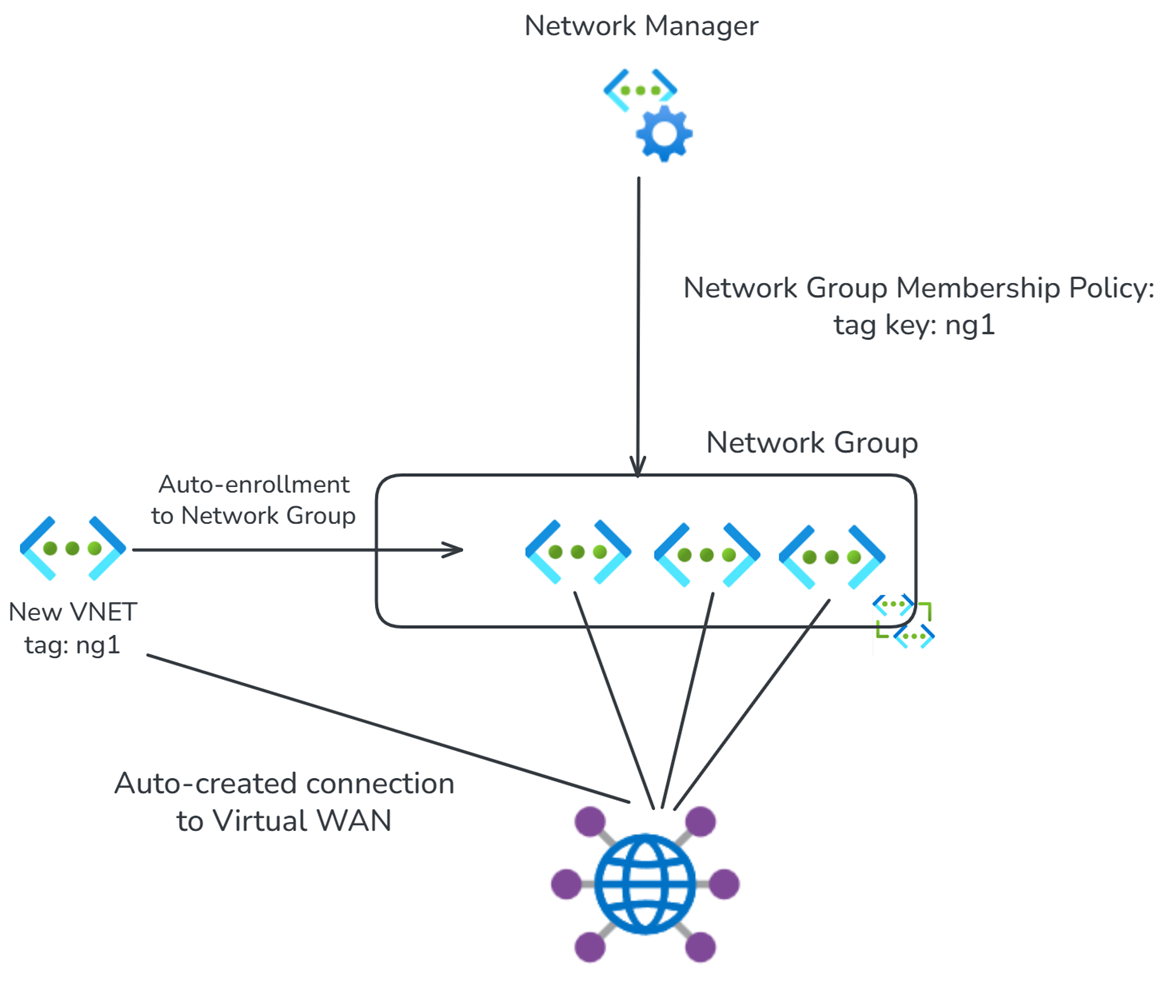
Use Azure Policy to dynamically connect Virtual Networks to Virtual WAN
Implement Azure Policy on your subscription to automatically connect newly created Virtual Networks to Virtual WAN and apply the correct routing configurations. This allows you to build faster by automating new workload onboarding and network access.
Batch routing configuration updates at scale
Virtual Network Manager and Virtual WAN’s control plane integration enables you to push critical configuration settings to all Virtual Networks in a network group as a single fully parallelized operation.
Update parallelization significantly reduces the length of maintenance windows required to make, and potentially roll back, network changes and allows you to make changes at scale without depending on infrastructure-as-code or CI/CD pipelines.
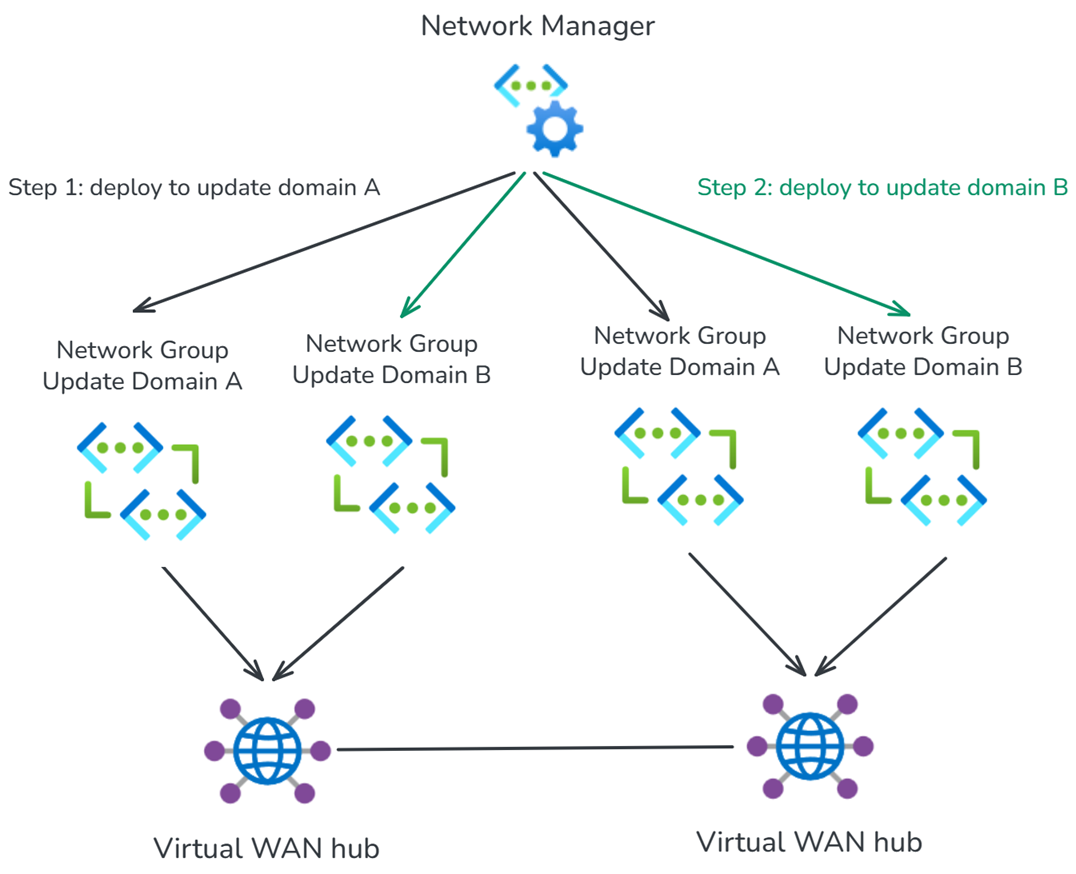
Incremental deployment and management
Virtual Network Manager allows you to segment your network into more precise update domains by incrementally applying changes to your Virtual WAN Virtual Network connections. You can create individual network groups by environment, for example staging, development, and production, or by region. You can then apply connection policies to each network group or Azure region independently, allowing you to test changes on a smaller subset of your network before applying them globally. This helps minimize the blast radius of any potential misconfiguration and ensures the stability of your network.
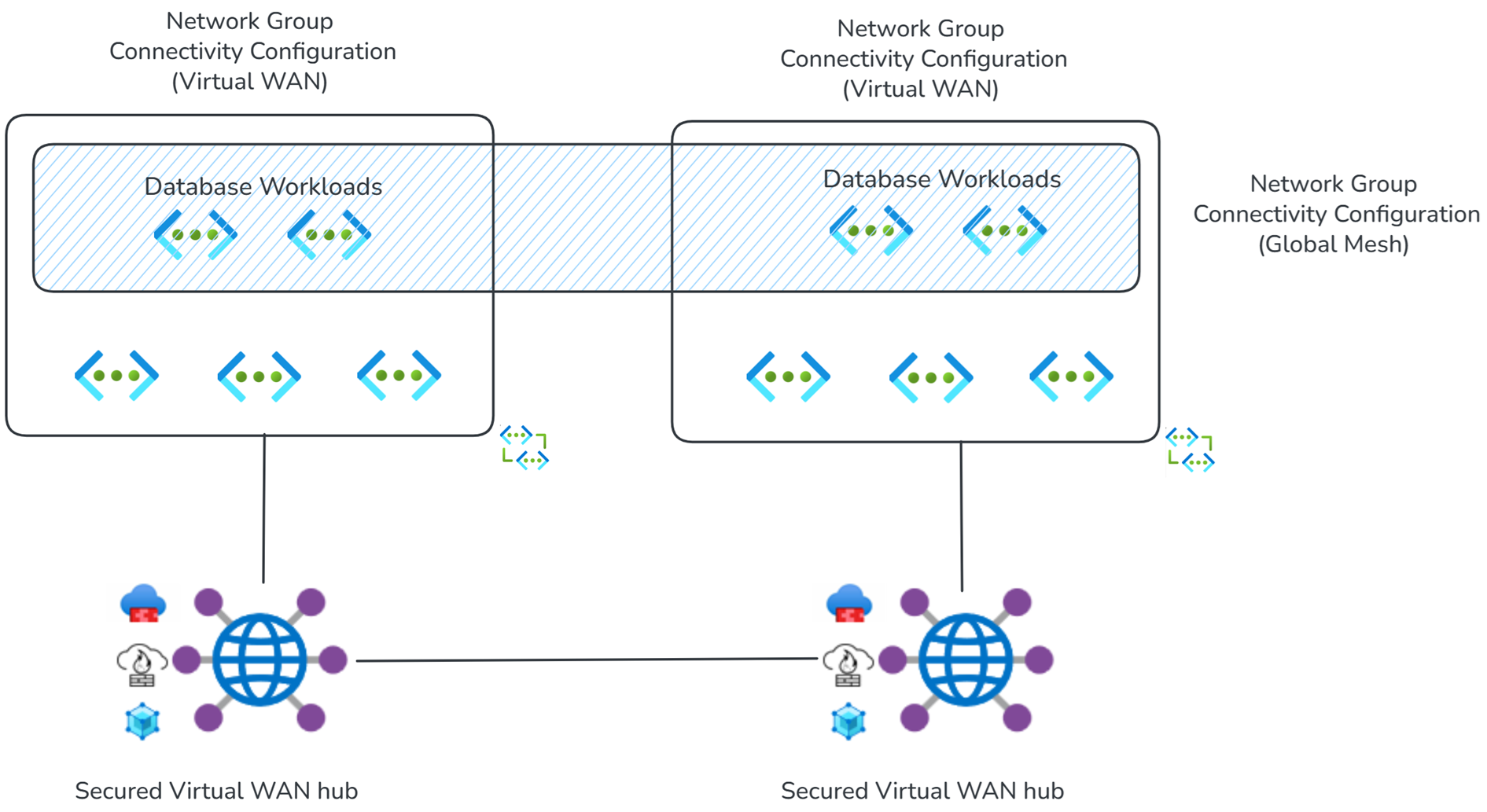
Mesh peering for direct connectivity for selective inspection scenarios
Routing intent and routing policies allow Virtual WAN customers to configure all private (Virtual Network and on-premises) traffic to be inspected by a Firewall appliance in the Virtual WAN hub.
In certain high-throughput or latency-sensitive applications, such as nightly database updates, inspecting traffic via a next-generation Firewall deployed in the Virtual WAN hub throttles throughput, adds latency, and increases cost. To allow Virtual Network-to-Virtual Network traffic to bypass inspection, enable direct connectivity to create a mesh between Virtual Networks in a Network Group.
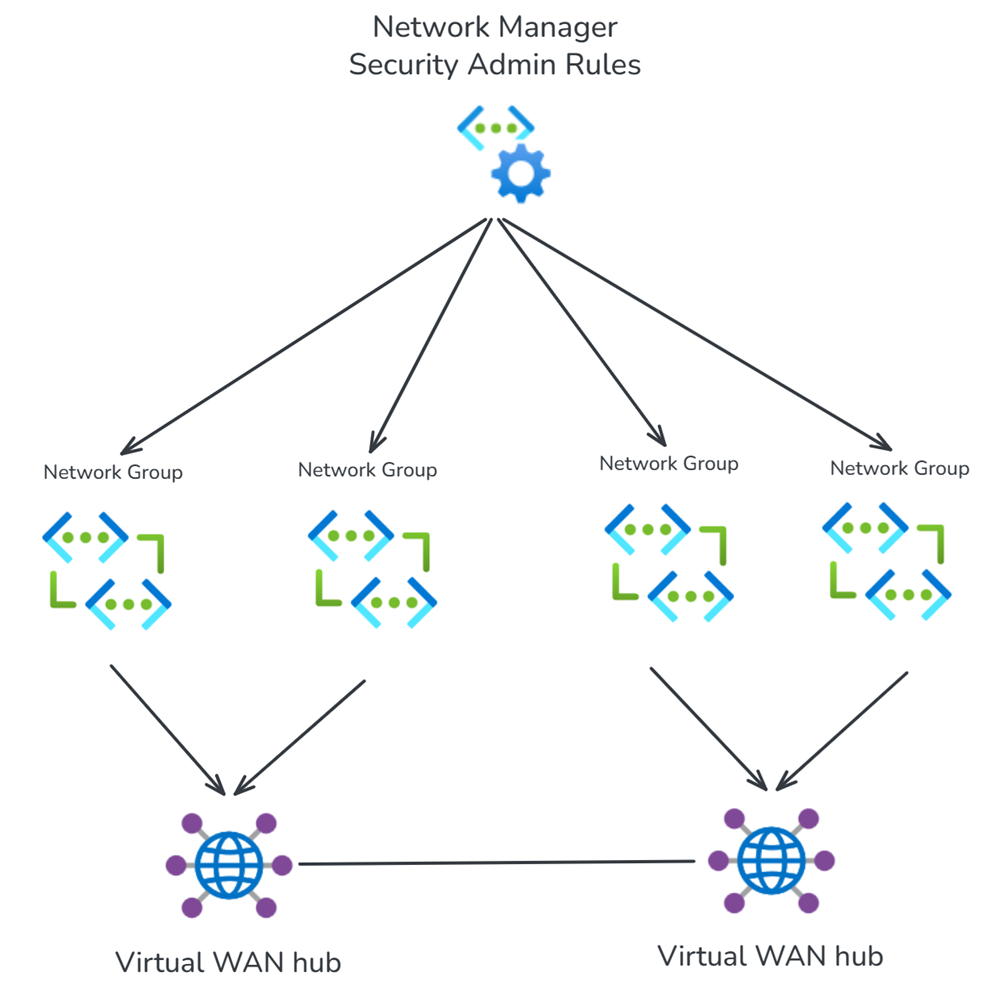
Implement security admin rules to simplify deployment and management of access control lists at scale
Define network groups to connect your spoke Virtual Networks to Virtual WAN and then use security admin rules to author and deploy Access Control Lists (ACLs) to your Virtual WAN spoke networks. Security admin rules offer an easy-to-use way to configure multiple layers of defense from external threats alongside next-generation Firewalls in the Virtual WAN hub.