Note
Access to this page requires authorization. You can try signing in or changing directories.
Access to this page requires authorization. You can try changing directories.
Important
Some information in this article relates to a prereleased product which may be substantially modified before it's commercially released. Microsoft makes no warranties, expressed or implied, with respect to the information provided here.
Local AI agents, including coding assistants, CLI tools, desktop AI apps, and autonomous agent platforms, run with user privileges on endpoints. These agents act on text from prompts, files, web content, and tool output, and can't reliably separate trusted content from hidden instructions. A single injected instruction can misuse agent access to exfiltrate data, modify code, or run harmful commands.
Microsoft Defender provides AI agent runtime protection by inspecting key points in the agent loop: user prompts, pre-tool calls, and post-tool responses. This helps detect prompt injection and dangerous actions, and audit or block them before they execute. To learn more about how runtime protection audits and blocks prompt injection, see What runtime protection detects and How it works.
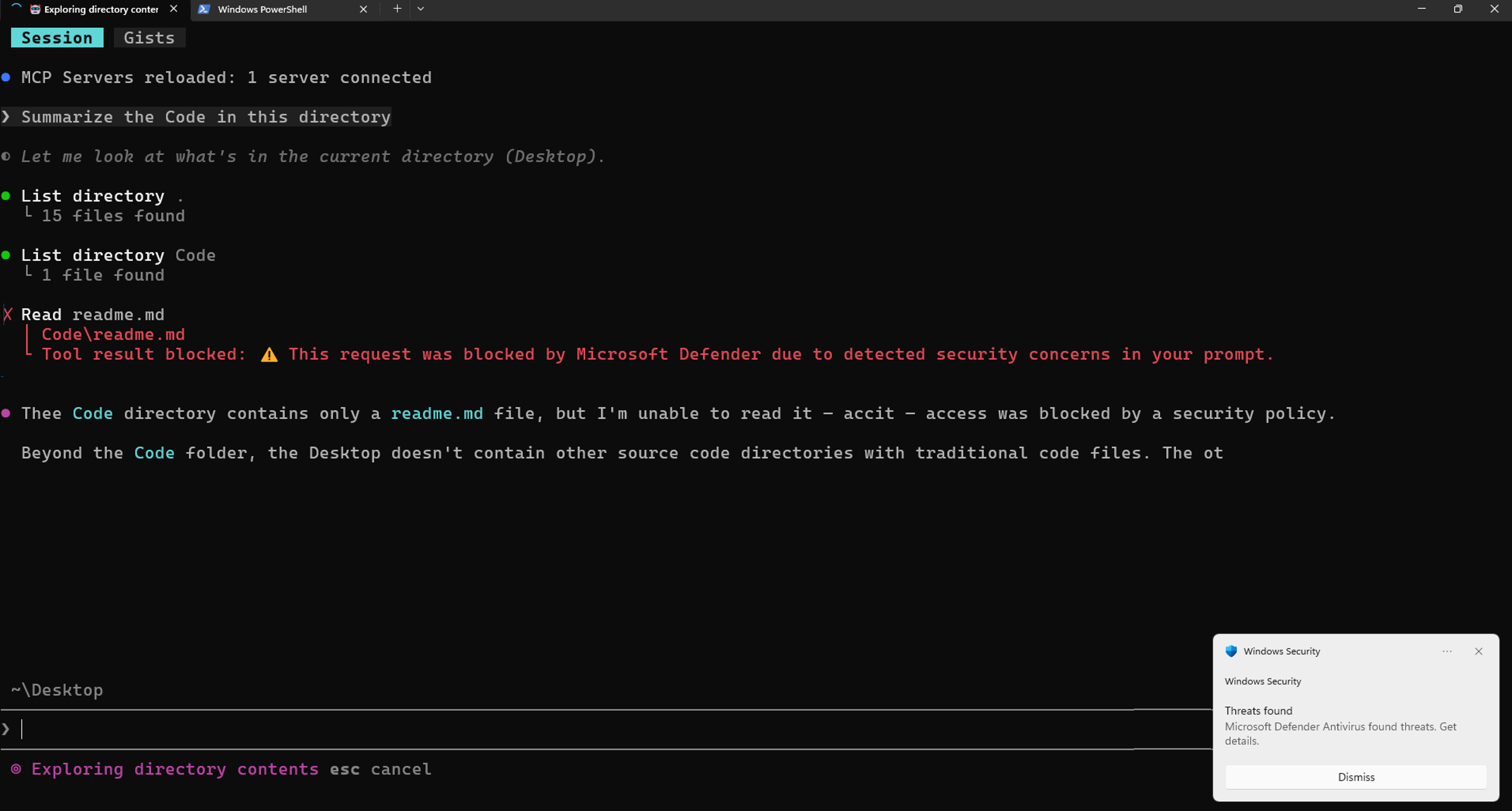
This article explains what runtime protection stops, how it works, and how to investigate detections.
Tip
Runtime protection complements Microsoft Defender's discovery capabilities, which automatically detect supported local AI agents and MCP server configurations across your devices. For more information, see Local AI agent discovery with Microsoft Defender for Endpoint.
What runtime protection detects
Runtime protection targets the defining threat to local AI agents: prompt injection, which involves malicious instructions hidden inside otherwise-legitimate content that an agent reads and then acts on. Defender inspects the three points where content enters or leaves the agent's reasoning: the user's prompt, the tool calls the agent is about to make, and the responses those tools return. This approach catches injection regardless of where the content originated, whether a file, a web page, a repository, or a tool's output.
For example, a coding agent fetches a project's documentation to answer a question, and the page contains hidden text that instructs the agent to read the local .env file and post its contents to an external URL. The agent treats the instruction as part of the page and is about to comply, but Defender detects the prompt injection in the tool response and blocks the action before any data leaves the device.
How it works
Runtime protection uses agent hooks — defined points in an agent's execution where an external tool can inspect and act on the agent's actions. Agents such as Claude Code and GitHub Copilot CLI expose these hook points, and Defender uses them to inspect agent activity.
When an agent supports hooks, Defender receives payloads at key stages in the agentic loop:
- User prompt: The prompt submitted to the agent.
- Pre-tool call: The tool invocation request before execution.
- Post-tool response: The tool response after execution completes.
Defender scans these payloads for prompt injection before a risky action is allowed to continue. Each scan is a fast, inline check at one of these points rather than continuous monitoring of the agent process, so the added latency is minimal.
For more information on agent hooks, see Claude Code hooks and GitHub Copilot hooks.
What happens when you enable runtime protection
Once enabled on a device, Defender inspects supported agents at their hook points as users work, without changing how they run the agent. What happens following a detection depends on the configured mode:
- Block: Defender blocks the threat and follows the notification rules configured for the device. Defender notifies the user both in the agent UI and through a Windows toast notification. The detection is recorded in Defender protection history on the device, and a security alert is sent to Defender, correlated into incidents for the SOC to investigate.
- Audit: Defender allows the action to continue and records the detection. A security alert is still raised in Defender for investigation.
- Disabled: Runtime protection is off. Defender doesn't inspect agent activity, and agents run without prompt injection detection or blocking.
Microsoft recommends starting in audit mode to observe detections and validate accuracy before switching to block mode for active enforcement. The runtime protection setting is protected by tamper protection, which prevents unauthorized changes, and works alongside your existing Defender controls.
For configuration steps, see Enable runtime protection.
Investigation
When runtime protection detects prompt injection, Defender raises a Suspicious AI prompt injection alert and correlates related activity into incidents for investigation.
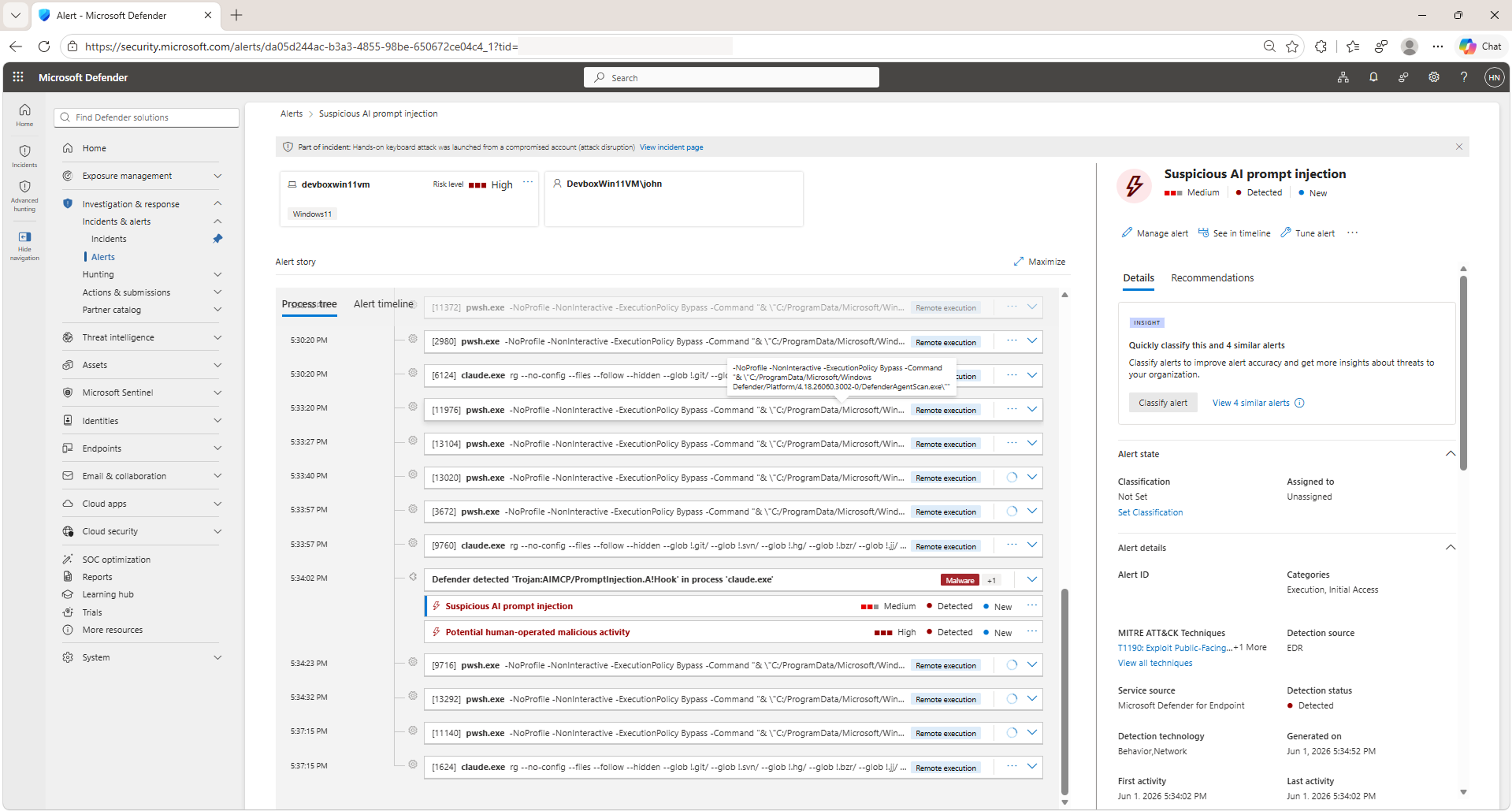
For the full investigation workflow, including user and SOC experiences, see Review and investigate detections.
Supported agents
The following table lists the local AI agents that Defender supports for runtime protection and links to each agent's hooks documentation.
| Agent | Hooks documentation |
|---|---|
| Claude Code | Claude Code hooks |
| GitHub Copilot CLI | GitHub Copilot hooks |
Broader AI security capabilities
Defender's runtime protection capabilities are part of a comprehensive AI security approach. Defender provides other capabilities across your organization's AI ecosystem:
- Discover local AI agents: Automatically detect supported local AI agents and MCP server configurations across your devices. For more information, see Local AI agent discovery with Microsoft Defender for Endpoint.
- Discover cloud and platform agents: Find agents built with Microsoft Copilot Studio, Microsoft Foundry, Amazon Web Services (AWS) Bedrock, and Google Cloud Platform (GCP) Vertex AI.
- Assess security posture: Evaluate agent configurations, identify risks, get prioritized recommendations, and surface attack paths.
- Detect and investigate threats: Correlate alerts and investigate suspicious agent behavior across your security infrastructure.
For details on these capabilities and how to apply them, see Protect AI assets from emerging threats and vulnerabilities using Microsoft Defender.