Note
Access to this page requires authorization. You can try signing in or changing directories.
Access to this page requires authorization. You can try changing directories.
When you enable the option to exit a sequence, you disconnect the sequence from its records when the criteria is met. For example, if the flow includes an email reply from the customer, the record disconnects from the sequence.
Prerequisites
Review the following requirements before you configure the exit criteria:
- Create at least one email activity step in the sequence.
- The sequence must be in inactive or revision state.
- Configure the email engagement feature in your organization before you start using this option for the email activity.
Configure the exit sequence criteria
Open the sequence. On the designer page, select Exit criteria.
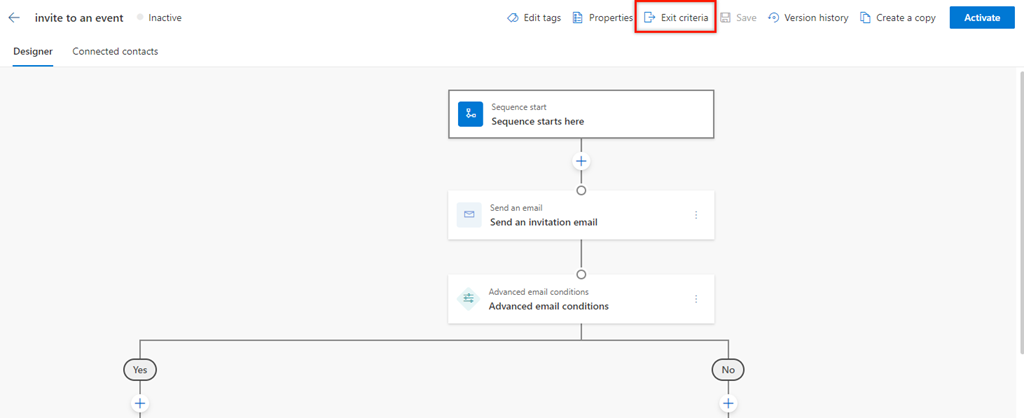
On the Sequence Options pane, turn on the Exit a sequence toggle to exit a sequence when a customer replies to any email in the sequence.

Select Save.
Can't find the feature in your app?
There are a few possibilities:
- You don't have the necessary license to use this feature. Check out the comparison table and the licensing guide to see which features are available with your license.
- You don't have the necessary security role to use this feature.
- To configure or setup a feature, you need to have the Administration and customization roles
- To use sales-related features, you need to have the Primary sales roles
- Some tasks require specific Functional roles.
- Your administrator hasn't turned on the feature.
- Your organization is using a custom app. Check with your administrator for exact steps. The steps described in this article are specific to the out-of-the-box Sales Hub and Sales Professional apps.
Related information
Create and activate a sequence
Add steps to sequence
Add condition steps to sequences
Add command steps to sequences
Add LinkedIn activities to sequence