Note
Access to this page requires authorization. You can try signing in or changing directories.
Access to this page requires authorization. You can try changing directories.
Accidental deletion, misconfiguration, or malicious change to Microsoft Entra tenant objects can disrupt user sign-in, block access to business-critical applications, and rapidly affect downstream operations. This article explains how you can prepare for and execute tenant-scoped recovery under the shared responsibility model. The following diagram illustrates a layered approach that maximizes coverage across failure modes.
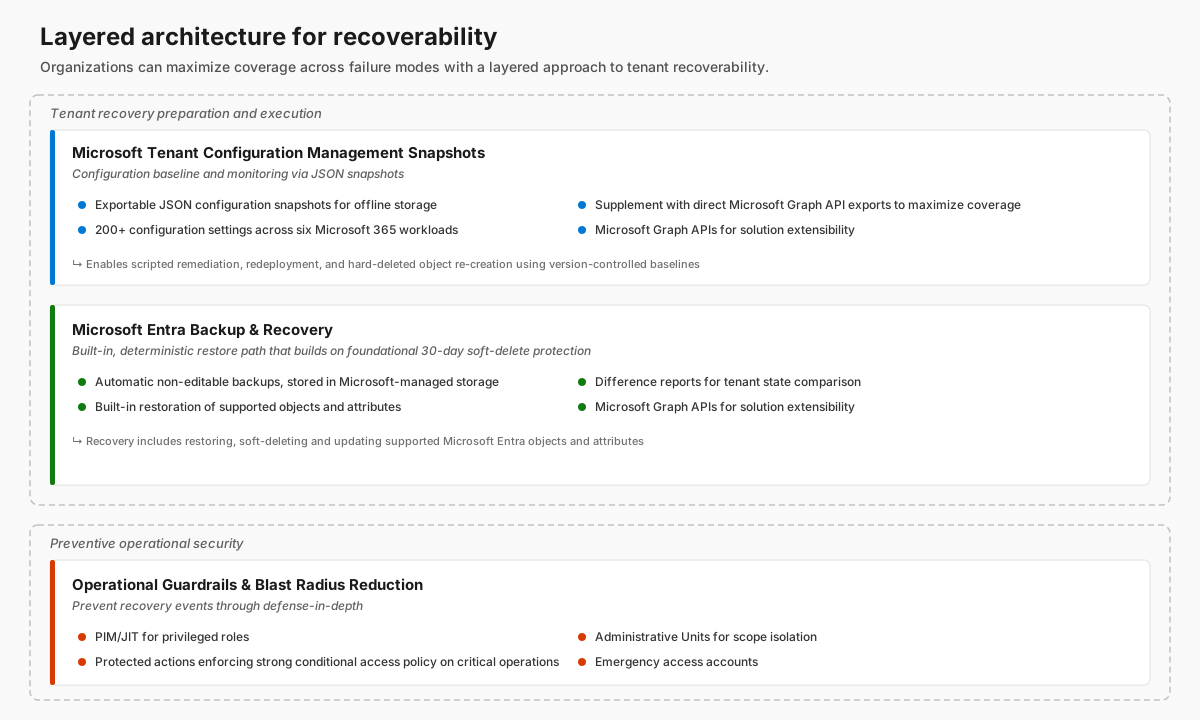
Always include recoverability in your organization's overall identity resilience strategy:
- Building resilience into identity and access management with Microsoft Entra ID provides guidance on service-level resilience and high availability.
- Incident response overview details cybersecurity incident response guidance.
To reduce the likelihood of disruption and to recover quickly, include these recommendations in your workflow:
- Design with the shared responsibility model in mind. Microsoft provides service-level redundancy, isolation, and automated mitigation. Be ready to restore a known-good tenant state when a compromise changes tenant objects or configuration.
- Maintain an external, versioned, known-good state. Regularly capture configuration using Tenant Configuration Management (TCM) APIs and Microsoft Graph exports. You can then manually or programmatically reapply settings as needed.
- Prioritize built-in recovery options when Microsoft supports them. Microsoft Entra Backup and Recovery provides the lowest effort restore path for supported objects and configuration changes within its retention window.
- Extend coverage beyond built-in capabilities when your recovery scenarios require it. Evaluate non-Microsoft backup and recovery solutions. Explore options for unsupported object types, granular attribute rollback, longer retention, and scenarios where you need to recreate hard-deleted objects.
- Operationalize recovery. Retain audit and sign-in logs beyond default windows. Define Recovery Time Objective (RTO) and Recovery Point Objective (RPO). Run regular recovery drills so recovery is executable under pressure.
- Reduce blast radius to avoid (and simplify) recovery events. Implement least-privilege administration, Microsoft Entra Privileged Identity Management (PIM), just-in-time (JIT), protected actions, emergency access accounts, and—where warranted—tenant isolation for critical workloads.
Compare resilience and recoverability
This article distinguishes between resilience and recoverability. Service-level resilience and recoverability are dimensions of an organization's identity resilience. Identity resilience is the ability to protect, secure, and rapidly recover core authentication systems such as Microsoft Entra ID. It's a critical component of broader operational resilience. Operational resilience is the ability to prevent, adapt to, and recover from disruption so that critical business services continue running. Resilience and recoverability aren't individual product features. Rather, they're end-to-end properties of a socio-technical system (people, process, and technology).
Resilience to continue operating through disruption
Resilience refers to design and operational measures that allow identity and access functionality to continue—possibly in a degraded but safe mode—during failures of service components, dependencies, or connectivity. The primary goal is to minimize user and application impact while the disruptive condition is present.
Typical resilience scenarios include:
- availability failures in the identity service path (such as transient Microsoft Entra service disruption)
- network or DNS failures
- federation or multifactor authentication (MFA) dependency outages
- token acquisition interruptions
Microsoft Entra has high availability at the platform level. Following the shared responsibility model, design tenant configuration and integrations to support resilience outcomes. Include authentication method selection, dependency minimization, and application tolerance to transient failures. Don't rely on resilience to undo erroneous or malicious tenant changes.
Recoverability to restore objects to a desired state after disruption
Recoverability refers to the capabilities and runbooks necessary to restore Microsoft Entra tenant objects and configuration to a known good state after unintended or malicious changes. The primary goal is to minimize recovery time and irreversible impact by detecting tenant changes, using supported recovery paths, and defining clear operational runbook actions.
Typical recoverability scenarios include:
- integrity failures of tenant configuration (such as accidental deletion of directory objects)
- misconfiguration (such as Conditional Access or application permission changes)
- compromise driven changes (including mass deletion or changes that establish or maintain unauthorized access)
Following the shared responsibility model, plan tenant level recoverability that includes tenant objects and configuration before problems occur. Operationalize recovery features, APIs, and logs that Microsoft provides. Don't depend on recoverability to eliminate all service outages or dependency failures.
In practice, incidents can involve both resilience and recoverability. Compromise driven events might require recoverability actions (restore and re secure tenant state). Resilience patterns—such as emergency access accounts and independent administrative paths—can materially reduce time to control, limit blast radius, and simplify subsequent recovery.
Microsoft Entra resilience
Microsoft Entra has a 99.99% availability SLA as a distributed, cloud-native identity service with layered redundancy, continuous health monitoring, and automated mitigation. Capabilities such as backup authentication help maintain sign-in continuity during primary service disruptions. The following resources explain the resilience model and design patterns that you can adopt to reduce dependency on any single authentication path.
- Resilience in identity and access management with Microsoft Entra ID (overview)
- Microsoft Entra architecture overview
- Build resilience in your IAM infrastructure with Microsoft Entra ID (infrastructure patterns and dependency minimization)
- Increase the resilience of authentication and authorization for applications (application development resilience)
- Microsoft Entra ID backup authentication system (how supported apps and services maintain sign-in continuity during a primary-service disruption)
Microsoft Entra resilience outcomes depend on tenant configuration and integration choices. For example:
- Use resilient credential and MFA strategies.
- Reduce fragile dependencies (such as avoidable single points of failure in federation or on-premises connectivity).
- Build applications to tolerate transient authentication and token acquisition failures.
This article focuses on the complementary disciplines of recoverability: preparing for and executing tenant-scoped recovery after integrity compromise.
Prepare for tenant-scoped recovery
It's important to separate service-level safeguards from tenant-level recoverability. Microsoft uses redundancy and isolation measures to keep the service operating through infrastructure and component failure. By contrast, recoverability addresses logical errors and adverse tenant-level change scenarios such as accidental deletion, misconfiguration, or malicious modification of directory objects. For those scenarios, Microsoft provides capabilities and APIs so that you can document known-good states, monitor for directory changes, and recover from soft object deletion and misconfiguration scenarios.
Microsoft and your organization share responsibility for recoverability. Use the tools and services that Microsoft provides to prepare for and respond to deletions and misconfigurations within your tenant.
To ensure business continuity following an unintended or malicious change, proactively establish a recovery-ready posture. Include the following steps in ongoing business continuity disaster recovery (BCDR) planning.
- Define and document the tenant's known-good state. You can recover only if you have a clear baseline to which you can restore. To facilitate rapid reconstruction after permanent object deletion, maintain an external versioned record of your environment's healthy configuration. Adopt a layered capture approach. Select the mechanism that provides the scope and fidelity that your recovery plan requires.
- Tenant Configuration Management (TCM) snapshots provide cross-workload coverage for a defined subset of Microsoft Graph-supported resources and properties.
- Direct Microsoft Graph API exports provide supplementary coverage for objects outside TCM scope.
- Non-Microsoft configuration management tools support abstraction, normalization, and declarative reapplication workflows.
Store exports from different mechanisms in an external version-controlled repository. Set retention periods to meet your organization's Recovery Point Objectives (RPO). Logically separate exports from capture mechanisms. Remember that TCM snapshots cover only supported resources and can't reapply configuration outside that scope. Recoverability best practices provides API examples and tooling options.
Note
Plan for circular dependencies when using external repositories like GitHub or Azure DevOps for recovery. If these platforms rely on the same Microsoft Entra ID tenant for authentication, a catastrophic misconfiguration (such as a global Conditional Access lockout) can prevent access to the scripts and configuration files that you need for remediation.
- Retain logs. Configure proactive monitoring and alerting for incident response.
- Audit log retention. Microsoft Entra ID stores audit logs for a limited time (typically 30 days). For effective forensic analysis and recovery, configure longer retention periods.
- Diagnostic settings and alerts. Configure Microsoft Entra ID to stream audit and sign-in logs to a log analytics workspace, Azure Storage account, or security information and event management (SIEM) such as Microsoft Sentinel. Make sure that you have a historical record of who changed what long after an event occurs. Create alerts for hard deletion events that fall outside of expected operations.
- Configuration monitoring. The tenant monitoring APIs in TCM allow administrators to create one or more monitors and enable periodic detection of deviations from the desired configuration state. TCM monitors run at fixed six-hour intervals that you can't change.
- Incident response playbooks. Ensure that hard deletes and configuration changes to critical objects (such as high-priority groups or Conditional Access policies) trigger an immediate, high-priority incident response playbook for rapid investigation and remediation.
- Formulate and regularly test the recovery plan. Technical tools work only when your organization defines and tests a recovery process. Define the human element of recovery before a crisis strikes.
- Define RTO/RPO. Establish the Recovery Time Objective (RTO) and Recovery Point Objective (RPO) for identity services. Ask business stakeholders to agree on these metrics to align IT efforts with organizational requirements.
- Communication templates. Pre-draft notifications for end users and business owners. Clear communication during an identity outage reduces help desk volume and allows the technical team to focus on remediation.
- Periodic recovery drills. Regularly conduct game day exercises to validate the recovery plan. Use a nonproduction tenant to simulate and test recovery from unintended and malicious directory changes so that you don't affect production directory data and resources that rely on Microsoft Entra.
- To expedite the end-to-end recovery process, prepare built-in difference reports for supported objects. Proactively create Microsoft Entra Backup and Recovery difference reports with APIs. Data loading times vary based on tenant size and recent changes, especially when you generate a report for a backup for the first time.
Important
Only changed objects that still exist in the tenant appear in Microsoft Entra Backup and Recovery difference reports. Microsoft Entra records hard deletion events in the audit log.
- When you plan large-scale tenant changes, consider the Microsoft Entra Backup schedule. Microsoft Entra Backup and Recovery automatically creates backups at Microsoft-defined fixed intervals. To determine the schedule, view backup timestamps in the Microsoft Entra admin center or with the Microsoft Graph API. To help meet Recovery Point Objectives (RPO), plan at-scale tenant changes to take place shortly after backup creation whenever your change schedule allows.
- Reduce blast radius in your tenant.
Execute tenant-scoped recovery
When you need recovery, useMicrosoft Entra capabilities and APIs to identify and execute object recovery actions. This section describes how to identify tenant changes and determine object lifecycle states to select recovery options.
Identify tenant changes
Identify changes in the tenant that might require recovery actions. The following methods help you improve your recoverability by making it easier to identify changes when problems occur.
- Entra Backup and Recovery difference reports. Create reports to identify directory changes, such as additions, attribute edits, link edits, and soft deletes, to critical directory objects since the last backup. Determine which objects or properties you can restore by using built-in Microsoft Entra recovery jobs.
- Point in time comparison using documented known-good state. To precisely identify what changed, compare configuration snapshots from TCM APIs (or Microsoft Graph exports) against the current tenant state. TCM supports a broader range of object types (resources) compared to Microsoft Entra Backup and Recovery, albeit with support for a different subset of supported object attributes.
- Microsoft Entra audit logs. Collect all traceable activities within your Microsoft Entra tenant, including hard deletion activities, even when built-in recovery tooling can't recover them. Deletion and configuration change audit log events are relevant to recovery scenarios.
- Other backup and recovery solutions. Evaluate non-Microsoft backup and recovery solutions that can help identify what changed and when, particularly in long dwell or delayed detection scenarios. The following section describes non-Microsoft solution use cases.
Note
Non-Microsoft solutions are for informational purposes only. Microsoft doesn't endorse or guarantee reliability, security, or suitability of non-Microsoft solutions. Independently evaluate and validate them as part of your overall recovery strategy.
Determine object lifecycle state
Recovery models in Microsoft Entra depend on an object's lifecycle state: soft deleted, hard deleted, or modified in place. This distinction directly affects recovery fidelity and the options that you can use. The nature of the change—deletion, misconfiguration, or addition—and its lifecycle state determine the recovery path.
Note
Microsoft Entra Backup and Recovery supports recovery for a defined set of tenant object types and selected properties on those objects. Follow guidance for recovering user authentication methods and recovering application secrets, which fall outside Microsoft Entra Backup and Recovery scope.
Recover from soft deletion
For several core object types, Microsoft Entra provides a soft-delete safety net of 30 days during which objects retain full properties, memberships, and configurations.
- Supported objects. Recover from deletions in Microsoft Entra ID describes objects that support soft deletion.
- Restoration fidelity. When you restore objects from the recycle bin, Microsoft preserves group memberships, role assignments, and service principal links, which reduces manual relinking.
- Operational path. You can restore soft-deleted objects by using Microsoft Entra Backup and Recovery, deleted object pages in the Microsoft Entra admin center, Microsoft Graph API, or the Microsoft Graph PowerShell SDK.
Recover from misconfigurations
Unlike deletions, misconfigurations (such as incorrectly scoped Conditional Access policy or modified federation setting) don't move objects to the recycle bin. Rather, you identify what changed, compare the current state to a known‑good configuration, and deliberately roll back or reconstruct affected settings.
- Configuration change recovery. You can recover from configuration changes (attribute edits, link edits) to critical directory objects since the last backup. Use Microsoft Entra Backup and Recovery jobs to restore supported objects to a previous point. This option reduces the need for manual reconfiguration when unintended changes occur.
- Scripted remediation and redeployment. When you store configurations as version‑controlled artifacts (such as JSON files in GitHub or Azure DevOps), recover by redeploying the last known‑good version with scripted or infrastructure‑as‑code workflows. Use this option to efficiently recover complex object configurations such as Conditional Access policies, authentication method configurations, and cross‑tenant access settings.
- Targeted manual rollback or reconstruction. For small-scale recovery, you can manually revert individual settings or reapply the prior configuration using the Microsoft Entra admin center, Microsoft Graph, or automation scripts.
Recreate following hard deletion
Hard deletion creates the most disruptive recovery scenario. Hard deletion happens when an administrator manually purges a deleted object or when an object doesn't support soft delete. Microsoft Entra permanently deletes objects after they exceed the thirty-day soft-delete retention window.
Hard deletion causes permanent removal from Microsoft Entra. After hard deletion, you can't restore or undelete the object. To recover, recreate the object from a known-good configuration that you captured before deletion. Recreation options for hard deletion include the following.
- Manually recreate using documented baselines. You can recreate the deleted object using configuration snapshots or exported definitions that you captured before deletion. The newly created object receives a new Object ID that might require further remediation such as access reassignment.
- Programmatically recreate using configuration snapshots and exports. After you capture configuration data with TCM snapshots or Microsoft Graph exports, you can recreate directory objects with scripted or automated workflows.
- Relink dependent configurations. Because object identifiers change after recreation, reestablish dependencies that referenced the original Object ID. For example, recreating a hard‑deleted group requires group member reassignment. You then relink the group to Conditional Access policies, application assignments, role assignments, or access packages that previously targeted the original object.
Partner-led backup and recovery solutions
If you need more directory object support and functionality, consider non-Microsoft backup and recovery solutions for Microsoft cloud workloads such as Microsoft Entra ID.
Non-Microsoft solutions can use built-in Microsoft Entra capabilities to identify changes, orchestrate recovery workflows, and restore supported objects and properties. Capabilities include backup and recovery APIs, soft delete, Microsoft Entra audit logs, and Microsoft Graph APIs. These solutions complement built-in recovery capabilities. Non-Microsoft solutions can offer Microsoft Entra recoverability capabilities within the scope of platform-supported recovery scenarios, object types, and property-level support. Example capabilities:
- Directory object and attribute support beyond the subset of directory objects and attributes that built-in Microsoft Entra recovery capabilities support.
- Granular restoration allows you to restore specific attributes without affecting the rest of the object. For example, you can restore only a user's department or a specific Conditional Access (CA) policy condition.
- Recreate hard-deleted objects and, in some cases, recreate links and relationships between directory objects.
- Back up and recover both on-premises Active Directory Domain Services (AD DS) and Microsoft Entra directory objects.
- Externally store backups and retain them beyond the current data retention periods for built-in Microsoft Entra soft deletion and Backup and Recovery.
Key failure scenarios and recovery options
Use the following high-level steps to recover from key failure scenarios. Reference this article's Prepare for tenant-scoped recovery section. For tenant-scoped recovery scenarios:
- Follow a suitable incident response process.
- Restore accounts.
- Recover applications and other directory objects.
- Re-enable CA policies.
- Rebuild security settings using known-good states as part of your BCDR plan.
Recover from customer Microsoft Entra ID tenant corruption or data loss
Directory data corruption or deletion due to accidental or malicious activity results in business disruption. The tenant remains accessible to the customer (such as when you use Microsoft Entra break glass accounts).
You can recover from this scenario by using Microsoft Entra recovery features, configuration baselines, and operational runbooks.
During incident response, determine the scope and impact of the incident that necessitates recovery. Microsoft Entra Backup and Recovery difference reports, configuration exports using Microsoft Graph APIs, Microsoft Entra audit logs, and some non-Microsoft solutions can help you to select recovery options.
After you identify which objects and settings require recovery, select recovery actions based on the nature of the change and the state of the affected objects.
- Microsoft Entra Backup and Recovery provides the most efficient recovery path for supported objects and attributes that fall within the backup retention period. Proactively create a difference report for recovery scenarios when objects still exist in the tenant (not hard deleted).
- Establish a documented known‑good configuration state and capture configuration snapshots using TCM APIs. Augment them with Microsoft Graph exports for unsupported resources. Use known‑good states during recovery scenarios to manually or programmatically reapply selected tenant settings, policies, or attributes outside built-in restore capabilities. To selectively restore configuration to a known‑good version, integrate snapshots into automation workflows (such as scripted Microsoft Graph updates or pipeline‑driven deployments).
- Extend recovery coverage to object types and attributes beyond built-in capabilities using Microsoft Graph APIs (directly or through non-Microsoft solutions). Depending on approach and implementation, address scenarios such as recreating hard-deleted objects and recovering objects to points that built-in backup retention periods no longer cover.
When you recreate objects, expect new object identifiers. Plan to reestablish dependent relationships (such as group memberships, access assignments, and Conditional Access targeting). You can automate these steps using non-Microsoft backup and recovery solutions.
Recover from customer Microsoft Entra ID tenant lockout
Ransomware, Conditional Access lockout, an administrator hard deleting all users, and inaccessible Microsoft Entra break glass accounts might lock an organization out of its Microsoft Entra tenant.
During tenant lockout, open a case with Microsoft Support. You can call customer service phone numbers when you can't access portals. Microsoft follows a high-assurance identity verification process to validate tenant ownership. Microsoft helps designated Global Administrator users regain tenant access. Microsoft doesn't issue a new tenant. After Microsoft verifies ownership, Microsoft recovers access to the existing tenant.
Recover from Microsoft Entra ID service outage (not tenant-specific)
A service-layer outage that makes Microsoft Entra ID unavailable can affect multiple customers. Reference this article's Microsoft Entra resilience section.
Microsoft operates Microsoft Entra with service-layer redundancy to help prevent major outages, even during significant failures. In the unlikely event of service‑level disruption, Microsoft's design and operational practices focus on restoring service as quickly as possible to minimize customer impact.
Some Microsoft customers add identity infrastructure solutions to improve resilience of critical workloads in specific scenarios. These solutions introduce significant operational overhead and complexity. They might include high-bar dependencies (such as users being physically located alongside apps and federation infrastructure).
Protect your tenant with operational security guardrails
Reducing the blast radius limits how much tenant compromise or misconfiguration can affect your environment. Microsoft enforces the integrity of tenant boundaries. To further limit privilege and reduce the blast radius within your tenants, apply defense-in-depth controls. Implement a Zero Trust assume breach mindset so that a single point of failure doesn't lead to a systemic identity crisis.
Reduce blast radius in a tenant
Preventing a recovery event is as critical as preparing for one. Take a layered approach to implementing administrative controls that minimize tenant compromise risk and reduce the blast radius in your Microsoft Entra tenants. At minimum, include the following controls.
- Privileged Identity Management (PIM). Enforce JIT elevation for all high-privilege roles. Configure PIM policies to require MFA and administrative approval for roles capable of permanent deletions (such as Global Administrator and User Administrator).
- Administrative Units (AUs). Use AUs to delegate permissions based on departmental or geographical boundaries. This approach limits the blast radius by ensuring an administrator in one business unit can't accidentally delete objects in another.
- Restricted Management Administrative Units (RMAUs). Identify Tier 0 identities (such as emergency access accounts). To prevent their removal, add them to RMAUs and apply extra layers of monitoring.
- Conditional Access (CA) protected actions. Use protected actions to protect high-impact permissions independent of user role, such as permanent deletion and CA policy Create, Update, and Delete.
- Emergency access accounts. To mitigate accidental lack of administrative access or tenant lockout, create two or more emergency access accounts in each Microsoft Entra tenant. To reduce the risk of accidental or malicious deletion, misconfiguration, or usage of these accounts, protect them by using RMAUs.
Isolate critical workloads with multiple tenants
You can maintain dedicated tenants to host high-value or mission-critical applications and resources, isolating them from the broader enterprise environment. Use a risk assessment to determine whether this architectural choice is appropriate. Even after you apply all available security controls and best practices within a single tenant, a security incident or operational error in the main workforce tenant might disrupt certain critical workloads.
To protect the most sensitive systems when an incident occurs in the broader environment, separate critical workloads into dedicated tenants. Dedicated tenants enforce stricter security controls and governance, so that an organization doesn't have to accept the residual risk of exposing critical assets to the primary tenant blast radius, even with an optimal security posture.
Summary
Microsoft Entra provides high availability through cloud‑native service-level resilience with redundancy, isolation, and automated mitigation at the service layer. Treat these capabilities as the foundation for identity availability while recognizing that your organization and Microsoft share responsibility for tenant‑level recoverability. Accidental deletion, misconfiguration, and malicious changes require you to actively prepare for recovery:
- Document known‑good configuration states.
- Retain audit data.
- Establish clear operational runbooks that align with business recovery objectives.
To improve resilience and recoverability outcomes, adopt a layered recovery approach:
- Maintain an external, versioned known-good state. Adopt a layered capture approach. Select from available mechanisms based on the scope and fidelity required. This baseline is essential for comparison, reapplication, and recreation—particularly to identify hard-deleted objects and facilitate recreation.
- Use Microsoft Entra Backup and Recovery as a primary recovery mechanism for supported objects and recoverable properties within the built-in backup retention window. It provides a high fidelity and low effort restore path. Capture configuration snapshots using TCM APIs and direct Microsoft Graph API calls for further recovery options. When combined, these options extend coverage to any directory object accessible through Microsoft Graph.
- For scenarios outside built-in coverage (such as long-term retention and object recreation following hard deletion), use non-Microsoft backup and recovery solutions. Complement Microsoft platform capabilities with partner solutions that extend recoverability where built-in capabilities end. You remain responsible for validation, dependency relinking, and executing recovery runbooks.
Treat recoverability as part of a broader identity resilience strategy, not a standalone technical feature. Preventative guardrails such as least‑privilege administration, privileged access management, high‑risk change monitoring, and critical workload isolation can significantly reduce blast radius and recovery complexity. To withstand identity‑related incidents and restore trusted access with minimal disruption, combine Microsoft Entra's service‑level resilience with disciplined tenant governance, tested recovery procedures, and architectural isolation.
Next steps
- Recoverability best practices in Microsoft Entra ID
- Secure resource isolation in a single tenant in Microsoft Entra ID
- Resource isolation with multiple tenants to secure with Microsoft Entra ID
- Service Level Agreement performance for Microsoft Entra ID
- Architecture strategies for disaster recovery
- Incident response overview
- What are protected actions in Microsoft Entra ID?