Note
Access to this page requires authorization. You can try signing in or changing directories.
Access to this page requires authorization. You can try changing directories.
A variable library in Fabric is a bucket of variables that other items in the workspace can consume as part of application lifecycle management (ALM). It functions as an item within the workspace that contains a list of variables, along with their respective values for each stage of the release pipeline. It presents a unified approach for efficient management of item configurations within a workspace, to help ensure scalability and consistency across lifecycle stages.
For example, a variable library can contain variables that hold values for:
- An integer to be used in a wait activity in a pipeline.
- A lakehouse reference to be the source in a copy data activity. Each value is used in a different pipeline, based on the release stage of the pipeline.
- A lakehouse reference to be configured as a notebook default lakehouse. Each value is used in a different pipeline, based on the release stage of the notebook.
A Fabric variable library:
- Is compatible with continuous integration and continuous delivery (CI/CD) processes. This compatibility allows integration with Git and deployment through deployment pipelines.
- Supports automation via Fabric public APIs.
- Value resolution in the consumer item isn't necessarily tied to its deployment. Rather, each consumer item resolves the value based on its own context.
- The experience of a variable library differs based on the variable type, but all variable libraries allow you to define and manage variables that other items can use.
Benefits
Variable libraries enable customers to customize and share configurations.
Customize configurations
You can configure a variable value based on the release pipeline stage. You can configure the variable library with sets of values: one value for each stage of the release pipeline. Then, after one-time settings of the active value set for each stage, the correct value is automatically used in the pipeline stage. Examples include:
- Changing an item's connection based on the stage.
- Switching to a different cloud data source based on the stage.
- Adjusting data quantity in a query based on the stage.
Share configurations
Variable libraries provide a centralized way to manage configurations across the workspace items. For example, if you have several lakehouses in the workspace and each one has a shortcut that uses the same data source, you can create a variable library with that data source as one of the variables. That way, if you want to change the data source, you have to change it only once in the variable library. You don't need to change it in each lakehouse separately.
Variable library structure
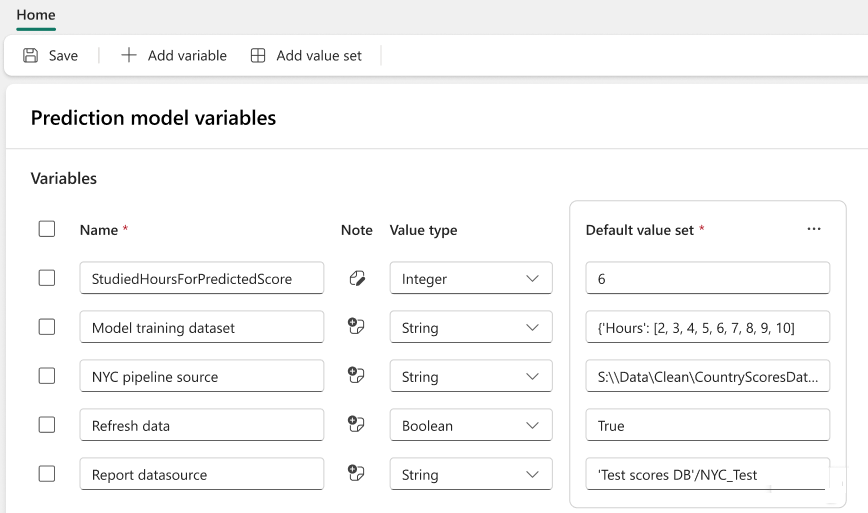
The Variable Library in Fabric is a structured system designed to manage configuration parameters across workspaces and deployment stages. At its core are user-defined variables, which can be basic types (like string, integer, boolean) or complex types such as item references. These variables are grouped within a Variable Library item and can be referenced by consumer items within the same workspace.
To support dynamic configuration, each variable can have multiple value-sets or alternative sets of values tailored for different environments (e.g., dev, test, prod). One value-set is designated as "active" per workspace, determining which values are used during runtime.
Users can create, edit, and manage variables and value-sets through the Fabric UI or APIs, with built-in validation and permission checks. The system supports CI/CD workflows, allowing variables to be managed as code, integrated with Git, and deployed via pipelines. This structure ensures scalable, automated, and governed configuration management across complex data systems.
Supported items
The following items support the variable library:
- Pipeline
- Shortcut for a lakehouse
- Notebook, through NotebookUtils and
%%configure - Dataflow Gen 2
- Copy job
- User data functions
- Eventstream
- Deployment plan action parameters
- Plan
Naming conventions
The name of variable library item itself must follow these conventions:
- Isn't empty
- Doesn't have leading or trailing spaces
- Starts with a letter
- Can include letters, numbers, underscores, hyphens, and spaces
- Doesn't exceed 256 characters in length
The variable library name is not case sensitive.
Considerations and limitations
Limitations for variables
There can be up to 1,000 variables and up to 1,000 value sets, as long as you meet both of these requirements:
- The total number of cells in the alternative value sets is less than 10,000.
- The item's size doesn't exceed 1 MB.
These requirements are validated when you save changes.
The note field can have up to 2,048 characters.
The value-set description field can have up to 2,048 characters.
Limitations for alternative value sets
- Alternative value sets in a variable library appear in the order in which you added them. Currently, you can't reorder them in the UI. To change the order, edit the JSON file directly.
- The name of each value set must be unique within a variable library.
- Variable names must be unique within a variable library. You can have two variables with the same name in a workspace if they're in different items.
- There's always one (and only one) active value set in a variable library at a time. You can't delete a value set while it's active. To delete it, first configure another value set to be active. You can have a different active value set for each stage of a deployment pipeline.