Note
Access to this page requires authorization. You can try signing in or changing directories.
Access to this page requires authorization. You can try changing directories.
Important
This feature is in preview.
Fabric runtime release channels provide a structured and transparent way for customers to test upcoming runtime changes before they become the default. This feature helps organizations validate their production workloads early with these new changes in early access, avoid unexpected disruptions, and gain better control over Spark runtime upgrades.
Instead of receiving silent updates that might break your production workloads, opt in to an early access release channel, test your workloads in a development or staging environment, and confirm compatibility before the update becomes default.
How release channels work
Each Spark runtime has at least two public release channels:
- Default channel – This production-grade channel runs the default version of the runtime. All users automatically use this channel unless they opt in to early access.
- Early access channel – This production-grade channel includes upcoming updates and library changes that are scheduled to become the next default channel. Opt in to test your workloads against upcoming changes.
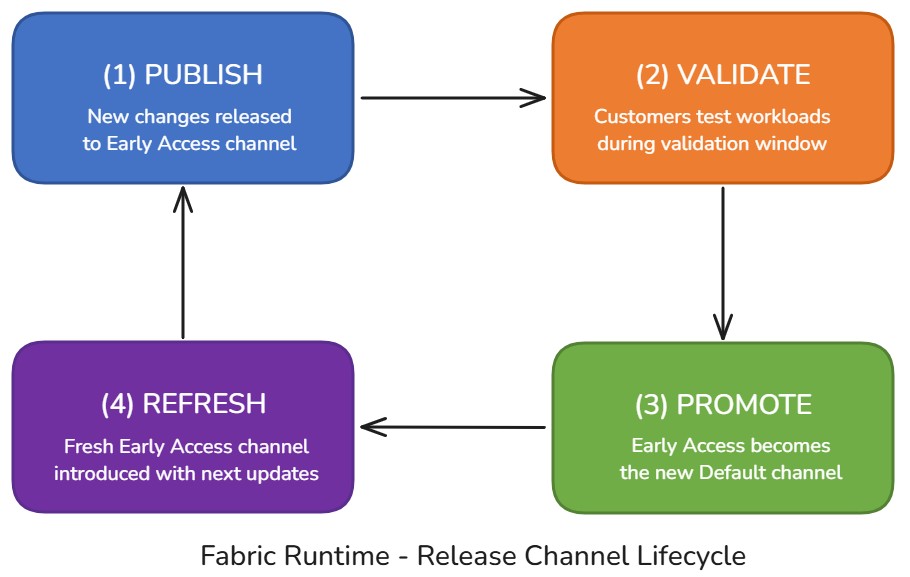
When the designated validation window ends, the early access release channel automatically gets promoted to become the new default, and a fresh early access channel is introduced with another set of new changes. This process continues the cycle. This model gives you a predictable testing window before changes become default for everyone.
Tip
Use the early access channel to validate production workloads before updates reach the default channel.
Why release channels matter
Spark runtime updates can include library upgrades, security patches, dependency changes, or even operating system upgrades. While all updates pass internal quality checks before release, those checks can't capture all customer-specific variations and use cases. Early access channels let you identify potential problems early and work with Microsoft by creating a support ticket to address them before updates affect your production environment.
| Benefit | Description |
|---|---|
| ✔ Predictable updates | You know exactly when a new runtime becomes available and have time to validate against it. |
| ✔ Reduced risk | Testing workloads on early access ensures compatibility before changes reach production. |
| ✔ Better visibility | You can easily tell which runtime version you're running, reference release notes, and verify upgrade timing. |
| ✔ Improved quality and security | You receive well-tested builds with security patches applied faster, giving you confidence in runtime stability. |
Choose a release channel
Select a release channel by using the Spark configurations or properties. Use the following property in your Spark settings or configuration:
Important
The early access channel doesn't use Starter Pool. You must set spark.fabric.pools.skipStarterPools=true to use the early access channel. Custom pools have a delay in session startup time compared to Starter Pool.
# Prerequisite: early access doesn't use Starter Pool so you need to set it to skip it
spark.fabric.pools.skipStarterPools=true

# Set one of the following values:
# Use this to switch to the early access channel
spark.computeConf.runtime.releaseChannel=earlyAccess

# or to revert to the default release channel
spark.computeConf.runtime.releaseChannel=default
Valid values are:
default– Uses the default generally available release channelearlyAccess– Uses the upcoming early access release for testing
Note
The release channel setting is immutable for the duration of a Spark session. To switch channels, start a new session.
Set up and run tests on early access
To effectively test early access releases, follow these steps:
1. Set up a test workspace or designate an existing test environment
Create a dedicated workspace for testing the early access channel:
Create a new workspace or designate an existing test environment.
Create an environment item and set these properties to use early access.
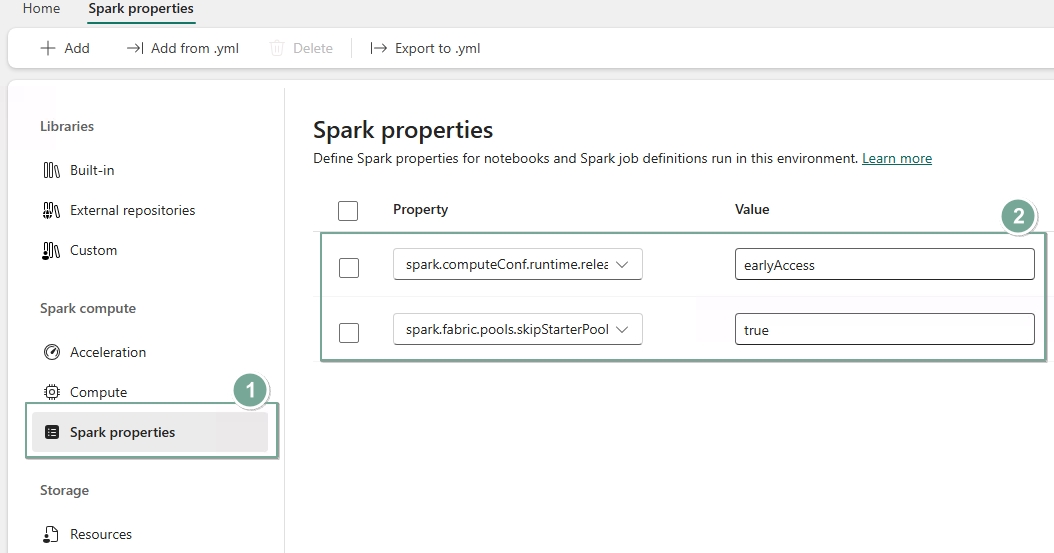
In your notebook or Spark job definition, refer to the environment item you created.
When the session starts, validate the usage of the early access release channel by using the following command.
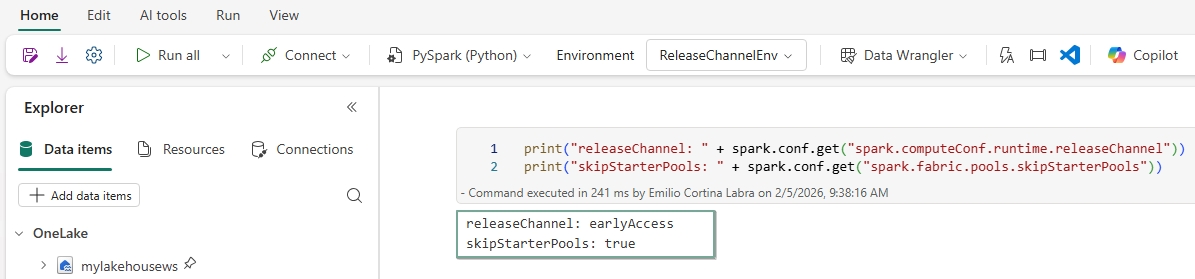
2. Identify representative workloads
Run workloads that represent your production pipelines:
- Ideally, run your entire production workload in the test workspace against the early access channel.
- If that's not practical, identify the critical tests and pipelines that best represent your production environment.
- Consider using existing UAT or staging environments you might already have.
3. Automate testing
Set up automated test runs:
- Schedule tests to run regularly, but less frequently than release updates.
- Monitor test results for failures that might indicate problems with the early access release.
4. Report issues
If you suspect a failure is caused by the early access release:
- Compare results against the default channel to isolate the problem.
- Note the VHD ID of the early access version you're testing.
- Contact Microsoft support with your findings. Microsoft prioritizes early access problems and either provides a hotfix or rolls back problematic changes.
Track release updates and VHD information
To stay informed about changes in each release channel:
Identify your VHD (Virtual Hard Disk) image. To find the VHD name of the runtime image you're running:
- Check Spark UI or cluster information in your session (like
spark.conf.get("spark.synapse.vhd.name", "")). - Look for the VHD name (which should look like *.vhd) in cluster logs.
- Use this information when reporting issues to support
- Check Spark UI or cluster information in your session (like
Review release notes. Monitor the Spark Runtime Releases and Updates repository for detailed release notes. Release notes are published per release channel, so you can easily compare changes. Each release includes documented changes to libraries, components, and improvements.
Examples:
- Official-Spark3.5-default-YYYY-MM-DD.md
- Official-Spark3.5-early-access-YYYY-MM-DD.md
When the early access channel becomes the new default:
- The previous default's notes are archived.
- Early access notes are renamed as the new default notes.
- A new early access notes file is published for the next cycle.
Frequently asked questions
Is early access lower quality?
No. The early access channel must pass all standard validation gates. It's simply earlier in the release timeline.
Do I have to use the early access channel?
No. It's entirely optional. If you don't opt in, you continue using the default channel.
Can I roll back if something fails?
Yes. You can switch back from the early access channel at any time by using the Spark configuration to revert to the default channel.
Does early access cost extra?
No. Billing remains the same as default channel usage.
Does early access use a custom pool only?
Yes. Early access only uses a custom pool because it's an opt-in feature. Unlike Starter Pool, custom pools have a delay in session startup time.