Note
Access to this page requires authorization. You can try signing in or changing directories.
Access to this page requires authorization. You can try changing directories.
Applies to: ✅ Warehouse in Microsoft Fabric
This article highlights the features and innovations in Fabric Data Warehouse's architecture that power its performance, scalability, and cost efficiency.
Fabric Data Warehouse runs on a future-ready architecture in a converged data platform. With an open Delta storage format and OneLake integration, your data in Fabric Data Warehouse is ready for analysis.
High level architecture
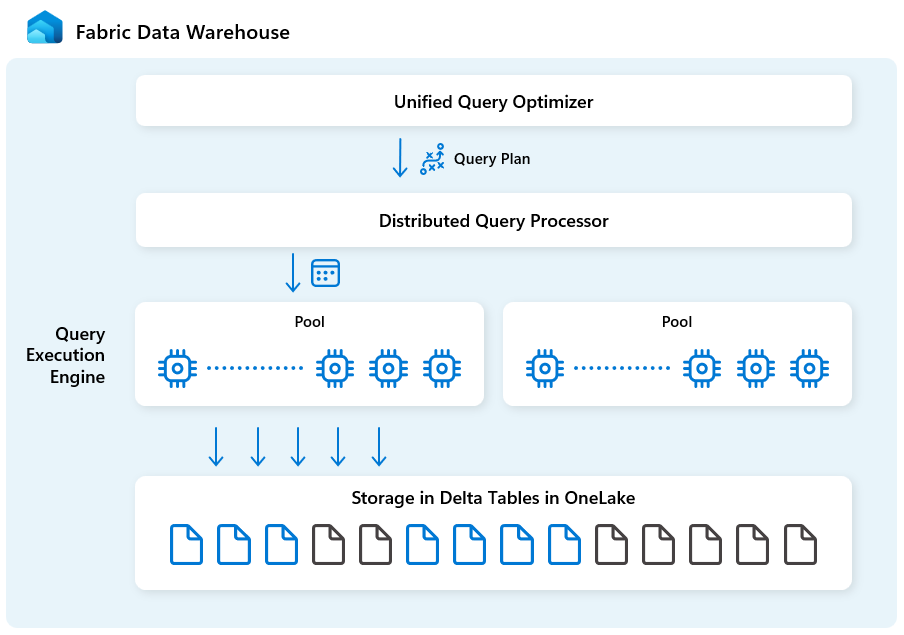
Fabric Data Warehouse is purpose-built for analytics at scale with the following building blocks:
| Building block | Description |
|---|---|
| Unified query optimizer | Generates an optimal execution plan for distributed cloud environments, irrespective of the quality of user-authored SQL queries. |
| Distributed query processing | Supports massive parallel query execution with rapid auto-scaling cloud infrastructure, instantly providing needed compute resources for queries. Separate SELECT and DML workloads use distinct pools for efficient and isolated execution. |
| Query Execution Engine | A SQL-based engine for executing analytics queries on large amount of data with fast performance and high concurrency. |
| Metadata and transaction management | Metadata resides in the frontend, backend, and in both the local SSD cache and remote OneLake storage. Supports concurrent transactions and ensures ACID compliance. |
| Storage in OneLake | Log Structured Tables implemented using the open Delta table format, a lakehouse model with secure open storage. |
| Fabric Platform | The Fabric Platform provides a unified authentication and security model, monitoring, and auditing. Your Fabric Data Warehouse is automatically available to other Fabric platform services to meet business needs, including Power BI, data pipelines in Data Factory, Real-Time Intelligence, and more. |
Unified query optimizer engine
Unified query optimizer in Fabric Data Warehouse is the engine that decides the smartest way to run your SQL queries.
When you submit a query, the unified query optimizer looks at possible ways to execute it: how to join tables, where to move data, and how to use resources like CPU, memory, and network. The unified query optimizer doesn't just pick the first option, it chooses the most optimal plan within the time allowed by evaluating cost across these factors and available metadata and statistics.
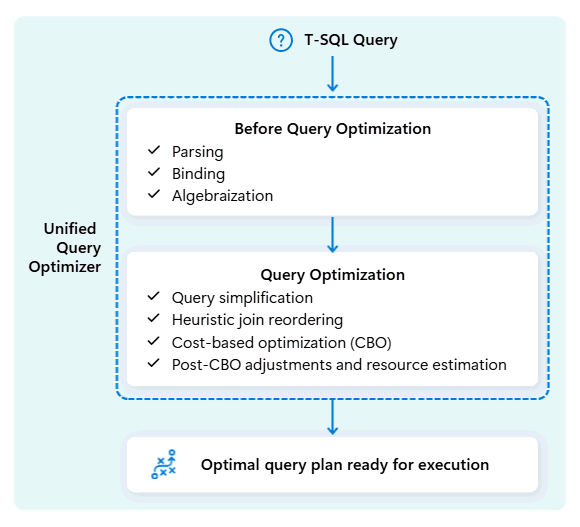
When optimizing a query's execution plan, the unified query optimizer considers everything in one go: the shape of your query, the data distribution of your tables, and the cost of moving data vs. processing locally. The unified query optimizer can make smart trade-offs like deciding whether broadcasting a small table is cheaper than shuffling a large one. This means fewer unnecessary data shuffles, better use of compute, and faster performance, even for complex or poorly written T-SQL queries.
Consistent performance does not require developers to spend time on manual T-SQL query tuning. For example, you do not have to manually determine the best JOIN order in queries. If your SQL lists the large table first and a smaller, highly selective data table second, the optimizer can automatically switch their positions for better performance. It will use the smaller table as the starting point for matching rows (the "build" side) and the larger table as the one to search through (the "probe" side, checked for matches). This approach minimizes memory usage, reduces data movement, and improves parallelism, while still delivering accurate results.
The unified query optimizer continuously learns from past query executions as workloads evolve, refining its optimization algorithm to deliver the best possible performance. Users benefit from fast query execution automatically, regardless of complexity and without needing to intervene.
Distributed query processing engine
In Fabric Data Warehouse, the distributed query processing engine allocates computing resources to tasks in query plans. The distributed query processing engine can schedule tasks across compute nodes so each node runs part of a query plan, enabling parallel execution for faster performance. Complex reports on large datasets can benefit from distributed query processing.
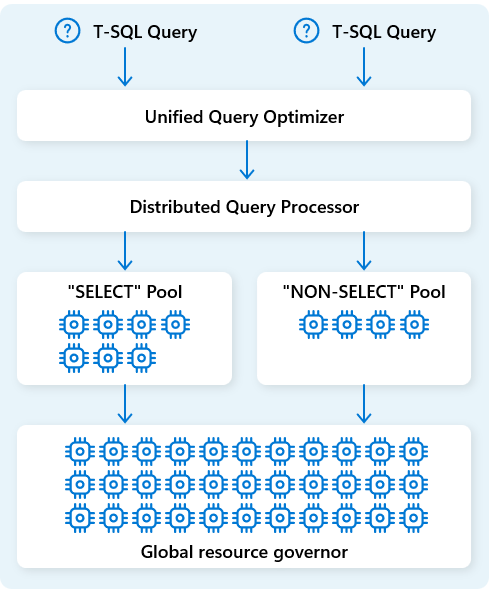
To further optimize resources, the distributed query processing engine separates compute resources into two pools: for SELECT queries and for data ingestion tasks (NON-SELECT queries). Each workload receives dedicated resources as needed. This means, for example, that your nightly ETL jobs won't delay morning dashboards.
With rapid node provisioning in the cloud, the distributed query processing engine automatically scales compute resources up or down in response to changes in query volume, data size, and query complexity. Fabric Data Warehouse has parallel processing capabilities for small datasets or data at the multi-petabyte scale.
Query execution engine
The query execution engine is a process that runs parts of the distributed execution plan that are assigned to the individual compute nodes. The query execution engine is based on the same engine used by SQL Server and Azure SQL Database to use batch mode execution and columnar data formats for efficient analytics on big data at an optimal cost.
The query execution engine reads data directly from Delta Parquet files stored in Fabric OneLake, and leverages multiple caching layers (memory and SSD) to accelerate query performance and ensure queries execute at optimal speed. The query execution engine processes data in-memory and, when necessary, retrieves additional data from the SSD cache or OneLake storage.
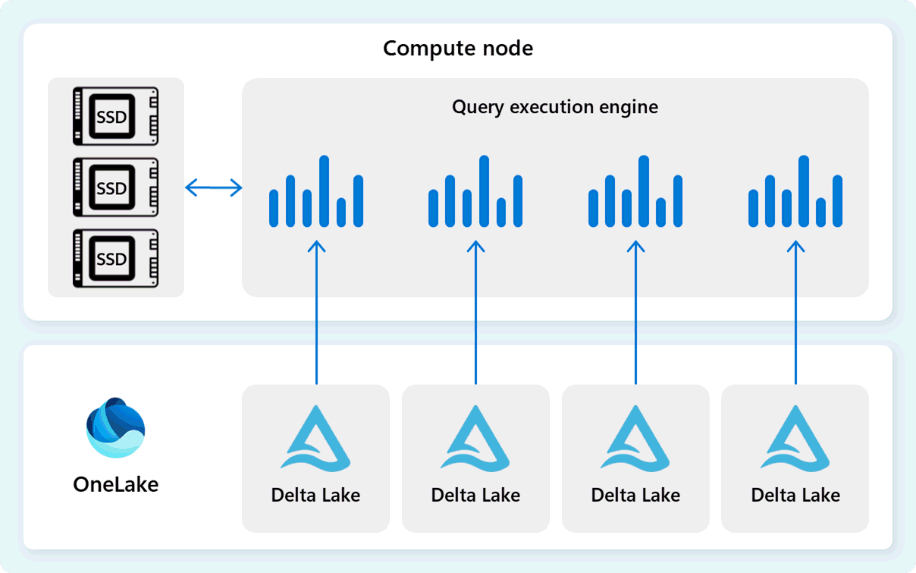
As it processes data, the query execution engine performs column and row group elimination to skip segments that aren't relevant to the query. This optimization reduces the amount of data scanned from the files and memory cache, helping to minimize resource usage and improve overall execution time.
The query execution engine excels at filtering and aggregating billions of rows, supporting the generic data analytic patterns used in modern data warehouse solutions. The batch mode execution takes advantage of modern CPU ability to process multiple rows in parallel, dramatically reducing overhead and making queries run up to hundreds of times faster compared to traditional row-by-row execution.
Metadata and transaction management
The warehouse engine uses metadata to describe table schema, file organization, version history, and transactional states. This metadata allows the warehouse engine to efficiently manage and query data. Fabric Data Warehouse offers a robust and comprehensive metadata and transaction management architecture, extending an OLTP transaction manager to orchestrate highly concurrent metadata operations and ensure ACID compliance.
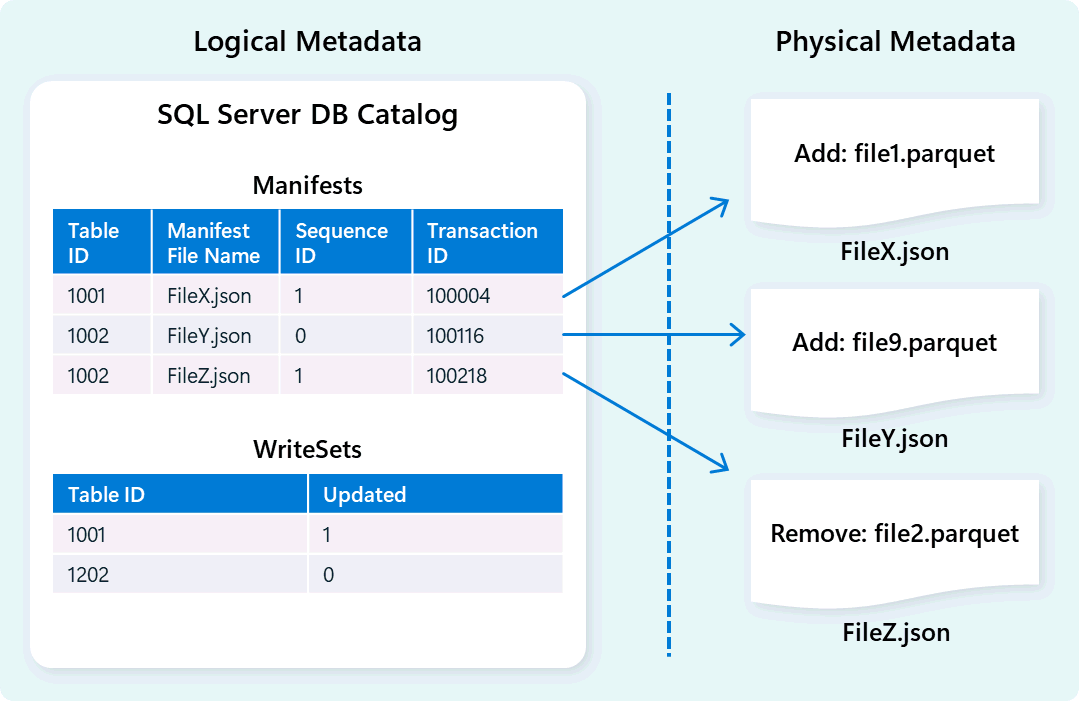
This design enables fast, reliable navigation of transactional states, supporting workloads with high concurrency while ensuring consistency.
Storage and data ingestion
Fabric Data Warehouse uses a lakehouse architecture with the open-source Delta format for scalable, secure, high-performance storage. The Delta table format supports data versioning, enabling instant access to historical snapshots via time travel and zero-copy cloning for safe testing and rollback operations. User data is stored within OneLake, allowing all Fabric engines to efficiently access shared data without redundancy.
Building on this foundation, Fabric Data Warehouse is designed to deliver optimal data ingestion performance with a focus on simplicity and flexibility. The engine efficiently manages table data storage through automatic data compaction, which consolidates fragmented files in the background to reduce unnecessary data scanning. Its intelligent data distribution method divides and organizes data into micro-partitioned cells to boost parallel processing and enhance query results. These capabilities function autonomously, without the need for manual adjustments.