Note
Access to this page requires authorization. You can try signing in or changing directories.
Access to this page requires authorization. You can try changing directories.
✅ SQL analytics endpoint and Warehouse in Microsoft Fabric
Fabric on-demand billing is a capacity-level setting that separates compute charges for warehouse from your Fabric capacity. When you enable on-demand billing for a capacity, queries can scale up and down within a workspace ceiling you configure.
Important
On-demand billing in Fabric is currently in preview.
Why enable on-demand billing for Fabric Data Warehouse?
On-demand billing solves the noisy neighbor problem within the same capacity for warehouses, SQL analytics endpoints, T-SQL notebooks, and warehouse snapshots. Fabric shared capacities, offered since the introduction of Microsoft Fabric, use pooled compute across every Fabric workload. In Fabric shared capacities, your warehouse queries share the same pool as Spark, pipelines, and Power BI. Shared billing in one capacity works well until a noisy neighbor saturates the capacity or bursty reporting exceeds what your SKU can absorb. These situations leave you with unpredictable performance, or force you to over-provision a larger SKU that sits mostly idle the rest of the month. In those situations, configurable on-demand billing can ensure high-performance is available for your workloads.
When a capacity admin enables on-demand billing, Fabric charges for compute for your warehouses, SQL analytics endpoints, T-SQL notebooks, and warehouse snapshots separately from your Fabric capacity. It scales dynamically with demand, with per-workspace guardrails that keep spend and concurrency predictable. This capability is part of the Microsoft Fabric on-demand consumption model, which also covers other Fabric workloads.
When you use on-demand billing, you get:
Separate billing for warehouse consumption, so warehouse usage is transparent on your billing statement.
Workspace-level compute ceilings set in the capacity admin portal.
Dynamic scale that automatically adjusts up or down with workload needs.
More predictable workload isolation through workspace-level compute ceilings, without reliance on shared-capacity bursting or smoothing.
For more information on the platform-wide framework, including F0 capacity, all on-demand billing categories, transition behavior, and quotas, see On-demand billing in Microsoft Fabric.
How on-demand billing works
When you enable on-demand billing:
- All workspaces on the capacity that contain a warehouse, SQL analytics endpoint, or warehouse snapshots begin consuming compute separately from the base capacity.
- Other Fabric workloads (OneLake, Data Engineering, Power BI, and so on) continue to use the shared base capacity as before.
- The Data Warehouse on-demand billing category has its own spend limit and appears as its own line item on your Azure bill.
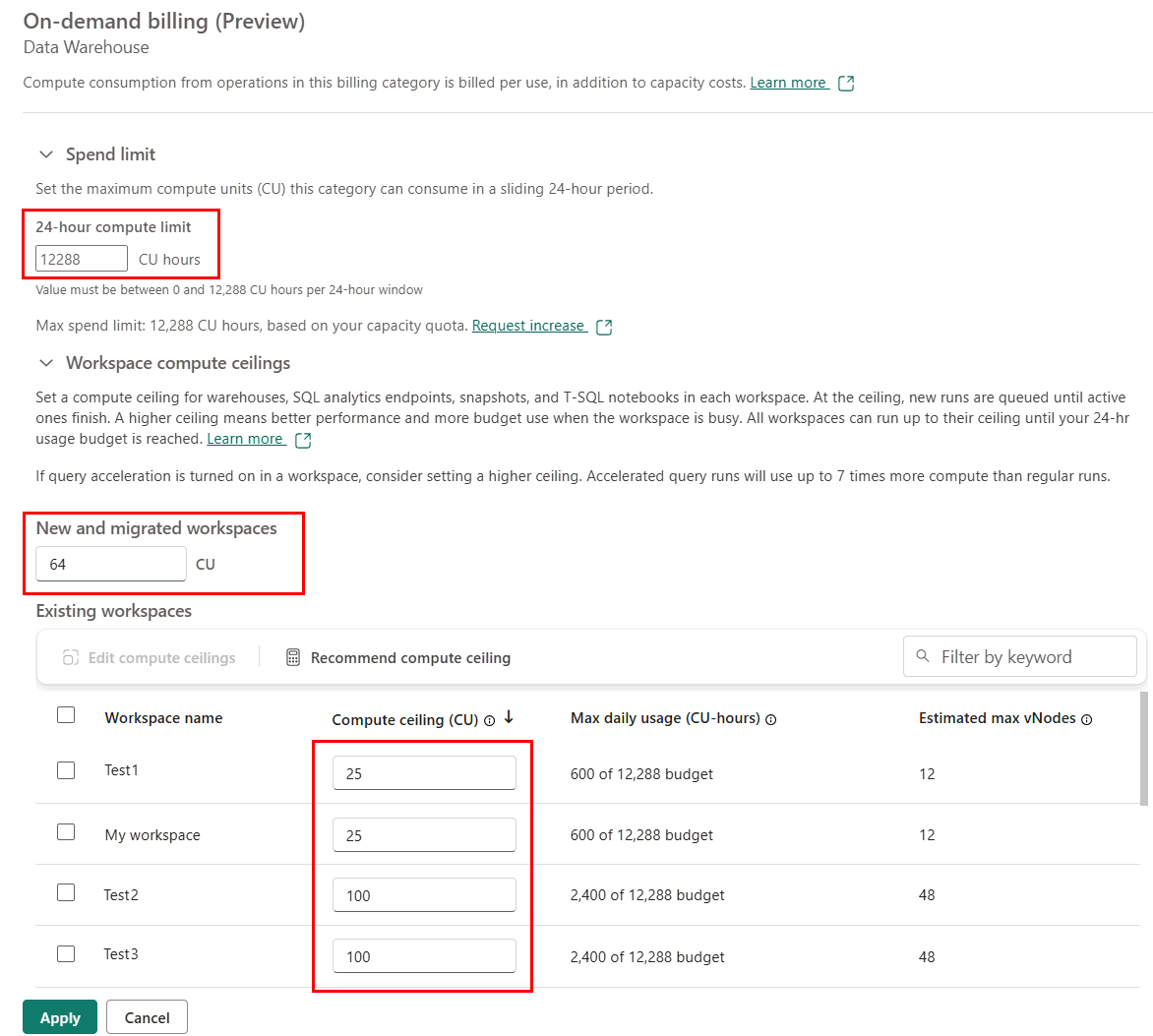
You can provide a compute ceiling for each workspace in the On-demand billing settings page for Fabric Data Warehouse.
- You set a 24-hour compute limit for the Data Warehouse on-demand billing category, measured in CU-hours. The 24-hour compute limit, referred to in this article as the spend limit, is measured over a rolling 24-hour window.
- You can set a default compute ceiling for new and migrated workspaces, measured in CUs.
- You can set a Compute ceiling (CU) for each existing workspace, measured in CUs.
- Based on the compute ceiling for each workspace, you then see the resulting calculated Max daily usage (CU-hours) and Estimated max vnodes.
- For information about how Microsoft Fabric handles workloads that meet these limits, see On-demand spend limits.
| Limit | Level | Units | Minimum | Maximum |
|---|---|---|---|---|
| 24-hour compute limit | Data Warehouse billing category of capacity | CU-hours | 0 | Subscription quota limit |
| Compute ceiling | Workspace | Concurrent CU | 25 | 24-hour compute limit |
What happens when guardrails are met
There are two levels of billing guardrails - capacity consumption limit, and individual workspace compute ceiling.
- Once the 24-hour capacity consumption limit is reached, new queries are rejected until consumption is available again without exceeding the rolling 24-hour consumption limit, similar to capacity throttling in shared capacity billing.
- Whenever a workspace Data Warehouse compute ceiling is hit, queries are queued until resources become available.
Enable on-demand billing
Enabling on-demand billing for the Data Warehouse category is an online operation (active queries aren't disrupted) and can take between 5 to 15 minutes.
- When you enable on-demand billing: new operations are billed as on-demand. Consumption already in smoothing continues to bill to the capacity. The spend limit window starts fresh.
- When you disable on-demand billing: new operations return to the capacity. Any smoothed consumption is billed to the capacity.
To get started and for steps to enable on-demand billing, see Configure on-demand billing for Fabric Data Warehouse (preview).
For general spend limit behavior (rolling 24-hour window, evaluation cadence, defaults, and maximums), see On-demand spend limits. For CU vs. CU-hours concepts, see CU vs. CU-hours.
Capacity spend limit and workspace compute ceiling
You can think of the capacity spend limit as fuel budget and the workspace compute ceiling as speed:
- Capacity spend limit defines how long compute can be consumed over a 24-hour window (CU-hours).
- Workspace compute ceiling defines how much compute a workspace can use at any moment (peak CU).
- A higher workspace compute ceiling allows more concurrent compute. More work completes in a given window. However, the workspace can burn through its share of the 24-hour compute limit more quickly.
- A lower workspace compute ceiling lowers peak concurrency and caps how quickly the workspace can consume its share of the 24-hour compute limit. Queries might queue when demand spikes.
The workspace compute ceiling prevents noisy neighbor scenarios like one workspace overwhelming the others. The compute ceiling defines the maximum throughput (in CU) that an existing workspace can use at any point in time. The compute ceiling isolates peak throughput, not budget. Actual consumption from all Data Warehouse workspaces on the capacity contributes to the same 24-hour compute limit. If that shared limit is reached, new Data Warehouse operations across the capacity are rejected until CU-hours become available in the rolling 24-hour window.
For example, a workspace with a compute ceiling of 300 CU can never exceed 300 CU of concurrent compute, regardless of demand from other workspaces or overall system load. Setting a high workspace compute ceiling doesn't cost you anything unless you use it. You only pay for the CU you actually consume - not for the ceiling you configured. Set the ceiling high enough to meet the workspace’s performance and concurrency requirements, while considering how quickly the workspace could consume the shared Data Warehouse spend limit. Start with the recommended or smart-default value, monitor actual usage, and adjust as needed.
Single-workspace setup
| Scenario | Ceiling | Actual load | 24-hour compute limit (assumed) | 24-hour compute consumed |
|---|---|---|---|---|
| Steady usage, ceiling fully used | 512 CU | 512 CU sustained | 12,288 CU-h | 12,288 CU-h over 24 hours |
| Headroom without cost | 512 CU | ≤ 256 CU | 12,288 CU-h | ≤ 6,144 CU-h |
| Aggressive burst | 12,288 CU | 12,288 CU | 12,288 CU-h | ~12,288 CU-h in ~1 h; New queries are rejected until enough earlier consumption ages out of the rolling 24-hour window |
In every case, you pay only for actual CU consumption, never for the configured workspace ceiling. Extra headroom doesn't incur a charge by itself; it allows a workspace to consume more concurrent compute when workload demand exists.
Multi-workspace setup
When you enable on-demand billing on a capacity, total daily usage is the sum of actual CU-hour consumption across workspaces. For example, consider the following scenario of independent workloads that require bursts of high activity CU consumption:
| Workspace | Ceiling | Actual load | 24-hour compute consumed |
|---|---|---|---|
| WS-A | 256 CU | 256 CU for 1 h | 256 CU-h |
| WS-B | 128 CU | 128 CU for 2 h | 256 CU-h |
| WS-C | 64 CU | Idle | 0 CU-h |
| WS-D | 64 CU | Idle | 0 CU-h |
| Combined | 512 CU (if all peaked at once) | — | 512 CU-h |
Total daily usage is the sum of actual CU-hour consumption, which accounts for both the compute level and runtime. It isn't the sum of runtimes or configured ceilings. In the same example, on a different business day based on sustained peak activity you can consume more 24-hour compute as shown in the following table:
| Workspace | Ceiling | Actual load | 24-hour compute consumed |
|---|---|---|---|
| WS-A | 256 CU | 256 CU sustained | 6,144 CU-h |
| WS-B | 128 CU | 128 CU sustained | 3,072 CU-h |
| WS-C | 64 CU | 64 CU sustained | 1,536 CU-h |
| WS-D | 64 CU | 64 CU sustained | 1,536 CU-h |
| Combined | 512 CU | 512 CU sustained | 12,288 CU-h over ~24 h |
At this sustained consumption rate, the workloads would consume 12,288 CU-hours over 24 hours. Because the limit is evaluated over a rolling 24-hour window, this isn't a calendar-day reset.
Compute ceiling for new and migrated workspaces
By default, there's a lightweight, safe starting point that prevents newly onboarded workspaces from immediately consuming excessive compute. Capacity admins can change this value at any time.
Minimum: 25 CU. During preview, the default is 64 CU.
Maximum: capped by the configured 24-hour compute limit for the Data Warehouse billing category.
This default applies only when a workspace contains at least one warehouse or SQL analytics endpoint item. If you later add a warehouse or SQL analytics endpoint to a workspace that previously had none, the workspace default takes effect for that workspace. You can adjust the value later if a workspace requires more or less compute.
Migrate Fabric workspaces to on-demand billing capacity
Administrators should be aware of the current workload in workspaces before migrating workspaces between on-demand billing capacities. While enabling on-demand billing in an existing capacity is an online operation that doesn't disrupt active queries, if you migrate a workspace from an on-demand billing capacity to a shared capacity, or from one on-demand capacity to another on-demand capacity, in-flight operations such as queries are disrupted and canceled.
For more information on reassigning a workspace to another capacity, see Capacity reassignment.
Smart defaults for capacities when bursting is enabled
Unlike shared capacity, on-demand billing doesn't support bursting or smoothing. When you migrate a shared capacity with bursting enabled, Fabric applies smart default workspace ceilings that approximate the effective compute previously available.
The following table shows the smart default workspace ceiling applied on each Fabric workspace where bursting was enabled:
| Fabric SKU | Smart workspace ceiling (CU) |
|---|---|
| F0 | 25 |
| F2 | 51 |
| F4 | 51 |
| F8 | 77 |
| F16 | 155 |
| F32 | 310 |
| F64 | 620 |
| F128 | 1,240 |
| F256 | 2,481 |
| F512 | 4,962 |
| F1024 | 9,924 |
| F2048 | 19,849 |
| F4096 | 19,849 |
| F8192 | 19,849 |
Billing rate
On-demand billing for Data Warehouse uses a 1.3× multiplier on the standard pay-as-you-go (PAYG) rate for Data Warehouse compute in the shared capacity model. In other words, one CU-hour of Data Warehouse consumption charged through on-demand billing costs 1.3 times what the same CU-hour would cost on a Fabric capacity. For current per-CU pricing in your region, see the Fabric pricing page.
The multiplier reflects the flexibility on-demand billing provides, including per-workspace guardrails, without bursting or smoothing. You continue to pay only for actual CU consumption. The multiplier is applied to the CU-hours you consume, not to the configured workspace ceiling.
Workload groups and custom SQL pools
The workspace compute ceiling applies to both user-controlled and system workload groups: SELECT, NONSELECT, and SYSTEM.
When you enable custom SQL pools, the workspace compute ceiling becomes the total poolable compute that you divide across user-controlled and system pools. The system pool always receives approximately one-third of the ceiling. The percentages you allocate for user-controlled pools apply to the remaining two-thirds, not to the full ceiling.
For example, if you set the workspace compute ceiling to 99 CU, the system pool receives about 33 CU and the remaining 66 CU can be allocated across user-controlled SQL pools. Note: These pool allocations are maximum resource boundaries. They don't guarantee that an individual query receives the pool maximum. Actual query parallelism and vNode usage depend on the query plan and available resources within the pool.
This allocation helps admins align compute distribution with workload priorities while maintaining predictable guardrails. For more information about setting up pools, see Custom SQL pools in Fabric Data Warehouse.
Query behavior under resource constraints
When multiple queries run concurrently within a workspace, Fabric dynamically allocates available compute up to the configured compute ceiling. Once the ceiling is reached, incoming queries are queued rather than throttled or terminated. Active queries complete without interruption, and queued queries begin execution as resources become available.
For example, a workspace has 100 nodes, and Query1 consumes 99 nodes. Then, Query2 arrives and requires 10 nodes. Fabric tries to run Query2 on a single node, but if that's not possible, Query2 is queued until more resources are available.
When a query requests compute beyond the workspace compute ceiling, Fabric Data Warehouse first attempts to shrink-fit the query plan. If the plan can't be optimized to fit within the ceiling, the query is blocked and the service returns "This query was rejected due to current capacity constraints". If you see this error message repeatedly for a query that can't fit within the ceiling, raise the workspace compute ceiling or reduce the query's resource requirements. Reducing concurrent load helps only when a query can fit within the ceiling but is waiting for resources used by other queries.
Query acceleration
Query acceleration is a workspace-level capability that automatically routes eligible SQL queries through extra compute for faster execution. It applies to all warehouses and SQL analytics endpoints in the workspace with no query rewrites. Eligible queries are accelerated on submission, while non-eligible queries run without acceleration. When query acceleration is enabled, all queries are billed through the query acceleration meter, including queries that aren't accelerated.
Query acceleration is fully supported with on-demand billing and can run queries with roughly up to seven times more compute than regular runs. Because query acceleration can drive high compute demand, set a higher workspace compute ceiling on any workspace where you plan to use it. A ceiling that's too low can reject acceleration-eligible queries before they can benefit.
How to size the workspace ceiling
Consider your workload when sizing the ceiling, and re-evaluate as the workload changes or evolves. As a starting point:
- For cost-sensitive workloads that run long hours, keep the ceiling low and let queries queue during peaks.
- For performance-sensitive workloads with short bursts, raise the ceiling so bursts complete quickly.
- When query acceleration is enabled, leave headroom for up to 7x compute demand.
- For development and test workspaces, use a lower ceiling than your production workspaces to keep costs bounded.
For step-by-step guidance, a workload-pattern table, and the built-in Recommend compute ceiling wizard (which recommends a value from your daily target spend and active hours), see Set the compute ceiling for an existing workspace in the configuration article.
Considerations
- Alerting on approaching spend or ceiling limits isn't available in preview, and there's no current supported workaround. Use the Fabric Capacity Metrics app to monitor consumption manually.
- On-demand billing is enabled for an entire capacity, not to individual workspaces. You can configure workspace-level compute ceilings.
- Only capacity admins can enable, disable, or modify on-demand billing values in the admin portal.
- For transition behavior when enabling or disabling on-demand billing, see Transition behavior when enabling or disabling on-demand billing.