Note
Access to this page requires authorization. You can try signing in or changing directories.
Access to this page requires authorization. You can try changing directories.
Data delivery is a Federated Analytics capability in Microsoft Fabric HorizonDB. Use a Copy job to load a bounded result from Fabric into PostgreSQL tables. This reverse ETL pattern materializes compact analytical results, such as customer scores or recommended actions, for low-latency operational use.
Load into a staging table first. Validate the batch, and then publish it to an application-facing table with stable business keys and an idempotent PostgreSQL upsert.
Important
Fabric HorizonDB is in public preview. Capabilities, limits, and behavior might change before general availability. Public preview doesn't promise source change data capture, source-delete propagation, conflict resolution, automatic schema evolution, checkpoints, automatic replay, or every Copy job scheduling mode for the Fabric HorizonDB destination. For more information, see Microsoft Fabric preview features.
Prerequisites
- A preview-enabled Fabric workspace with a HorizonDB database.
- A supported Fabric source with a bounded table or query result.
- Permission to create a Copy job and read the source.
- Sign-in as the database creator for the destination connection and PostgreSQL setup. Other users and principals can't connect in the current preview.
- A stable business key and a source timestamp or batch identifier.
The Copy job destination must use the Fabric HorizonDB PostgreSQL endpoint, not the SQL analytics endpoint.
Use a separate warehouse for a writable analytical source. The mirrored SQL analytics endpoint is read-only and can't host the source table. You can reuse the synthetic dbo.customer_signals table from Create a warehouse source.
Choose a load pattern
| Pattern | Use when | Staging behavior |
|---|---|---|
| Bounded snapshot | The source supplies the complete current result | Empty the staging table before the run, then publish the snapshot |
| Append-only events | Every source row is immutable and uniquely identified | Insert directly or stage by batch, and reject duplicate event IDs |
| Operational state | The source supplies new or changed values | Stage rows, select the latest row per key, and upsert into the serving table |
The initial PostgreSQL destination supports insert-oriented loading. The following procedure uses a bounded snapshot into staging, followed by a separate PostgreSQL upsert. Don't expect the Copy job itself to resolve conflicts or publish application state.
Create serving and staging tables
Run this PostgreSQL DDL on the Fabric HorizonDB endpoint:
CREATE SCHEMA IF NOT EXISTS analytics_ops;

CREATE TABLE IF NOT EXISTS analytics_ops.customer_signals (
    customer_id bigint PRIMARY KEY,
    risk_score numeric(5, 2) NOT NULL
        CHECK (risk_score BETWEEN 0 AND 100),
    recommended_action text NOT NULL,
    calculated_at timestamptz NOT NULL,
    load_batch_id text NOT NULL,
    loaded_at timestamptz NOT NULL DEFAULT now()
);

CREATE TABLE IF NOT EXISTS analytics_ops.customer_signals_stage (
    customer_id bigint NOT NULL,
    risk_score numeric(5, 2) NOT NULL,
    recommended_action text NOT NULL,
    calculated_at timestamptz NOT NULL,
    load_batch_id text NOT NULL,
    loaded_at timestamptz NOT NULL DEFAULT now()
);

CREATE INDEX IF NOT EXISTS ix_customer_signals_stage_batch
    ON analytics_ops.customer_signals_stage (load_batch_id, customer_id);
Don't point the Copy job directly at customer_signals. Staging isolates incomplete or invalid loads from application queries.
Create the Copy job
In the Fabric workspace, select + New item > Copy job.
Select the warehouse containing the bounded dataset and its
dbo.customer_signalstable.Select
customer_id,risk_score,recommended_action,calculated_at, andload_batch_id.For the destination, search for and select Azure Database for PostgreSQL.
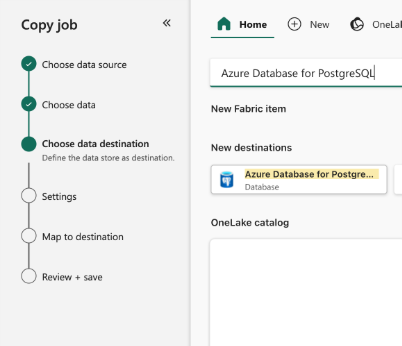
Copy the PostgreSQL host from the HorizonDB item's Visual Studio Code connection pane.
Create or select a connection to that host and database
postgres. Don't use the Fabric item display name as the database name.Set Authentication kind to Organizational account, sign in as the database creator, and keep Use encrypted connection selected.
On the read-method page, select Full copy.
Select
analytics_ops.customer_signals_stageas the destination.Map each of the five source columns to its same-named destination column, including
load_batch_id. Leaveloaded_atto its PostgreSQL default, and confirm thatcalculated_atrepresents UTC.Review the mapping. Before you select Save + Run, prepare staging as described next.
For a full snapshot, empty staging immediately before the load:
TRUNCATE TABLE analytics_ops.customer_signals_stage;
Use a released pre-copy script option if the connector exposes it. Otherwise, run the statement as a separately controlled step. Don't truncate the application-facing table.
After staging is ready, select Save + Run. Don't truncate staging again until you've validated and published the completed batch.
For general Copy job creation guidance, see Create a Copy job in Data Factory.
Monitor the load
Monitor the run in the Copy job panel or the Fabric Monitoring hub. Record:
- Run ID.
- Start and end time.
- Source and destination.
- Rows read and written.
- Duration.
- Error details.
A successful Copy job means that rows reached staging. It doesn't prove that the data passed business validation or was published.
Validate the staged batch
Replace <batch-id> with the expected identifier:
SELECT
    count(*) AS staged_rows,
    count(DISTINCT customer_id) AS distinct_customers,
    min(calculated_at) AS oldest_calculation,
    max(calculated_at) AS newest_calculation,
    min(loaded_at) AS load_started_at,
    max(loaded_at) AS load_finished_at
FROM analytics_ops.customer_signals_stage
WHERE load_batch_id = '<batch-id>';
Check duplicates:
SELECT
    customer_id,
    count(*) AS occurrences
FROM analytics_ops.customer_signals_stage
WHERE load_batch_id = '<batch-id>'
GROUP BY customer_id
HAVING count(*) > 1;
Check invalid ranges and missing values:
SELECT
    customer_id,
    risk_score,
    recommended_action,
    calculated_at
FROM analytics_ops.customer_signals_stage
WHERE load_batch_id = '<batch-id>'
  AND (
      risk_score NOT BETWEEN 0 AND 100
      OR btrim(recommended_action) = ''
  );
Stop the publish step if row counts, duplicates, ranges, timestamps, or required relationships don't match the batch contract.
Publish idempotently
Publish the newest staged row for each customer:
BEGIN;

INSERT INTO analytics_ops.customer_signals (
    customer_id,
    risk_score,
    recommended_action,
    calculated_at,
    load_batch_id,
    loaded_at
)
SELECT DISTINCT ON (stage.customer_id)
    stage.customer_id,
    stage.risk_score,
    stage.recommended_action,
    stage.calculated_at,
    stage.load_batch_id,
    now()
FROM analytics_ops.customer_signals_stage AS stage
WHERE stage.load_batch_id = '<batch-id>'
ORDER BY
    stage.customer_id,
    stage.calculated_at DESC,
    stage.loaded_at DESC
ON CONFLICT (customer_id) DO UPDATE
SET
    risk_score = EXCLUDED.risk_score,
    recommended_action = EXCLUDED.recommended_action,
    calculated_at = EXCLUDED.calculated_at,
    load_batch_id = EXCLUDED.load_batch_id,
    loaded_at = EXCLUDED.loaded_at
WHERE analytics_ops.customer_signals.calculated_at <= EXCLUDED.calculated_at;

COMMIT;
The ON CONFLICT clause makes the publish step safe to rerun for the same batch. The WHERE clause prevents an older source result from replacing a newer value.
Validate the serving table:
SELECT
    customer_id,
    risk_score,
    recommended_action,
    calculated_at,
    load_batch_id,
    loaded_at
FROM analytics_ops.customer_signals
ORDER BY risk_score DESC
LIMIT 20;
Handle deletions explicitly
A missing source row doesn't automatically mean that the serving row should be deleted. Define one of these policies:
- Missing means no change.
- The source supplies an explicit deletion marker.
- A complete snapshot is authoritative, and a separately reviewed statement removes keys absent from that snapshot.
Don't infer source-delete propagation from a successful Copy job.
Troubleshoot a load
| Symptom | Action |
|---|---|
| Fabric HorizonDB isn't listed as a destination | Search for Azure Database for PostgreSQL, the connector used by this preview. |
| Connection fails | Verify the PostgreSQL endpoint, Microsoft Entra identity, database access, and resume state. |
| A mapping fails | Compare source types with PostgreSQL target types and make conversions explicit. |
| The Copy job succeeds but serving data is unchanged | Check the batch ID, validation result, and publish transaction. |
| Duplicate keys appear in staging | Select the intended latest row or correct the source before publishing. |
| An older batch overwrites newer data | Keep the timestamp predicate in the upsert and validate source timestamps. |
| A run is partial or uncertain | Leave serving data unchanged, preserve the run ID and staging evidence, and rerun with a new controlled batch. |
Copy job health and Fabric HorizonDB health are independent. A failed job doesn't mean that the operational database is unhealthy.