Note
Access to this page requires authorization. You can try signing in or changing directories.
Access to this page requires authorization. You can try changing directories.
Microsoft Fabric provides multiple ways to bring data into your analytics environment. Whether you need to process streaming events in real time, replicate operational databases, orchestrate batch pipelines, or access data without copying it, Fabric offers built-in capabilities to support each scenario. Fabric also supports governed data sharing patterns through OneLake, enabling cross-tenant and cross-workspace access to live datasets without duplication.
This article describes the primary data ingestion and data movement options in Fabric. It covers:
- Real-time ingestion with Eventstreams and Eventhouse
- Batch orchestration with Data Factory pipelines and Copy job
- Near real-time replication with Mirroring
- Data virtualization with OneLake shortcuts
Use this overview to understand how each approach works and choose the strategy that best fits your workload requirements for latency, transformation, and operational complexity.
Real-time data ingestion
Eventstreams and Eventhouse items in the Real-Time Intelligence workload support streaming data scenarios. Eventstreams ingest and process real-time events, and Eventhouses store and query those events at scale. You typically use an Eventstream to capture and route data to an Eventhouse. You can also use each capability independently based on your requirements. The following diagram shows how real-time datasets flow to Eventstream and Eventhouse in Fabric:
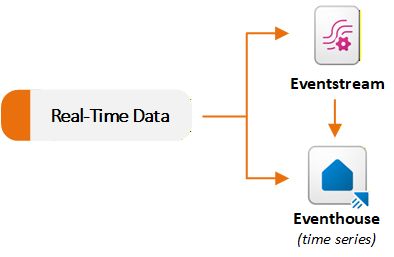
Ingest and route events with Eventstream
Eventstream provides a no-code experience to ingest events into Fabric, apply in-stream transformations, and route data to multiple destinations. An Eventstream acts as a real-time ingestion pipeline. You create an Eventstream and add one or more source connectors. Fabric supports many streaming sources, including internal Fabric events such as Fabric workspace events, OneLake file events, and pipeline job events.
After events start to flow, you can apply optional real-time transformations through a drag-and-drop editor. For example, you can filter events, compute time-window aggregates, join multiple streams, or reshape fields without writing code.
You can send the processed stream to one or more supported destinations. Eventstreams can expose Apache Kafka endpoints through custom endpoint sources and destinations. This capability enables Kafka producers to stream events into Fabric and Kafka consumers to consume events from Fabric.
Eventstreams do not store data permanently. They stream events through memory and forward them to configured destinations. This design makes Eventstreams suitable for real-time extract, transform, load (ETL) scenarios and for distributing streaming data to multiple targets. For example, you can ingest telemetry from Internet of Things (IoT) sensors, filter and aggregate data in real time, send the refined stream to an Eventhouse for analytics, and route anomaly events to Activator for alerting.
Ingest data directly into Eventhouse
Eventhouses can ingest data directly from multiple sources. Fabric includes an integrated Get data experience within Eventhouse. The wizard connects to sources such as local files, Azure Storage, Amazon S3, Azure Event Hubs, and OneLake. You can load data into a Kusto Query Language (KQL) database table in real time or batch mode by using the Eventhouse user interface.
You can also select an existing Eventstream in Fabric as a source. For example, if you use an Eventstream that ingests data from IoT Hub or Kafka, you can route its output directly to a KQL database table without additional configuration.
Batch data ingestion
Data Factory provides the primary experience for traditional extract, transform, load (ETL) and extract, load, transform (ELT) pipelines. It includes a large connector library. Fabric Data Factory provides a list of native connectors for on-premises and cloud data stores, including databases, software as a service (SaaS) applications, and file-based systems. These connectors help you connect to almost any source system.
Orchestrate data movement with pipelines
You can build pipelines that use these connectors to copy or move data into OneLake or analytical stores. This approach supports:
- Unstructured datasets such as images, video, and audio
- Semi-structured datasets such as JSON, CSV, and XML
- Structured datasets from supported relational database systems
In a pipeline, you combine multiple orchestration components, including:
- Data movement activities, such as Copy data and Copy job
- Data transformation activities, such as Dataflow Gen2, Delete data, Fabric Notebook, and SQL script
- Control flow activities, such as ForEach, Lookup, Set Variable, and Webhook
You can run a pipeline on demand, on a schedule, or in response to events. For example, you can schedule a pipeline to run every two hours during weekdays or trigger it when a new file is created in OneLake.
Simplify data movement with Copy job
Copy job supports multiple data delivery patterns, including bulk copy, incremental copy, and change data capture (CDC) replication. You can use Copy job to move data from a source to OneLake without creating a pipeline, while still accessing advanced configuration options. Copy job supports many sources and destinations. It offers more control than Mirroring and less operational complexity than managing pipelines that use the Copy activity.
Replicate data with Mirroring
Mirroring replicates data from external systems into Fabric in near real time with automated setup. You connect to an external system, such as Azure SQL Database, SQL Server, Oracle, SAP, or Snowflake. Fabric continuously replicates data or metadata into OneLake. Mirroring supports three types:
- Database mirroring replicates entire databases and tables.
- Metadata mirroring synchronizes metadata such as catalog names, schemas, and tables instead of physically moving data. This approach uses shortcuts so that data remains in its source system while still being accessible in Fabric.
- Open mirroring uses the open Delta Lake table format. Developers can write application changes directly to a mirrored database item in OneLake by using public APIs.
Fabric listens for source-system changes (through change data capture or similar methods) and applies those changes in near real time to the mirrored copy. The result is a live, queryable dataset that stays in sync with low latency, without a complex ETL pipelines.
Mirroring currently supports various sources, including Azure SQL Database, SQL Managed Instance, Azure Cosmos DB, Azure Database for PostgreSQL, Google BigQuery, Oracle, SAP, Snowflake, and SQL Server. It also supports data sources from partner solutions that have implemented the Open Mirroring API. Mirrored data is stored in OneLake as up-to-date Delta tables. Fabric maintains these tables automatically so that you can use them for real-time analytics or combine them with other Fabric data. This capability supports hybrid transactional and analytical processing scenarios, where operational data continuously flows into your analytics platform.
Mirroring removes the need to build incremental load pipelines manually. From a Mirroring cost perspective, compute operations that keep mirrored databases in sync don't use Capacity Units (CUs) from your Fabric capacity. Mirrored data storage in OneLake is also free up to the terabyte limit in your Fabric SKU (for example, F64 includes 64 TB of free mirrored database storage).
Access external data with shortcuts
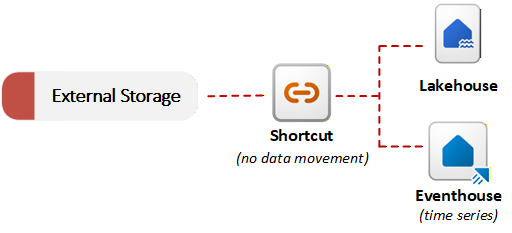
Fabric provides shortcuts to enable data virtualization. A shortcut in OneLake references data stored in an external system, such as Azure Data Lake Storage Gen2, Amazon S3, or SharePoint. Shortcuts can also reference data within OneLake itself, including data from other workspaces and data shared across tenants through OneLake data sharing. Instead of copying data, shortcuts allow OneLake to reference external and internal files as part of the unified data lake. You can query or join external data with local data without performing an initial migration. This no-copy ingestion approach is useful when data residency requirements or duplication concerns prevent moving data. The following diagram shows how shortcuts connect external storage systems to Fabric items without copying data:
OneLake can detect the data type referenced by a shortcut and apply either file transformations or AI transformations without requiring a pipeline or custom code. These transformations work on any shortcut target, including data shared from other tenants through OneLake data sharing. OneLake maintains the resulting Delta table in sync with the source automatically. For example, you can convert .csv files to Delta tables or apply AI-based sentiment analysis to .txt files in a folder.
Combined with Mirroring, shortcuts give you flexible data access patterns. You can keep data in place by using shortcuts, or you can replicate data by using mirroring. In both cases, data is ready for Fabric analytics tools without complex ETL.
Decision guide: Choose a data movement strategy
Microsoft Fabric provides several options for bringing data into Fabric, including Eventstreams for real-time processing, Mirroring, pipelines with Copy activities, Copy job, and shortcuts. Each option offers a different balance of control, automation, and operational complexity. When you need live, governed access to data that's already in OneLake (whether in the same tenant or shared from another organization), consider combining OneLake data sharing with shortcuts instead of replicating data.
For guidance on selecting the appropriate approach for your scenario, see Microsoft Fabric decision guide: Choose a data movement strategy.