Note
Access to this page requires authorization. You can try signing in or changing directories.
Access to this page requires authorization. You can try changing directories.
Mirroring in Fabric provides an easy experience to avoid complex ETL (Extract Transform Load) and integrate your existing Sharepoint List data with the rest of your data in Microsoft Fabric. You can continuously replicate your existing SharePoint data directly into Fabric's OneLake. Inside Fabric, you can unlock powerful business intelligence, artificial intelligence, Data Engineering, Data Science, and data sharing scenarios.
What analytics experiences are built in?
Mirrored databases are an item in Fabric Data Warehousing distinct from the Warehouse and SQL analytics endpoint.
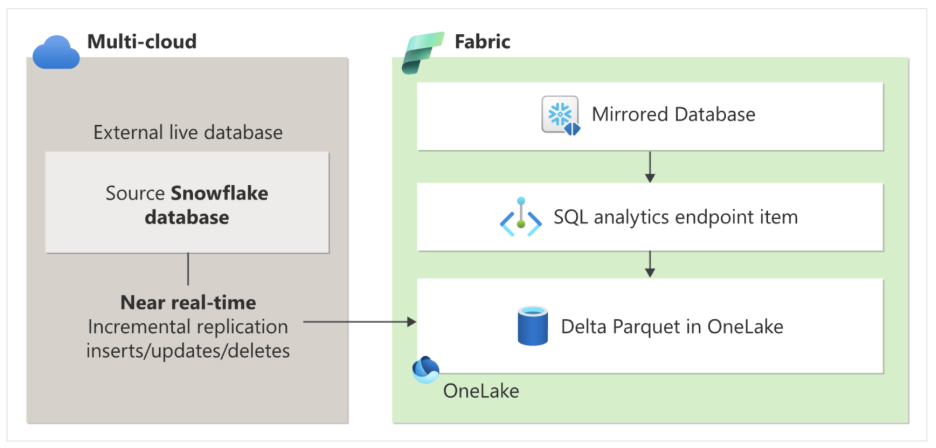
Mirroring creates these items in your Fabric workspace:
- The mirrored database item. This item enables downstream scenarios like data engineering, data science, and more. Mirroring manages:
- Document Library data is surfaced in OneLake through shortcuts, which act as symbolic links to the underlying storage containing the Document Library tables, without replicating the data itself. These shortcuts allow Fabric to access the data directly, and supported data can be surfaced as Delta tables for downstream workloads.
- The replication of managed table data into OneLake and conversion to Parquet, in an analytics-ready format.
- A SQL analytics endpoint
Each mirrored database has an autogenerated SQL analytics endpoint that provides a rich analytical experience on top of the Delta Tables created by the mirroring process. Users have access to familiar T-SQL commands that can define and query data objects but can't manipulate the data from the SQL analytics endpoint, as it's a read-only copy. You can perform the following actions in the SQL analytics endpoint:
- Explore the tables that reference data in your Delta Lake tables from Snowflake.
- Create no code queries and views and explore data visually without writing a line of code.
- Develop SQL views, inline TVFs (Table-valued Functions), and stored procedures to encapsulate your semantics and business logic in T-SQL.
- Manage permissions on the objects.
- Query data in other Warehouses and Lakehouses in the same workspace.
In addition to the SQL query editor, there's a broad ecosystem of tooling that can query the SQL analytics endpoint, including SQL Server Management Studio (SSMS), the mssql extension with Visual Studio Code, and even GitHub Copilot.
Cost overview
There's no charge for these components:
- The compute used to replicate your data to OneLake
- OneLake storage based on capacity size
You pay only for the compute you use when querying data through SQL, Power BI, or Spark, based on your Fabric Capacity.
For more information, see mirroring costs and OneLake pricing.
Related content
For a tutorial on configuring your Snowflake database for Mirroring in Fabric, see Tutorial: Configure Microsoft Fabric mirrored databases from SharePoint List.