Note
Access to this page requires authorization. You can try signing in or changing directories.
Access to this page requires authorization. You can try changing directories.
The SharePoint Storage report provides an overview of your tenant's storage usage. It also offers suggestions for storage optimization and future proofing your organization's file growth capacity.
Use the SharePoint Storage report to quickly answer three admin questions:
- How much SharePoint storage is used, available, and allocated?
- How fast is storage growing over time?
- What actions should you take now to delay or plan additional storage purchase?
Note
This report is available to non-Education tenants. Education tenants should refer to their pooled storage report. For more information about viewing the pooled storage report, see Pooled storage management.
For general information about usage reports in the Microsoft 365 admin center, and to see a list of all available reports, see Microsoft 365 admin center usage reports overview.
View the SharePoint Storage report in the Microsoft 365 admin center
For information about the roles needed to view usage reports, see "Before you begin" in Microsoft 365 admin center usage reports overview
- Go to the Microsoft 365 admin center.
- In the navigation menu, select Reports. If you don't see Reports, select Show all, and then select Reports.
- Select Usage.
- On the Usage page, under Reports, select SharePoint.
- On the report page, select the Storage tab.
Interpret the SharePoint Storage report
This report refreshes every 48-72 hours. Banner notifications appear when SharePoint usage exceeds 80% of quota.
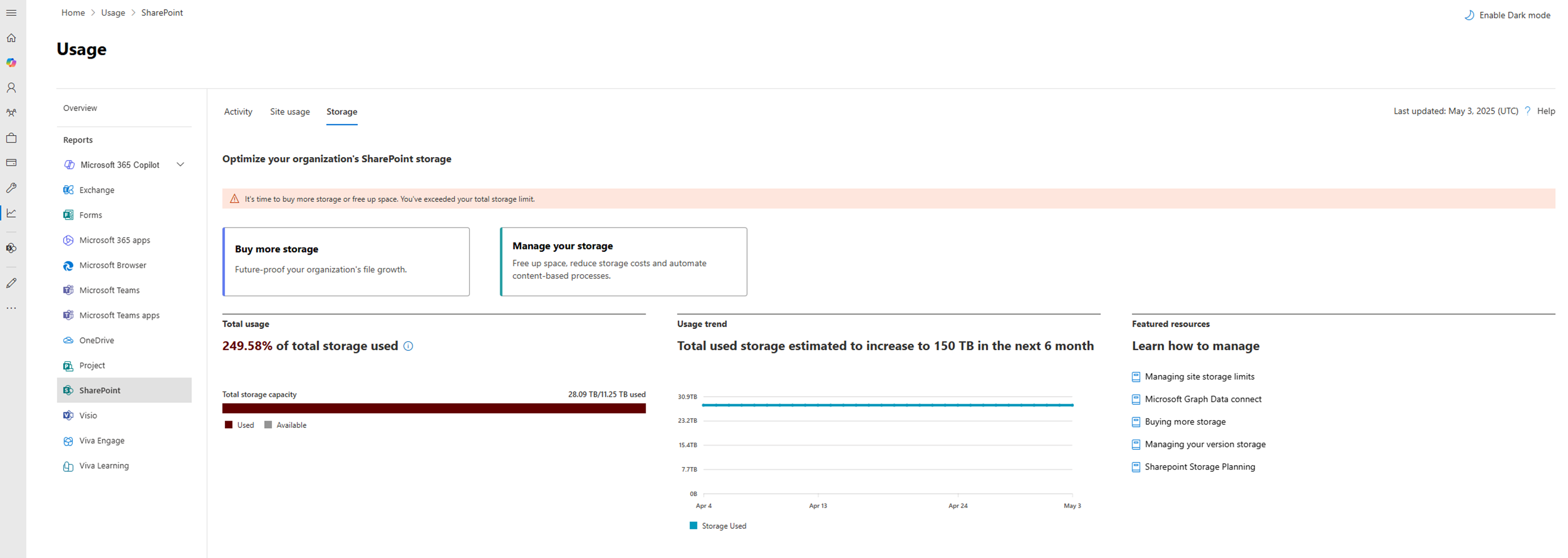
Optimize your organization's SharePoint storage
Explore ways to manage your storage through setting file history limits, archiving inactive sites1, and creating site lifecycle management policies1. To increase SharePoint storage capacity, buy more storage in one-gigabyte increments. For more information about planning for SharePoint storage, see SharePoint storage planning.
1 Additional licensing charges might apply.
Total usage
The Total usage chart shows the total storage used by your tenant, total storage quota, and available storage quota. For more information about SharePoint limits, see SharePoint limits - Service Descriptions.
Usage trend
The Usage trend report helps you understand your tenant's storage growth trend. Use the estimated future storage usage based on past usage to make informed decisions about when to buy more storage or whether to clean up usage.
Note
The historical trend represents usage across all sites and might slightly differ from the storage bar, which indicates tenant-level quota consumption.
Featured resources
The Featured resources section provides information about options for managing storage, like site storage limits and version history limits. Consider using Microsoft Graph Data connect for more in-depth SharePoint storage insights.