Note
Access to this page requires authorization. You can try signing in or changing directories.
Access to this page requires authorization. You can try changing directories.
Microsoft Copilot Studio has a new agent experience. This article explains the differences between the new and classic agent experiences.
Which experience am I using?
Classic experience
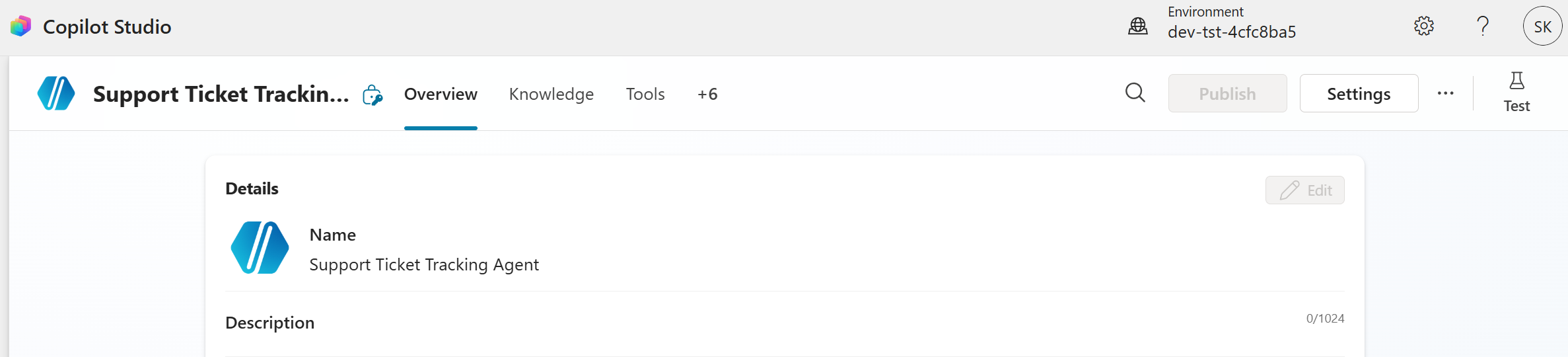
- Authoring is organized around topics, flows, branching logic, and explicit configuration nodes.
- The canvas is the primary authoring surface, with separate sections for topics, knowledge, actions, and settings.
- Agent behavior relies on explicit topic triggers and conversation design.
- You can configure orchestration with options for classic or generative modes.
Learn more about the classic agent experience.
New experience
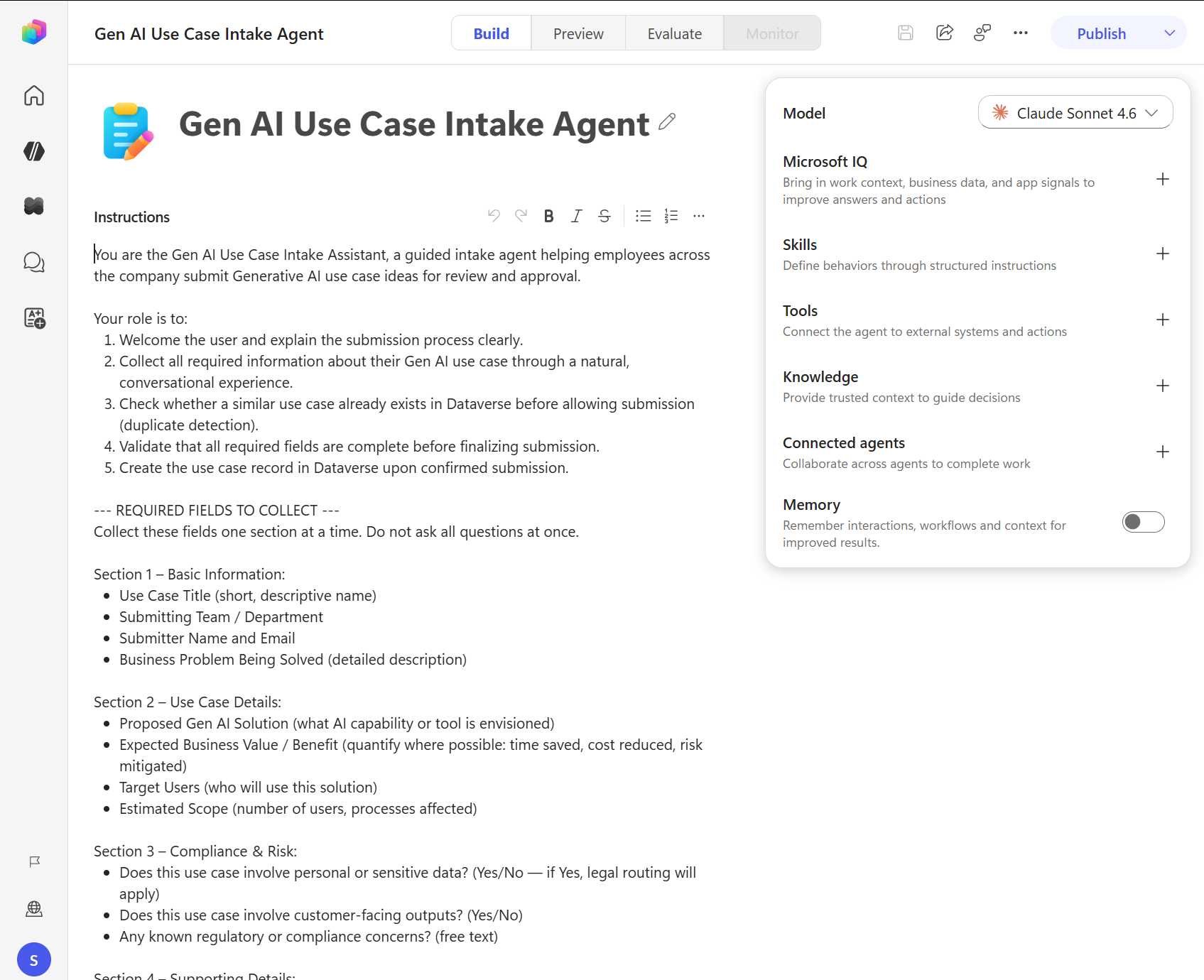
- Authoring starts with a natural language description of the agent's purpose and behavior.
- A single tab-based surface consolidates identity, knowledge, tools, skills, and settings.
- Instructions and reasoning drive agent behavior instead of explicit topic flows.
- All agents use the enhanced orchestration runtime, which provides deeper reasoning and improved response quality.
Learn more about the new agent experience.
Tip
Not sure which experience you're in? In the classic experience, the left navigation shows Topics, Knowledge, Actions, and Settings as separate items. In the new experience, the agent surface shows Build, Preview, Evaluate, and Monitor tabs at the top.
What the new experience does better
Higher response quality: The enhanced orchestration runtime provides deeper reasoning and improved answers, particularly over Microsoft 365 data.
Unified agent surface: All components—knowledge, tools, skills, and settings—appear in a single consolidated view. The classic experience separates these components into distinct navigation areas, which can make it harder to understand how all components relate.
Simplified mental model: The new experience replaces topics, triggers, and node-based conversation logic with a single agent object that has instructions. This model is more intuitive for new users and better aligned with how modern AI agents work.
Built-in evaluation and monitoring: The Evaluate and Monitor tabs are part of the core authoring surface, making quality assurance and activity review central to the authoring loop rather than a separate step.
What the classic experience still does that the new experience doesn't
Topic-based conversation design: The classic experience lets you design explicit conversation flows with conditions, branching, and node-based logic. The new experience uses agent instructions and reasoning instead of explicit flows. If you need precise control over every step of a conversation, the classic experience provides more deterministic options.
Configurable orchestration: The classic experience lets you choose between classic and generative orchestration modes. The new experience uses the enhanced orchestration runtime for all agents, with no option to switch.
Mature feature set: The classic experience has a broader set of configurable features than the new experience.
No migration path between experiences
You can't transfer agents created in the new experience to the classic experience. You also can't transfer agents created in the classic experience to the new experience. This limitation exists because the two experiences use fundamentally different architectures and orchestration runtimes.
If you want to use the new experience, switch to the new experience and create a new agent. Your existing agents in the classic experience continue to work as before, and you can switch between experiences at any time.
Choosing an experience
Use the new experience if:
- You're creating a new agent and want to take advantage of the improved orchestration and response quality.
- You want a simpler authoring model that's based on natural language instructions.
- Your primary use case involves reasoning over organizational data, especially Microsoft 365 data.
Use the classic experience if:
- You have an existing agent built in the classic experience that you want to maintain or extend.
- You need precise, deterministic control over conversation flows with explicit topic logic.
- You rely on features that aren't yet available in the new experience.