Note
Access to this page requires authorization. You can try signing in or changing directories.
Access to this page requires authorization. You can try changing directories.
Applies to:  Standard harness
Microsoft Copilot harness
Before migrating, identify a clear benefit to justify the move from the standard harness to the Copilot harness. Migrate when the change provides a clear benefit, such as improved task quality, more efficient orchestration, support for long-running tasks, or access to a specific reasoning model or capability. If your agent already meets your needs on the standard harness, you don't need to migrate.
Learn about creating an upgraded copy of your agent in Upgrade agents to the Microsoft Copilot harness (preview). Use the guidance in this article to evaluate the migration and plan any required redesign.
Upgrade capabilities, not components
Start by evaluating what capabilities your solution has today. Don't try to find the Copilot harness equivalent of every topic, variable, and Power Fx formula and migrate them one for one. Translate what the agent must do into loop-ready components.
In the standard harness the maker authors the path. In the Copilot harness the maker defines the outcome and the orchestrator decides how to reach it. Treat migration as re-architecture: start from the tasks the agent must accomplish and the purpose each existing component serves, not from the components themselves. The migration is complete when the rebuilt agent performs its core scenarios successfully, not when every old component has been recreated.
In the standard harness, you as the maker explicitly define the steps the agent follows. In the Copilot harness, you define the outcome, and the orchestrator decides how to achieve it. Treat migration as a redesign: start with the agent's tasks and the purpose of each existing component rather than recreating every component. Migration is complete when the rebuilt agent successfully performs its core tasks, not when every old component has been recreated.
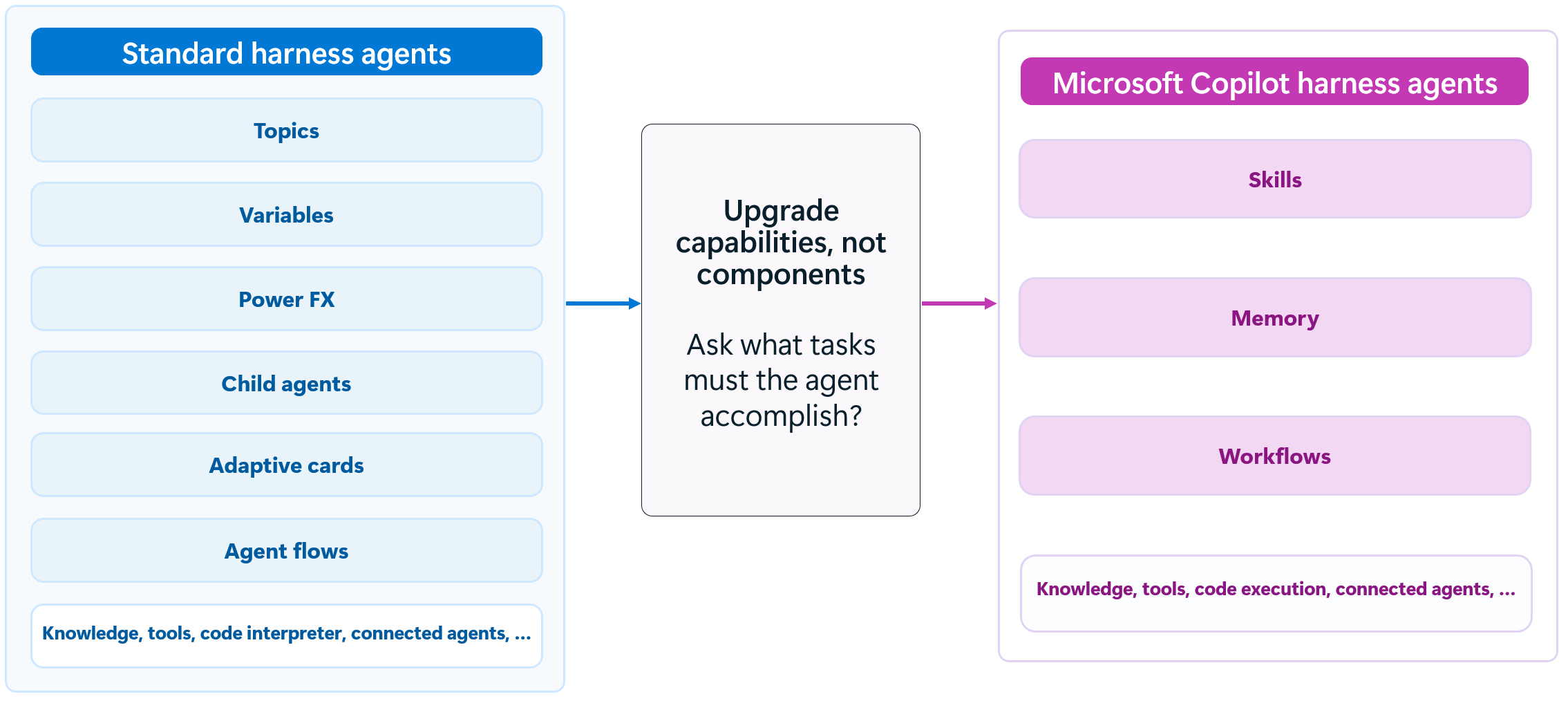
Map authoring and conversation logic
Most authoring and conversation logic map to instructions, skills, and tools. The following table compares the approaches and identifies capabilities with no current replacement.
| What you want to do | Standard harness | Copilot harness |
|---|---|---|
| Drive the conversational flow | Authored topics plus LLM-generated questions, one tool input at a time. | Agent-level instructions and reusable skills. The agent decides what to ask and when. |
| Transform data | Inline Power Fx formulas for deterministic logic. | Code execution in the agent sandbox, or helper code in a tool or skill. Python and bash are less approachable for low-code makers than Power Fx. Delegating to a workflow is also an option. |
| Use known context about the user, such as department, role, or channel | System and environment variables load user context and reference it deterministically throughout the conversation. | No system variables. Instead, instruct the agent to call a tool that fetches the context before it responds. |
| Intercept user messages and agent responses, such as capturing incoming messages or transforming the response before it's sent | System topics and triggers (such as On message received and On AI response generated) shape messages. | Currently no replacement. |
| Make an ungrounded LLM call | Prompts provide ungrounded LLM calls for tasks such as intent classification, sentiment analysis, and summarization. | Copilot harness agents use instructions to perform intent classification, sentiment analysis, and summarization without dedicated prompts. |
Map interface and runtime capabilities
This section highlights the differences between the harnesses: two capabilities with no current replacement, one deliberate design difference, and two areas where the Copilot harness is substantially stronger.
The following table compares UI support, knowledge grounding, error recovery, and file processing across the two harnesses. It identifies capabilities with no current replacement and differences in design and execution.
| What you want to do | Standard harness | Copilot harness |
|---|---|---|
| Display user interface (UI) components | Adaptive Cards render a deterministic card experience. | Currently no replacement. |
| Capture user input via UI components | Adaptive Cards with input fields collect structured input. | Currently no replacement. |
| Restrict to grounded knowledge only | A toggle disables general/LLM knowledge and forces grounded answers. | Not offered by design. Copilot harness agents have the autonomy to decide when to generate content or ask. |
| Recover when a tool call fails | The default Raise an error halts the topic and reroutes to an On Error system topic that only sends a message. There is no flexible way to retry the last topic. Continue on error skips the failure silently, without a reroute or retry. | The agent reads the error, reasons about an alternative approach, and continues the task without stopping, exploring other possible paths. It's more flexible, and it can also be instructed to stop or to handle specific errors in a specific way. |
| Read files and run real computation on data | Code Interpreter is limited: one file per prompt, no multi-turn questions, no system commands, and timeouts on large datasets. It only generates Python code, and only when the orchestrator decides. Admins must enable it per environment, and it can't be called from a topic. | Full shell access with a Python runtime in an isolated container (agent sandbox). No single-file limit, multi-turn capable, on by default. It's also a workspace that stores temporary files the agent produces during the current run, and it's always available to the agent. |
UI components are the primary capability gap. The Copilot harness currently has no equivalent for displaying Adaptive Cards or collecting input through them. It also doesn't provide a way to limit responses to grounded knowledge, which is a deliberate design choice. In other areas, the Copilot harness matches or exceeds the capabilities of the standard harness.
Choose the target component by intent
Once you understand a component's purpose, choose how to fulfill it in the Copilot harness. Several standard harness components have more than one possible replacement. Choose based on why you used the original component.
| Standard harness component | Candidate targets | How to choose |
|---|---|---|
| Topic | Skill or tool | Topics drive the conversational flow. Use a skill when the topic is a reusable procedure, or context that is useful only in a specific scenario. Add a tool when the topic mainly performs one action, lookup, or deterministic function. |
| Power Fx | Tool or skill helper code | Move deterministic data-manipulation formulas into explicit code, referenced either in the instructions or in a skill support file. |
| Variables | Conversation history, memory, or a database | Keep short-lived context in the loop. Use Dataverse for durable task context, memory for user context, and the agent sandbox when the value is derived. |
| Deterministic flows | Workflows | Workflows keep known deterministic blocks and gain AI-native actions. Move prompts into inline agents, which add tool orchestration on top of reasoning. |
| Fallback topic | Instructions, knowledge, and evaluations | Define fallback behavior, grounding strategy, and tests for unresolved intents. |
Split an existing component into separate components when it has multiple responsibilities. For example, split a topic that collects input, calls a service, and formats a response.
Plan the migration
Follow these steps, refining the rebuilt agent until it meets your evaluation criteria.
Confirm the benefit: Identify what the migration offers, such as improved quality, more efficient orchestration, support for long-running tasks, or access to a specific reasoning model or new capability.
Check for blocking features: If the agent depends on Adaptive Cards, consider a workaround or keep the agent on the standard harness until a migration path exists.
Define outcomes, boundaries, risks, and evaluation criteria before you create the new agent. Create evaluations based on what the agent must do, and then run them against the existing agent to establish a benchmark.
Inventory the existing agent by purpose: Record the purpose of each topic, flow, variable, and prompt. Then choose the component that serves that purpose in the Copilot harness.
Rebuild in the new harness: Start with agent instructions. Then add skills for reusable procedures, tools for actions and lookups, workflows for deterministic logic, memory and Dataverse for context, and the agent sandbox for computation.
Evaluate and compare: Run the same evaluations against the rebuilt agent and compare the results to the benchmark, scenario by scenario, not by component parity. Test the scenarios your business uses.
Plan for consumption and governance: Copilot harness solutions use usage-based billing through Copilot Credits, while standard harness agents retain the established Copilot Studio licensing model. Evaluate usage across the full lifecycle, including building, testing, evaluating, and running. Put environments, capacity controls, architecture reviews, evaluation requirements, and security guardrails in place as the solution moves from experimentation to production.
Repeat steps 5 and 6 as needed. If the rebuilt agent doesn't meet your evaluation criteria, refine it and test again.
Migration checklist
Before you migrate, review:
Components that don't migrate automatically: Identify what must be rebuilt or reconfigured.
Knowledge-source reconstruction: Plan how to reconnect or replace existing knowledge sources.
Power Fx dependencies: Identify formulas and logic that need an alternative implementation.
Child and connected agents: Review agent relationships and how they map to the new architecture.
Authentication and permissions: Verify authentication requirements and access to tools and data.
Channel compatibility: Confirm that required channels and interactions are supported.
ALM and deployment pipelines: Plan how the rebuilt agent moves through development, test, and production.
Regression testing: Test existing business scenarios against the rebuilt agent.
Coexistence: Decide whether the existing and rebuilt agents need to run in parallel during the transition.
Rollback planning: Define how to return to the existing agent if the migration doesn't meet your requirements.
When not to migrate
Keep the agent on the standard harness when:
- Tasks are short, clearly scoped, and structured, and consistency matters more than autonomous planning.
- The agent requires a predefined conversation sequence and deterministic handoff, such as an HR intake and routing bot.
- The agent relies on Adaptive Cards for core interactions, such as structured input forms or approval cards, which currently have no equivalent in the Copilot harness.
- The agent serves a high volume of user interactions, and fast responses matter more than deeper reasoning.