Note
Access to this page requires authorization. You can try signing in or changing directories.
Access to this page requires authorization. You can try changing directories.
Note
This article describes features used in agents or agent flows powered by the standard harness.
Agents collect sensitive information while interacting with both internal and external users. These interactions lead to data being stored across various locations in your organization's tenant. It's crucial to ensure security and compliance of this data with your organization's policies.
The Sensitive data setting in Copilot Studio enables you to protect sensitive information such as customer PINs, account numbers, credit card details, and protected health information (PHI) data. This feature ensures that data protection doesn't interfere with user productivity or collaboration. Agent makers can mark variables as sensitive according to the specific requirements of their organization, to improve the security of the collected information.
Note
The Sensitive data setting applies to voice-enabled agent interactions and to context variables passed into the agent from Live Chat through the Live Chat SDK.
Prerequisites
- Install the voice channel
- Set up inbound calling
- A Copilot Studio voice-enabled agent
- The Power Platform admin center system administrator role
- A review of the variables that might contain sensitive data, based on your organization's data classification policies
Configure sensitive data masking
Identify the information in your agent's conversational flow that might contain sensitive data. For example, the input to the agent is a credit card number. Handle sensitive data by using variables. You can mark a variable as sensitive in two ways:
- For data your agent collects during a conversation, use a Question node and turn on Sensitive data on the variable it creates.
- For context variables passed into the agent from Live Chat or a voice channel, define a global variable on the Conversation Start system topic and turn on both External sources can set value and Sensitive data. Learn more in Mark context variables as sensitive.
Design flows that handle sensitive data, such as identity verification, PCI payment collection, or consent capture, by using deterministic (classic) orchestration to ensure auditability and compliance. Learn more in Choose how to control the conversation.
Use a Question node to mark a variable as sensitive
To initialize a variable as containing sensitive data by using a Question node, complete the following steps:
In a topic, add a Question node.
Assign or create a global variable.
Open the global variable's properties and turn on Sensitive data.
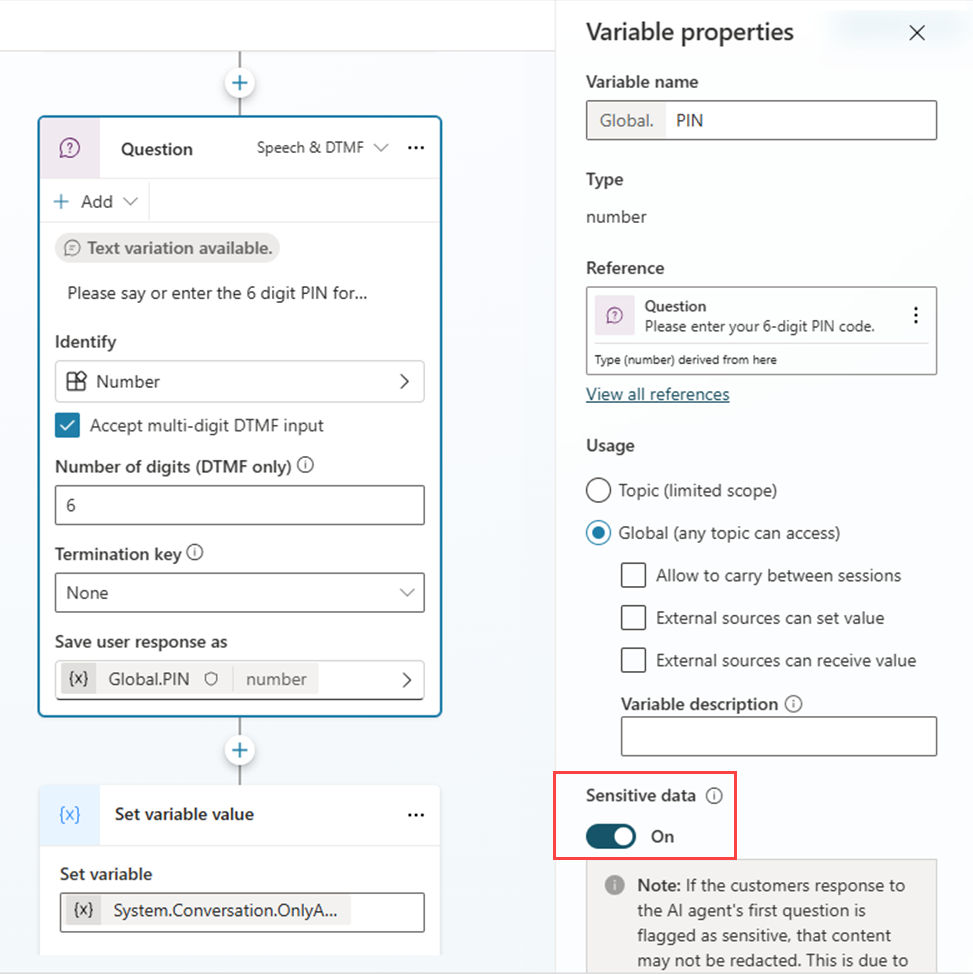
Note
- When you assign a sensitive data variable to a nonsensitive data variable, the nonsensitive variable automatically inherits the sensitive data properties.
- When you use Application Insights to log activity, turn off Log sensitive activity. If you turn on this setting, sensitive data is logged.
Protect data in variables
Values in variables that you explicitly mark as Sensitive data on topic input and output parameters aren't written to conversation transcripts or platform logs. They remain available in memory for topic execution and can be passed between topics.
Learn more about topic inputs and outputs in Manage topic inputs and outputs.
Add or edit a sensitive variable
In the authoring canvas, select More (...) in the topic toolbar, and then select Details. Go to the Input and Output tabs.
In the topic's Input and Output tabs, assign or create a global variable.
Enter a Variable name and select a Variable data type.
Turn on Sensitive data for each variable.
Save the topic.
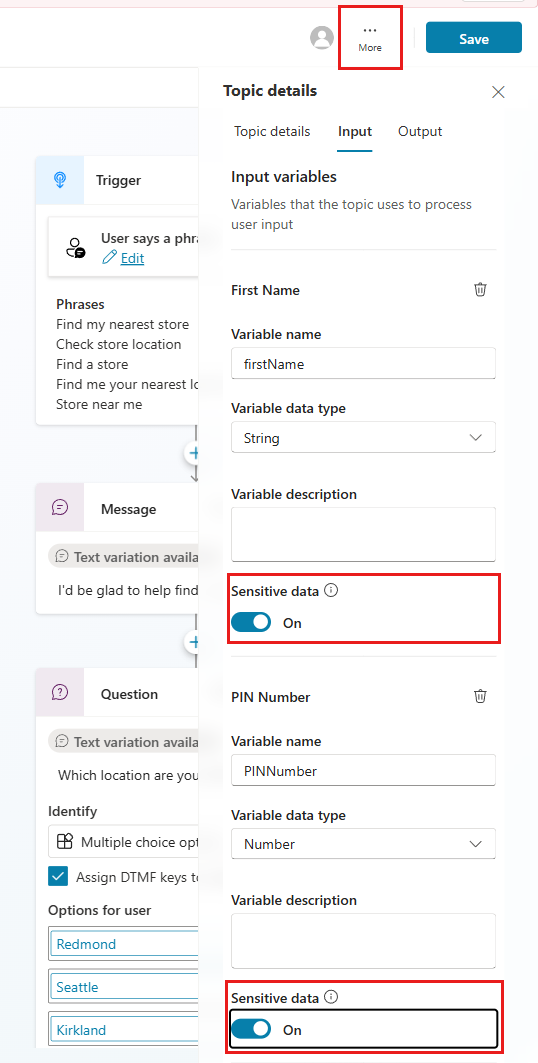
Pass sensitive variables between topics
You can pass a sensitive variable between topics without exposing the value in any transcript or log.
Example
Topic A output:
paymentCardNumber(Sensitive data = On)Topic B input:
paymentCardNumber(Sensitive data = On)
The variable value is available to Topic B's logic at runtime but doesn't appear in Copilot Studio transcripts or standard logs.
Limitations and scope
The Sensitive data setting prevents platform transcripts and logs from containing the variable's value. However, it doesn't automatically:
Mask values you intentionally send to external systems.
Overwrite content saved by non-Microsoft tools or custom instrumentation.
Prevent values from being stored in Dataverse. The Sensitive data setting keeps values out of logs and telemetry, but it doesn't stop other systems from persisting the values they receive.
Mark context variables as sensitive
Context variables carry data that you pass into your agent from an external source at the start of a conversation. You can mark a context variable as sensitive so that its value is redacted from transcripts and telemetry while remaining available to your agent for routing and other runtime logic.
Copilot Studio accepts context variables from these channels:
- Live Chat: the Live Chat SDK passes values through the setContextProvider method.
- Voice: your telephony system passes values through SIP X-headers. Learn more in Enable SIP X-header support for context transfer.
Context variables can also flow into Dynamics 365 Contact Center for routing and agent-experience scenarios.
Mark the global variable as sensitive in Copilot Studio
This step is the same for Live Chat and voice. Complete it before you configure the calling channel.
In Copilot Studio, open your agent.
Open the Conversation Start system topic.
Create a global variable for each context variable you want the agent to receive. The variable name must match the name used by the calling system exactly, including case.
Open each global variable's properties, and then turn on:
- External sources can set value
- Sensitive data
Save the topic.
After you mark the variable as sensitive, its value stays available to your agent's runtime logic but doesn't appear in transcripts or telemetry.
Live Chat: match the variable in the workstream
For Live Chat, define a matching context variable in the Dynamics 365 Contact Center workstream so the value passes correctly from the SDK to your agent.
In Dynamics 365 Contact Center, go to Workstreams and open the relevant workstream.
Go to Advanced settings.
Select Add context variable.
Enter a Name that matches the SDK variable name exactly, and set Type to Text.
Save the workstream.
Whether an agent can see the context variable during a conversation is controlled by the isDisplayable flag on the workstream context variable. Set isDisplayable to false to keep sensitive values hidden from agents.
Note
The Live Chat SDK doesn't support Boolean or Number types for context variables. Pass the values as string.
Voice: pass the context through SIP X-headers
For voice calls, configure your telephony system to send context by using SIP X-headers (also known as UUI headers). Learn more in Enable SIP X-header support for context transfer.
Agent visibility for voice context variables is controlled centrally in the Customer Service admin center at the workstream level. Unlike Live Chat, isDisplayable isn't configurable per conversation for voice channels.
Variable naming rules
You must use the same name for a context variable across every system involved:
- The Live Chat SDK call or SIP header
- The workstream context variable in Dynamics 365 Contact Center
- The global variable in the Conversation Start system topic in Copilot Studio
Names are case-sensitive. If there's a mismatch, the value doesn't reach your agent.
What the Sensitive data setting does and doesn't do for context variables
When you mark a context variable as sensitive, its value:
- Isn't written to conversation transcripts.
- Isn't logged in telemetry such as Application Insights.
- Remains in memory for routing, orchestration, and passing between topics.
Important
Even when you turn on the Sensitive data setting, the context variable's value is stored in Dataverse. Redact or otherwise handle the data appropriately at any destination outside Copilot Studio.
Turn on Application Insights logging
Copilot Studio includes a setting in Application Insights that makers and administrators use to control whether variables marked as sensitive are logged.
By default, keep this setting turned off because enabling it causes sensitive variables to be written to Application Insights logs. If you need to log sensitive variables for troubleshooting or diagnostics, administrators must first turn on logging and then turn on Log sensitive properties. Before turning on this setting, ensure your organization's compliance or security team reviews and approves the decision.
Go to the Settings page for your agent.
Select Advanced.
Select Application Insights.
Turn on Log sensitive properties.
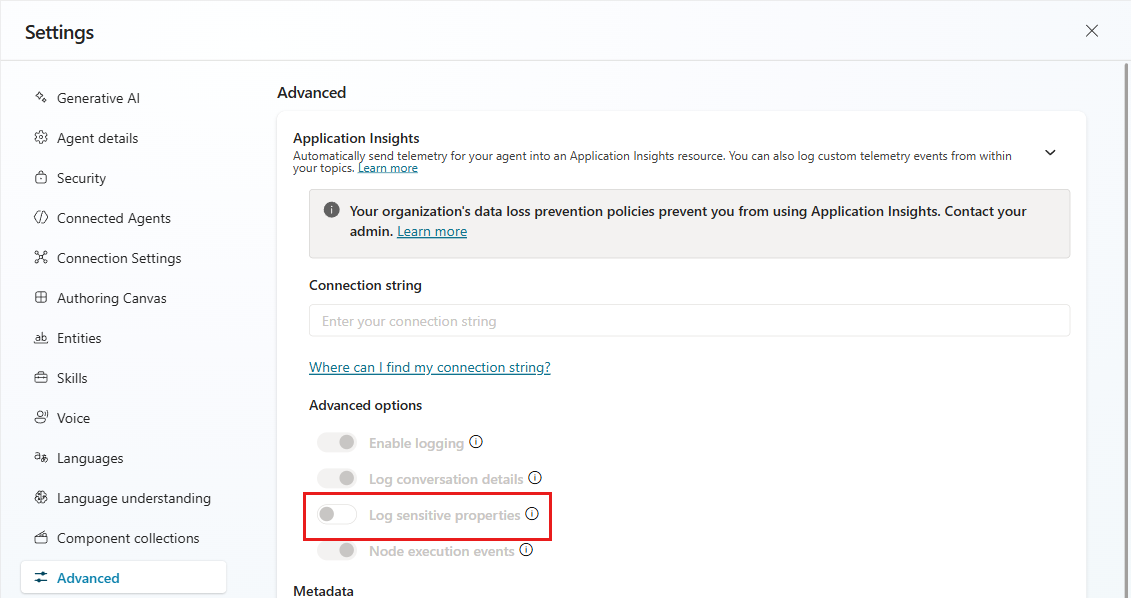
Test sensitive data redaction
When you test sensitive data redaction by using the Test your agent panel, the transcripts stored in Dataverse in the ConversationTranscript table contain unredacted values. The unredacted values are visible in the JSON file under the name: DialogTracing section. This behavior is expected and is designed to help makers confirm that their redaction rules are configured correctly before the agent is deployed to production.
The following JSON displays how the redacted information is visible for the Var1 variable:
Note
All identifiers and values in this sample were anonymized for documentation purposes and don't correspond to real Copilot Studio resources or user data.
{
  "valueType": "VariableAssignment",
  "id": "11111111aa224333bb44555566667777",
  "type": "trace",
  "timestamp": 1752635074,
  "from": {
    "id": "aaaaaaaa-bbbb-4ccc-8ddd-eeeeeeeeeeee",
    "role": 0
  },
  "value": {
    "name": "Var1",
    "id": "Topic.Var1",
    "newValue": "[REDACTED]",
    "type": "local"
  }
},
{
  "id": "99999999-8888-4777-8666-555555555555",
  "type": "event",
  "timestamp": 1752635074,
  "from": {
    "id": "aaaaaaaa-bbbb-4ccc-8ddd-eeeeeeeeeeee",
    "role": 0
  },
  "name": "DialogTracing",
  "channelId": "pva-studio",
  "attachments": [],
  "replyToId": "12345678-90ab-4cde-8f01-23456789abcd",
  "value": {
    "actions": [
      {
        "actionId": "question_Cvq9n5",
        "topicId": "contoso_sample.topic.Order_Status",
        "triggerId": "main",
        "dialogComponentId": "fedcba98-7654-4321-9abc-def012345678",
        "actionType": "Question",
        "conditionItemExit": [],
        "variableState": {
          "dialogState": {
            "Var1": "123456789"
          },
          "globalState": {}
        },
        "exception": "",
        "resultTrace": {}
      }
    ]
  }
}
Supported actions
Note
Scenarios not explicitly listed in the following tables aren't supported.
Variable sensitivity and usage
| Capability | Redaction support | Notes |
|---|---|---|
| Flag variables as sensitive | Not supported | You can't directly assign a variable as sensitive. Apply sensitivity through a Question node. |
| Assign a sensitive variable to a nonsensitive variable | Supported | The destination variable inherits sensitivity and is treated as sensitive. |
| Sensitive variable in a Question node | Supported | |
| Sensitive variable in a Message node | Supported | |
| Sensitive variable in a Condition node | Supported | |
| Using sensitive variable in Power Fx | Supported | |
| Variable Management and other variable‑management actions (for example, directly assigning sensitivity without a Question node) | Not supported | Data isn't redacted. |
| Any other variable tasks | Not supported | |
| Context variables | Supported | Turn on External sources can set value and Sensitive data on a global variable in the Conversation Start system topic. Learn more in Mark context variables as sensitive. |
Topic inputs, outputs, and entities
| Capability | Redaction support | Notes |
|---|---|---|
| Passing sensitive variables from one topic to another (topic input and output) | Supported | |
| Entities | Not supported | |
| Multientity | Supported | Supports up to two entities only. |
Note
Transcript redaction depends on a successful match to a variable marked as sensitive through a Question node. Topic inputs that don't populate the sensitive variable might remain visible in transcripts and aren't redacted. Entity-based redaction isn't supported.
Orchestration, nodes, and conversation control
| Capability | Redaction support | Notes |
|---|---|---|
| Pass sensitive information explicitly in Transfer task | Not supported | Data isn't redacted. |
| Recognize Intent flagged as sensitive | Not supported | Data isn't redacted. |
| Setting context variables as sensitive | Supported | Turn on External sources can set value and Sensitive data on a global variable in the Conversation Start system topic. Learn more in Mark context variables as sensitive. As an alternative, you can collect the value with a Question node and mark that variable as sensitive. |
Connectors, Power Automate, and HTTP
Important
Copilot Studio doesn't log sensitive variable values. However, you're responsible for configuring any external destination (connectors, HTTP endpoints, Power Automate, or data sinks) for redaction and compliance.
| Capability | Redaction support | Notes |
|---|---|---|
| Connectors – Pass sensitive data | Supported | Copilot Studio doesn't log sensitive variables. You must redact at the destination. |
| Connectors – Receive sensitive data | Not supported | Data isn't redacted. |
| HTTP – Pass sensitive data | Supported | Copilot Studio doesn't log sensitive variables. You must redact at the destination. |
| HTTP – Receive sensitive data | Not supported | Data isn't redacted. |
| Power Automate – Pass sensitive data | Supported | Turn on the sensitive flag in Power Automate to keep it sensitive end‑to‑end. |
| Power Automate – Receive sensitive data | Not supported | Data isn't redacted. |
Data stores, logs, and telemetry
| Capability | Redaction support | Notes |
|---|---|---|
| Write sensitive data to Dataverse explicitly | Not supported | Data isn't redacted. Avoid writing sensitive values explicitly. |
| Conversation logs in Dataverse | Supported | Redacts variable values flagged as sensitive. |
| Copilot Studio agent transcripts passed to Copilot Service workspace | Supported | Only variables flagged as sensitive are redacted. Telephony channel only. |
| Write sensitive data to Application Insights | Not supported | Data isn't redacted. Don't send sensitive values unless approved by compliance and compensating controls are in place. |
Generative AI and orchestration
| Capability | Redaction support | Notes |
|---|---|---|
| Generative orchestration | Not supported | Data isn't redacted. |
| Pass sensitive information to Generative AI | Not supported | Data isn't redacted. |
| Advanced features | Not supported | Data isn't redacted. For more information, see Connectors, Power Automate, and HTTP. |
Channels, Adaptive Cards, and language understanding
| Capability | Redaction support | Notes |
|---|---|---|
| Adaptive Cards | Not supported | Data isn't redacted. |
| Digital and messaging channel | Supported | Data redaction is supported in Copilot Studio. However, check platform support if you're using other channels. For example, Dynamics 365 Contact Center whole call transcripts don't redact sensitive data. |
| CLU | Not supported | Data isn't redacted. |
| External entities | Not supported | Data isn't redacted. |
| Constraint grammar | Not supported | Data isn't redacted. |
| Tool actions | Not supported | Data isn't redacted. |
Known limitations
If the customer response to the agent's first question is flagged as sensitive, the system might not redact that content. This limitation happens because of a timing problem that affects redaction at the start of the conversation.
Note
When this limitation occurs, the system still redacts all other responses flagged as sensitive as described in this article.