Appropriate roles: Global admin | Admin agent | Sales agent
The following questions and answers address potential issues and solutions for helping indirect resellers understand how and why to accept the Microsoft Partner Agreement (MPA).
Indirect providers, direct-bill partners, and indirect resellers in the Cloud Solution Provider program will find this information useful.
Questions about the MPA program and policy
What are the legal implications if an indirect reseller doesn't accept the MPA?
Unless you (the indirect reseller) accept the MPA, you won't be able to transact with an indirect provider (Distributor) in Cloud Service Provider (CSP) program. The MPA must be accepted for each CSP region that you want to do business in. We need at least one MPA signature per CSP region for the indirect reseller to be compliant to do CSP transactions with any indirect provider in that CSP region.
Is the MPA available in local languages?
No. It's only available in English.
My reseller thinks they're already enrolled as an indirect reseller because they've been able to resell cloud subscriptions through us, but they don't have the option to accept the MPA. Why is that?
If the reseller can sign in to Partner Center but doesn't see the option to accept the MPA or verify that they're enrolled in CSP indirect reseller program, that most likely means that they only enrolled in the Microsoft AI Cloud Partner Program and not in CSP as an indirect reseller. (In the past, we did allow resellers to transact through their indirect provider, even if they hadn't officially enrolled in the CSP program.)
Now it's time to become an official CSP an indirect reseller. This situation also applies to "advisor" partners who have been transacting in CSP. Microsoft needs an active CSP indirect reseller account in every CSP region of business for indirect resellers to transact with indirect providers.
I work with multiple indirect providers (distributors) in various countries/regions. Do I need to accept the MPA in each CSP country/region?
You need at least one MPA signature per CSP region against an MPN ID. For example, if you have an MPN ID in France and have enrolled in the CSP indirect reseller program in France and accepted the MPA, you're compliant with the entire CSP Europe region and don't have to accept an MPA in other European countries/regions. You can transact with any indirect provider in the entire CSP European region.
I'm a direct-bill partner in France and also transact with an indirect provider in Italy. Do I need to accept two MPAs, one as direct-bill and one as an indirect reseller?
If you've already accepted a direct bill MPA in a CSP region, you don't have to accept a CSP indirect reseller MPA. However, you need to make sure that your Microsoft AI Cloud Partner Program account is in Partner Center and the MPN ID shared with your indirect provider is in Partner Center.
Do we have to keep accepting the indirect reseller MPA agreement every year?
No. You don't need to accept every year. To transact with an indirect provider, at least one MPA per CSP region must be accepted to maintain compliance.
If the subscriptions aren't changing, does it matter if resellers accept the agreement?
If indirect resellers don't accept the MPA, they're blocked from transacting with the indirect provider. Their Microsoft incentives will be affected.
Will I be off-boarded from Partner Center if I don't accept the MPA? What are the exact risks if resellers don't accept the MPA?
Indirect resellers are blocked from transacting with an indirect provider (Distributor). There's no plan to off-board the indirect resellers.
My reseller says that the MPA was already accepted by an employee who left the company. Do they need to accept again?
No
My reseller recently changed their company name but accepted the MPA already. Do they need to accept again?
No
Do we have to communicate with our resellers about accepting the MPA, or will Microsoft work with resellers directly to accept the MPA?
As an indirect provider, it is your responsibility to clearly communicate with all your indirect resellers and make them aware of the repercussions of not accepting the MPA. You're also required to provide them with appropriate support and guidance in accepting the MPA. For critical issues that you can't solve, you should redirect them to Microsoft with this Partner Center Support article.
Are there any documents that describe how resellers can accept the MPA and confirm whether the latest MPA was accepted?
The following public documents can help indirect resellers accept the MPA and be compliant.
- The Microsoft Partner Agreement (MPA) for CSP (Contains step-by-step guidance to migrate Microsoft AI Cloud Partner Program account and accept MPA in Partner Center)
- Work with indirect providers in the CSP program
- Manage locations in your partner account
Questions about your Microsoft AI Cloud Partner Program and CSP account structure
What is the difference between my Microsoft AI Cloud Partner Program and CSP accounts and how are they related?
Your Microsoft AI Cloud Partner Program account should be used to manage your membership with Microsoft. It provides you with one Global PartnerID (PGA) and one or many Location PartnerIDs (PLA) depending on the number of subsidiaries you create. Your CSP account is associated with your location PartnerIDs and is used to transact with indirect providers or manage Incentives.
- Manage locations in your partner account
- Verify your organization profile
- Microsoft AI Cloud Partner Program membership benefits
Your CSP account associated with the PartnerLocationID enables you to work with indirect providers, manage customers, and earn incentives.
What is the difference between a Global PartnerID and a Location PartnerID?
A Microsoft AI Cloud Partner Program Global Account is equivalent to your headquarters, and Microsoft AI Cloud Partner Program locations are your subsidiaries. There's one unique Global PartnerID (PGA PartnerID) and one or many unique Location PartnerID (PLA PartnerIDs). You can check the PartnerIDs by signing into Partner Center with your Microsoft AI Cloud Partner Program account. Select Settings > Account settings > Identifiers.
If you have subsidiaries in different countries/regions, you can create Microsoft AI Cloud Partner Program locations in those countries/regions and get Location PartnerIDs. You can then use those location PartnerIDs to enroll into the CSP program, share the information with your indirect providers, and get incentives.
If you experience issues, create a support request from within Partner Center.
I don't know which PartnerID to use while enrolling in the CSP Indirect Reseller program.
Before enrolling into CSP Indirect Reseller program, you should have an active Microsoft AI Cloud Partner Program Account in Partner Center. The PartnerID country/region and your CSP account country/region should match for successful association and the PartnerID should be in Partner Center. Sign in to your Microsoft AI Cloud Partner Program account (CSP sign-in credentials might be different). Go to Settings > Account settings > Organization Profile > Identifiers and find the PartnerID with Type "Location" that matches the country/region of your CSP account. Learn more about MPN locations before associating a PartnerID to your CSP account during the CSP enrollment process.
How do I check which PartnerID is associated with my CSP Account?
Sign in to Partner Center with your CSP Indirect Reseller account. Select the Settings (gear) icon, then Account settings > Organization Profile > Identifiers. Under the CSP area of the page, the Associated PartnerID is the PartnerID associated with your CSP account and should be given to your Indirect Provider for CSP transactions.
How can I view all my Microsoft AI Cloud Partner Program PartnerIDs?
Sign in to Partner Center with your Microsoft AI Cloud Partner Program account credentials (Microsoft AI Cloud Partner Program and CSP sign-in credentials might be different). Select the Settings (gear) icon, then select Account settings > Organization Profile > Identifiers to view your PartnerIDs. To add a new Microsoft AI Cloud Partner Program location/subsidiary, go to Legal profile and select Add location.
Questions about CSP regional authorization
What is a CSP region?
A CSP region consists of one or more countries/regions where CSP business can be conducted. Some examples of conducting business include working with indirect providers, connecting with customers, transacting, and accruing incentives. You need at least one CSP account (Office 365 work account) to do business in a CSP region. To learn more, see CSP region.
If you're a CSP indirect reseller, you need to partner with an indirect provider in the same region, and you can only sell to customers in the same region.
Why can't I associate my PartnerID with my tenant?
If you're unable to associate your PartnerID with your tenant, and you see an error that means that the PartnerID and the tenant aren't in the same country/region. For the association to work, they both must be in the same country/region. This requirement is because Microsoft incentives are paid per country/region and PartnerID level. For example, if you have a CSP account in France, you need a Microsoft AI Cloud Partner Program location (PartnerID) that's also in France to get paid incentives. A PartnerID in the U.K. won't work even though they're in same CSP region.
To resolve this issue, create a Microsoft AI Cloud Partner Program location in the same country/region as the CSP country/region. To learn more, see manage Microsoft AI Cloud Partner Program locations.
I have a CSP indirect reseller account in France. Can I partner with an indirect provider in Germany?
Yes. Once your CSP indirect reseller account is active in a CSP region, the same account can be used to do business in the entire region. To learn more, see CSP region.
I'm an indirect reseller in the US. Can I partner with an indirect provider in UK?
No. CSP is a regional program. The CSP account of both the Indirect Reseller and the Indirect provider must be in same CSP region to do business. To resolve this, create a new CSP account in the European region, create a Microsoft AI Cloud Partner Program location in the same country/region as CSP account country/region, and then accept the relationship request from your Indirect Provider. For example, you can create a CSP Indirect Reseller account in France, create a Microsoft AI Cloud Partner Program location in France, and then accept an invitation from an Indirect Provider who is either in France or any of the other countries/regions in the CSP European region.
Can I have more than one Microsoft AI Cloud Partner Program and CSP Account in Partner Center?
You can have only one Microsoft AI Cloud Partner Program account (sign-in) but one or many CSP accounts (sign-ins), depending on the CSP regions of business your company is doing. For example, you can have your Microsoft AI Cloud Partner Program account in the U.S. (HQ) with locations in the U.S. (Subsidiary), U.K. (Subsidiary), and Australia (Subsidiary). You can have one CSP account (Office 365 work account) in U.S. that has same sign-in credentials as your Microsoft AI Cloud Partner Program account. You can have a second CSP account in the U.K. that has different sign-in credentials to manage CSP business in the European region, and third one in Australia, which has different sign-in credentials from other two to manage CSP business in Australia.
All three CSP accounts must be associated with PartnerID location accounts to do business and earn incentives in those subsidiaries. The Microsoft AI Cloud Partner Program competencies and benefits can be managed only by the Microsoft AI Cloud Partner Program account.
I'm a CSP indirect reseller in U.S. and want to expand my business to Europe. What do I need to do in Partner Center?
You need a partner location in the country/region where you want to do business, and you need to enroll in the CSP Indirect Reseller program in that same country/region. To learn more, see creating new MPN locations and CSP enrollments.
Questions about Microsoft AI Cloud Partner Program and CSP account verification
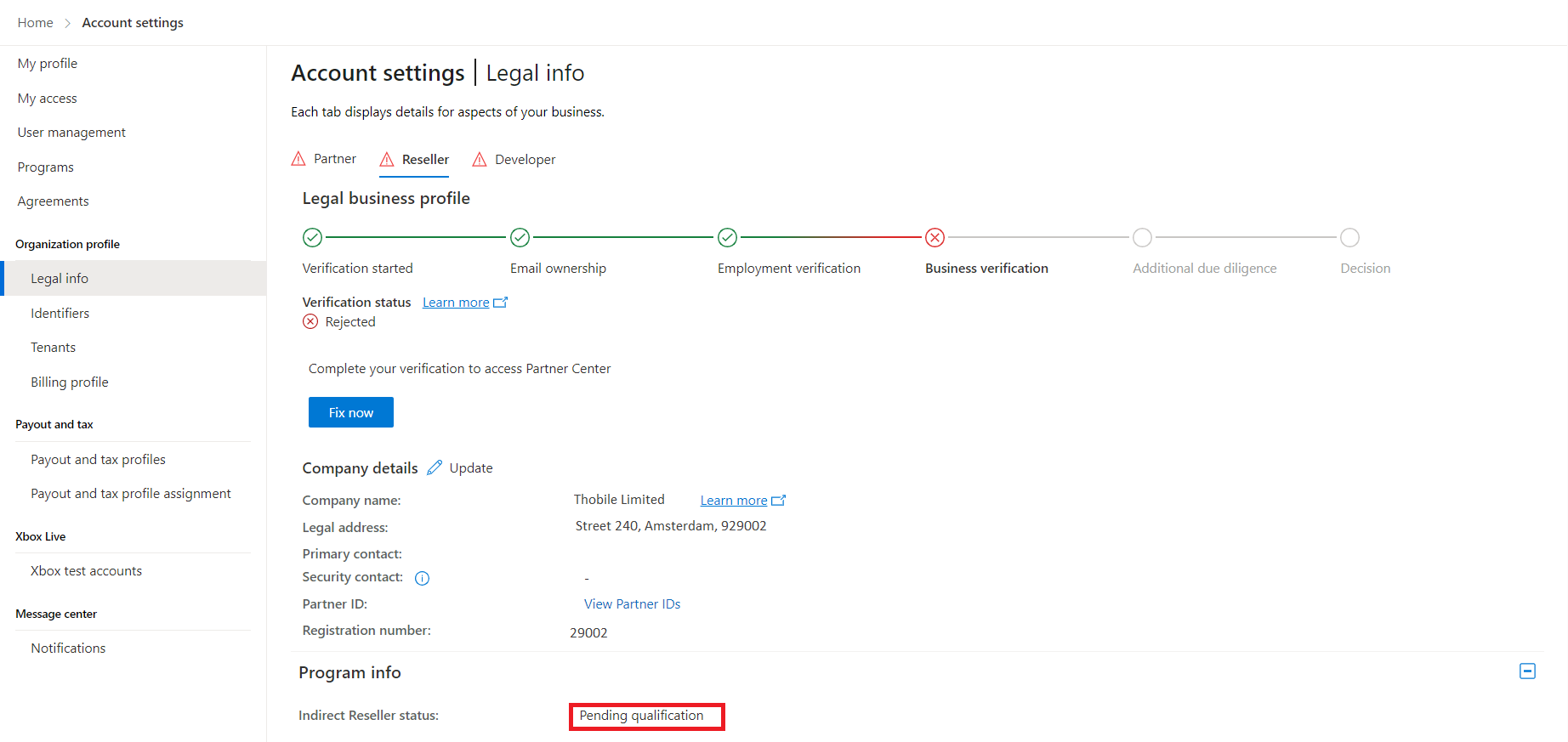
I enrolled in the Microsoft AI Cloud Partner Program program and as a CSP Indirect Reseller program, but my legal business profile verification status is in the Rejected state. What should I do?
You need to update the legal profile information by selecting Update. Read the following articles before proceeding:
To get authorized in vetting, you no longer need to create a support request. You can select the "Fix Now" button.

I enrolled in the Microsoft AI Cloud Partner Program program / CSP Indirect Reseller program, but my legal business profile verification status seems to be stuck in the Pending state. What should I do?
If your CSP indirect reseller legal business profile is in the Pending qualification status for more than five business days, create a support request in Partner Center by selecting Partner Center Support.
Questions about working in Partner Center
I don't know who the Partner Center admin is. Who can accept the MPA?
A Global admin in your company must accept the MPA. To find out who in your company is assigned the role of Global admin, go to User management. In the Search box, enter global admin. Names appear of people who are assigned the global admin role. Any of those people can accept the MPA. If your company doesn't have a Global admin, read What to do if your company needs a global admin.
My reseller says they don't see an option to accept the MPA in Partner Center. How can I support them?
If the reseller can sign in to the Partner Center, but doesn't see the option to accept the MPA:
Do they see the Membership workspace on the home page?
If they don't see the Membership workspace in the Partner Center menu, then that means they haven't enrolled in the CSP program. The reseller must start the process to enroll as a CSP indirect reseller as explained in Work with indirect providers in the CSP program. After they have completed enrolling, they can accept the MPA.
If they do see the Membership workspace, ask them to go to Settings > Account settings > Legal > Partner OR Reseller tab and scroll down to Program Info. What status do they see next to indirect reseller Status?
If the status is anything but Active, that means that the Legal Business Profile verification is still in progress or has been rejected. On that the same page, the reseller should check the Verification status and select Learn more to fix. That enables the reseller to provide the required documentation to proceed with verification.
If your reseller needs support with passing the Legal business profile check, ask them to open a support request with the following options:
- Select Support on the Partner Center menu and then select General > Account verification > and then choose the step that they need help with.
How do I know if I have right role in Partner Center to accept the MPA?
Only Global admins can accept the MPA. To find out what your role in Partner Center is:
Sign in to Partner Center with your CSP indirect reseller account and verify that you've enrolled in the CSP indirect reseller account.
Go to User management and check that the signed-in account is assigned the "Global admin" role. If it isn't, it can't be used to accept the MPA. Search for Global admin in the search box on the User management page, and contact them to accept the MPA.
How can I check if my company has accepted the MPA?
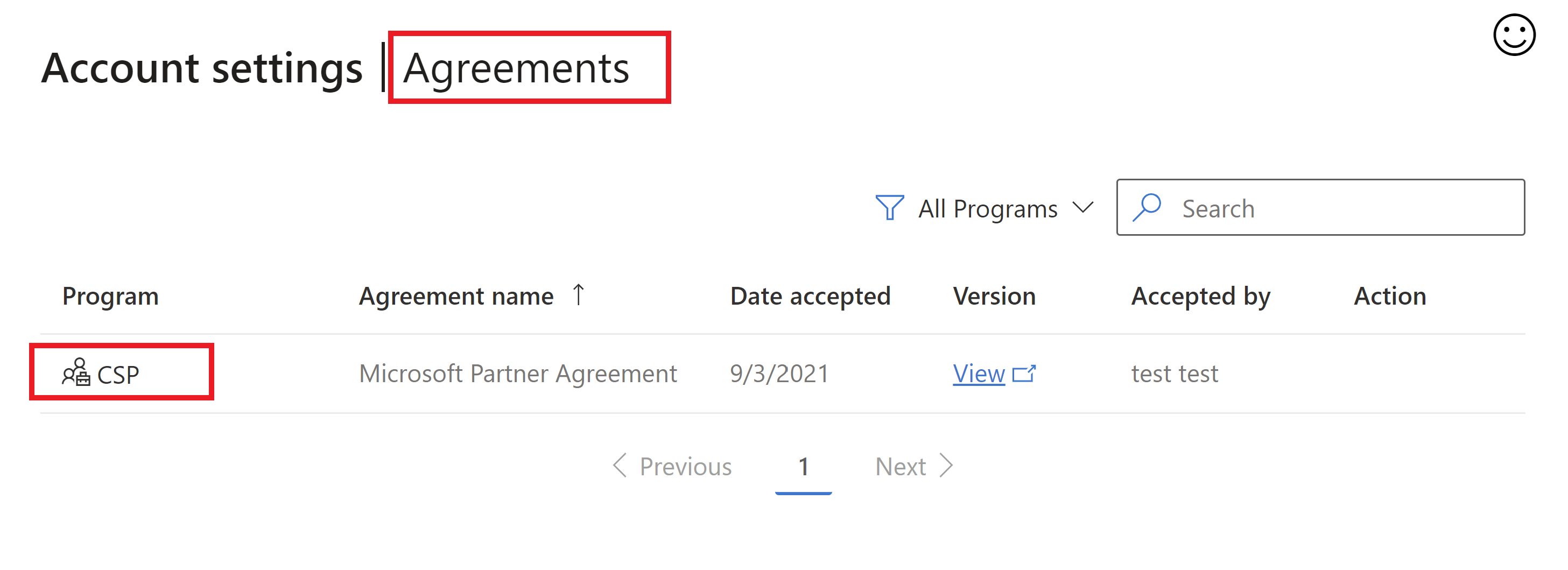
Sign in to Partner Center with a CSP indirect reseller account. If you're an Admin agent or Sales agent in CSP, you can go to the Agreements page to verify that the Microsoft Partner Agreement is visible.
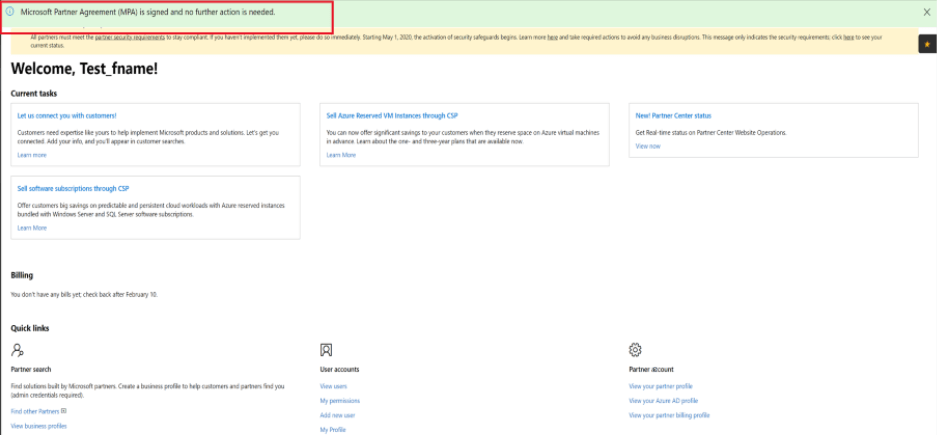
If you're a Global admin, go to the CSP Overview page. If you see a green banner, you're all set up to transact with the indirect provider in that CSP region. If not, the Accept and Continue button appears. Select this button to accept MPA and activate your CSP account.
I want to accept the MPA, but I don't see anywhere to do so (for example, a button to accept terms).
Sign in to Partner Center with your CSP indirect reseller account credentials. Go to the CSP Overview page. If you don't see the Accept and continue button and a green banner telling you that an MPA is accepted, that means that you don't have the right role to accept the MPA. Contact your Global admin to have them accept the MPA.