Note
Access to this page requires authorization. You can try signing in or changing directories.
Access to this page requires authorization. You can try changing directories.
Activity logging data supports Data Protection Impact Assessment (DPIA) for Power Platform and customer engagement apps such as Dynamics 365 Sales, Dynamics 365 Customer Service, Dynamics 365 Field Service, Dynamics 365 Marketing, and Dynamics 365 Project Service Automation.
Regularly view Microsoft Dataverse activities in Microsoft Purview to:
- maintain governance, compliance, and security
- gain operational insights
- identify and troubleshoot problems
- mitigate failures.
This article covers prerequisites, how to access your data in Microsoft Purview's compliance portal, and details about Dataverse and model-driven apps events and schema.
Prerequisites
To view Dataverse and model-driven app activity logs in Microsoft Purview, make sure you:
- Review and complete all the prerequisites in the overview article.
- Are an admin with a Microsoft Office 365 E1 or greater license.
- Are assigned either the Audit Logs or View-Only Audit Logs role in Microsoft Purview.
Learn more:
- Manage Dataverse auditing
- Auditing overview
- Learn more about auditing solutions in Microsoft Purview
- Permissions in the Microsoft Purview portal
Access the logs
Take these steps to sign in to the Microsoft Purview portal:
Sign in to the Microsoft Purview portal
In the Microsoft Purview portal, you can access the Audit page two ways:
- On the left navigation pane, select Solutions and then select Audit.
- Or, on the Home page, select the Audit solution card. If the Audit solution card isn't displayed, select View all solutions and then select Audit from the Core section.
The audit solution lets you search activities or create audit retention policies. On the Search page, you can filter for different Power Platform activities in the Activities list. Activities are mapped to event types and categories, which are listed in the tables in this article for you to reference.
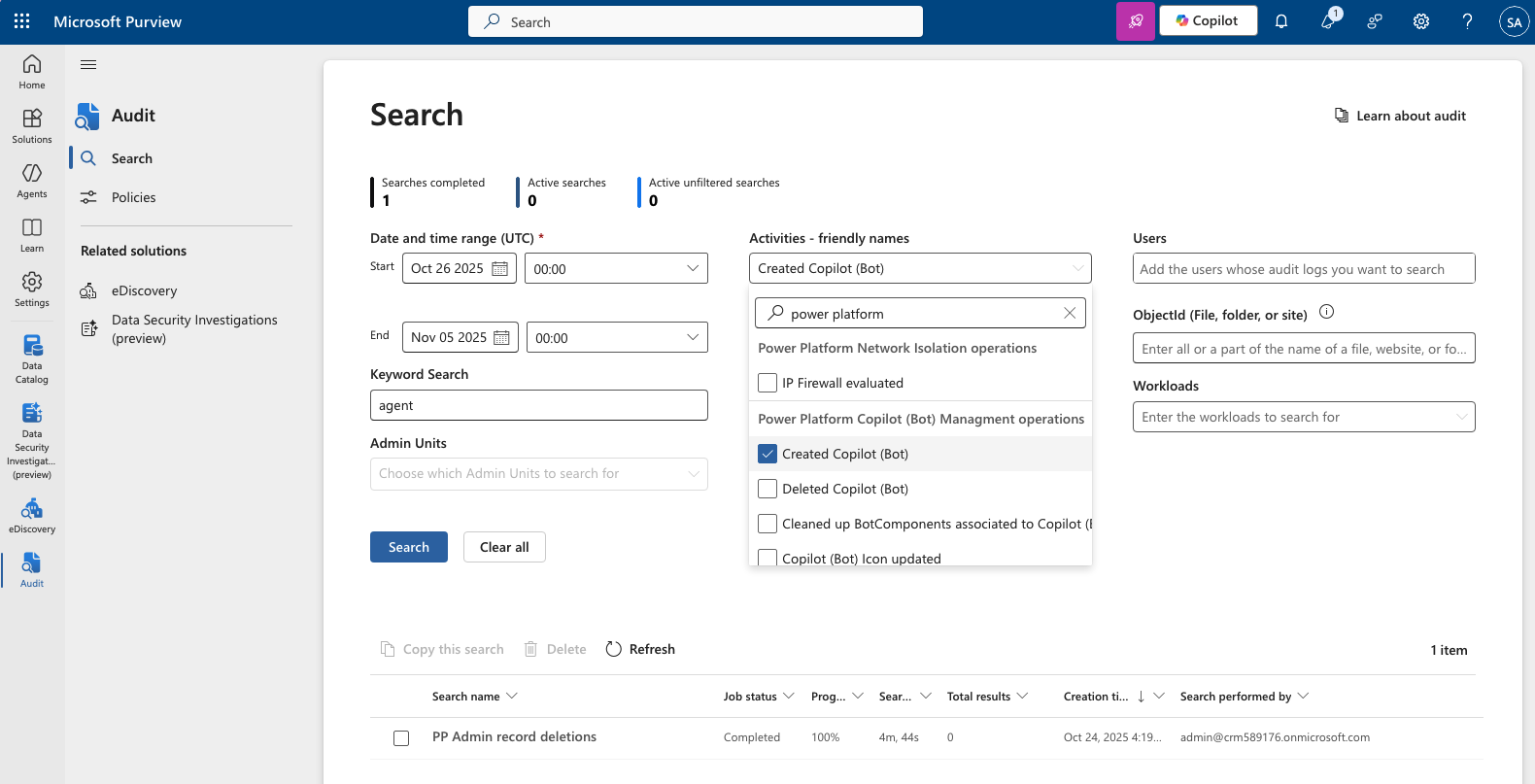
The logs are also accessible to developers via the Office 365 Management API.
See Get started with search to learn more about searching the audit logs in Microsoft Purview.
User and support-related events audited
Logging takes place at the SDK layer, which means a single action can trigger multiple logged events. The following table covers common examples of user and support-related events.
| Event | Description |
|---|---|
| Create, read, update, delete (CRUD) | Logging all CRUD activities is essential for understanding the impact of a problem and being compliant with data protection impact assessments (DPIA). |
| Multiple record view | Users of Dynamics view information in bulk, like grid views, Advanced Find search, and more. Critical customer content information is part of these views. |
| Export to Excel | Exporting data to Excel moves the data outside of the secure environment and makes it vulnerable to threats. |
| SDK calls via surround or custom apps | Actions taken via the core platform or surround apps that call into the SDK to perform an action need to be logged. |
| All support CRUD activities | Microsoft support engineer activities on customer environment. |
| Backend commands | Microsoft support engineer activities on customer tenant and environment. |
| Report Viewed | Logging when a report is viewed. Critical customer content information might be displayed on the report. |
| Report Viewer Export | Exporting a report to different formats moves the data outside of the secure environment and makes it vulnerable to threats. |
| Report Viewer Render Image | Logging multimedia assets that are shown when a report is displayed. They might contain critical customer information. |
Base schema
Schemas define which fields are sent to the Microsoft Purview portal. Some fields are common to all applications that send audit data to Microsoft Purview, while others are specific to customer engagement apps. The Base schema contains these common fields.
| Field name | Type | Mandatory | Description |
|---|---|---|---|
Date |
Edm.Date | No | Date and time the log was generated in Coordinated Universal Time (UTC) |
IP Address |
Edm.String | No | IP address of the user or corporate gateway |
Id |
Edm.Guid | No | Unique GUID for every row logged |
Result Status |
Edm.String | No | Status of the row logged. Success in most cases |
Organization Id |
Edm.Guid | Yes | Unique identifier of the organization from which the log was generated and can be found under Dynamics Developer Resources |
ClientIP |
Edm.String | No | IP address of the user or corporate gateway |
CorrelationId |
Edm.Guid | No | Unique value used to associate related rows (for example, when a large row is split) |
CreationTime |
Edm.Date | No | Date and time the log was generated in Coordinated Universal Time (UTC) |
Operation |
Edm.Date | No | Name of the message called in the SDK |
UserKey |
Edm.String | No | Unique identifier of the user in Microsoft Entra ID–also known as User PUID |
UserType |
Self.UserType | No | The Microsoft 365 audit type (Regular, System) |
User |
Edm.String | No | Primary email of the user |
Customer engagement apps schema
The customer engagement apps schema contains fields specific to customer engagement apps and partner teams.
| Field name | Type | Mandatory | Description |
|---|---|---|---|
User Id |
Edm.String | No | Unique identifier of the user GUID in the organization |
Crm Organization Unique Name |
Edm.String | No | Unique name of the organization |
Instance Url |
Edm.String | No | URL to the instance |
Item Url |
Edm.String | No | URL to the record emitting the log |
Item Type |
Edm.String | No | Name of the entity |
Message |
Edm.String | No | Name of the message called in the SDK |
User Agent |
Edm.String | No | Unique identifier of the user GUID in the organization |
EntityId |
Edm.Guid | No | Unique identifier of the entity |
EntityName |
Edm.String | No | Name of the entity in the organization |
Fields |
Edm.String | No | JSON of Key Value pair reflecting the values that were created or updated |
Id |
Edm.String | No | Entity name in customer engagement apps |
Query |
Edm.String | No | The Filter query parameters used while executing the FetchXML |
QueryResults |
Edm.String | No | One or multiple unique records returned by the Retrieve and Retrieve Multiple SDK message call |
ServiceContextId |
Edm.Guid | No | The unique ID associated with service context |
ServiceContextIdType |
Edm.String | No | Application defined token to define context use |
ServiceName |
Edm.String | No | Name of the Service generating the log |
SystemUserId |
Edm.Guid | No | Unique identifier of the user GUID in the organization |
UserAgent |
Edm.Guid | No | Browser used to execute the request |
UserId |
Edm.Guid | No | The unique ID of the Dynamics system user associated with this activity |
UserUpn |
Edm.String | No | User principal name of the user associated with this activity |
See what's logged
For a list of activities that are logged, see Microsoft.Crm.Sdk.Messages Namespace.
The system logs all SDK messages except the following messages:
WhoAmIRetrieveFilteredFormsTriggerServiceEndpointCheckQueryExpressionToFetchXmlFetchXmlToQueryExpressionFireNotificationEventRetrieveMetadataChangesRetrieveEntityChangesRetrieveProvisionedLanguagePackVersionRetrieveInstalledLanguagePackVersionRetrieveProvisionedLanguagesRetrieveAvailableLanguagesRetrieveDeprovisionedLanguagesRetrieveInstalledLanguagePacksGetAllTimeZonesWithDisplayNameGetTimeZoneCodeByLocalizedNameIsReportingDataConnectorInstalledLocalTimeFromUtcTimeIsBackOfficeInstalledFormatAddressIsSupportUserRoleIsComponentCustomizableConfigureReportingDataConnectorCheckClientCompatibilityRetrieveAttribute
How to categorize Read and ReadMultiple
Use the prefix to categorize each request.
| If the request starts with: | The category is: |
|---|---|
RetrieveMultiple |
ReadMultiple |
ExportToExcel |
ReadMultiple |
RollUp |
ReadMultiple |
RetrieveEntitiesForAggregateQuery |
ReadMultiple |
RetrieveRecordWall |
ReadMultiple |
RetrievePersonalWall |
ReadMultiple |
ExecuteFetch |
ReadMultiple |
Retrieve |
Read |
Search |
Read |
Get |
Read |
Export |
Read |
Example generated logs
The following entries are examples of activity logs.
Example 1 – Logs generated when user reads an Account record
| Schema Name | Value |
|---|---|
ID |
50e01c88-2e43-4005-8be8-9ceb172e2e90 |
UserKey |
10033XXXA49AXXXX |
ClientIP |
131.107.XXX.XX |
Operation |
Retrieve |
Date |
3/2/2018 11:25:56 PM |
EntityId |
00aa00aa-bb11-cc22-dd33-44ee44ee44ee |
EntityName |
Account |
Query |
N/A |
QueryResults |
N/A |
ItemURL |
https://orgname.onmicrosoft.com/main.aspx?etn=account&pagetype=entityrecord&id=00aa00aa-bb11-cc22-dd33-44ee44ee44ee |
Example 2 – Logs generated when user sees Account records in a grid (Export to Microsoft Excel logs are like this)
| Schema Name | Value |
|---|---|
ID |
ef83f463-b92f-455e-97a6-2060a47efe33 |
UserKey |
10033XXXA49AXXXX |
ClientIP |
131.107.XXX.XX |
Operation |
RetrieveMultiple |
Date |
3/2/2018 11:25:56 PM |
EntityId |
N/A |
EntityName |
Account |
Query |
\<filter type="and">\<condition column="ownerid" operator="eq-userid" />\<condition column="statecode" operator="eq" value="0" />\</filter> |
QueryResults |
00aa00aa-bb11-cc22-dd33-44ee44ee44ee, dc136b61-6c1e-e811-a952-000d3a732d76 |
ItemURL |
N/A |
Example 3 – List of messages logged when user converts a lead to opportunity
| ID | EntityID | EntityName | Operation |
|---|---|---|---|
53c98033-cca4-4420-97e4-4c1b4f81e062 |
23ad069e-4d22-e811-a953-000d3a732d76 |
Contact |
Create |
5aca837c-a1f5-4801-b770-5c66183a58aa |
25ad069e-4d22-e811-a953-000d3a732d76 |
Opportunity |
Create |
c9585748-fdbf-4ff7-970c-bb37f6aa2c36 |
25ad069e-4d22-e811-a953-000d3a732d76 |
Opportunity |
Update |
a0469f30-078b-419d-be61-b04c9a34121f |
1cad069e-4d22-e811-a953-000d3a732d76 |
Lead |
Update |
0975bceb-07c7-4dc2-b621-5a7b245c36a4 |
1cad069e-4d22-e811-a953-000d3a732d76 |
Lead |
Update |
Known issues
- Office has a 3-KB limit for each audit record. Therefore, in some cases, a single record from customer engagement apps needs to split into multiple records in Office. You can use the
CorrelationIdfield to retrieve the set of split records for a given source record. Operations that are likely to require splitting includeRetrieveMultipleandExportToExcel. - Some operations need more processing to retrieve all relevant data. For example, the system processes
RetrieveMultipleandExportToExcelto extract the list of records that are retrieved or exported. However, not all relevant operations are yet processed. For example,ExportToWordis currently logged as single operation with no other details about what was exported. - In future releases, the system disables logging for operations deemed unnecessary based on a review of the logs. For example, some operations originate from automated system activity rather than user actions.
- In some record instances, the
EntityNamevalue appears asUnknown. These records aren't related to any specific entity related operation and came in blank from CRM. They all have the entity ID,0000000-0000-0000-0000-000000000000.