Note
Access to this page requires authorization. You can try signing in or changing directories.
Access to this page requires authorization. You can try changing directories.
Use the Power Platform admin center to manage environments, security, Copilot, monitoring, deployments, licensing, and support across Power Platform and some Dynamics 365 apps.
Learn more about the Power Platform admin center in the following sections:
- Watch a video about the admin center
- Find admin center feature areas
- Explore the admin center user interface
Watch a video about the admin center
Find admin center feature areas
The Power Platform admin center feature areas are located on the left navigation pane.
| Feature area | Description | Learn more |
|---|---|---|
| Actions | View recommendations about your Power Platform implementation. The recommendations enhance security, reliability, and overall health of your implementation. | Use the actions page |
| Manage | Manage your environments, environment groups, and tenant settings. | |
| Security | Run your organizational workloads in the safest way possible with a wide set of security features available. | Security page overview |
| Copilot | Access educational resources, track usage, and access governance controls about Copilot features. | Manage Copilot |
| Monitor | Measure and improve operational health metrics of resources built or deployed in Power Platform, such as apps. | Monitor page |
| Deployment | Navigate the complexities of managing Power Platform application lifecycle management (ALM) workloads, including managing pipelines deployments at enterprise scale. Maintain visibility of all the deployments in your tenant to easily approve deployment requests and troubleshoot issues. | Admin deployment page |
| Licensing | View a summary of environments in your tenant requiring licensing attention and license consumption for your environments. | View license consumption |
| Support | Get a list of self-help solutions or create a support ticket for technical support. Note: Although you administer Power BI using the Power BI admin portal, you request support for Power BI through support in the Power Platform admin center. |
Get Help + Support |
Note
Power BI administrators use the Power BI admin portal to manage a Power BI tenant including the configuration of governance policies, usage monitoring, and provisioning of licenses, capacities, and organizational resources. Learn more about Power BI admin portal in What is Power BI administration?.
Explore the admin center user interface
Use the navigation pane and page controls to find administrative tasks and related admin centers.
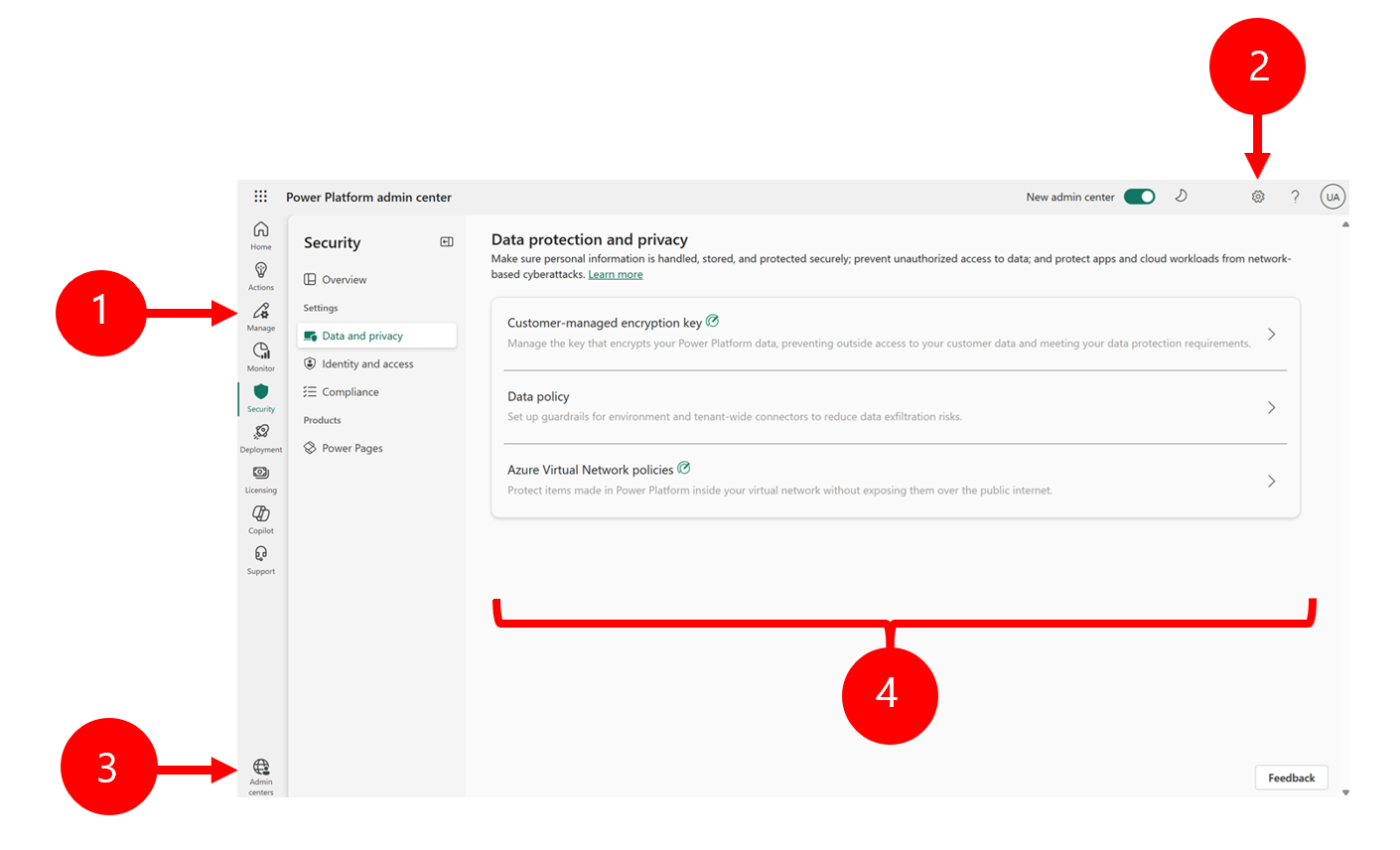
Legend:
1. Navigation pane
Find Power Platform admin center pages on the left navigation pane to complete tasks. Select different pages to deploy, manage, secure, and monitor your Power Platform implementation.
2. Settings icon
Select the gear icon to manage tenant settings, view session details, change the user interface theme, change your password, or update contact preferences.
3. Admin center links
Access related admin centers, such as the Microsoft 365 admin center, Microsoft Entra admin center, and Power BI admin portal.
4. Power Platform pages
Complete administrative functions on each of the Power Platform admin center pages.