Note
Access to this page requires authorization. You can try signing in or changing directories.
Access to this page requires authorization. You can try changing directories.
PIX can detect inefficient Direct3D 12 usage patterns in a GPU Capture, and it can replay the capture under the Direct3D 12 debug layer to report API usage errors. The Warnings view lists everything PIX finds and links each warning to the events involved.
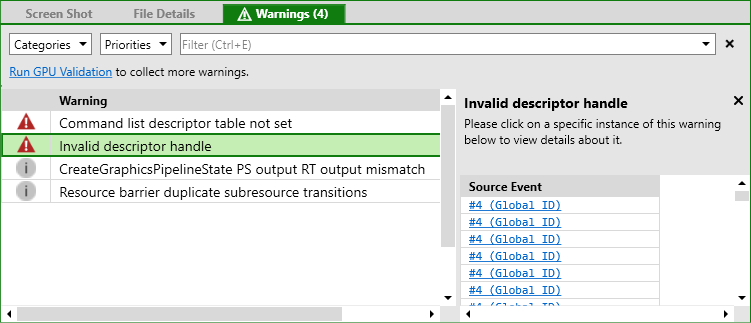
Collect warnings
The Warnings view is in the Overview tab of the default layout. To open it in another layout, see Arrange views. The view shows a set of warnings as soon as you open a capture. To collect more, select one of the links at the top of the view. Each link starts an analysis session first if one isn't already running.
- Run Warnings Analysis: Runs the PIX checks that need the capture to be replayed, such as barrier, descriptor, and root signature usage.
- Run Debug Layer: Replays the capture with the Direct3D 12 debug layer enabled and reports its messages as warnings.
- Run GPU Validation: Replays the capture with GPU-based validation, which is a superset of the debug layer, but takes longer to run.
A link disappears after you select it, and reappears if the collection fails. Because GPU validation also collects debug layer messages, Run Debug Layer disappears after you select Run GPU Validation.
Review and filter warnings
Each row shows a priority icon and a description of the warning. Select a row to open a details panel that explains the warning and how to fix it. To list the places the warning occurred, see the instances panel at the bottom of the view.
To jump to the cause, select a link in the instances panel. PIX navigates to the related event, resource, or object.
Use the Categories and Priorities drop-down lists to filter the list:
- Categories: Performance, Correctness, and Other.
- Priorities: Session, High, Medium, and Low. Session warnings relate to how you use PIX or to your device configuration. They don't reflect a problem in the capture, and PIX never saves them to the capture file.
You can also use the filter bar to search the list by text.
Warnings PIX reports
PIX reports many Direct3D 12 usage issues. The following list shows examples.
- Resource barriers:
- Redundant transitions, including transitions to an unused state.
- Transitions that can use a more constrained state, such as
DEPTH_WRITEtoDEPTH_READ. - A subresource transitioned multiple times in one
ResourceBarrier()call. - Transitions that are redundant because of resource decay or promotion.
- Split barrier recommendations.
- Redundant or optimizable UAV barriers.
- Command lists and execution:
- Back-to-back
ExecuteCommandListscalls and low GPU work per call. - Too many command allocators.
- High
ExecuteIndirectMaxCommandCountvalues.
- Back-to-back
- Pipeline state and root signatures:
- Unused or already-set pipeline states.
- Redundant root state and
SetRootSignaturecalls. - Unused root signature parameters.
- Descriptor table recommendations.
- Recommendations to use the
all_resources_boundcompiler switch. - A root signature that uses only default UAV flags.
- Resources and descriptors:
D3D12_RESOURCE_FLAGSrecommendations, such as addingDENY_SHADER_RESOURCE.- Descriptor duplication and large descriptor counts.
- SRVs that might perform better as CBVs.
- Structured buffer size recommendations.
- Memory usage over budget.
- Potential clear color optimizations and potentially slow depth/stencil subresource copies.
ResolveQueryDatausage improvements.
- Correctness:
- A shader that accesses an out-of-bounds register index.
- Invalid root descriptors.
- A device removal, such as a TDR, during capture or analysis.
Validate a single frame
GPU validation helps you verify that your Direct3D 12 API usage is correct, but its overhead can make a game too slow to reach the point of interest. Instead of running GPU validation against the game, take a GPU Capture of a single frame, and then select Run GPU Validation to validate only that frame in isolation.