Note
Access to this page requires authorization. You can try signing in or changing directories.
Access to this page requires authorization. You can try changing directories.
Azure Databricks released these features and improvements in November 2026.
Note
Releases are staged. Your Azure Databricks account might not be updated until a week or more after the initial release date.
New jobs compute defaults to Auto access mode
November 9, 2026
When you create new jobs compute in the UI, the access mode now defaults to Auto instead of Dedicated. Auto uses Standard access mode unless a machine learning runtime, a GPU instance type, or a Databricks Runtime version lower than 14.3 is selected. A cluster policy that enforces a different access mode still takes precedence. Existing jobs are not changed.
For workspaces with the compliance security profile enabled, this change takes effect in December 2026. See What's coming.
Databricks Genie app in Microsoft Teams is now generally available
November 9, 2026
The Databricks Genie app in Microsoft Teams is now generally available. Chat with the app in a direct message or mention @Databricks Genie in a channel or group chat to get answers to data questions without leaving Microsoft Teams. See Databricks Genie app in Microsoft Teams.
Databricks Genie app for Slack is now generally available
November 9, 2026
The Databricks Genie app for Slack is now generally available. Send a direct message to the app or mention @Genie in a channel or group DM to get answers to data questions without leaving Slack. See Databricks Genie app for Slack.
Genie Search is now generally available
November 9, 2026
Genie Search is now generally available. Genie Search indexes your organization's knowledge in sources such as Google Drive, Jira, Confluence, and Workday, so Genie One can search all of that knowledge in one place. Azure Databricks indexes each document's permissions with its content and keeps both current, so users see only the documents that they can already access in the source.
Genie Search also powers the following features in Genie One:
- Org directories: Find teammates, browse the org chart, and view profiles from Workday. See Browse org directories in Genie One.
- Search in Discover: Search Azure Databricks assets and content from connected sources in one place. See Use Genie Search in Genie One.
Databricks recommends using Genie Search together with MCP connectors, which let Genie One access live data and take action in the applications your team uses.
Genie Ontology is now generally available
November 9, 2026
Genie Ontology is now generally available. Genie Ontology is the context layer that gives Genie One, Genie Code, and other AI agents a business-aware map of your organization. It combines modeled knowledge that you define in Unity Catalog semantics with learned knowledge that Genie extracts from your assets and usage.
Shift dates in Lakeflow Jobs parameters with date arithmetic (Beta)
November 9, 2026
Dynamic value references in Lakeflow Jobs can now shift a date by a duration before formatting it. For example, {{(job.start_time - 1.day).iso_date}} passes the date of the day before the run started to a task. Date arithmetic is in Beta.
See Shift dates with date arithmetic.
Anthropic Claude Fable 5.2 is now available on Unity Gateway
November 9, 2026
Anthropic Claude Fable 5.2 is now available on Unity Gateway. You can access this model using Foundation Model APIs.
Customers are responsible for ensuring their compliance with applicable terms.
Provision Claude desktop with MDM using Unity Gateway
November 9, 2026
Admins can use ug configure --global from their mobile device management (MDM) software to provision the Claude desktop app machine-wide with governed models, MCP servers, and skills, and users can import their claude.ai projects and chats. This is available on macOS only. Learn more.
Recover dropped Unity Catalog volumes with UNDROP VOLUME
November 7, 2026
You can now recover a dropped Unity Catalog volume within 7 days. Find its ID with SHOW VOLUMES DROPPED, then run UNDROP VOLUME WITH ID to restore it with its privileges and tags. Requires Databricks Runtime 19 and above. See UNDROP VOLUME.
Unity Catalog wikis are in Beta
November 6, 2026
Unity Catalog wikis are in Beta. A wiki lets your team document a table's meaning, intended use, and sources, then collaborate on that information. Data owners and stewards draft and publish wikis in Catalog Explorer, manually or with Genie Code, and anyone who can view the table's metadata can comment on, suggest edits to, and react to published wikis. Account admins can control access to this feature from the Previews page.
Restore a deleted Unity Catalog metastore with the REST API (Public Preview)
November 6, 2026
Account admins can now restore a deleted Unity Catalog metastore by its ID. You can restore a metastore for up to 5 days after it's deleted. See Restore a deleted metastore.
Install drivers for JDBC Unity Catalog connections from Maven
November 6, 2026
You can now install the JDBC driver for a JDBC Unity Catalog connection from a Maven coordinate instead of uploading it to a volume. This requires serverless compute, Databricks Runtime 19 or above, or SQL warehouses 2026.43 or above. See Maven coordinates.
Zhipu AI GLM 5.2 is scheduled for retirement
November 6, 2026
Zhipu AI GLM 5.2 is deprecated and will be retired on February 4, 2027. GLM 5.3 is the recommended replacement. See Legacy, deprecated, and retired models for migration guidance.
Load Unity Catalog tables into PyTorch on AI Runtime (Beta)
November 6, 2026
UCDataset streams rows from Unity Catalog tables directly into PyTorch training loops on AI Runtime, without Spark or a SQL warehouse. It applies filter expressions and deletion vectors as it reads, and splits the matching rows across GPUs and data loader workers. See Load Unity Catalog tables into PyTorch with UCDataset.
Run Claude Code and Codex in the SSH tunnel
November 5, 2026
Claude Code and Codex are now available in SSH tunnel sessions. The agents send model requests through Unity Gateway and authenticate with the credentials of your SSH session. This requires Databricks CLI version 1.23.0 or above. See Run coding agents in an SSH session.
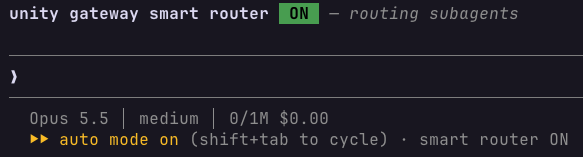
Smart Routing is faster and lower cost, and now routes subagents only (Beta)
November 5, 2026
Smart Routing now routes only subagents, not the first prompt. It costs up to 70% less in internal benchmarks and cuts p90 routing latency from 9 seconds to 2 seconds. Smart Routing for Codex is paused. See Select models or use Smart Routing.
Allow partner platforms in context-based ingress policies
November 5, 2026
Context-based ingress policies can now allow traffic from Power BI, Tableau Cloud, dbt Cloud, and the Genie apps for Slack and Microsoft Teams. Azure Databricks keeps partner details current, so you don't track IPs. See Allow partner platforms in context-based ingress policies.
Metric view listings are generally available in Databricks Marketplace
November 5, 2026
Providers can publish governed business metrics in Databricks Marketplace by adding metric views. Only Azure Databricks recipients can use shared metric views. See Create a Marketplace listing and Add metric views to a share.
FedRAMP High compliance controls now available on Azure Databricks on Azure
November 5, 2026
Azure Databricks is a FedRAMP® Authorized Cloud Service Offering (CSO) at the high impact level in the Azure East US and East US2 (commercial) regions. To process data regulated by FedRAMP High, enable the compliance security profile on your workspace and select the FedRAMP High compliance standard. Serverless compute workloads require base environment version 5 or higher. See FedRAMP High.
External knowledge sources are in Beta
November 5, 2026
External knowledge sources are in Beta. You can pull metadata from Power BI semantic models into Azure Databricks, and Genie can use your Power BI measure definitions when it answers questions. To use external knowledge sources, an account admin turns on External knowledge from the account console Previews page. See Manage account-level previews.
DeepSeek V4 Flash (0731) is retired
November 5, 2026
DeepSeek V4 Flash (0731) is retired as of November 5, 2026. DeepSeek V4.1 Flash (1017) is the recommended replacement. See Legacy, deprecated, and retired models for migration guidance.
Upcoming removal of AI Functions support on older runtimes
November 5, 2026
Starting in January 2027, AI Functions in SQL queries will no longer be supported on Databricks Runtime versions below 17.3 LTS. This change doesn't affect ai_similarity or the AI Functions REST API. To continue using AI Functions in SQL, use Databricks Runtime 17.3 LTS and above.
Publish Unity Gateway Skills with a GitHub Action in Beta
November 4, 2026
Publish Git-managed skills to Unity Catalog with a GitHub Action in Beta. Map folders to skills and publish updates on merges to your publishing branch. See Publish skills from your GitHub repository.
AI Function tasks for jobs (Beta)
November 4, 2026
You can now add AI Function tasks to your Azure Databricks jobs to run ai_parse_document, ai_extract, or ai_classify on the files in a volume or the rows of a table, without writing SQL. Each run processes only the inputs that are new or changed since the previous run and writes the results to a Unity Catalog table that later tasks can read. This feature is in Beta.
See AI Function tasks for jobs.
Okta connector is available in Beta
November 3, 2026
The managed Okta connector is now available in Beta in Databricks Lakeflow Connect. Workspace admins can enable Lakeflow Connect for Okta on the Previews page.
Use the connector to ingest identity and access data from Okta into Azure Databricks, including users, groups, group memberships, app integrations, devices, policies, and administrator roles. The connector uses SSWS API token authentication and supports incremental ingestion.
Lakehouse//RT supports fine-grained access control (Beta)
November 3, 2026
You can now run read queries on tables protected by row filters, column masks, and attribute-based access control (ABAC) policies with Lakehouse//RT. See Fine-grained access control.
Start Lakeflow Designer workflows from suggested or recent tables
November 3, 2026
Start a visual data prep in Lakeflow Designer from suggested, favorite, or recently used tables on the welcome screen. See Browse existing tables.
Edit shared Lakeflow Designer operators with Genie Code
November 3, 2026
Use Genie Code in Lakeflow Designer to create shared custom operators or edit them by workspace YAML file path. See Build a shared custom operator.
Write Lakeflow Designer results to Google Drive or SharePoint
November 3, 2026
Write Lakeflow Designer results to Google Drive or SharePoint with the Output operator. Each run creates or replaces a file of up to 2.75 MiB. See Output.
Set checkpoints across a Lakeflow Designer file
November 3, 2026
Set checkpoint options across a visual data prep file with Set all to Auto or Set all to On. See Configure operator checkpoints.
Control Lakebase sink upserts with merge strategies
November 3, 2026
When you write to Lakebase from Structured Streaming, you can use merge strategies to control how upserts update individual columns. Keep the first or last value, ignore nulls, or select values by an ordering column. Merge strategies require Databricks Runtime 19 and above. See Merge strategies for upserts.
Trigger Lakeflow Jobs when upstream jobs complete (Beta)
November 3, 2026
You can now run a Lakeflow Job when one or more upstream jobs complete, including across workspaces attached to the same Unity Catalog metastore. Configure dependencies on the downstream job. See Trigger jobs when upstream jobs complete.
Approve Genie tool actions in Slack and Microsoft Teams (Public Preview)
November 3, 2026
When Genie needs approval to run a connected external tool, the Databricks Genie apps for Slack and Microsoft Teams now show an approval prompt in the reply, so you can allow or deny the action without leaving the chat. See Approve tool actions and Approve tool actions.
Zerobus Ingest into default storage is now generally available
November 2, 2026
Ingesting into tables backed by default storage with Zerobus Ingest in Lakeflow Connect is now generally available. See Create or identify the target table.
Higher limits and BROWSE support for Unity Catalog secrets
November 2, 2026
A schema can now hold up to 1,000 Unity Catalog secrets, and a metastore up to 10,000, up from 100 and 1,000. The limits apply to Azure Databricks-managed secrets and secrets backed by Azure Key Vault. BROWSE on a catalog now applies to Unity Catalog secrets, so users can discover secrets and their metadata without being able to read the values or reference the secrets in code. See Grant access to secrets.
Simba JDBC Driver (Legacy) 2.8.7 is available
November 2, 2026
Simba JDBC Driver (Legacy) 2.8.7 updates jackson-core, jackson-databind, and jackson-datatype-jsr310 to 2.21.8. Download it from the JDBC drivers archive under All JDBC Driver Versions (Simba).
OneLake external locations are in Public Preview
November 2, 2026
OneLake external locations are now in Public Preview. Use a OneLake external location as managed storage for a Unity Catalog catalog to store managed tables, volumes, materialized views, and streaming tables in Microsoft OneLake while Unity Catalog governs access. Workspace admins can control access to External location support for OneLake from the Previews page.
See Connect Azure Databricks to a OneLake external location.
Managed warehouse for MLflow (Beta)
November 2, 2026
With managed warehouse, users can view traces stored in Unity Catalog in the MLflow UI without selecting a SQL warehouse. MLflow runs trace queries on a SQL warehouse that it creates in your workspace when your workspace supports it, and on serverless compute otherwise. Workspace admins can enable Managed Warehouse for MLflow on the Previews page. See Managed warehouse for MLflow traces.
AI Functions usage is now included in Unity Gateway budgets
November 1, 2026
Beginning November 1, 2026, Unity Gateway budgets include spend from task-specific AI Functions such as ai_parse_document, ai_extract, and ai_classify across batch and real-time execution paths. See Manage budgets for Unity Gateway.