Nota:
El acceso a esta página requiere autorización. Puede intentar iniciar sesión o cambiar directorios.
El acceso a esta página requiere autorización. Puede intentar cambiar los directorios.
Note
Este artículo describe características utilizadas en agentes o flujos de agentes alimentados por el arnés estándar.
El lienzo del agente controla cómo aparece el agente a los usuarios. Puede personalizar el lienzo de dos maneras:
Personalice el lienzo predeterminado mediante JavaScript y CSS en su sitio web. Use esta opción para realizar cambios sencillos.
Use un lienzo personalizado basado en el lienzo de Bot Framework Chat en web. Esta opción requiere experiencia de desarrollo y admite la personalización completa.
También puede combinar el lienzo personalizado con la configuración de un inicio automático de conversación.
Puede cambiar el nombre y el icono del agente en el portal.
Después de publicar un agente, los usuarios pueden interactuar con él a través del lienzo Chat en web.
Important
Puede instalar y usar el código de ejemplo incluido en este artículo solo para su uso con Copilot Studio. El código de muestra tiene licencia "tal cual" y está excluido de cualquier acuerdo de nivel de servicio o servicios de soporte. Usted asume el riesgo de utilizarla.
Microsoft no ofrece garantías expresas, garantías ni condiciones y renuncia a todas las garantías implícitas, incluidas las de comerciabilidad, idoneidad para un propósito genérico y ausencia de infracción.
Cambie el nombre y el icono del agente
Important
- Después de actualizar el icono de un agente, el icono puede tardar hasta 24 horas en aparecer en todas partes.
- Si el agente está conectado a Omnichannel para Cliente, la propiedad Nombre para mostrar del portal de Azure define su nombre.
- Si tu agente está destinado a publicarse en Teams, revisa los requisitos para iconos en la documentación para desarrolladores de Microsoft Teams.
Vaya a la página Información general del agente.
Selecciona Editar junto a Detalles.
Cambie el nombre y el icono del agente según sea necesario.
Seleccione Guardar.
Personalizar el lienzo predeterminado (sencillo)
Use JavaScript y CSS para ajustar el lienzo predeterminado.
Primero, configura el lugar donde implementarás el lienzo del agente.
Copie el código HTML de ejemplo en un archivo denominado
index.html. También puede usar el editor de pruebas HTML.<!DOCTYPE html> <html lang="en"> <head> <meta charset="UTF-8" /> <meta name="viewport" content="width=device-width, initial-scale=1.0" /> <meta name="description" content="Contoso Web Chat Assistant" /> <title>Contoso Sample Web Chat Test</title> <script src="https://cdn.botframework.com/botframework-webchat/latest/webchat.js"></script> <script> let webChatInstance = null; let directLineUrl = null; // Replace with your token endpoint const tokenEndpoint = "<YOUR TOKEN ENDPOINT>"; const styleOptions = { "accent": "#0078D4", "autoScrollSnapOnPage": true, "autoScrollSnapOnPageOffset": 0, "avatarBorderRadius": "7%", "avatarSize": 31, "backgroundColor": "#e8e9eb", "botAvatarBackgroundColor": "#ffffff00", "botAvatarImage": "https://powercatexternal.blob.core.windows.net/creatorkit/Assets/ChatbotLogoBlue.png", "botAvatarInitials": "B", "bubbleAttachmentMaxWidth": 480, "bubbleAttachmentMinWidth": 250, "bubbleBackground": "#f0eded", "bubbleBorderColor": "#f5f5f5", "bubbleBorderRadius": 41, "bubbleBorderStyle": "solid", "bubbleBorderWidth": 1, "bubbleFromUserBackground": "#ebefff", "bubbleFromUserBorderColor": "#f5f5f5", "bubbleFromUserBorderRadius": 41, "bubbleFromUserBorderStyle": "solid", "bubbleFromUserBorderWidth": 1, "bubbleFromUserNubOffset": 0, "bubbleFromUserNubSize": 0, "bubbleFromUserTextColor": "#242424", "bubbleImageHeight": 10, "bubbleImageMaxHeight": 240, "bubbleImageMinHeight": 240, "bubbleMessageMaxWidth": 480, "bubbleMessageMinWidth": 120, "bubbleMinHeight": 50, "bubbleNubOffset": 0, "bubbleTextColor": "#242424", "emojiSet": true, "fontSizeSmall": "70%", "hideUploadButton": false, "messageActivityWordBreak": "break-word", "monospaceFont": "Consolas", "paddingRegular": 10, "paddingWide": 10, "primaryFont": null, "sendBoxBackground": "#e8e9eb", "sendBoxBorderTop": "solid 1px #808080", "sendBoxButtonColor": "#0078d4", "sendBoxButtonColorOnHover": "#006cbe", "sendBoxButtonShadeBorderRadius": 40, "sendBoxButtonShadeColorOnHover": "", "sendBoxHeight": 60, "sendBoxPlaceholderColor": "#171616", "sendBoxTextColor": "#2e2d2d", "showAvatarInGroup": "status", "spinnerAnimationHeight": 16, "spinnerAnimationPadding": 12, "spinnerAnimationWidth": 16, "subtleColor": "#000000FF", "suggestedActionBackgroundColor": "#006FC4FF", "suggestedActionBackgroundColorOnHover": "#0078D4", "suggestedActionBorderColor": "", "suggestedActionBorderRadius": 10, "suggestedActionBorderWidth": 1, "suggestedActionLayout": "flow", "suggestedActionTextColor": "#FFFFFFFF", "typingAnimationBackgroundImage": "url('https://wpamelia.com/wp-content/uploads/2018/11/ezgif-2-6d0b072c3d3f.gif')", "typingAnimationDuration": 5000, "typingAnimationHeight": 20, "typingAnimationWidth": 64, "userAvatarBackgroundColor": "#222222", "userAvatarImage": "https://avatars.githubusercontent.com/u/8174072?v=4&size=64", "userAvatarInitials": "U" }; const backgroundImage = ""; document.addEventListener('DOMContentLoaded', () => { const root = document.documentElement; root.style.setProperty('--primary-color', createGradient(styleOptions.accent)); root.style.setProperty('--header-textColor', styleOptions.suggestedActionTextColor); if (backgroundImage) { const webchatElement = document.getElementById('webchat'); webchatElement.style.backgroundImage = `url(${backgroundImage})`; webchatElement.style.backgroundSize = 'cover'; webchatElement.style.backgroundPosition = 'center'; webchatElement.style.backgroundRepeat = 'no-repeat'; const overlay = document.createElement('div'); overlay.className = 'webchat-overlay'; webchatElement.appendChild(overlay); } }); function createGradient(baseColor) { const r = parseInt(baseColor.slice(1, 3), 16); const g = parseInt(baseColor.slice(3, 5), 16); const b = parseInt(baseColor.slice(5, 7), 16); const lighterColor = `#${Math.min(255, r + 30).toString(16).padStart(2, '0')}${Math.min(255, g + 30).toString(16).padStart(2, '0')}${Math.min(255, b + 30).toString(16).padStart(2, '0')}`; const darkerColor = `#${Math.max(0, r - 30).toString(16).padStart(2, '0')}${Math.max(0, g - 30).toString(16).padStart(2, '0')}${Math.max(0, b - 30).toString(16).padStart(2, '0')}`; return `linear-gradient(135deg, ${lighterColor}, ${baseColor}, ${darkerColor})`; } const environmentEndPoint = tokenEndpoint.slice( 0, tokenEndpoint.indexOf("/powervirtualagents") ); const apiVersion = tokenEndpoint .slice(tokenEndpoint.indexOf("api-version")) .split("=")[1]; const regionalChannelSettingsURL = `${environmentEndPoint}/powervirtualagents/regionalchannelsettings?api-version=${apiVersion}`; function showChat() { const popup = document.getElementById("chatbot-popup"); const openButton = document.getElementById("open-chat"); popup.classList.add("visible"); openButton.classList.add("hidden"); } function hideChat() { const popup = document.getElementById("chatbot-popup"); const openButton = document.getElementById("open-chat"); popup.classList.remove("visible"); openButton.classList.remove("hidden"); } function createCustomStore() { return window.WebChat.createStore( {}, ({ dispatch }) => (next) => (action) => { if (action.type === "DIRECT_LINE/CONNECT_FULFILLED") { dispatch({ type: "DIRECT_LINE/POST_ACTIVITY", meta: { method: "keyboard" }, payload: { activity: { channelData: { postBack: true }, name: "startConversation", type: "event", }, }, }); } return next(action); } ); } async function restartConversation() { try { if (!directLineUrl) { console.error("DirectLine URL not initialized"); return; } const response = await fetch(tokenEndpoint); const conversationInfo = await response.json(); if (!conversationInfo.token) { throw new Error("Failed to get conversation token"); } const newDirectLine = window.WebChat.createDirectLine({ domain: `${directLineUrl}v3/directline`, token: conversationInfo.token, }); const webchatElement = document.getElementById("webchat"); webChatInstance = window.WebChat.renderWebChat( { directLine: newDirectLine, styleOptions, store: createCustomStore(), }, webchatElement ); } catch (err) { console.error("Failed to restart conversation:", err); } } async function initializeChat() { try { const response = await fetch(regionalChannelSettingsURL); const data = await response.json(); directLineUrl = data.channelUrlsById.directline; if (!directLineUrl) { throw new Error("Failed to get DirectLine URL"); } const conversationResponse = await fetch(tokenEndpoint); const conversationInfo = await conversationResponse.json(); if (!conversationInfo.token) { throw new Error("Failed to get conversation token"); } const directLine = window.WebChat.createDirectLine({ domain: `${directLineUrl}v3/directline`, token: conversationInfo.token, }); webChatInstance = window.WebChat.renderWebChat( { directLine, styleOptions, store: createCustomStore(), }, document.getElementById("webchat") ); } catch (err) { console.error("Failed to initialize chat:", err); } } initializeChat(); </script> <style> :root { --primary-gradient: var(--primary-color); --chat-width: 450px; --chat-height: 520px; --header-height: 56px; --border-radius: 16px; --transition-speed: 0.3s; } * { margin: 0; padding: 0; box-sizing: border-box; font-family: system-ui, -apple-system, BlinkMacSystemFont, "Segoe UI", Roboto, sans-serif; } body { min-height: 100vh; background-color: #f3f4f6; } #chatbot-popup { display: none; position: fixed; bottom: 32px; right: 32px; width: var(--chat-width); height: var(--chat-height); background: white; border-radius: var(--border-radius); box-shadow: 0 18px 40px -5px rgba(0, 0, 0, 0.2), 0 15px 20px -5px rgba(0, 0, 0, 0.1); overflow: hidden; opacity: 0; transform-origin: bottom right; transform: scale(0.95); transition: all var(--transition-speed) ease-in-out; z-index: 999; } #chatbot-popup.visible { display: block; opacity: 1; transform: scale(1); } #chatbot-header { background: var(--primary-color); padding: 16px 20px; height: var(--header-height); display: flex; justify-content: space-between; align-items: center; color: var(--header-textColor); } .header-title { display: flex; align-items: center; gap: 12px; font-size: 16px; font-weight: 500; } .header-buttons { display: flex; gap: 12px; align-items: center; } .icon-button { background: none; border: none; color: var(--header-textColor); cursor: pointer; padding: 8px; border-radius: 8px; display: flex; align-items: center; justify-content: center; transition: all 0.2s ease; } .icon-button:hover { color: var(--header-textColor); background: rgba(255, 255, 255, 0.1); } .icon-button:focus { outline: 2px solid rgba(255, 255, 255, 0.5); outline-offset: 2px; } #webchat { height: calc(100% - var(--header-height)); background-color: #f9fafb; position: relative; } .webchat-overlay { position: absolute; top: 0; left: 0; right: 0; bottom: 0; background: rgba(255, 255, 255, 0.85); pointer-events: none; z-index: 1; } #webchat > div { position: relative; z-index: 2; } #webchat .webchat__basic-transcript__content { white-space: pre-wrap !important; word-break: break-word !important; } #webchat .webchat__bubble__content { padding: 8px 12px !important; } #webchat .webchat__bubble { max-width: 85% !important; margin: 8px !important; } #webchat .webchat__basic-transcript__content ul, #webchat .webchat__basic-transcript__content ol, #webchat .webchat__bubble__content ul, #webchat .webchat__bubble__content ol { padding-left: 24px !important; margin: 8px 0 !important; list-style-position: outside !important; } #webchat .webchat__basic-transcript__content li, #webchat .webchat__bubble__content li { margin: 4px 0 !important; padding-left: 4px !important; } #open-chat { position: fixed; bottom: 32px; right: 32px; width: 64px; height: 64px; border-radius: 50%; background: var(--primary-gradient); border: none; cursor: pointer; display: flex; align-items: center; justify-content: center; box-shadow: 0 4px 6px -1px rgba(0, 0, 0, 0.1); transition: all var(--transition-speed) ease-in-out; z-index: 998; } #open-chat.hidden { opacity: 0; transform: scale(0.95) translateY(10px); pointer-events: none; } #open-chat:hover { transform: translateY(-4px); box-shadow: 0 10px 15px -3px rgba(0, 0, 0, 0.1); } #open-chat:focus { outline: 3px solid rgba(79, 70, 229, 0.5); outline-offset: 2px; } #open-chat svg { width: 28px; height: 28px; color: white; transition: transform 0.2s ease; } .main-content { max-width: 1200px; margin: 0 auto; padding: 48px 24px; } .main-content h1 { font-size: 36px; color: #111827; text-align: center; } .main-content p { font-size: 18px; color: #4b5563; line-height: 1.6; margin-bottom: 48px; text-align: center; max-width: 800px; margin-left: auto; margin-right: auto; } .content-grid { display: grid; grid-template-columns: repeat(2, 1fr); gap: 32px; margin-bottom: 32px; } .content-box { background: linear-gradient(135deg, #e6e6e6, #c4c4c4, #9f9f9f); padding: 32px; border-radius: 12px; box-shadow: 0 4px 6px -1px rgba(0, 0, 0, 0.1), 0 2px 4px -1px rgba(0, 0, 0, 0.06); min-height: 300px; display: flex; flex-direction: column; justify-content: center; align-items: center; text-align: center; position: relative; overflow: hidden; } .content-box::before { content: ''; position: absolute; top: 0; left: 0; right: 0; height: 4px; } .content-box.featured { grid-column: span 2; min-height: 350px; background: linear-gradient(135deg, #e6e6e6, #c4c4c4, #9f9f9f); color: #000000; } .content-box h2 { font-size: 24px; margin-bottom: 16px; position: relative; } .content-box p { font-size: 16px; color: #6b7280; margin-bottom: 0; } .content-box.featured p { color: #000000; } @media (max-width: 768px) { .content-grid { grid-template-columns: 1fr; } .content-box.featured { grid-column: span 1; } .main-content { padding: 24px 16px; } .main-content h1 { font-size: 28px; } #chatbot-popup { width: 100%; height: 100%; bottom: 0; right: 0; border-radius: 0; } } </style> </head> <body> <div class="main-content"> <h1>Header</h1> <p>Lorem ipsum dolor sit amet consectetur adipiscing elit. Quisque faucibus ex sapien vitae pellentesque sem placerat.</p> <div class="content-grid"> <div class="content-box featured"> <h2>Featured Content</h2> <p>Primary content area with custom styling and gradient background</p> </div> <div class="content-box"> <h2>Section One</h2> <p>Content box with minimal design</p> </div> <div class="content-box"> <h2>Section Two</h2> <p>Another content section with consistent styling</p> </div> </div> </div> <div id="chatbot-popup" role="complementary" aria-label="Chat Assistant"> <div id="chatbot-header"> <div class="header-title"> <svg class="chat-icon" width="24" height="24" viewBox="0 0 24 24" fill="none" stroke="currentColor" stroke-width="2" stroke-linecap="round" stroke-linejoin="round" aria-hidden="true" > <path d="M21 15a2 2 0 0 1-2 2H7l-4 4V5a2 2 0 0 1 2-2h14a2 2 0 0 1 2 2z" ></path> </svg> <span>Contoso Assistant</span> </div> <div class="header-buttons"> <button class="icon-button" id="restart-button" onclick="restartConversation()" aria-label="Restart Conversation" > <svg width="20" height="20" viewBox="0 0 24 24" fill="none" stroke="currentColor" stroke-width="2" stroke-linecap="round" stroke-linejoin="round" aria-hidden="true" > <path d="M3 12a9 9 0 1 0 9-9 9.75 9.75 0 0 0-6.74 2.74L3 8" ></path> <path d="M3 3v5h5"></path> </svg> </button> <button class="icon-button" id="close-button" onclick="hideChat()" aria-label="Close Chat" > <svg width="20" height="20" viewBox="0 0 24 24" fill="none" stroke="currentColor" stroke-width="2" stroke-linecap="round" stroke-linejoin="round" aria-hidden="true" > <line x1="18" y1="6" x2="6" y2="18"></line> <line x1="6" y1="6" x2="18" y2="18"></line> </svg> </button> </div> </div> <div id="webchat" role="main"></div> </div> <button id="open-chat" onclick="showChat()" aria-label="Open Chat Assistant" > <svg viewBox="0 0 24 24" fill="none" stroke="currentColor" stroke-width="2" stroke-linecap="round" stroke-linejoin="round" aria-hidden="true" > <path d="M21 15a2 2 0 0 1-2 2H7l-4 4V5a2 2 0 0 1 2-2h14a2 2 0 0 1 2 2z" ></path> </svg> </button> </body> </html>En
index.html, reemplace:const tokenEndpoint = "<YOUR TOKEN ENDPOINT>";con el punto de conexión del token.
Abra
index.htmlen un explorador moderno, como Microsoft Edge.Pruebe el agente.
Si el agente no responde:
- Asegúrese de que el agente esté publicado.
- Compruebe el valor del punto de conexión del token.
- Confirme que el punto de conexión del token aparece después de
=, y está rodeado por comillas dobles".
Recuperar el punto de conexión del token para el agente
Para personalizar su lienzo, ya sea el lienzo por defecto o uno personalizado al que se conecte, necesita el extremo token de su agente.
En Configuración, seleccione Canales.
Seleccione Correo electrónico.
Junto a Punto de conexión de token, seleccione Copiar.
Personalizar el icono, el color de fondo y el nombre del agente
Use el styleOptions objeto para configurar estilos predefinidos.
Para obtener más información sobre lo que puede personalizar y los enlaces al archivo defaultStyleOptions.js, consulte Personalización de Chat en web.
Cambiar el icono del agente
Actualice el
index.htmlarchivo con el código de ejemplo siguiente:const styleOptions = { "accent": "#00809d", "botAvatarBackgroundColor": "#FFFFFF", "botAvatarImage": "https://learn.microsoft.com/azure/bot-service/v4sdk/media/logo_bot.svg", "botAvatarInitials": "BT", "userAvatarImage": "https://avatars.githubusercontent.com/u/661465", "userAvatarInitials": "U" };Sustituye ambas imágenes avatar por las de tu empresa. Si no tienes una URL de imagen, usa una cadena de imagen codificada en Base64.
Cambiar el color de fondo
En
index.htmlañadir unbackgroundColorelemento a tustyleOptionsdefinición:const styleOptions = { "backgroundColor": "lightgray", // ... };Cámbialo
backgroundColoral color que quieras. Utiliza nombres estándar de color CSS, valores RGB o HEX.
Cambiar el nombre del agente
Actualiza el
<h1>texto del encabezado en elindex.htmlarchivo con el siguiente código:<body> <div id="banner"> <h1><img src="contoso-agent.png"> Contoso agent name</h1> </div> <!-- ... -->Cambie el texto por el nombre que quiera dar al agente. También puedes insertar una imagen, pero puede que necesites darle estilo para que encaje dentro de la sección del encabezado.
Personaliza y aloja tu área de chat (avanzado)
Puede conectar el agente de Copilot Studio con un lienzo personalizado que hospede como una aplicación web independiente. Esta opción funciona mejor si necesitas incrustar un iFrame personalizado en varias páginas web.
Note
Hospedar un lienzo personalizado requiere desarrollo de software. Esta guía está pensada para profesionales de TI experimentados, como administradores de TI o desarrolladores que tienen una buena comprensión de las herramientas de desarrollo, las utilidades y los entornos de desarrollo integrados (IDE).
Comience con uno de estos ejemplos creados de forma personalizada para trabajar con Copilot Studio:
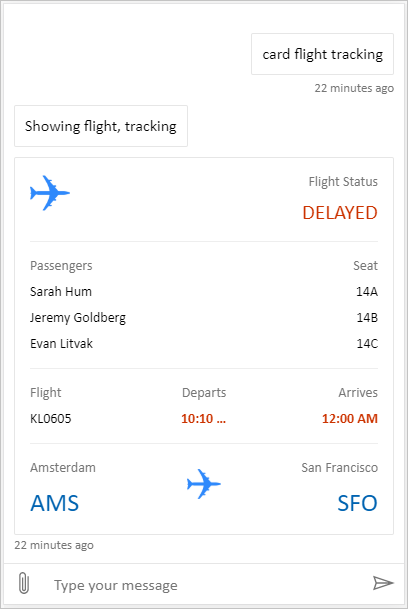
Full bundle es un lienzo personalizado capaz de mostrar todo el contenido enriquecido de Copilot Studio. Por ejemplo:
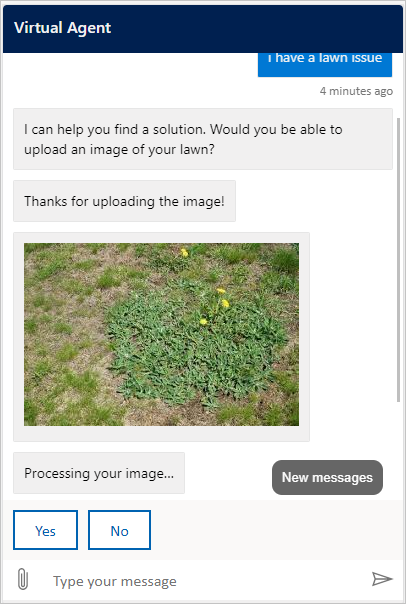
Ubicación y subida de archivos es un lienzo personalizado capaz de obtener la ubicación de un usuario y enviarla a un agente de Copilot Studio. Por ejemplo:
Como alternativa, pruebe otros ejemplos de plantillas de Chat en web de Bot Framework.
Como con el lienzo por defecto, puedes usarlo styleSetOptions para ajustar el lienzo personalizado. Todas las propiedades personalizables se muestran en defaultStyleOptions.js. Para obtener más información sobre lo que puede personalizar, consulte Chat en web personalización.
Soporte para la configuración de conexión en un lienzo personalizado
Cuando un agente basado en el standard harness necesita una conexión de usuario, el canvas del chat recibe una Adaptive Card que indica que se requiere una conexión. Tu lienzo personalizado debe gestionar la acción de la tarjeta Action.OpenUrlDialog. Sin este manejo, seleccionar Conectar no abre la ventana de conexión enfocada.
Abre la ventana de conexión
- Registra
Action.OpenUrlDialogen el renderizador de Tarjetas adaptables y lee su propiedadurl. Acepta solo una URL absolutahttp://ohttps://URL. - Decide si el origen del destino es confiable antes de abrirlo. Confía solo en los orígenes que controlas o que tu equipo de seguridad revisó e incluyó en la lista de permitidos.
- Abre la URL directamente desde la selección del usuario con
window.open(url, "_blank", "popup"). Abrir la ventana desde la acción del usuario reduce la posibilidad de que el navegador la bloquee. - Para un destino confiable, en el argumento
windowFeaturesdewindow.open, omitenoopenerynoreferrerpara que la ventana de conexión pueda devolver un resultado awindow.opener. Para cualquier otro destino, usanoopener,noreferrery no aceptes un mensaje de respuesta. - Conserva la referencia retornada
Windowy el ID de actividad de la tarjeta que requiere conexión. Si la ventana emergente está bloqueada, o si el usuario la cierra sin un resultado válido, mantenga disponible Continuar u otra acción de recuperación. No interpretes el cierre de la ventana como un establecimiento correcto de la conexión.
El Tarjetas adaptables JavaScript SDK no lo implementa Action.OpenUrlDialog por defecto. Registra la acción a través de SerializationContext.actionRegistry, o gestiona la acción directamente en un renderizador que poseas. Una Action.OpenUrl alternativa puede abrir el destino en clientes que no admiten la acción de cuadro de diálogo, pero la alternativa no puede devolver un resultado de la ventana emergente.
Important
Una ventana de conexión con acceso a window.opener puede acceder a la página del chat o afectarla de alguna manera. Revisa el destino y sus redirecciones con tu equipo de seguridad web. No permitas que un destino confiable redirija a un sitio no confiable mientras mantiene el acceso a window.opener.
Si incrustas Bot Framework Chat en web, el manejo de Action.OpenUrlDialog abre la ventana de conexión. Las ventanas del mismo origen son de confianza por defecto. Para un destino de origen cruzado aprobado, fija styleOptions.callURLActionTrustedOrigin en el origen exacto permitido. Separa los orígenes múltiples con comas. También puedes establecer callURLActionPopupWindowHeight y callURLActionPopupWindowWidth. No añadas un origen que no hayas revisado.
Continuar después de establecer correctamente la conexión (vista previa)
[Esta sección es documentación preliminar y está sujeto a cambios.]
Important
Este artículo contiene la documentación de la versión preliminar de Microsoft Copilot Studio y está sujeto a modificaciones.
Las funciones de vista previa no están diseñadas para uso en producción y pueden tener una funcionalidad restringida. Estas características están disponibles antes del lanzamiento oficial para que pueda tener acceso anticipado y proporcionar comentarios.
Si está creando un agente listo para producción, consulte Información general sobre Microsoft Copilot Studio.
La ventana de conexión confiable puede enviar un resultado de finalización a la página del chat con window.opener.postMessage. Usa el origen exacto de la página de chat como origen objetivo, no *.
En la página del chat:
Si
window.opendevuelvenull, no aceptes un mensaje por ese intento. De lo contrario, acepta un mensaje solo cuandoevent.sourcecoincida con la referencia de popup retenida yevent.origincoincida con el origen esperado.Valida que los datos del mensaje tengan
type: "postback"y un valor en la forma esperada por tu agente o runtime.El siguiente ejemplo envía un mensaje con el texto "hello-world" al agente. No es visible en la interfaz del chat.
{ "type": "postback", "value": { hello: "World!" } }El siguiente ejemplo envía un mensaje en JSON
{ hello: "World!" }al agente.{ "type": "postback", "value": { hello: "World!" } }Envía el valor aceptado a través del mecanismo de postback del Bot Framework. Usa el ID de actividad retenido para
replyToId; no aceptes un ID de actividad de respuesta desde la ventana emergente.Acepta como máximo un resultado por cada ventana emergente. Elimina el oyente de eventos y borra su temporizador tras aceptar un resultado, rechazar un mensaje mal formado de la ventana emergente de confianza, detectar que la ventana se cerró o alcanzar el límite de tiempo. Chat en web utiliza un límite de cinco minutos.
Coordina con el agente o runtime para correlacionar el postback con la interacción original que requiere conexión y reanuda ese turno exactamente una vez.
La mensajería del navegador funciona según disponibilidad. Los bloqueadores de ventanas emergentes, la navegación, la política de apertura de origen cruzado o una ventana cerrada pueden impedir la continuación automática. Mantén Continuar o otra vía de recuperación disponible, y no interpretes la ausencia de un mensaje como un éxito.
Implementa tu lienzo personalizado
Para hospedar el lienzo personalizado, implemente todos los archivos en una aplicación web.