Märkus.
Juurdepääs sellele lehele nõuab autoriseerimist. Võite proovida sisse logida või kausta vahetada.
Juurdepääs sellele lehele nõuab autoriseerimist. Võite proovida kausta vahetada.
Microsoft Fabric provides tools for advanced analytics, machine learning (ML), and AI model operationalization, all within a single unified platform. The Data Science workload is designed for data scientists and analysts to explore, prepare, and analyze data, build and track ML models, and operationalize AI workflows. Fabric IQ Data Agents, Operations Agents, and Copilot in Power BI enhance interaction with data through natural language, automation, and insight-driven actions.
In this article, you'll learn about:
- AI agents for conversational analytics and operational automation
- Data science workflows for model training, tracking, and deployment
- Developer and user access options with GraphQL and Copilot
AI agents
AI agents in Microsoft Fabric help teams move from passive reporting to active decision support. Data Agents make governed data easier to explore through natural-language questions, while Operations Agents monitor business conditions and trigger actions when rules are met. Together, they connect insights and automation so teams can respond faster, reduce manual effort, and make decisions with more context.
Data agent
Fabric Data Agents allow conversational Q&A over enterprise data using generative AI. Users can ask plain-English questions and get structured, secure, read-only answers without needing SQL, DAX, or KQL. Data Agents use Azure OpenAI Assistant APIs to identify relevant OneLake data sources, including Lakehouses, Warehouses, Power BI semantic models, KQL databases, and ontologies. You can configure agents with custom instructions, examples, and domain-specific guidance to improve response relevance.
Data Agents integrate with Microsoft Foundry, Copilot Studio, and Microsoft 365 Copilot to extend capabilities from conversational analytics to AI workflows:
Foundry IQ provides a shared context layer where Data Agents contribute structured business insights alongside other agents, enabling multistep reasoning and orchestration across enterprise systems.
Copilot Studio lets you embed these agents as custom skills in Teams, web apps, or line-of-business applications, injecting live business context into Copilot prompts and combining Q&A with workflow automation.
The integration with Microsoft 365 Copilot lets these agents surface governed, ontology-driven insights directly within productivity tools like Outlook, Excel, and Teams, combining conversational analytics with workflow automation.
Operations agent
Operations Agents are autonomous, ontology-driven AI components that monitor real-time data streams, interpret events, and execute or recommend actions. They use the ontology to apply rules and objectives, enabling proactive decision-making rather than reactive responses. They integrate with Activator and Power Automate to trigger workflows in ERP, CRM, and other systems, while Teams provides alerts and human approvals. Unlike Data Agents, which focus on answering questions, Operations Agents continuously act on live conditions, learning from results to improve future decisions and transform operations into adaptive, context-aware automation.
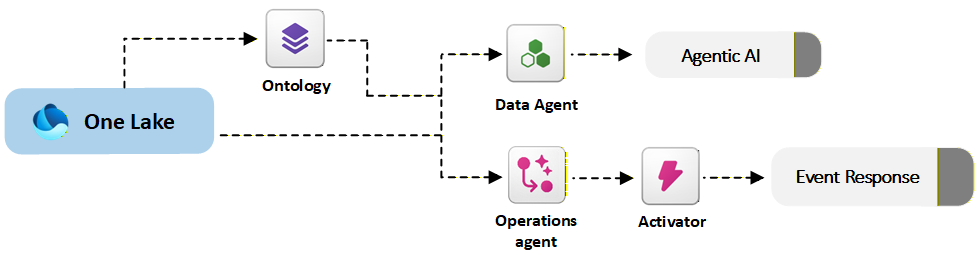
The following diagram shows how Data Agents and Operations Agents in Fabric IQ use governed enterprise data and automation services to deliver insights and trigger actions.
Choose between data agents and operations agents
Data Agents and Operations Agents in Microsoft Fabric IQ serve distinct roles. Data Agents provide conversational analytics by answering user questions in natural language, using ontology for semantic grounding and querying multiple sources like Lakehouses, Warehouses, and Power BI models. They integrate externally through Teams, Copilot Studio, and custom apps for insight delivery.
In contrast, Operations Agents focus on autonomous decision-making. They monitor real-time data streams against ontology-based rules to trigger or recommend actions. They integrate with Power Automate (through Activator), Teams for alerts and approvals, and external operational systems like ERP or CRM. Data Agents democratize data access for insights, while Operations Agents drive proactive, governed automation for operational optimization.
Data science workflows
Fabric Data Science covers the full ML lifecycle: data exploration, preparation, model experimentation, tracking, deployment, and consumption. Tools you need include notebooks, Apache Spark, MLflow, and AutoML, all within a unified platform. Data scientists can develop and operationalize ML models alongside data engineers and analysts in one place.
Track experiments with MLflow
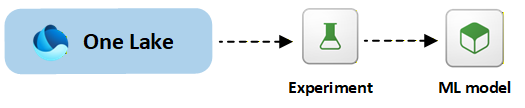
Experiments in Microsoft Fabric organize and track model training runs. An experiment in Fabric works like a MLflow experiment, it contains a collection of runs, where each run is one execution of model training code. Because Fabric integrates with MLflow, every run can automatically log relevant information such as hyperparameters, metrics, tags, code version, and output items without requiring custom logging code. MLflow tracking is natively built into Fabric's notebooks and Spark jobs, so data scientists can use MLflow APIs or Fabric's UI to create experiments and record runs.
Register and deploy ML models
ML models in Fabric are registered machine learning models. Fabric's model management uses MLflow-powered registries to store, version, and track models. After selecting the best experiment run, register the model in Fabric to store metadata like hyperparameters, metrics, and environment details. Models are saved in a standardized MLflow format, which enables interoperability across Spark and Python environments.
Models can be deployed for batch scoring in Spark or through real-time endpoints for low-latency predictions.
The following diagram shows the end-to-end Data Science workflow in Fabric, from data preparation and experimentation to model registration and deployment.
Developer data access with GraphQL
The API for GraphQL provides a single, flexible endpoint to query multiple Fabric data sources, including Warehouses, SQL Databases, Lakehouses, and mirrored databases. It supports schema discovery, generated queries, relationship modeling, and interactive query testing. It makes it easier to expose specific tables, views, and fields while enabling fast, client‑driven data access across Fabric environments.
Copilot in Power BI
Copilot in Power BI enables natural-language data interaction. Users can explore data, generate insights, create visuals, and generate DAX expressions.
The standalone Copilot experience supports cross-item conversational analysis, automatically selecting a relevant data source such as a report, semantic model, or Fabric data agent that users can access. It asks clarifying questions when needed and can immediately deliver insights once it selects the right report or model. Preparing data for AI and approving semantic models improves accuracy and ensures high-quality responses.