Muistiinpano
Tämän sivun käyttö edellyttää valtuutusta. Voit yrittää kirjautua sisään tai vaihtaa hakemistoa.
Tämän sivun käyttö edellyttää valtuutusta. Voit yrittää vaihtaa hakemistoa.
Azure network foundation services provide the core connectivity that your resources need in Azure. These services are Azure Virtual Network, Azure Private Link, and Azure DNS. They build on each other to form the foundation of your Azure network. When you move workloads to the cloud, you need a private, isolated network that connects your resources to each other and to on-premises networks, reaches Azure platform services without exposing traffic to the public internet, and resolves those services by name. Together, these three services meet that need.
This article explains what each foundation service does and how Azure Virtual Network, Azure Private Link, and Azure DNS work together to form a secure, private network in Azure.
The following table summarizes each foundation service and when to use it:
| Service | Purpose | When to use |
|---|---|---|
| Azure Virtual Network | Private network and segmentation in Azure | Isolate Azure resources, segment workloads, and connect to on-premises networks |
| Azure Private Link | Private connectivity to Azure platform services | Reach Azure PaaS services (such as Azure Storage or Azure SQL) without exposure to the public internet |
| Azure DNS | Public and private domain name hosting and resolution | Host DNS zones for your domains and resolve private endpoints from inside virtual networks |
The following diagram shows an example of how these services work together in a basic Azure network.
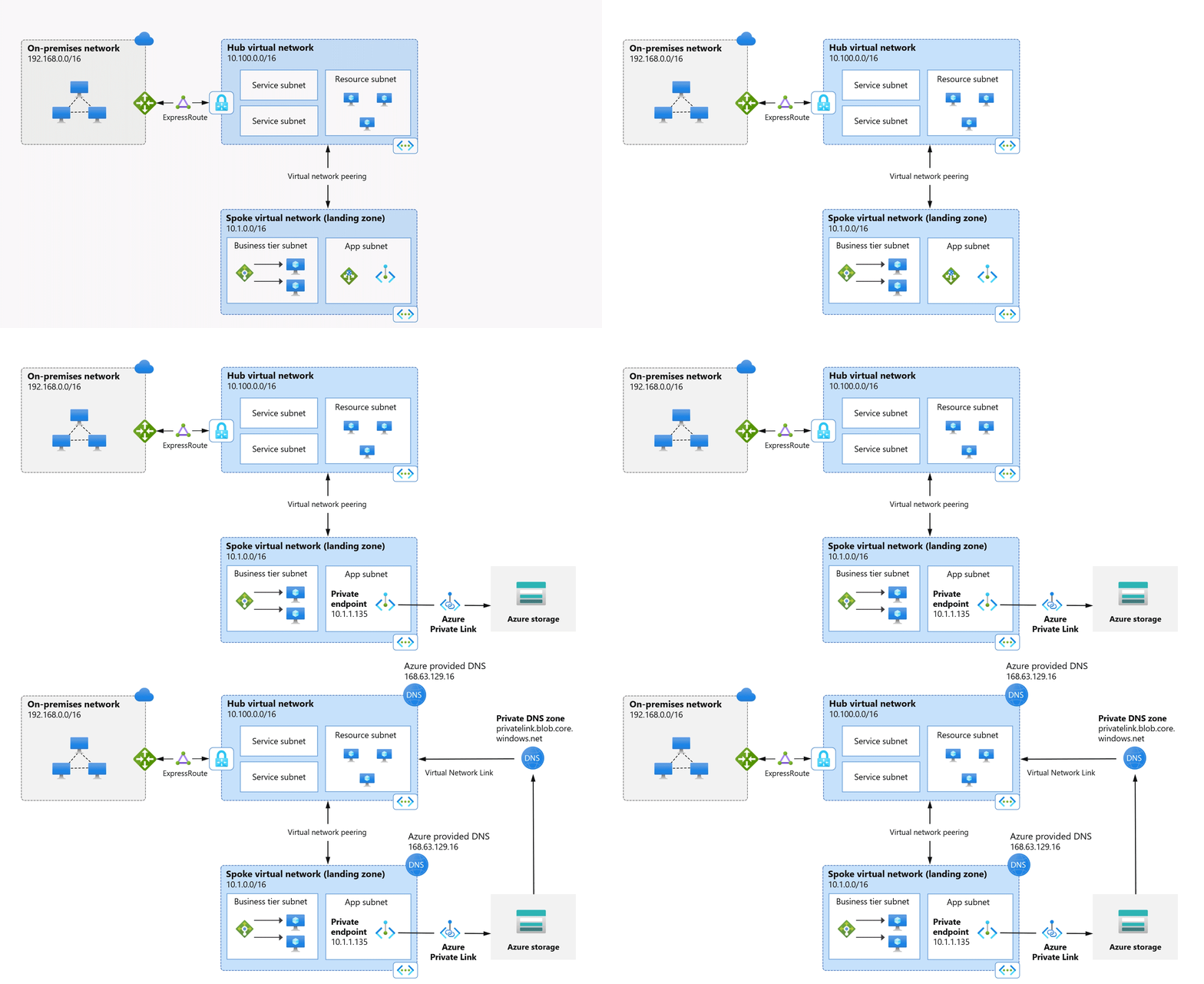
Azure network foundation services build on each other in a specific order. Azure Virtual Network establishes the private, isolated network boundary that hosts your Azure resources and connects them to on-premises networks. Within that boundary, Azure Private Link projects Azure platform services (such as Azure Storage or Azure SQL Database) into your virtual network through private endpoints, so that traffic to those services stays off the public internet. Azure DNS then resolves the names of those private endpoints and other resources to their private IP addresses, so that clients inside the virtual network reach each service by its fully qualified domain name (FQDN).
To follow how a secure, private network takes shape, read the following sections in order: Azure Virtual Network, then Azure Private Link, then Azure DNS. Each section links to more detailed guidance for that service.
Azure Virtual Network
By using Azure Virtual Network, you can create private networks in the cloud and securely connect Azure resources, the internet, and on-premises networks.
The following example provisions two virtual networks:
- Use the hub virtual network to deploy Azure services and provide access to data resources. Optionally, connect the hub to an on-premises network.
- Peer the hub with a spoke virtual network that contains a business tier subnet with virtual machines to process user interactions, and an application subnet to handle data storage and transactions.
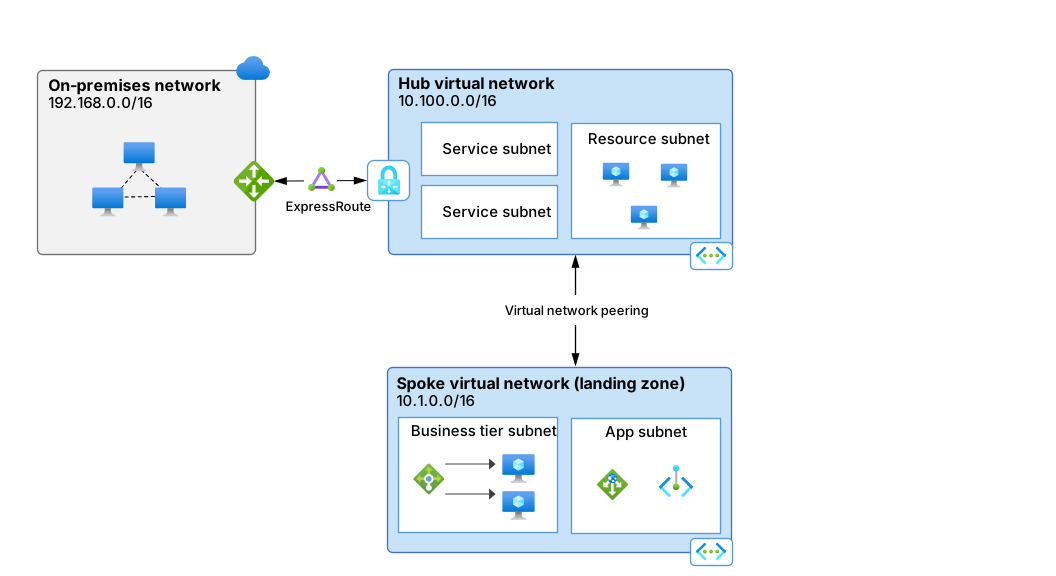
For more information about designing virtual networks, see Plan virtual networks. To create a virtual network, see Use the Azure portal to create a virtual network.
Azure Private Link
Azure Private Link provides secure, private connectivity from your virtual network to services that don't traverse the public internet. Azure Private Link builds on Azure Virtual Network: it projects Azure platform services (such as Azure Storage or Azure SQL Database) into the virtual network through a private endpoint, so that traffic to those services stays inside the network boundary.
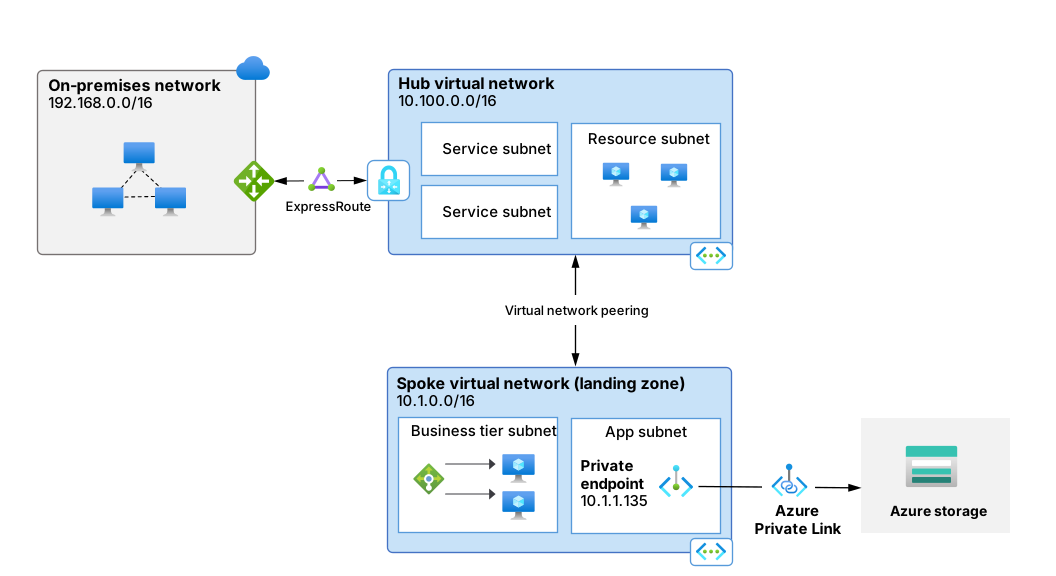
The following figure shows a private endpoint in the application subnet of a spoke virtual network. A private endpoint is a private IP address (10.1.1.135 in this example) inside the virtual network that's associated with a service powered by Azure Private Link.
Private endpoints securely connect Azure platform services into virtual networks. Azure DNS then resolves the private endpoint's FQDN to this private IP address, as described in the Azure DNS section.
Note
Private endpoints offer DNS integration options during creation. You can integrate with a private DNS zone. This configuration remains flexible, so you can add, remove, or modify it after deployment. The example shows how to select private DNS zone integration, which provides a straightforward DNS setup ideal for virtual network workloads without an Azure DNS Private Resolver. For more information, see Azure Private Endpoint DNS integration.
For an overview of private link and private endpoint, see What is Azure Private Link service and What is a private endpoint. To create a private endpoint, see Create a private endpoint.
Azure DNS
Azure DNS provides cloud-based public and private domain name hosting and resolution. It includes three DNS hosting and resolution services, plus a DNS-based load balancer:
- Azure Public DNS provides high-availability hosting for public DNS domains.
- Azure Private DNS is a DNS naming and resolution service for virtual networks and the private services hosted inside those networks.
- Azure DNS Private Resolver is a fully managed high-availability DNS service that you can use to query private DNS zones from an on-premises environment and vice versa without deploying VM-based DNS servers.
- Azure Traffic Manager is a DNS-based traffic load balancer that can distribute traffic to public-facing applications across Azure regions.
Azure DNS also provides internal DNS resolution for both private and public (internet) resources from within virtual networks. By default, virtual networks resolve DNS records by using Azure-provided DNS at 168.63.129.16.
Azure DNS completes the network foundation established by Azure Virtual Network and Azure Private Link: it resolves the private endpoints that Private Link projects into your virtual network to their private IP addresses, so that clients reach each service by its FQDN. Consider a private endpoint for an Azure Blob Storage account, deployed in a spoke virtual network and assigned the private IP 10.1.1.135. This private endpoint is associated with the private DNS zone privatelink.blob.core.windows.net. The resource type determines the zone name (blob storage, in this case). For more information about private DNS zones and private endpoints, see Azure Private Endpoint private DNS zone values.
A virtual network link also connects the privatelink.blob.core.windows.net zone to the hub virtual network. This link lets all resources in the hub virtual network resolve the zone by using Azure-provided DNS (168.63.129.16) and access the private endpoint by its FQDN.
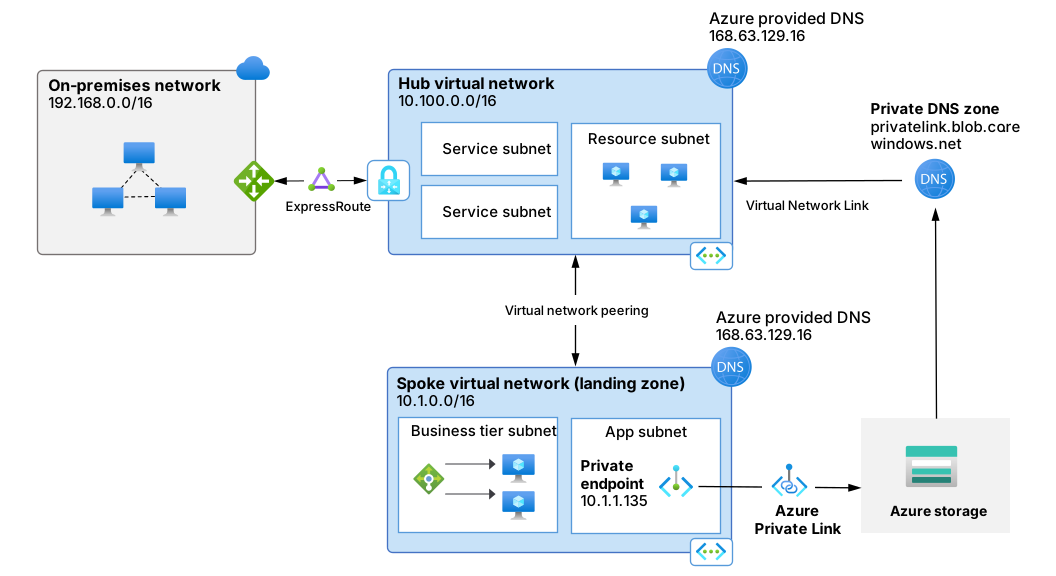
By default, you can resolve private endpoints only from within Azure. To resolve a storage account exposed through a private endpoint from on-premises, or to resolve on-premises resources from within Azure, you can configure an Azure DNS Private Resolver in the hub virtual network (not shown).
For information about private endpoint scenarios with an Azure DNS Private Resolver, see private endpoint DNS configuration scenarios.
For more information about configuring an Azure DNS Private Resolver, see Resolve Azure and on-premises domains.
Azure portal experience
The Azure portal provides a centralized experience for getting started with network foundation services. Information and links help you create an isolated network, manage network services, secure access to resources, manage hybrid name resolution, and troubleshoot network issues.
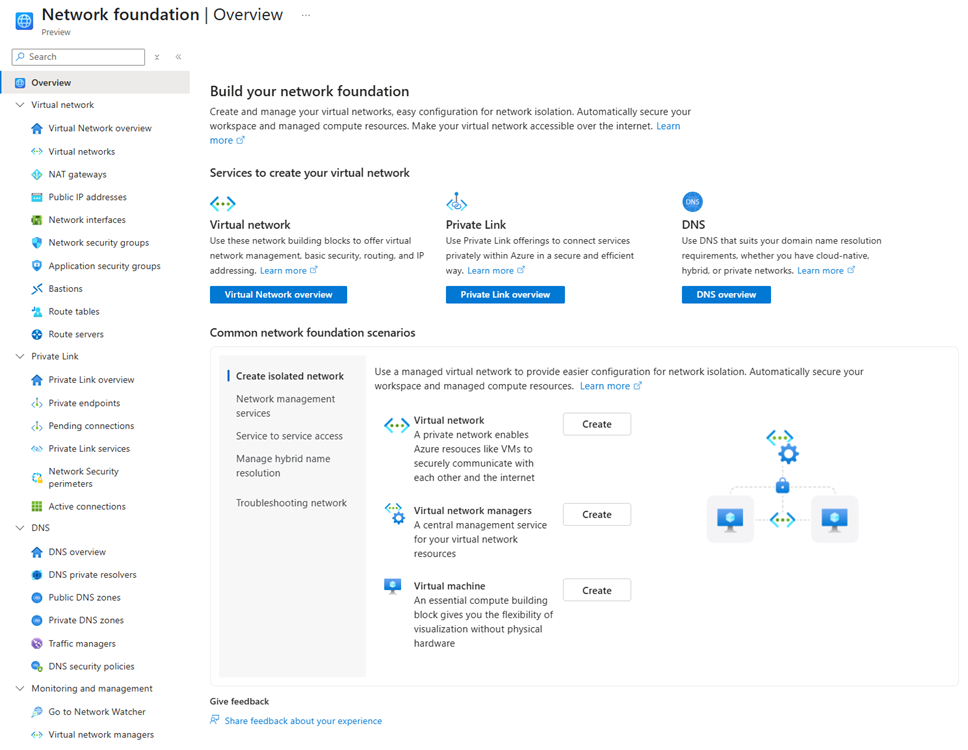
Resource links in the left service tree also help you understand, create, and view supporting components of the network foundation services.