Nota
O acceso a esta páxina require autorización. Pode tentar iniciar sesión ou modificar os directorios.
O acceso a esta páxina require autorización. Pode tentar modificar os directorios.
As plataformas Copilot Studio e Dynamics 365 Customer Service difiren lixeiramente na forma en que soportan mensaxes de medios enriquecidos segundo o canal e o tipo de mensaxe de medios ricos. Este artigo describe como podes soportar mensaxes multimedia enriquecidas en Copilot Studio.
Recuperar o JSON do axente para Apple Messages for Business
- No mapa do sitio do centro de administración do servizo Copilot, seleccione Produtividade na experiencia de soporte.
- Na páxina de produtividade , seleccione Xestionar mensaxes enriquecidas.
- Na lista de todas as mensaxes dispoñibles da lista, seleccione unha mensaxe rica que desexa enviar á conversa.
- Para mensaxes enriquecidas de Apple Messages for Business, use a API Microsoft.Omnichannel.sendMessageToConversation para enviar ficheiros JSON.
Recuperar JSON do axente para formularios de chat en directo, JSON personalizado de chat en directo e respostas suxeridas por WhatsApp
No mapa do sitio do centro de administración do servizo Copilot, seleccione Produtividade na experiencia de soporte.
Na páxina de produtividade , seleccione Xestionar mensaxes enriquecidas.
Busca a mensaxe multimedia que queres que envíe un axente e, se ten JSON dispoñible, aparece na columna JSON para Copilot Studio . Seleccione Ver JSON e o tipo de canle específico para copiar o JSON.
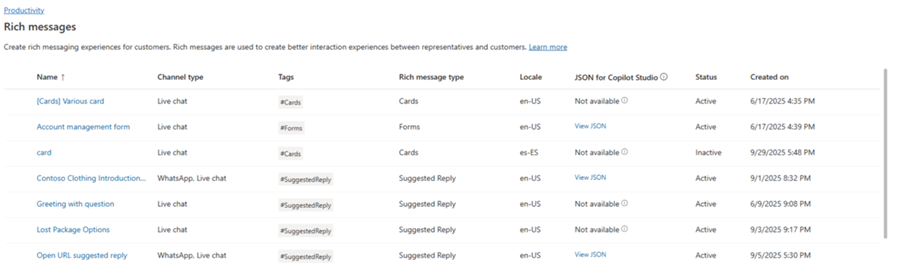
Para os modelos de chat en directo e WhatsApp rich media, podes pegar o JSON directamente nun nodo de tarxeta adaptativa en Copilot Studio.
Mostras JSON para mensaxes enriquecidas para Apple Messages for Business
Esta sección inclúe mostras de JSON para os tipos de mensaxes ricos dispoñibles no canal Apple Messages for Business en Dynamics 365 Customer Service. Máis información: Xestionar mensaxes ricas
Nota
Non podes enviar mensaxes enriquecidas de tipo Forms ás conversas.
Apple Pay
let applePayJSON = // <copy_and_paste_details_content>
applePayJSON.survey = { Questions: JSON.parse(applePayJSON.survey)[0].Questions, Answers: JSON.parse(applePayJSON.survey)[1].Answers };
applePayJSON.survey.Answers.AppleMessagesforBusinessJSON = JSON.parse(applePayJSON.survey.Answers.AppleMessagesforBusinessJSON);
applePayJSON.survey.Answers.AppleMessagesforBusinessJSON = JSON.stringify(applePayJSON.survey.Answers.AppleMessagesforBusinessJSON);
applePayJSON.survey = JSON.stringify(applePayJSON.survey);

// Can now send this payload using the API
Microsoft.Omnichannel.sendMessageToConversation(applePayJSON, false);

// Or take the JSON elsewhere for use in bringing your own logic
copy(applePayJSON);
Autenticación
let authJSON = // <copy_and_paste_details_content>
authJSON.survey = { Questions: JSON.parse(authJSON.survey)[0].Questions, Answers: JSON.parse(authJSON.survey)[1].Answers };
authJSON.survey = JSON.stringify(authJSON.survey);

// Can now send this payload using the API
Microsoft.Omnichannel.sendMessageToConversation(authJSON, false);

// Or take the JSON elsewhere for use in bringing your own logic
copy(authJSON);
JSON personalizado (aplicación iMessage)
let customJSON = // <copy_and_paste_details_content>
customJSON.survey = { Questions: JSON.parse(customJSON.survey)[0].Questions, Answers: JSON.parse(customJSON.survey)[1].Answers };
customJSON.survey.Answers.AppleMessagesforBusinessJSON = JSON.parse(customJSON.survey.Answers.AppleMessagesforBusinessJSON);
customJSON.survey.Answers.AppleMessagesforBusinessJSON = JSON.stringify(customJSON.survey.Answers.AppleMessagesforBusinessJSON);
customJSON.survey = JSON.stringify(customJSON.survey);

// Can now send this payload using the API
Microsoft.Omnichannel.sendMessageToConversation(customJSON, false);

// Or take the JSON elsewhere for use in bringing your own logic
copy(customJSON);
Escoller de listas
listPickerJSON = // <copy_and_paste_details_content>
listPickerJSON.survey = { Questions: JSON.parse(lpFromDetails.survey)[0].Questions, Answers: JSON.parse(listPickerJSON.survey)[1].Answers };
listPickerJSON.survey = JSON.stringify(listPickerJSON.survey);

// Can now send this payload using the API
Microsoft.Omnichannel.sendMessageToConversation(listPickerJSON, false);

// Or take the JSON elsewhere for use in bringing your own logic
copy(listPickerJSON);
Resposta suxerida
suggestedReplyJSON = // <copy_and_paste_details_content>
suggestedReplyJSON.survey = { Questions: JSON.parse(suggestedReplyJSON.survey)[0].Questions, Answers: JSON.parse(suggestedReplyJSON.survey)[1].Answers };
suggestedReplyJSON.survey = JSON.stringify(suggestedReplyJSON.survey);

// Can now send this payload using the API
Microsoft.Omnichannel.sendMessageToConversation(suggestedReplyJSON, false);

// Or take the JSON elsewhere for use in bringing your own logic
copy(suggestedReplyJSON);
Selector de horas
timePickerJSON = // <copy_and_paste_details_content>
timePickerJSON.survey = { Questions: JSON.parse(timePickerJSON.survey)[0].Questions, Answers: JSON.parse(timePickerJSON.survey)[1].Answers };
timePickerJSON.survey = JSON.stringify(timePickerJSON.survey);

// Can now send this payload using the API
Microsoft.Omnichannel.sendMessageToConversation(timePickerJSON, false);

// Or take the JSON elsewhere for use in bringing your own logic
copy(timePickerJSON);
Ligazón enriquecida de vídeo
videoRichLinkJSON = // <copy_and_paste_details_content>
videoRichLinkJSON.survey = { Questions: JSON.parse(videoRichLinkJSON.survey)[0].Questions, Answers: JSON.parse(videoRichLinkJSON.survey)[1].Answers };
timePickerJSON.survey = JSON.stringify(videoRichLinkJSON.survey);

// Can now send this payload using the API
Microsoft.Omnichannel.sendMessageToConversation(videoRichLinkJSON, false);

// Or take the JSON elsewhere for use in bringing your own logic
copy(videoRichLinkJSON);
Enlace enriquecido web
websiteRichLinkJSON = // <copy_and_paste_details_content>
websiteRichLinkJSON.survey = { Questions: JSON.parse(websiteRichLinkJSON.survey)[0].Questions, Answers: JSON.parse(websiteRichLinkJSON.survey)[1].Answers };
timePickerJSON.survey = JSON.stringify(websiteRichLinkJSON.survey);

// Can now send this payload using the API
Microsoft.Omnichannel.sendMessageToConversation(websiteRichLinkJSON, false);

// Or take the JSON elsewhere for use in bringing your own logic
copy(websiteRichLinkJSON);
Configurar axentes para enviar respostas suxeridas de chat en directo e tarxetas/carruseles
Copilot Studio admite respostas suxeridas e tarxetas básicas fóra da caixa. Máis información en Enviar unha mensaxe - Microsoft Copilot Studio.
Nota
Copilot Studio refírese ás respostas suxeridas como respostas rápidas.
Información relacionada
Referencia á API JavaScript do SDK de chat en directo
Referencia da API JavaScript omnicanal
enviar mensaxe á conversa