Megjegyzés
Az oldalhoz való hozzáféréshez engedély szükséges. Megpróbálhat bejelentkezni vagy módosítani a címtárat.
Az oldalhoz való hozzáféréshez engedély szükséges. Megpróbálhatja módosítani a címtárat.
A következőre vonatkozik: : SQL Server
Ez a cikk az egészségtelen bővítmények azonosításának módjait ismerteti, amelyek nincsenek megfelelően telepítve, nem futnak megfelelően, vagy nincsenek csatlakoztatva az Azure-hoz.
Nem kifogástalan bővítmények azonosítása
A beépített bővítményállapot-irányítópult használata az Azure portálon
A Azure portálon a built-in bővítményállapot-irányítópult használatával megjelenítheti az SQL Server összes telepített Azure bővítményének állapotát.
Borravaló
Hozzon létre saját egyéni irányítópultot ezzel a fájllal az sql-server-samples GitHub adattárból: Arc-kompatibilis SQL Server Health.json.
Meg nem felelő bővítmények lekérdezése az Azure Resource Graph használatával
A Azure Resource Graph segítségével azonosíthatja a SQL Server Azure bővítményének állapotát a Azure Arc-kompatibilis kiszolgálókon.
Borravaló
Ha még nem ismeri, ismerje meg a Azure Resource Graph:
Ez a lekérdezés a SQL Server példányait adja vissza a telepített bővítményekkel rendelkező kiszolgálókon, de nem kifogástalan állapotban.
resources
| where type == "microsoft.hybridcompute/machines/extensions"
| where properties.type in ("WindowsAgent.SqlServer", "LinuxAgent.SqlServer")
| extend targetMachineName = tolower(tostring(split(id, '/')[8])) // Extract the machine name from the extension's id
| join kind=leftouter (
    resources
    | where type == "microsoft.hybridcompute/machines"
    | project machineId = id, MachineName = name, subscriptionId, LowerMachineName = tolower(name), resourceGroup , MachineStatus= properties.status , MachineProvisioningStatus= properties.provisioningState, MachineErrors = properties.errorDetails //Project relevant machine health information.
) on $left.targetMachineName == $right.LowerMachineName and $left.resourceGroup == $right.resourceGroup and $left.subscriptionId == $right.subscriptionId // Join Based on MachineName in the id and the machine's name, the resource group, and the subscription. This join allows us to present the data of the machine as well as the extension in the final output.
| extend statusExpirationLengthRange = 3d // Change this value to change the acceptable range for the last time an extension should have reported its status.
| extend startDate = startofday(now() - statusExpirationLengthRange), endDate = startofday(now()) // Get the start and end position for the given range.
| extend extractedDateString = extract("timestampUTC : (\\d{4}\\W\\d{2}\\W\\d{2})", 1, tostring(properties.instanceView.status.message)) // Extracting the date string for the LastUploadTimestamp. Is empty if none is found.
| extend extractedDateStringYear = split(extractedDateString, '/')[0], extractedDateStringMonth = split(extractedDateString, '/')[1], extractedDateStringDay = split(extractedDateString, '/')[2] // Identifying each of the parts of the date that was extracted from the message.
| extend extractedDate = todatetime(strcat(extractedDateStringYear,"-",extractedDateStringMonth,"-",extractedDateStringDay,"T00:00:00Z")) // Converting to a datetime object and rewriting string into ISO format because todatetime() does not work using the previous format.
| extend isNotInDateRange = not(extractedDate >= startDate and extractedDate <= endDate) // Created bool which is true if the date we extracted from the message is not within the specified range. This bool will also be true if the date was not found in the message.
| where properties.instanceView.status.message !contains "SQL Server Extension Agent: Healthy" // Begin searching for unhealthy extensions using the following 1. Does extension report being healthy. 2. Is last upload within the given range. 3. Is the upload status in an OK state. 4. Is provisioning state not in a succeeded state.
    or isNotInDateRange
    or properties.instanceView.status.message !contains "uploadStatus : OK"
    or properties.provisioningState != "Succeeded"
    or MachineStatus != "Connected"
| extend FailureReasons = strcat( // Makes a String to list all the reason that this resource got flagged for
        iif(MachineStatus != "Connected",strcat("- Machine's status is ", MachineStatus," -"),"") ,
        iif(MachineErrors != "[]","- Machine reports errors -", ""),
        iif(properties.instanceView.status.message !contains "SQL Server Extension Agent: Healthy","- Extension reported unhealthy -",""),
        iif(isNotInDateRange,"- Last upload outside acceptable range -",""),
        iif(properties.instanceView.status.message !contains "uploadStatus : OK","- Upload status is not reported OK -",""),
        iif(properties.provisioningState != "Succeeded",strcat("- Extension provisiong state is ", properties.provisioningState," -"),"")
    )
| extend RecommendedAction = //Attempt to Identify RootCause based on information gathered, and point customer to what they should investigate first.
    iif(MachineStatus == "Disconnected", "Machine is disconnected. Please reconnect the machine.",
        iif(MachineStatus == "Expired", "Machine cert is expired. Go to the machine on the Azure portal for more information on how to resolve this issue.",
            iif(MachineStatus != "Connected", strcat("Machine status is ", MachineStatus,". Investigate and resolve this issue."),
                iif(MachineProvisioningStatus != "Succeeded", strcat("Machine provisioning status is ", MachineProvisioningStatus, ". Investigate and resolve machine provisioning status"),
                    iff(MachineErrors != "[]", "Machine is reporting errors. Investigate and resolve machine errors",
                        iif(properties.provisioningState != "Succeeded", strcat("Extension provisioning status is ", properties.provisioningState,". Investigate and resolve extension provisioning state."),
                            iff(properties.instanceView.status.message !contains "SQL Server Extension Agent:" and properties.instanceView.status.message contains "SQL Server Extension Agent Deployer", "SQL Server extension employer ran. However, SQL Server extension seems to not be running. Verify that the extension is currently running.",
                                iff(properties.instanceView.status.message !contains "uploadStatus : OK" or isNotInDateRange or properties.instanceView.status.message !contains "SQL Server Extension Agent: Healthy", "Extension reported as unhealthy. View FailureReasons and LastExtensionStatusMessage for more information as to the cause of the failure.",
                                    "Unable to recommend actions. Please view FailureReasons."
                                )
                            )
                        )
                    )
                )
            )
        )
    )
| project ID = id, MachineName, ResourceGroup = resourceGroup, SubscriptionID = subscriptionId, Location = location, RecommendedAction, FailureReasons, LicenseType = properties.settings.LicenseType,
    LastReportedExtensionHealth = iif(properties.instanceView.status.message !contains "SQL Server Extension Agent: Healthy", "Unhealthy", "Healthy"),
    LastExtensionUploadTimestamp = iif(indexof(properties.instanceView.status.message, "timestampUTC : ") > 0,
        substring(properties.instanceView.status.message, indexof(properties.instanceView.status.message, "timestampUTC : ") + 15, 10),
        "no timestamp"),
    LastExtensionUploadStatus = iif(indexof(properties.instanceView.status.message, "uploadStatus : OK") > 0, "OK", "Unhealthy"),
    ExtensionProvisioningState = properties.provisioningState,
    MachineStatus, MachineErrors, MachineProvisioningStatus,MachineId = machineId,
    LastExtensionStatusMessage = properties.instanceView.status.message
A lehetséges problémák azonosításához tekintse át az RecommendedAction vagy a FailureReasons oszlop értékét. A RecommendedAction oszlop a probléma megoldásának lehetséges első lépéseit, illetve az első ellenőrzéshez szükséges nyomokat tartalmazza. A FailureReasons oszlop felsorolja azokat az okokat, amelyek miatt az erőforrás nem megfelelőnek minősült. Végül ellenőrizze a LastExtensionStatusMessage-t, hogy megtekintse az ügynök által utoljára jelentett üzenetet.
Ajánlások
| Javasolt művelet | Művelet részletei |
|---|---|
| A gépi tanúsítvány lejárt. Az Azure portálon lévő géphez menjen további információért a probléma megoldásával kapcsolatban. |
Az Arc-kompatibilis gépet újra csatlakoztatni kell az Arc-hoz, mert a hitelesítéshez használt tanúsítvány lejárt az Azure-ban. Az Arc-gép állapota Expired a Azure portálon. Eltávolíthatja az ügynököt, majd újra telepítheti. Újraregisztráláskor nem kell törölnie az Arc-kompatibilis SQL Server erőforrásokat a portálon. Az SQL-bővítmény automatikusan újra települ, ha automatikus előkészítési engedélyezve van (alapértelmezett). |
| A gép le van választva. Csatlakoztassa újra a gépet. |
Az Arc-gép a state = Disconnectedhelyiségben található. Ennek az állapotnak különböző okai lehetnek:Az archoz csatlakoztatott gépügynök leáll, le van tiltva vagy folyamatosan összeomlik vagy Az ügynök és a Azure között a kapcsolat le van tiltva. Ellenőrizze az Arc-csatlakoztatott gépi szolgáltatások/démonok állapotát, hogy engedélyezve vannak-e, és fut-e. Ellenőrizze a kapcsolatot. Az ügynök hibaelhárítása arészletes napló használatával. |
| Egészségtelenként jelentett bővítmény. A hiba okával kapcsolatos további információkért tekintse meg a FailureReasons és a LastExtensionStatusMessage webhelyet. Utolsó feltöltés elfogadható tartományon kívül (az elmúlt három napon belül). |
Ellenőrizze a LastExtensionUploadTimestamp oszlopot. Ha Nincs időbélyeg, soha nem jelentett leltár- vagy használati adatokat az Azure számára.
Az adatfeldolgozási szolgáltatáshoz és a telemetriai végpontokhoz való kapcsolódás hibaelhárítása. Ha az utolsó feltöltés az elfogadható tartományon kívül esik (az elmúlt három napon belül), és minden más rendben van, például LastExtensionUploadStatus, ExtensionProvisioningState és MachineStatus, akkor lehetséges, hogy a SQL Server szolgáltatás/démon Azure bővítménye leáll. Megtudhatja, hogy miért áll le, és indítsa újra. Ellenőrizze a LastExtensionStatusMessage-t a probléma egyéb nyomaiért. |
| A bővítménykiépítés állapota Sikertelen. A bővítmény kiépítési állapotának vizsgálata és megoldása. |
Az SQL-bővítmény kezdeti telepítése vagy a frissítés meghiúsult.Troubleshoot Azure bővítmény SQL Server üzembe helyezéshez. Ellenőrizze a LastExtensionStatusMessageértékét. |
| A feltöltési állapotot nem jelentik "OK"-ként. | Ellenőrizze a LastExtensionMessage oszlopot az irányítópulton, és tekintse meg az uploadStatus értéket és az uploadMessage értéket (ha van, a verziótól függően). Az uploadStatus érték általában HTTP-hibakód. Tekintse át hibakódokhibaelhárítását. Az uploadMessage több konkrét információval is rendelkezhet. Az adatfeldolgozási szolgáltatáshoz és a telemetriai végpontokhoz való kapcsolódás hibaelhárítása. |
| A bővítmények kiépítésének állapota frissítése vagy A bővítménykiépítés állapota létrehozása vagy A bővítmény kiépítési állapota Sikertelen vagy A bővítmény telepítési állapota törlési |
Ha egy adott kiterjesztés több mint 30 percig marad az alábbi állapotok egyikében, valószínűleg probléma merül fel a telepítéssel kapcsolatban. Távolítsa el a bővítményt, és telepítse újra a parancssori felület vagy a portál használatával. Ha a probléma továbbra is fennáll, ellenőrizze a telepítő és a bővítmény naplóit. Ha a bővítmény létrehozása sikertelen, ellenőrizze, hogy az ügynök csatlakoztatva van-e, és a társított ügynökszolgáltatások futnak-e. Ha a törlés sikertelen, távolítsa el az ügynököt, és szükség esetén törölje az Arc-gép erőforrását a portálon, majd telepítse újra. Eltávolíthatja az ügynököt, majd újra telepítheti. |
Problémás bővítmény azonosítása (PowerShell)
Ez a példa a PowerShellben fut. A példa ugyanazt az eredményt adja vissza, mint az előző lekérdezés, de egy PowerShell-szkripten keresztül.
# PowerShell script to execute an Azure Resource Graph query using Azure CLI
# where the extension status is unhealthy or the extension last upload time isn't in this month or the previous month.

# Requires the Az.ResourceGraph PowerShell module

# Login to Azure if needed
#az login

# Define the Azure Resource Graph query
$query = @"
resources
| where type == "microsoft.hybridcompute/machines/extensions"
| where properties.type in ("WindowsAgent.SqlServer", "LinuxAgent.SqlServer")
| extend targetMachineName = tolower(tostring(split(id, '/')[8])) // Extract the machine name from the extension's id
| join kind=leftouter (
    resources
    | where type == "microsoft.hybridcompute/machines"
    | project machineId = id, MachineName = name, subscriptionId, LowerMachineName = tolower(name), resourceGroup , MachineStatus= properties.status , MachineProvisioningStatus= properties.provisioningState, MachineErrors = properties.errorDetails //Project relevant machine health information.
) on $left.targetMachineName == $right.LowerMachineName and $left.resourceGroup == $right.resourceGroup and $left.subscriptionId == $right.subscriptionId // Join Based on MachineName in the id and the machine's name, the resource group, and the subscription. This join allows us to present the data of the machine as well as the extension in the final output.
| extend statusExpirationLengthRange = 3d // Change this value to change the acceptable range for the last time an extension should have reported its status.
| extend startDate = startofday(now() - statusExpirationLengthRange), endDate = startofday(now()) // Get the start and end position for the given range.
| extend extractedDateString = extract("timestampUTC : (\\d{4}\\W\\d{2}\\W\\d{2})", 1, tostring(properties.instanceView.status.message)) // Extracting the date string for the LastUploadTimestamp. Is empty if none is found.
| extend extractedDateStringYear = split(extractedDateString, '/')[0], extractedDateStringMonth = split(extractedDateString, '/')[1], extractedDateStringDay = split(extractedDateString, '/')[2] // Identifying each of the parts of the date that was extracted from the message.
| extend extractedDate = todatetime(strcat(extractedDateStringYear,"-",extractedDateStringMonth,"-",extractedDateStringDay,"T00:00:00Z")) // Converting to a datetime object and rewriting string into ISO format because todatetime() does not work using the previous format.
| extend isNotInDateRange = not(extractedDate >= startDate and extractedDate <= endDate) // Created bool which is true if the date we extracted from the message is not within the specified range. This bool will also be true if the date was not found in the message.
| where properties.instanceView.status.message !contains "SQL Server Extension Agent: Healthy" // Begin searching for unhealthy extensions using the following 1. Does extension report being healthy. 2. Is last upload within the given range. 3. Is the upload status in an OK state. 4. Is provisioning state not in a succeeded state.
    or isNotInDateRange
    or properties.instanceView.status.message !contains "uploadStatus : OK"
    or properties.provisioningState != "Succeeded"
    or MachineStatus != "Connected"
| extend FailureReasons = strcat( // Makes a String to list all the reason that this resource got flagged for
        iif(MachineStatus != "Connected",strcat("- Machine's status is ", MachineStatus," -"),"") ,
        iif(MachineErrors != "[]","- Machine reports errors -", ""),
        iif(properties.instanceView.status.message !contains "SQL Server Extension Agent: Healthy","- Extension reported unhealthy -",""),
        iif(isNotInDateRange,"- Last upload outside acceptable range -",""),
        iif(properties.instanceView.status.message !contains "uploadStatus : OK","- Upload status is not reported OK -",""),
        iif(properties.provisioningState != "Succeeded",strcat("- Extension provisiong state is ", properties.provisioningState," -"),"")
    )
| extend RecommendedAction = //Attempt to Identify RootCause based on information gathered, and point customer to what they should investigate first.
    iif(MachineStatus == "Disconnected", "Machine is disconnected. Please reconnect the machine.",
        iif(MachineStatus == "Expired", "Machine cert is expired. Go to the machine on the Azure portal for more information on how to resolve this issue.",
            iif(MachineStatus != "Connected", strcat("Machine status is ", MachineStatus,". Investigate and resolve this issue."),
                iif(MachineProvisioningStatus != "Succeeded", strcat("Machine provisioning status is ", MachineProvisioningStatus, ". Investigate and resolve machine provisioning status"),
                    iff(MachineErrors != "[]", "Machine is reporting errors. Investigate and resolve machine errors",
                        iif(properties.provisioningState != "Succeeded", strcat("Extension provisioning status is ", properties.provisioningState,". Investigate and resolve extension provisioning state."),
                            iff(properties.instanceView.status.message !contains "SQL Server Extension Agent:" and properties.instanceView.status.message contains "SQL Server Extension Agent Deployer", "SQL Server extension employer ran. However, SQL Server extension seems to not be running. Verify that the extension is currently running.",
                                iff(properties.instanceView.status.message !contains "uploadStatus : OK" or isNotInDateRange or properties.instanceView.status.message !contains "SQL Server Extension Agent: Healthy", "Extension reported as unhealthy. View FailureReasons and LastExtensionStatusMessage for more information as to the cause of the failure.",
                                    "Unable to recommend actions. Please view FailureReasons."
                                )
                            )
                        )
                    )
                )
            )
        )
    )
| project ID = id, MachineName, ResourceGroup = resourceGroup, SubscriptionID = subscriptionId, Location = location, RecommendedAction, FailureReasons, LicenseType = properties.settings.LicenseType,
    LastReportedExtensionHealth = iif(properties.instanceView.status.message !contains "SQL Server Extension Agent: Healthy", "Unhealthy", "Healthy"),
    LastExtensionUploadTimestamp = iif(indexof(properties.instanceView.status.message, "timestampUTC : ") > 0,
        substring(properties.instanceView.status.message, indexof(properties.instanceView.status.message, "timestampUTC : ") + 15, 10),
        "no timestamp"),
    LastExtensionUploadStatus = iif(indexof(properties.instanceView.status.message, "uploadStatus : OK") > 0, "OK", "Unhealthy"),
    ExtensionProvisioningState = properties.provisioningState,
    MachineStatus, MachineErrors, MachineProvisioningStatus,MachineId = machineId,
    LastExtensionStatusMessage = properties.instanceView.status.message
"@

# Execute the Azure Resource Graph query
$result = Search-AzGraph -Query $query

# Output the results
$result | Format-Table -Property ExtensionHealth, LastUploadTimestamp, LastUploadStatus, Message
A lehetséges problémák azonosításához tekintse át az RecommendedAction vagy a FailureReasons oszlop értékét. A RecommendedAction oszlop a probléma megoldásának lehetséges első lépéseit, illetve az első ellenőrzéshez szükséges nyomokat tartalmazza. A FailureReasons oszlop felsorolja azokat az okokat, amelyek miatt az erőforrás nem megfelelőnek minősült. Végül ellenőrizze a LastExtensionStatusMessage-t, hogy megtekintse az ügynök által utoljára jelentett üzenetet.
Hiányzó bővítmények azonosítása
Azonosítsa a bővítményeket a legutóbbi állapotfrissítések nélkül. Ez a lekérdezés a SQL Server Azure bővítményeinek listáját adja vissza a bővítmény állapotának legutóbbi frissítése óta eltelt napok száma alapján. A "-1" érték azt jelzi, hogy a bővítmény összeomlott, és van egy hívásverem a bővítmény állapotjelentésében.
// Show the timestamp extracted
// If an extension has crashed (i.e. no heartbeat), fill timestamp with "1900/01/01, 00:00:00.000"
//
resources
| where type =~ 'microsoft.hybridcompute/machines/extensions'
| extend extensionStatus = parse_json(properties).instanceView.status.message
| extend timestampExtracted = extract(@"timestampUTC\s*:\s*(\d{4}/\d{2}/\d{2}, \d{2}:\d{2}:\d{2}\.\d{3})", 1, tostring(extensionStatus))
| extend timestampNullFilled = iff(isnull(timestampExtracted) or timestampExtracted == "", "1900/01/01, 00:00:00.000", timestampExtracted)
| extend timestampKustoFormattedString = strcat(replace(",", "", replace("/", "-", replace("/", "-", timestampNullFilled))), "Z")
| extend agentHeartbeatUtcTimestamp = todatetime(timestampKustoFormattedString)
| extend agentHeartbeatLagInDays = datetime_diff('day', now(), agentHeartbeatUtcTimestamp)
| project id, extensionStatus, agentHeartbeatUtcTimestamp, agentHeartbeatLagInDays
| limit 100
| order by ['agentHeartbeatLagInDays'] asc
Ez a lekérdezés a bővítmények számát adja vissza a bővítmény állapotának legutóbbi frissítése óta eltelt napok száma szerint csoportosítva. A "-1" érték azt jelzi, hogy a bővítmény összeomlott, és van egy hívásverem a bővítmény állapotjelentésében.
// Aggregate by timestamp
//
// -1: Crashed extension with no heartbeat, we got a stacktrace instead
//  0: Healthy
// >1: Stale/Offline
//
resources
| where type =~ 'microsoft.hybridcompute/machines/extensions'
| extend extensionStatus = parse_json(properties).instanceView.status.message
| extend timestampExtracted = extract(@"timestampUTC\s*:\s*(\d{4}/\d{2}/\d{2}, \d{2}:\d{2}:\d{2}\.\d{3})", 1, tostring(extensionStatus))
| extend timestampNullFilled = iff(isnull(timestampExtracted) or timestampExtracted == "", "1900/01/01, 00:00:00.000", timestampExtracted)
| extend timestampKustoFormattedString = strcat(replace(",", "", replace("/", "-", replace("/", "-", timestampNullFilled))), "Z")
| extend agentHeartbeatUtcTimestamp = todatetime(timestampKustoFormattedString)
| extend agentHeartbeatLagInDays = iff(agentHeartbeatUtcTimestamp == todatetime("1900/01/01, 00:00:00.000Z"), -1, datetime_diff('day', now(), agentHeartbeatUtcTimestamp))
| summarize numExtensions = count() by agentHeartbeatLagInDays
| order by numExtensions desc
A törölt erőforrás továbbra is megjelenik a Azure portálon
Megjegyzés:
Miután töröl egy SQL Server – Azure Arc erőforrást, előfordulhat, hogy az erőforrás egy ideig továbbra is megjelenik az Azure portálon. Ezt a viselkedést a Azure Resource Manager gyorsítótárazás okozza. Az erőforrás általában eltűnik a gyorsítótár frissítése után. Ha az erőforrás több óra elteltével is megjelenik, a Azure Resource Graph lekérdezésével vagy a Azure CLI használatával ellenőrizheti, hogy sikeresen törölték-e. Nincs szükség további műveletre – az erőforrás nem működik, és a törlés után nem jár díjakkal.
A bővítmény frissítése
Az aktuális bővítménykiadás verziójának meghatározásához tekintse át a kibocsátási megjegyzéseket.
A bővítmény verziójának ellenőrzéséhez használja a következő PowerShell-parancsot:
azcmagent version
A bővítményfrissítések egyszerűsítése érdekében mindenképpen engedélyezze az automatikus frissítéseket. A bővítményt manuálisan is frissítheti a Azure portál, a PowerShell és a Azure CLI használatával.
Ha frissíteni szeretné a bővítményt a Azure portálon, kövesse az alábbi lépéseket:
A Azure portálon lépjen a Machines – Azure Arc.
A kiszolgáló Overview paneljének megnyitásához válassza ki annak a gépnek a nevét, amelyen a SQL Server telepítve van.
A Beállítások területen válassza a Bővítmények lehetőséget.
Jelölje be a bővítmény jelölőnégyzetét
WindowsAgent.SqlServer, majd válassza a Frissítés lehetőséget a navigációs menüben.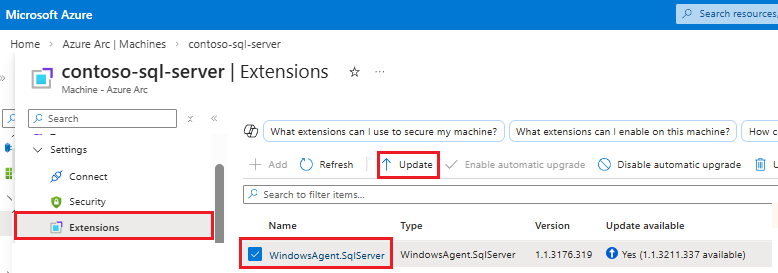
A frissítés befejezéséhez válassza az Igen lehetőséget a Bővítmény frissítése párbeszédpanelen.
A SQL Server Azure bővítményének frissítéséről további információt a Upgrade bővítmény című témakörben talál.