Megjegyzés
Az oldalhoz való hozzáféréshez engedély szükséges. Megpróbálhat bejelentkezni vagy módosítani a címtárat.
Az oldalhoz való hozzáféréshez engedély szükséges. Megpróbálhatja módosítani a címtárat.
Ismerje meg, hogyan használhat vektorkeresést az Azure DocumentDB-ben a .NET MongoDB-illesztővel a vektoradatok hatékony tárolásához és lekérdezéséhez.
Ez a rövid útmutató egy .NET mintaalkalmazás GitHub használatával bemutatja a főbb vektorkeresési technikákat.
Az alkalmazás egy szállodai mintaadatkészletet használ egy JSON-fájlban, amelyben előre kiszámított vektorok vannak a text-embedding-3-small modellből, de a vektorokat saját maga is létrehozhatja. A szálloda adatai közé tartoznak a szállodanevek, a helyek, a leírások és a vektoros beágyazások.
Prerequisites
Azure-előfizetés
- Ha nem rendelkezik Azure-előfizetéssel, hozzon létre egy ingyenes fiókot
Meglévő Azure DocumentDB-fürt
Ha nincs klasztere, hozzon létre egy új klasztert
A szerepköralapú hozzáférés-vezérlés (RBAC) engedélyezve van
Az ügyfél IP-címéhez való hozzáférés engedélyezésére konfigurált tűzfal
-
Egyéni tartomány konfigurálva
A szerepköralapú hozzáférés-vezérlés (RBAC) engedélyezve van
text-embedding-3-smallüzembe helyezett modell
Használja a Bash-környezetet az Azure Cloud Shellben. További információért lásd: Az Azure Cloud Shell használatának kezdő lépései.

Ha a CLI referencia parancsokat helyben szeretnéd futtatni, telepítsd az Azure CLI-t. Ha Windows vagy macOS rendszeren fut, fontolja meg az Azure CLI-t egy Docker-konténerben futtatni. További információkért lásd: Az Azure CLI használata Docker-konténerben.
Ha egy helyileg telepített verziót használ, jelentkezzen be az Azure CLI-be az az login parancs futtatásával. Az azonosítási folyamat befejezéséhez kövesse a terminálján megjelenő lépéseket. További bejelentkezési lehetőségekért lásd: Az Azure CLI használatával történő Azure-hitelesítést.
Amikor megjelenik a felszólítás, az első használatkor telepítse az Azure CLI bővítményt. További információ a bővítményekről: Bővítmények használata és kezelése az Azure CLI-vel.
Futtasd a az version parancsot, hogy megtudd a telepített verziót és függő könyvtárakat. A legújabb verzióra való frissítéshez futtassa a az upgrade parancsot.
.NET 8.0 SDK vagy újabb
- C#-bővítmény a Visual Studio Code-hoz
Alkalmazásfüggőségek
Az alkalmazás a következő NuGet-csomagokat használja:
-
Azure.Identity: Azure Identity-kódtár jelszó nélküli hitelesítéshez a Microsoft Entra-azonosítóval -
Azure.AI.OpenAI: Azure OpenAI-ügyfélkódtár AI-modellekkel való kommunikációhoz és vektoros beágyazások létrehozásához -
Microsoft.Extensions.Configuration: Alkalmazásbeállítások konfigurációkezelése -
MongoDB.Driver: Hivatalos MongoDB .NET-illesztőprogram adatbázis-kapcsolathoz és műveletekhez -
Newtonsoft.Json: Népszerű JSON szerializálási és deszerializálási kódtár
Az alkalmazás konfigurálása és futtatása
Az alábbi lépések végrehajtásával konfigurálhatja az alkalmazást saját értékekkel, és keresést futtathat az Azure DocumentDB-fürtön.
Az alkalmazás konfigurálása
Frissítse a appsettings.json helyőrző értékeket a sajátjával:
{
  "AzureOpenAI": {
    "TenantId": "<your-tenant-id>",
    "EmbeddingModel": "text-embedding-3-small",
    "ApiVersion": "2023-05-15",
    "Endpoint": "https://<your-openai-service-name>.openai.azure.com/"
  },
  "DataFiles": {
    "WithoutVectors": "data/Hotels.json",
    "WithVectors": "data/Hotels_Vector.json"
  },
  "Embedding": {
    "FieldToEmbed": "Description",
    "EmbeddedField": "DescriptionVector",
    "Dimensions": 1536,
    "BatchSize": 16
  },
  "MongoDB": {
    "TenantId": "<your-tenant-id>",
    "ClusterName": "<your-cluster-name>",
    "LoadBatchSize": 100
  },
  "VectorSearch": {
    "Query": "quintessential lodging near running trails, eateries, retail",
    "DatabaseName": "Hotels",
    "TopK": 5
  }
}
Autentikálj az Azure-hoz
A mintaalkalmazás jelszó nélküli hitelesítést DefaultAzureCredential és Microsoft Entra-azonosítót használ.
Jelentkezzen be az Azure-ba egy támogatott eszközzel , például az Azure CLI-vel vagy az Azure PowerShell-lel az alkalmazás futtatása előtt, hogy biztonságosan hozzáférhessen az Azure-erőforrásokhoz.
Megjegyzés:
Győződjön meg arról, hogy a bejelentkezett identitás rendelkezik a szükséges adatsík-szerepkörökkel az Azure DocumentDB-fiókban és az Azure OpenAI-erőforráson is.
A projekt létrehozása és futtatása
A mintaalkalmazás feltölti a vektorizált mintaadatokat egy MongoDB-gyűjteményben, és lehetővé teszi különböző típusú keresési lekérdezések futtatását.
Az alkalmazás elindításához használja a
dotnet runparancsot:dotnet runAz alkalmazás kinyomtat egy menüt az adatbázis és a keresési beállítások kiválasztásához:
=== DocumentDB Vector Samples Menu ===
Please enter your choice (0-5):
1. Create embeddings for data
2. Show all database indexes
3. Run IVF vector search
4. Run HNSW vector search
5. Run DiskANN vector search
0. Exit
Írja be
5és nyomja le az Enter billentyűt.Miután az alkalmazás feltöltötte az adatbázist, és futtatta a keresést, megjelenik az öt legjobb szálloda, amelyek megfelelnek a kiválasztott vektorkeresési lekérdezésnek és azok hasonlósági pontszámainak.
Az alkalmazás naplózása és kimenete a következő:
- Gyűjteménylétrehozás és adatbeszúrás állapota
- Vektorindex létrehozásának megerősítése
- Keresési eredmények szállodanevekkel, helyszínekkel és hasonlósági pontszámokkal
Példakimenet (rövidítve a rövidítéshez):
MongoDB client initialized with passwordless authentication
Starting DiskANN vector search workflow
Collection is empty, loading data from file
Successfully loaded 50 documents into collection
Creating vector index 'vectorIndex_diskann'
Vector index 'vectorIndex_diskann' is ready for DiskANN search
Executing DiskANN vector search for top 5 results

Search Results (5 found using DiskANN):
1. Royal Cottage Resort (Similarity: 0.4991)
2. Country Comfort Inn (Similarity: 0.4786)
3. Nordick's Valley Motel (Similarity: 0.4635)
4. Economy Universe Motel (Similarity: 0.4461)
5. Roach Motel (Similarity: 0.4388)
Az alkalmazáskód megismerése
A következő szakaszok a mintaalkalmazás legfontosabb szolgáltatásaival és kóddal kapcsolatos részleteket ismertetik. A teljes alkalmazáskód megismeréséhez látogasson el a GitHub-adattárba.
A keresési szolgáltatás felfedezése
A VectorSearchService teljeskörű vektoros hasonlóságkeresést irányít az IVF, a HNSW és a DiskANN keresési technikák alkalmazásával, az Azure OpenAI-beágyazásokkal.
using Azure.AI.OpenAI;
using Azure.Identity;
using DocumentDBVectorSamples.Models;
using Microsoft.Extensions.Logging;
using MongoDB.Bson;
using MongoDB.Driver;
using Newtonsoft.Json;
using Newtonsoft.Json.Linq;
using System.Reflection;

namespace DocumentDBVectorSamples.Services.VectorSearch;

/// <summary>
/// Service for performing vector similarity searches using different algorithms (IVF, HNSW, DiskANN).
/// Handles data loading, vector index creation, query embedding generation, and search execution.
/// </summary>
public class VectorSearchService
{
    private readonly ILogger<VectorSearchService> _logger;
    private readonly AzureOpenAIClient _openAIClient;
    private readonly MongoDbService _mongoService;
    private readonly AppConfiguration _config;

    public VectorSearchService(ILogger<VectorSearchService> logger, MongoDbService mongoService, AppConfiguration config)
    {
        _logger = logger;
        _mongoService = mongoService;
        _config = config;

        // Initialize Azure OpenAI client with passwordless authentication
        var credentialOptions = new DefaultAzureCredentialOptions();
        if (!string.IsNullOrEmpty(_config.AzureOpenAI.TenantId))
        {
            credentialOptions.TenantId = _config.AzureOpenAI.TenantId;
        }
        var credential = new DefaultAzureCredential(credentialOptions);
        _openAIClient = new AzureOpenAIClient(new Uri(_config.AzureOpenAI.Endpoint), credential);
    }

    /// <summary>
    /// Executes a complete vector search workflow: data setup, index creation, query embedding, and search
    /// </summary>
    /// <param name="indexType">The vector search algorithm to use (IVF, HNSW, or DiskANN)</param>
    public async Task RunSearchAsync(VectorIndexType indexType)
    {
        try
        {
            _logger.LogInformation($"Starting {indexType} vector search workflow");

            // Setup collection
            var collectionSuffix = indexType switch
            {
                VectorIndexType.IVF => "ivf",
                VectorIndexType.HNSW => "hnsw",
                VectorIndexType.DiskANN => "diskann",
                _ => throw new ArgumentException($"Unknown index type: {indexType}")
            };
            var collectionName = $"hotels_{collectionSuffix}";
            var indexName = $"vectorIndex_{collectionSuffix}";

            var collection = _mongoService.GetCollection<HotelData>(_config.VectorSearch.DatabaseName, collectionName);

            // Load data from file if collection is empty
            var assemblyLocation = Path.GetDirectoryName(Assembly.GetExecutingAssembly().Location) ?? string.Empty;
            var dataFilePath = Path.Combine(assemblyLocation, _config.DataFiles.WithVectors);
            await _mongoService.LoadDataIfNeededAsync(collection, dataFilePath);

            // Create the vector index with algorithm-specific search options
            var searchOptions = indexType switch
            {
                VectorIndexType.IVF => CreateIVFSearchOptions(_config.Embedding.Dimensions),
                VectorIndexType.HNSW => CreateHNSWSearchOptions(_config.Embedding.Dimensions),
                VectorIndexType.DiskANN => CreateDiskANNSearchOptions(_config.Embedding.Dimensions),
                _ => throw new ArgumentException($"Unknown index type: {indexType}")
            };

            await _mongoService.CreateVectorIndexAsync(
                _config.VectorSearch.DatabaseName, collectionName, indexName,
                _config.Embedding.EmbeddedField, searchOptions);

            _logger.LogInformation($"Vector index '{indexName}' is ready for {indexType} search");
            await Task.Delay(5000); // Allow index to be fully initialized

            // Create embedding for the query
            var embeddingClient = _openAIClient.GetEmbeddingClient(_config.AzureOpenAI.EmbeddingModel);
            var queryEmbedding = (await embeddingClient.GenerateEmbeddingAsync(_config.VectorSearch.Query)).Value.ToFloats().ToArray();
            _logger.LogInformation($"Generated query embedding with {queryEmbedding.Length} dimensions");

            // Build MongoDB aggregation pipeline for vector search
            var searchPipeline = new BsonDocument[]
            {
                // Vector similarity search using cosmosSearch
                new BsonDocument("$search", new BsonDocument
                {
                    ["cosmosSearch"] = new BsonDocument
                    {
                        ["vector"] = new BsonArray(queryEmbedding.Select(f => new BsonDouble(f))),
                        ["path"] = _config.Embedding.EmbeddedField,  // Field containing embeddings
                        ["k"] = _config.VectorSearch.TopK           // Number of results to return
                    }
                }),
                // Project results with similarity scores
                new BsonDocument("$project", new BsonDocument
                {
                    ["score"] = new BsonDocument("$meta", "searchScore"),
                    ["document"] = "$$ROOT"
                })
            };

            // Execute and process the search
            _logger.LogInformation($"Executing {indexType} vector search for top {_config.VectorSearch.TopK} results");
            var searchResults = (await collection.AggregateAsync<BsonDocument>(searchPipeline)).ToList()
                .Select(result => new SearchResult
                {
                    Document = MongoDB.Bson.Serialization.BsonSerializer.Deserialize<HotelData>(result["document"].AsBsonDocument),
                    Score = result["score"].AsDouble
                }).ToList();

            // Print the results
            if (searchResults?.Count == 0)
            {
                _logger.LogInformation("❌ No search results found. Check query terms and data availability.");
            }
            else
            {
                _logger.LogInformation($"\n✅ Search Results ({searchResults!.Count} found using {indexType}):");
                for (int i = 0; i < searchResults.Count; i++)
                {
                    var result = searchResults[i];
                    var hotelName = result.Document?.HotelName ?? "Unknown Hotel";
                    _logger.LogInformation($"  {i + 1}. {hotelName} (Similarity: {result.Score:F4})");
                }
            }
        }
        catch (Exception ex)
        {
            _logger.LogError(ex, $"{indexType} vector search failed");
            throw;
        }
    }

    /// <summary>
    /// Creates IVF (Inverted File) search options - good for large datasets with fast approximate search
    /// </summary>
    private BsonDocument CreateIVFSearchOptions(int dimensions) => new BsonDocument
    {
        ["kind"] = "vector-ivf",
        ["similarity"] = "COS",
        ["dimensions"] = dimensions,
        ["numLists"] = 1
    };

    /// <summary>
    /// Creates HNSW (Hierarchical Navigable Small World) search options - best accuracy/speed balance
    /// </summary>
    private BsonDocument CreateHNSWSearchOptions(int dimensions) => new BsonDocument
    {
        ["kind"] = "vector-hnsw",
        ["similarity"] = "COS",
        ["dimensions"] = dimensions,
        ["m"] = 16,
        ["efConstruction"] = 64
    };

    /// <summary>
    /// Creates DiskANN search options - optimized for very large datasets stored on disk
    /// </summary>
    private BsonDocument CreateDiskANNSearchOptions(int dimensions) => new BsonDocument
    {
        ["kind"] = "vector-diskann",
        ["similarity"] = "COS",
        ["dimensions"] = dimensions
    };
}
Az előző kódban a VectorSearchService következő feladatokat hajtja végre:
- A kért algoritmus alapján határozza meg a gyűjtemény- és indexneveket
- Létrehozza vagy lekéri a MongoDB-gyűjteményt, és betölti a JSON-adatokat, ha üres
- Létrehozza az algoritmusspecifikus indexbeállításokat (IVF/ HNSW/DiskANN), és biztosítja a vektorindex meglétét
- Beágyazást hoz létre a konfigurált lekérdezéshez az Azure OpenAI-on keresztül
- Az aggregációs keresési folyamat felépítése és futtatása
- Deszerializálja és kinyomtatja az eredményeket
Az Azure DocumentDB szolgáltatás megismerése
Az MongoDbService kezeli az Azure DocumentDB-vel való interakciókat olyan feladatok érdekében, mint az adatok betöltése, a vektorindex létrehozása, az indexek felsorolása és a szállodai vektorkereséshez szükséges tömeges beszúrások.
using Azure.Identity;
using DocumentDBVectorSamples.Models;
using Microsoft.Extensions.Configuration;
using Microsoft.Extensions.Logging;
using MongoDB.Bson;
using MongoDB.Driver;
using Newtonsoft.Json;

namespace DocumentDBVectorSamples.Services;

/// <summary>
/// Service for MongoDB operations including data insertion, index management, and vector index creation.
/// Supports Azure DocumentDB with passwordless authentication.
/// </summary>
public class MongoDbService
{
    private readonly ILogger<MongoDbService> _logger;
    private readonly AppConfiguration _config;
    private readonly MongoClient _client;

    public MongoDbService(ILogger<MongoDbService> logger, IConfiguration configuration)
    {
        _logger = logger;
        _config = new AppConfiguration();
        configuration.Bind(_config);

        // Validate configuration
        if (string.IsNullOrEmpty(_config.MongoDB.ClusterName))
            throw new InvalidOperationException("MongoDB connection not configured. Please provide ConnectionString or ClusterName.");

        // Configure MongoDB connection for Azure DocumentDB with OIDC authentication
        var connectionString = $"mongodb+srv://{_config.MongoDB.ClusterName}.global.mongocluster.cosmos.azure.com/?tls=true&authMechanism=MONGODB-OIDC&retrywrites=false&maxIdleTimeMS=120000";
        var settings = MongoClientSettings.FromUrl(MongoUrl.Create(connectionString));
        settings.UseTls = true;
        settings.RetryWrites = false;
        settings.MaxConnectionIdleTime = TimeSpan.FromMinutes(2);
        settings.Credential = MongoCredential.CreateOidcCredential(new AzureIdentityTokenHandler(new DefaultAzureCredential(), _config.MongoDB.TenantId));
        settings.Freeze();

        _client = new MongoClient(settings);
        _logger.LogInformation("MongoDB client initialized with passwordless authentication");
    }

    /// <summary>Gets a database instance by name</summary>
    public IMongoDatabase GetDatabase(string databaseName) => _client.GetDatabase(databaseName);

    /// <summary>Gets a collection instance from the specified database</summary>
    public IMongoCollection<T> GetCollection<T>(string databaseName, string collectionName) =>
        _client.GetDatabase(databaseName).GetCollection<T>(collectionName);

    /// <summary>Drops a collection from the specified database</summary>
    public async Task DropCollectionAsync(string databaseName, string collectionName)
    {
        _logger.LogInformation($"Dropping collection '{collectionName}' from database '{databaseName}'");
        await _client.GetDatabase(databaseName).DropCollectionAsync(collectionName);
        _logger.LogInformation($"Collection '{collectionName}' dropped successfully");
    }

    /// <summary>
    /// Creates a vector search index for DocumentDB, with support for IVF, HNSW, and DiskANN algorithms
    /// </summary>
    public async Task<BsonDocument> CreateVectorIndexAsync(string databaseName, string collectionName, string indexName, string embeddedField, BsonDocument cosmosSearchOptions)
    {
        var database = _client.GetDatabase(databaseName);
        var collection = database.GetCollection<BsonDocument>(collectionName);

        // Check if index already exists to avoid duplication
        var indexList = await (await collection.Indexes.ListAsync()).ToListAsync();
        if (indexList.Any(index => index.TryGetValue("name", out var nameValue) && nameValue.AsString == indexName))
        {
            _logger.LogInformation($"Vector index '{indexName}' already exists, skipping creation");
            return new BsonDocument { ["ok"] = 1 };
        }

        // Create the specified vector index type
        _logger.LogInformation($"Creating vector index '{indexName}' on field '{embeddedField}'");
        return await database.RunCommandAsync<BsonDocument>(new BsonDocument
        {
            ["createIndexes"] = collectionName,
            ["indexes"] = new BsonArray
            {
                new BsonDocument
                {
                    ["name"] = indexName,
                    ["key"] = new BsonDocument { [embeddedField] = "cosmosSearch" },
                    ["cosmosSearchOptions"] = cosmosSearchOptions
                }
            }
        });
    }

    /// <summary>
    /// Displays all indexes across all user databases, excluding system databases
    /// </summary>
    public async Task ShowAllIndexesAsync()
    {
        try
        {
            // Get user databases (exclude system databases)
            var databases = (await (await _client.ListDatabaseNamesAsync()).ToListAsync())
                .Where(name => !new[] { "admin", "config", "local" }.Contains(name)).ToList();

            if (!databases.Any())
            {
                _logger.LogInformation("No user databases found or access denied");
                return;
            }

            foreach (var dbName in databases)
            {
                var database = _client.GetDatabase(dbName);
                var collections = await (await database.ListCollectionNamesAsync()).ToListAsync();

                if (!collections.Any())
                {
                    _logger.LogInformation($"Database '{dbName}': No collections found");
                    continue;
                }

                _logger.LogInformation($"\n📂 DATABASE: {dbName} ({collections.Count} collections)");

                // Display indexes for each collection
                foreach (var collName in collections)
                {
                    try
                    {
                        var indexList = await (await database.GetCollection<BsonDocument>(collName).Indexes.ListAsync()).ToListAsync();
                        _logger.LogInformation($"\n  🗃️ COLLECTION: {collName} ({indexList.Count} indexes)");
                        indexList.ForEach(index => _logger.LogInformation($"    Index: {index.ToJson()}"));
                    }
                    catch (Exception ex)
                    {
                        _logger.LogError(ex, $"Failed to list indexes for collection '{collName}'");
                    }
                }
            }
        }
        catch (Exception ex)
        {
            _logger.LogError(ex, "Failed to retrieve database indexes");
            throw;
        }
    }

    /// <summary>
    /// Loads data from file into collection if the collection is empty
    /// </summary>
    /// <param name="collection">Target collection to load data into</param>
    /// <param name="dataFilePath">Path to the JSON data file containing vector embeddings</param>
    /// <returns>Number of documents loaded, or 0 if collection already had data</returns>
    public async Task<int> LoadDataIfNeededAsync<T>(IMongoCollection<T> collection, string dataFilePath) where T : class
    {
        var existingDocCount = await collection.CountDocumentsAsync(Builders<T>.Filter.Empty);

        // Skip loading if collection already has data
        if (existingDocCount > 0)
        {
            _logger.LogInformation("Collection already contains data, skipping load operation");
            return 0;
        }

        // Load and validate data file
        _logger.LogInformation("Collection is empty, loading data from file");
        if (!File.Exists(dataFilePath))
            throw new FileNotFoundException($"Vector data file not found: {dataFilePath}");

        var jsonContent = await File.ReadAllTextAsync(dataFilePath);
        var data = JsonConvert.DeserializeObject<List<T>>(jsonContent) ?? new List<T>();

        if (data.Count == 0)
            throw new InvalidOperationException("No data found in the vector data file");

        // Insert data using existing method
        var summary = await InsertDataAsync(collection, data);
        _logger.LogInformation($"Successfully loaded {summary.Inserted} documents into collection");

        return summary.Inserted;
    }

    /// <summary>
    /// Inserts data into MongoDB collection, converts JSON embeddings to float arrays, and creates standard indexes
    /// </summary>
    public async Task<InsertSummary> InsertDataAsync<T>(IMongoCollection<T> collection, IEnumerable<T> data)
    {
        var dataList = data.ToList();
        _logger.LogInformation($"Processing {dataList.Count} items for insertion");

        // Convert JSON array embeddings to float arrays for vector search compatibility
        foreach (var hotel in dataList.OfType<HotelData>().Where(h => h.ExtraElements != null))
            foreach (var kvp in hotel.ExtraElements.ToList().Where(k => k.Value is Newtonsoft.Json.Linq.JArray))
                hotel.ExtraElements[kvp.Key] = ((Newtonsoft.Json.Linq.JArray)kvp.Value).Select(token => (float)token).ToArray();

        int inserted = 0, failed = 0;
        try
        {
            // Use unordered insert for better performance
            await collection.InsertManyAsync(dataList, new InsertManyOptions { IsOrdered = false });
            inserted = dataList.Count;
            _logger.LogInformation($"Successfully inserted {inserted} items");
        }
        catch (Exception ex)
        {
            failed = dataList.Count;
            _logger.LogError(ex, $"Batch insert failed for {dataList.Count} items");
        }

        // Create standard indexes for common query fields
        var indexFields = new[] { "HotelId", "Category", "Description", "Description_fr" };
        foreach (var field in indexFields)
            await collection.Indexes.CreateOneAsync(new CreateIndexModel<T>(Builders<T>.IndexKeys.Ascending(field)));

        return new InsertSummary { Total = dataList.Count, Inserted = inserted, Failed = failed };
    }

    /// <summary>Disposes the MongoDB client and its resources</summary>
    public void Dispose() => _client?.Cluster?.Dispose();
}
Az előző kódban a MongoDbService következő feladatokat hajtja végre:
- Beolvassa a konfigurációt, és létrehoz egy jelszó nélküli ügyfelet Azure hitelesítő adatokkal
- Igény szerint biztosít adatbázis- vagy gyűjteményhivatkozásokat
- Vektorkeresési indexet csak akkor hoz létre, ha még nem létezik
- Felsorolja az összes nem rendszeralapú adatbázist, azok gyűjteményeit és az egyes gyűjtemények indexeit
- Mintaadatok beszúrása, ha a gyűjtemény üres, és támogató indexeket ad hozzá
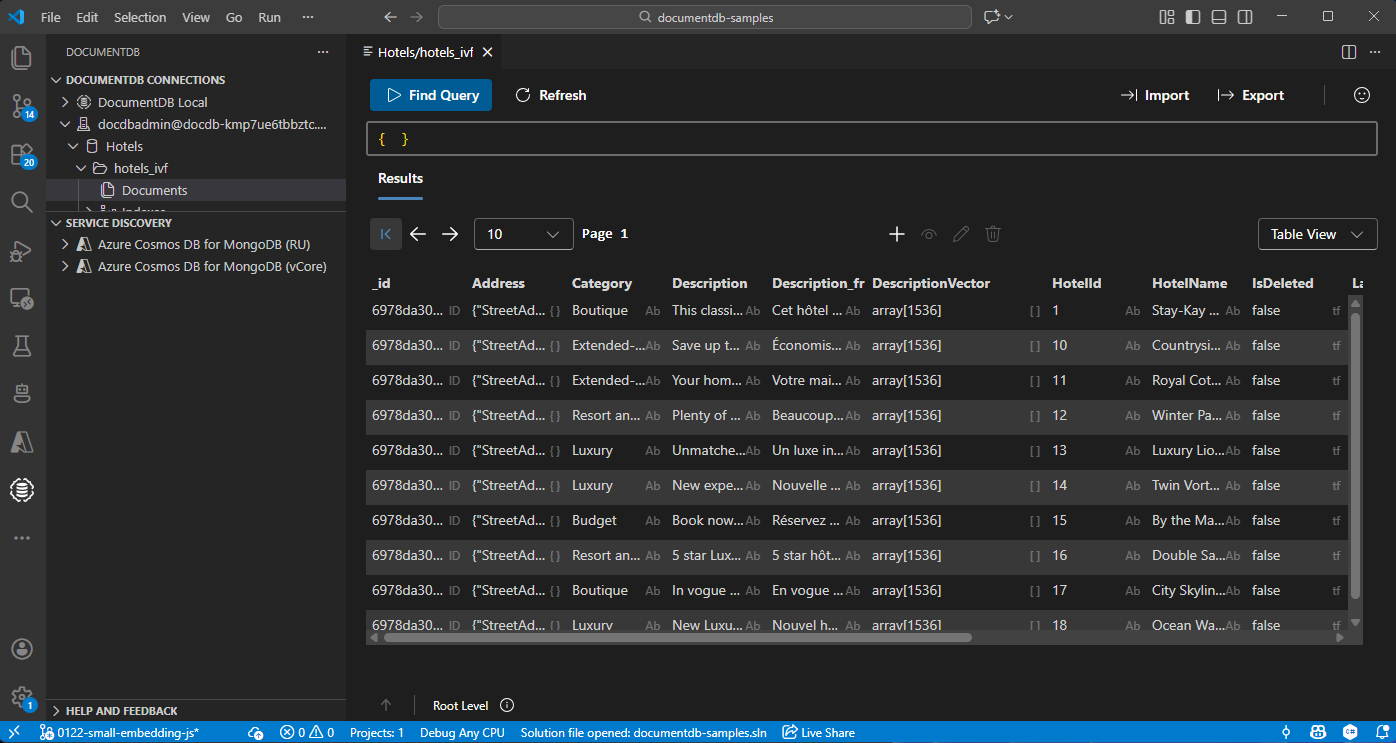
Adatok megtekintése és kezelése a Visual Studio Code-ban
Telepítse a DocumentDB ésa C# bővítményt a Visual Studio Code-ban.
Csatlakozzon Azure DocumentDB-fiókjához a DocumentDB bővítmény használatával.
Az adatok és indexek megtekintése a Hotels adatbázisban.
Erőforrások tisztítása
Törölje az erőforráscsoportot, az Azure DocumentDB-fürtöt és az Azure OpenAI-erőforrást, ha már nincs rájuk szüksége a szükségtelen költségek elkerülése érdekében.