Catatan
Akses ke halaman ini memerlukan otorisasi. Anda dapat mencoba masuk atau mengubah direktori.
Akses ke halaman ini memerlukan otorisasi. Anda dapat mencoba mengubah direktori.
Orkestrasi obrolan grup memodelkan percakapan kolaboratif di antara beberapa agen, yang dikoordinasikan oleh orkestrator yang menentukan pemilihan pembicara dan alur percakapan. Pola ini sangat ideal untuk skenario yang memerlukan penyempurnaan berulang, pemecahan masalah kolaboratif, atau analisis multi-perspektif.
Secara internal, orkestrasi obrolan grup menggabungkan agen dalam topologi bintang, dengan orkestrator di tengah. Orkestrator dapat menerapkan berbagai strategi untuk memilih agen mana yang berbicara berikutnya, seperti round-robin, pemilihan berbasis prompt, atau logika kustom berdasarkan konteks percakapan, menjadikannya pola yang fleksibel dan kuat untuk kolaborasi multi-agen.
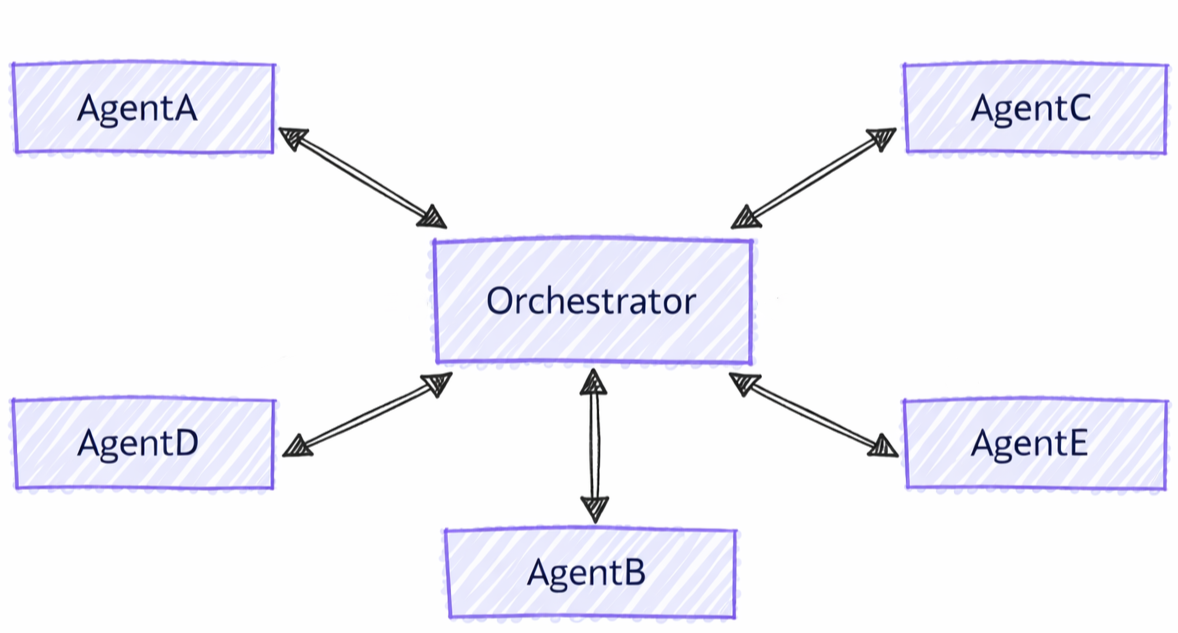
Perbedaan Antara Obrolan Grup dan Pola Lainnya
Orkestrasi obrolan grup memiliki karakteristik yang berbeda dibandingkan dengan pola multi-agen lainnya:
- Koordinasi Terpusat: Tidak seperti pola handoff di mana agen langsung mentransfer kontrol, obrolan grup menggunakan orkestrator untuk mengoordinasikan siapa yang berbicara berikutnya
- Perbaikan Berulang: Agen dapat meninjau dan membangun respons satu sama lain dalam beberapa putaran
- Pemilihan Pembicara Fleksibel: Orkestrator dapat menggunakan berbagai strategi (round-robin, berbasis perintah, logika kustom) untuk memilih speaker
- Konteks Bersama: Semua agen melihat riwayat percakapan lengkap, memungkinkan penyempurnaan kolaboratif
Apa yang akan Anda Pelajari
- Cara membuat agen khusus untuk kolaborasi grup
- Cara mengonfigurasi strategi pemilihan pembicara
- Cara membangun alur kerja dengan pemurnian agen iteratif
- Cara mengkustomisasi alur percakapan dengan orkestrator kustom
Menyiapkan Klien Azure OpenAI
using System;
using System.Collections.Generic;
using System.Threading.Tasks;
using Azure.AI.Projects;
using Azure.Identity;
using Microsoft.Agents.AI.Workflows;
using Microsoft.Extensions.AI;
using Microsoft.Agents.AI;

// Set up the Azure OpenAI client
var endpoint = Environment.GetEnvironmentVariable("AZURE_OPENAI_ENDPOINT") ??
    throw new InvalidOperationException("AZURE_OPENAI_ENDPOINT is not set.");
var deploymentName = Environment.GetEnvironmentVariable("AZURE_OPENAI_DEPLOYMENT_NAME") ?? "gpt-4o-mini";
var client = new AIProjectClient(new Uri(endpoint), new DefaultAzureCredential())
    .GetProjectOpenAIClient()
    .GetProjectResponsesClient()
    .AsIChatClient(deploymentName);
Warning
DefaultAzureCredential nyaman untuk pengembangan tetapi membutuhkan pertimbangan yang cermat dalam produksi. Dalam produksi, pertimbangkan untuk menggunakan kredensial tertentu (misalnya, ManagedIdentityCredential) untuk menghindari masalah latensi, pemeriksaan kredensial yang tidak diinginkan, dan potensi risiko keamanan dari mekanisme fallback.
Tentukan Agen Anda
Buat agen khusus untuk peran yang berbeda dalam percakapan grup:
// Create a copywriter agent
ChatClientAgent writer = new(client,
    "You are a creative copywriter. Generate catchy slogans and marketing copy. Be concise and impactful.",
    "CopyWriter",
    "A creative copywriter agent");

// Create a reviewer agent
ChatClientAgent reviewer = new(client,
    "You are a marketing reviewer. Evaluate slogans for clarity, impact, and brand alignment. " +
    "Provide constructive feedback or approval.",
    "Reviewer",
    "A marketing review agent");
Mengonfigurasi Obrolan Grup dengan Orkestrator Round-Robin
Buat alur kerja obrolan grup menggunakan AgentWorkflowBuilder:
// Build group chat with round-robin speaker selection
// The manager factory receives the list of agents and returns a configured manager
var workflow = AgentWorkflowBuilder
    .CreateGroupChatBuilderWith(agents =>
        new RoundRobinGroupChatManager(agents)
        {
            MaximumIterationCount = 5  // Maximum number of turns
        })
    .AddParticipants(writer, reviewer)
    .Build();
Jalankan Alur Kerja Obrolan Grup
Jalankan alur kerja dan amati percakapan berulang:
// Start the group chat
var messages = new List<ChatMessage> {
    new(ChatRole.User, "Create a slogan for an eco-friendly electric vehicle.")
};

await using StreamingRun run = await InProcessExecution.RunStreamingAsync(workflow, messages);
await run.TrySendMessageAsync(new TurnToken(emitEvents: true));

await foreach (WorkflowEvent evt in run.WatchStreamAsync().ConfigureAwait(false))
{
    if (evt is AgentResponseUpdateEvent update)
    {
        // Process streaming agent responses
        AgentResponse response = update.AsResponse();
        foreach (ChatMessage message in response.Messages)
        {
            Console.WriteLine($"[{update.ExecutorId}]: {message.Text}");
        }
    }
    else if (evt is WorkflowOutputEvent output)
    {
        // Workflow completed
        var conversationHistory = output.As<List<ChatMessage>>();
        Console.WriteLine("\n=== Final Conversation ===");
        foreach (var message in conversationHistory)
        {
            Console.WriteLine($"{message.AuthorName}: {message.Text}");
        }
        break;
    }
}
Interaksi Contoh
[CopyWriter]: "Green Dreams, Zero Emissions" - Drive the future with style and sustainability.

[Reviewer]: The slogan is good, but "Green Dreams" might be a bit abstract. Consider something
more direct like "Pure Power, Zero Impact" to emphasize both performance and environmental benefit.

[CopyWriter]: "Pure Power, Zero Impact" - Experience electric excellence without compromise.

[Reviewer]: Excellent! This slogan is clear, impactful, and directly communicates the key benefits.
The tagline reinforces the message perfectly. Approved for use.

[CopyWriter]: Thank you! The final slogan is: "Pure Power, Zero Impact" - Experience electric
excellence without compromise.
Menyiapkan Aplikasi Obrolan
import os

from agent_framework.foundry import FoundryChatClient
from azure.identity import AzureCliCredential

# Initialize the Azure OpenAI client
client = FoundryChatClient(
    project_endpoint=os.environ["FOUNDRY_PROJECT_ENDPOINT"],
    model=os.environ["FOUNDRY_MODEL"],
    credential=AzureCliCredential(),
)
Tentukan Agen Anda
Buat agen khusus dengan peran yang berbeda:
from agent_framework import Agent

# Create a researcher agent
researcher = Agent(
    client=client,
    name="Researcher",
    description="Collects relevant background information.",
    instructions="Gather concise facts that help answer the question. Be brief and factual.",
)

# Create a writer agent
writer = Agent(
    client=client,
    name="Writer",
    description="Synthesizes polished answers using gathered information.",
    instructions="Compose clear, structured answers using any notes provided. Be comprehensive.",
)
Menyiapkan Obrolan Grup dengan Selector Sederhana
Buat obrolan grup dengan logika pemilihan pembicara kustom:
from agent_framework.orchestrations import GroupChatBuilder, GroupChatState

def round_robin_selector(state: GroupChatState) -> str:
    """A round-robin selector function that picks the next speaker based on the current round index."""

    participant_names = list(state.participants.keys())
    return participant_names[state.current_round % len(participant_names)]


# Build the group chat workflow
workflow = GroupChatBuilder(
    participants=[researcher, writer],
    termination_condition=lambda conversation: len(conversation) >= 4,
    intermediate_output_from=[researcher, writer],
    selection_func=round_robin_selector,
).build()
Mengonfigurasi Obrolan Grup dengan Orkestrator Berbasis Agen
Atau, gunakan orkestrator berbasis agen untuk pemilihan pembicara cerdas. Orkestrator adalah Agent penuh dengan akses ke alat, konteks, dan kemampuan observasi.
# Create orchestrator agent for speaker selection
orchestrator_agent = Agent(
    name="Orchestrator",
    description="Coordinates multi-agent collaboration by selecting speakers",
    instructions="""
You coordinate a team conversation to solve the user's task.

Guidelines:
- Start with Researcher to gather information
- Then have Writer synthesize the final answer
- Only finish after both have contributed meaningfully
""",
    client=client,
)

# Build group chat with agent-based orchestrator
workflow = GroupChatBuilder(
    participants=[researcher, writer],
    # Set a hard termination condition: stop after 4 assistant messages
    # The agent orchestrator will intelligently decide when to end before this limit but just in case
    termination_condition=lambda messages: sum(1 for msg in messages if msg.role == "assistant") >= 4,
    orchestrator_agent=orchestrator_agent,
    intermediate_output_from=[researcher, writer],
).build()
Jalankan Alur Kerja Obrolan Grup
Jalankan alur kerja dan olah pembaruan peserta streaming. Keluaran terminal non-streaming berupa AgentResponse; keluaran terminal streaming dikeluarkan sebagai potongan AgentResponseUpdate.
from agent_framework import AgentResponseUpdate, Message

task = "What are the key benefits of async/await in Python?"

print(f"Task: {task}\n")
print("=" * 80)

last_author: str | None = None
# Run the workflow with streaming enabled
stream = workflow.run(task, stream=True)
async for event in stream:
    if event.type in ("intermediate", "output") and isinstance(event.data, AgentResponseUpdate):
        # Print streaming agent updates
        author = event.data.author_name
        if author != last_author:
            if last_author is not None:
                print()
            print(f"[{author}]:", end=" ", flush=True)
            last_author = author
        print(event.data.text, end="", flush=True)
result = await stream.get_final_response()
if outputs := result.get_outputs():
    print("\n\n" + "=" * 80)
    print("Final Response:")
    print(outputs[-1])

print("\nWorkflow completed.")
Interaksi Contoh
Task: What are the key benefits of async/await in Python?

================================================================================

[Researcher]: Async/await in Python provides non-blocking I/O operations, enabling
concurrent execution without threading overhead. Key benefits include improved
performance for I/O-bound tasks, better resource utilization, and simplified
concurrent code structure using native coroutines.

[Writer]: The key benefits of async/await in Python are:

1. **Non-blocking Operations**: Allows I/O operations to run concurrently without
   blocking the main thread, significantly improving performance for network
   requests, file I/O, and database queries.

2. **Resource Efficiency**: Avoids the overhead of thread creation and context
   switching, making it more memory-efficient than traditional threading.

3. **Simplified Concurrency**: Provides a clean, synchronous-looking syntax for
   asynchronous code, making concurrent programs easier to write and maintain.

4. **Scalability**: Enables handling thousands of concurrent connections with
   minimal resource consumption, ideal for high-performance web servers and APIs.

--------------------------------------------------------------------------------

Workflow completed.
Siapkan Konfigurasi Foundry
endpoint := os.Getenv("FOUNDRY_PROJECT_ENDPOINT")
model := cmp.Or(os.Getenv("FOUNDRY_MODEL"), "gpt-4o-mini")

token, err := azidentity.NewDefaultAzureCredential(nil)
if err != nil {
    return err
}
Warning
azidentity.NewDefaultAzureCredential nyaman untuk pengembangan tetapi membutuhkan pertimbangan yang cermat dalam produksi. Dalam produksi, pertimbangkan untuk menggunakan kredensial tertentu, seperti azidentity.NewManagedIdentityCredential, untuk menghindari masalah latensi, pemeriksaan kredensial yang tidak diinginkan, dan potensi risiko keamanan dari mekanisme fallback.
Tentukan Agen Anda
Buat agen khusus dengan peran yang berbeda dalam percakapan:
copywriter := foundryprovider.NewAgent(
    endpoint,
    token,
    foundryprovider.ModelDeployment(model),
    foundryprovider.AgentConfig{
        Instructions: "You are a creative copywriter. Generate catchy slogans and marketing copy. Be concise and impactful.",
        Config:      agent.Config{Name: "CopyWriter"},
    },
)

reviewer := foundryprovider.NewAgent(
    endpoint,
    token,
    foundryprovider.ModelDeployment(model),
    foundryprovider.AgentConfig{
        Instructions: "You are a marketing reviewer. Evaluate slogans for clarity, impact, and brand alignment. Provide constructive feedback or approval.",
        Config:      agent.Config{Name: "Reviewer"},
    },
)
Mengonfigurasi Obrolan Grup dengan Round-Robin Manager
Buat alur kerja obrolan grup dengan agentworkflow.NewGroupChatWorkflowBuilder. Penyusun mengambil pabrik manajer dan agen yang berpartisipasi.
NewRoundRobinGroupChatManager memilih setiap agen secara berurutan dan berhenti setelah jumlah maksimum giliran peserta yang dikonfigurasi tercapai.
managerFactory := func(agents []*agent.Agent) *agentworkflow.GroupChatManager {
    return agentworkflow.NewRoundRobinGroupChatManager(
        agents,
        agentworkflow.RoundRobinGroupChatOptions{MaximumIterationCount: 5},
    )
}

wf, err := agentworkflow.NewGroupChatWorkflowBuilder(managerFactory, copywriter, reviewer).
    WithName("Marketing Review Group Chat").
    WithDescription("A copywriter and reviewer collaborate on marketing copy.").
    Build()
if err != nil {
    return err
}
Jalankan Alur Kerja Obrolan Grup
Jalankan alur kerja dengan pesan pengguna dan token giliran. Ketika emisi peristiwa diaktifkan, pembaruan peserta diterima sebagai peristiwa keluaran antara, dan transkrip akhir diterima sebagai peristiwa keluaran akhir.
run, err := inproc.Default.RunStreaming(ctx, wf, []*message.Message{
    message.NewText("Create a slogan for an eco-friendly electric vehicle."),
})
if err != nil {
    return err
}
defer run.Close(ctx)

emitEvents := true
if accepted, err := run.TrySendMessage(ctx, workflow.TurnToken{EmitEvents: &emitEvents}); err != nil {
    return err
} else if !accepted {
    return fmt.Errorf("workflow doesn't accept turn tokens")
}

lastExecutorID := ""
for evt, err := range run.WatchStream(ctx) {
    if err != nil {
        return err
    }

    switch e := evt.(type) {
    case workflow.OutputEvent:
        switch value := e.Output.(type) {
        case *agent.ResponseUpdate:
            if e.ExecutorID != lastExecutorID {
                lastExecutorID = e.ExecutorID
                fmt.Printf("\n[%s]: ", e.ExecutorID)
            }
            fmt.Print(value.String())
        case []*message.Message:
            fmt.Println("\n\n=== Final Conversation ===")
            for _, msg := range value {
                author := msg.AuthorName
                if author == "" {
                    author = string(msg.Role)
                }
                fmt.Printf("%s: %s\n", author, msg.String())
            }
        }
    case workflow.ErrorEvent:
        return e.Error
    case workflow.ExecutorFailedEvent:
        return fmt.Errorf("executor %q failed: %w", e.ExecutorID, e.Error)
    }
}
Interaksi Contoh
[CopyWriter]: "Pure Power, Zero Impact" - Experience electric performance without compromise.

[Reviewer]: This is clear and memorable. It communicates performance and sustainability directly.
Approved.

[CopyWriter]: The final slogan is: "Pure Power, Zero Impact" - Experience electric performance
without compromise.

=== Final Conversation ===
user: Create a slogan for an eco-friendly electric vehicle.
CopyWriter: "Pure Power, Zero Impact" - Experience electric performance without compromise.
Reviewer: This is clear and memorable. It communicates performance and sustainability directly. Approved.
CopyWriter: The final slogan is: "Pure Power, Zero Impact" - Experience electric performance without compromise.
Konsep utama
- Manajer Terpusat: Obrolan grup menggunakan manajer untuk mengoordinasikan pemilihan dan alur pembicara
- AgentWorkflowBuilder.CreateGroupChatBuilderWith(): Membuat alur kerja dengan fungsi factory manager
- RoundRobinGroupChatManager: Manajer bawaan yang mengatur pergantian peserta secara bergilir
- MaximumIterationCount: Mengontrol jumlah maksimum putaran agen sebelum dihentikan
-
Manajer Kustom: Memperluas
RoundRobinGroupChatManageratau menerapkan logika kustom - Perbaikan Berulang: Agen meninjau dan meningkatkan kontribusi satu sama lain
- Konteks Bersama: Semua peserta melihat riwayat percakapan lengkap
-
Strategi Orkestrator Fleksibel: Pilih antara pemilih sederhana, orkestrator berbasis agen, atau logika kustom melalui parameter konstruktor (
selection_func,orchestrator_agent, atauorchestrator). - GroupChatBuilder: Membuat alur kerja dengan pilihan pembicara yang dapat dikonfigurasi
- GroupChatState: Menyediakan status percakapan untuk keputusan pemilihan
- Kolaborasi Berulang: Agen membangun kontribusi satu sama lain
-
Output AgentResponse: Output terminal berisi
AgentResponsepesan penyelesaian orkestrator -
Streaming Peristiwa: Memproses
AgentResponseUpdateperistiwa secara real-time melaluiworkflow.run(task, stream=True) -
Keluaran Antara: Berikan
intermediate_output_from=[participant, ...]untuk menampilkan keluaran setiap peserta yang tercantum sebagai peristiwa"intermediate", selain peristiwa"output"terminal dari orkestrator
- GroupChatWorkflowBuilder: Membuat alur kerja topologi bintang dengan host obrolan grup di pusat dan agen yang dihosting sebagai peserta
- GroupChatManager: Memilih peserta berikutnya, dapat memperbarui riwayat siaran, dan dapat mengakhiri percakapan
- NewRoundRobinGroupChatManager: Manajer bawaan yang menggilir peserta dalam urutan round-robin
- RoundRobinGroupChatOptions: Mengonfigurasi jumlah maksimum giliran peserta dan fungsi penghentian opsional
- Peristiwa Keluaran: Secara bawaan, keluaran peserta adalah peristiwa perantara dan host obrolan grup menghasilkan transkrip akhir
-
Manajer Kustom: Menerapkan
SelectNextAgentdan panggilan balik siklus hidup opsional untuk pemilihan pembicara kustom atau status titik pemeriksaan
Tingkat Lanjut: Pemilihan Pembicara Kustom
Anda dapat menerapkan logika manajer kustom dengan membuat manajer obrolan grup kustom:
public class ApprovalBasedManager : RoundRobinGroupChatManager
{
    private readonly string _approverName;

    public ApprovalBasedManager(IReadOnlyList<AIAgent> agents, string approverName)
        : base(agents)
    {
        _approverName = approverName;
    }

    // Override to add custom termination logic
    protected override ValueTask<bool> ShouldTerminateAsync(
        IReadOnlyList<ChatMessage> history,
        CancellationToken cancellationToken = default)
    {
        var last = history.LastOrDefault();
        bool shouldTerminate = last?.AuthorName == _approverName &&
            last.Text?.Contains("approve", StringComparison.OrdinalIgnoreCase) == true;

        return ValueTask.FromResult(shouldTerminate);
    }
}

// Use custom manager in workflow
var workflow = AgentWorkflowBuilder
    .CreateGroupChatBuilderWith(agents =>
        new ApprovalBasedManager(agents, "Reviewer")
        {
            MaximumIterationCount = 10
        })
    .AddParticipants(writer, reviewer)
    .Build();
Anda dapat menerapkan logika pemilihan canggih berdasarkan status percakapan:
def smart_selector(state: GroupChatState) -> str:
    """Select speakers based on conversation content and context."""
    conversation = state.conversation

    last_message = conversation[-1] if conversation else None

    # If no messages yet, start with Researcher
    if not last_message:
        return "Researcher"

    # Check last message content
    last_text = last_message.text.lower()

    # If researcher finished gathering info, switch to writer
    if "i have finished" in last_text and last_message.author_name == "Researcher":
        return "Writer"

    # Else continue with researcher until it indicates completion
    return "Researcher"

workflow = GroupChatBuilder(
    participants=[researcher, writer],
    selection_func=smart_selector,
).build()
Penting
Saat menggunakan implementasi BaseGroupChatOrchestrator kustom untuk skenario tingkat lanjut, semua properti harus diatur, termasuk participant_registry, , max_roundsdan termination_condition.
max_rounds dan termination_condition yang diatur dalam penyusun akan diabaikan.
Hasil Sementara
Secara bawaan, hanya output akhir orkestrator yang muncul sebagai peristiwa alur kerja "output" (terminal). Teruskan intermediate_output_from beserta peserta yang ingin Anda tetapkan sebagai sumber perantara agar output masing-masing mereka juga dimunculkan sebagai event "intermediate":
workflow = GroupChatBuilder(
    participants=[researcher, writer],
    termination_condition=lambda conversation: len(conversation) >= 4,
    selection_func=round_robin_selector,
    intermediate_output_from=[researcher, writer],
).build()
Terapkan pemilihan speaker kustom dengan mengembalikan GroupChatManager dari factory pengelola builder:
type approvalManager struct {
    agents []*agent.Agent
}

func newApprovalManager(agents []*agent.Agent) *agentworkflow.GroupChatManager {
    manager := &approvalManager{agents: agents}
    return &agentworkflow.GroupChatManager{
        SelectNextAgent: manager.selectNextAgent,
        ShouldTerminate: manager.shouldTerminate,
    }
}

func (m *approvalManager) selectNextAgent(_ context.Context, history []*message.Message) (*agent.Agent, error) {
    last := lastAssistantMessage(history)
    if last == nil || last.AuthorName == "Reviewer" {
        return m.agentByName("CopyWriter")
    }
    return m.agentByName("Reviewer")
}

func (m *approvalManager) shouldTerminate(_ context.Context, history []*message.Message, iterationCount int) (bool, error) {
    if iterationCount >= 10 {
        return true, nil
    }
    last := lastAssistantMessage(history)
    return last != nil &&
        last.AuthorName == "Reviewer" &&
        strings.Contains(strings.ToLower(last.String()), "approve"), nil
}

func (m *approvalManager) agentByName(name string) (*agent.Agent, error) {
    for _, currentAgent := range m.agents {
        if currentAgent.Name() == name {
            return currentAgent, nil
        }
    }
    return nil, fmt.Errorf("agent %q is not part of the group chat", name)
}

func lastAssistantMessage(history []*message.Message) *message.Message {
    for i := len(history) - 1; i >= 0; i-- {
        if history[i].Role == message.RoleAssistant {
            return history[i]
        }
    }
    return nil
}

wf, err := agentworkflow.NewGroupChatWorkflowBuilder(newApprovalManager, copywriter, reviewer).
    WithName("Approval Group Chat").
    Build()
GroupChatManager juga mendukung callback UpdateHistory, Reset, OnCheckpoint, dan OnCheckpointRestored untuk manajer tingkat lanjut yang memfilter pesan siaran atau mempertahankan status yang dimiliki manajer.
Hasil Sementara
Secara default, GroupChatWorkflowBuilder memancarkan output peserta sebagai output alur kerja menengah dan memancarkan akumulasi transkrip percakapan sebagai output terminal. Gunakan OutputEvent.IsIntermediate() untuk membedakan pembaruan peserta dari transkrip akhir:
if output, ok := evt.(workflow.OutputEvent); ok {
    if output.IsIntermediate() {
        fmt.Printf("intermediate from %s: %v\n", output.ExecutorID, output.Output)
        return nil
    }

    fmt.Printf("terminal output: %v\n", output.Output)
}
Memanggil WithOutputFrom atau WithIntermediateOutputFrom pada penyusun obrolan grup beralih ke penunjukan output eksplisit. Gunakan metode ini saat Anda menginginkan output peserta yang dipilih alih-alih transkrip akhir default ditambah semua output perantara peserta.
Sinkronisasi Konteks
Seperti disebutkan di awal panduan ini, semua agen dalam obrolan grup melihat riwayat percakapan yang disinkronkan.
Agen dalam Agent Framework mengandalkan sesi agen (AgentSession) untuk mengelola konteks. Dalam orkestrasi obrolan grup, agen tidak berbagi instans sesi yang sama, tetapi orkestrator menyinkronkan sesi setiap agen dengan riwayat percakapan sebelum setiap giliran. Orkestrator mendistribusikan respons ke semua agen lain setelah setiap agen selesai gilirannya, memastikan semua peserta memiliki konteks terbaru untuk giliran berikutnya.
Python mempertahankan teks pengguna, data sebaris, URI, file yang dihosting, dan penyimpanan vektor yang dihosting dalam riwayat obrolan grup yang disinkronkan. Pesan non-pengguna hanya menyimpan teks, dan panggilan fungsi, hasil fungsi, payload persetujuan, dan konten kontrol alat lainnya difilter sebelum disiarkan.
Tip
Untuk meredaksi atau menahan teks peserta sebelum masuk ke riwayat bersama atau menjangkau peserta lain, filter di handler respons peserta kustom GroupChatOrchestrator . Memfilter event yang dikembalikan oleh workflow.run() sudah terlambat karena respons asli sudah disimpan dan disiarkan.
Lihat sampel pemfilteran respons obrolan grup.
Contoh melindungi riwayat bersama dan batas broadcast; ini tidak menghapus konten asli dari sesi agen pengirim, alat, penyedia model, telemetri, atau peristiwa siklus hidup alur kerja sebelumnya.
Tip
Agen tidak berbagi instans sesi yang sama karena jenis agen yang berbeda mungkin memiliki implementasi abstraksi yang AgentSession berbeda. Berbagi instans sesi yang sama dapat menyebabkan inkonsistensi dalam cara setiap agen memproses dan mempertahankan konteks.
Setelah menyiarkan respons, orkestrator memutuskan pembicara berikutnya dan mengirim permintaan ke agen yang dipilih, yang sekarang memiliki riwayat percakapan yang diperbarui untuk menghasilkan responsnya.
Kapan Menggunakan Obrolan Grup
Orkestrasi obrolan grup sangat ideal untuk:
- Penyempurnaan Berulang: Beberapa putaran tinjauan dan peningkatan
- Pemecahan Masalah Kolaboratif: Agen dengan keahlian pelengkap bekerja sama
- Pembuatan Konten: Alur kerja Writer-reviewer untuk pembuatan dokumen
- Analisis Multi-Perspektif: Mendapatkan beragam titik pandang pada input yang sama
- Jaminan Kualitas: Tinjauan otomatis dan proses persetujuan
Pertimbangkan alternatif saat:
- Anda memerlukan pemrosesan berurutan yang ketat (gunakan orkestrasi Berurutan)
- Agen-agen harus bekerja dengan independen penuh (menggunakan orkestrasi bersamaan)
- Pemindahan langsung dari agen-ke-agen diperlukan (gunakan orkestrasi pemindahan)
- Perencanaan dinamis yang kompleks diperlukan (gunakan orkestrasi Magentik)