Catatan
Akses ke halaman ini memerlukan otorisasi. Anda dapat mencoba masuk atau mengubah direktori.
Akses ke halaman ini memerlukan otorisasi. Anda dapat mencoba mengubah direktori.
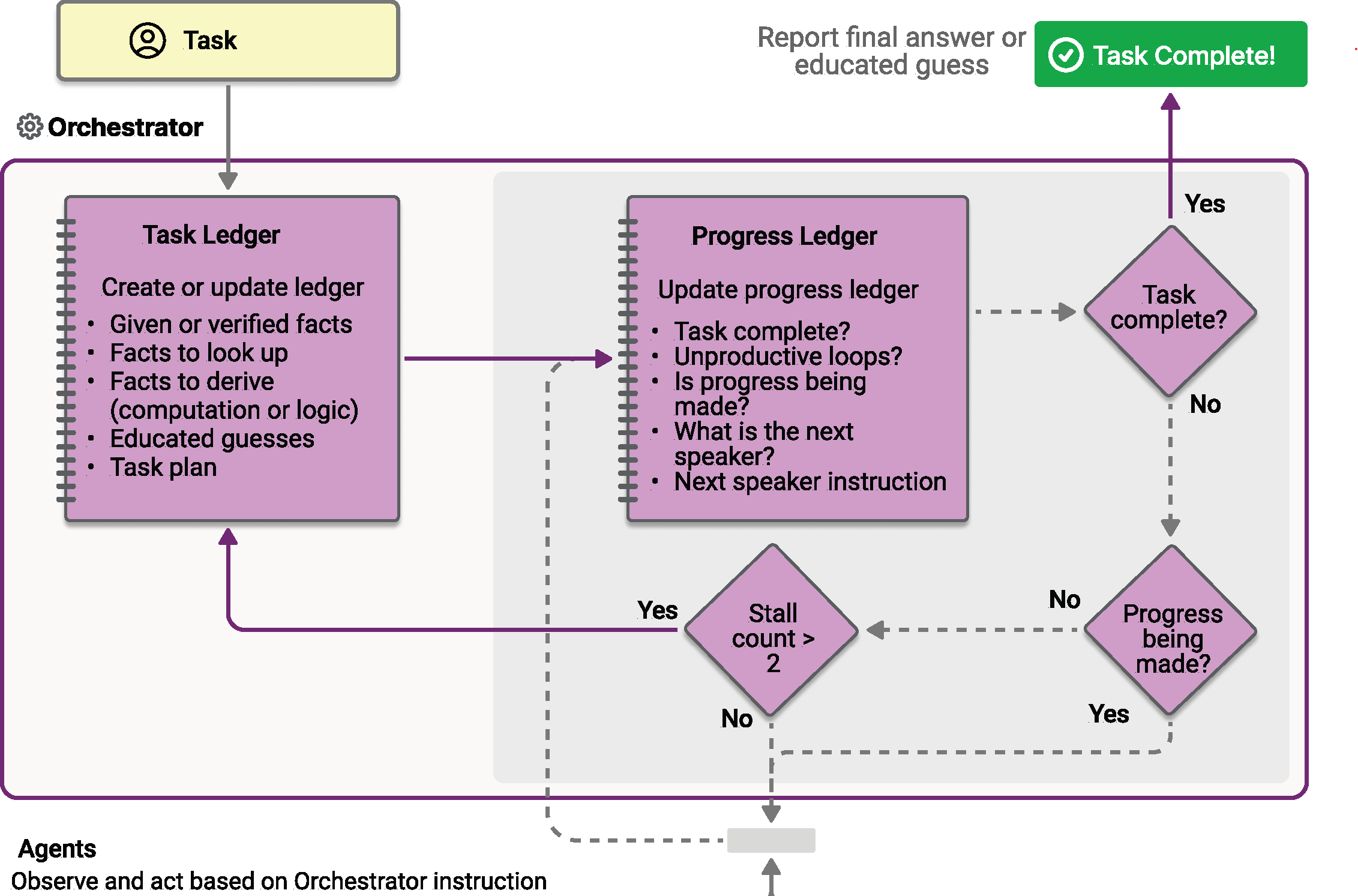
Orkestrasi magentik dirancang berdasarkan sistem Magentic-One yang ditemukan oleh AutoGen. Ini adalah pola multi-agen tujuan umum yang fleksibel yang dirancang untuk tugas kompleks dan terbuka yang memerlukan kolaborasi dinamis. Dalam pola ini, manajer Magentic khusus mengoordinasikan tim agen khusus, memilih agen mana yang harus bertindak selanjutnya berdasarkan konteks yang berkembang, kemajuan tugas, dan kemampuan agen.
Manajer Magentic mempertahankan konteks bersama, melacak kemajuan, dan mengadaptasi alur kerja secara real time. Ini memungkinkan sistem untuk memecah masalah kompleks, mendelegasikan subtugas, dan memperbaiki solusi secara berulang melalui kolaborasi agen. Orkestrasi sangat cocok untuk skenario di mana jalur solusi tidak diketahui sebelumnya dan mungkin memerlukan beberapa putaran penalaran, penelitian, dan komputasi.
Tip
Orkestrasi Magentic memiliki arsitektur yang sama dengan pola orkestrasi Obrolan Grup , dengan manajer yang sangat kuat yang menggunakan perencanaan untuk mengoordinasikan kolaborasi agen. Jika skenario Anda memerlukan koordinasi yang lebih sederhana tanpa perencanaan yang kompleks, pertimbangkan untuk menggunakan pola Obrolan Grup sebagai gantinya.
Nota
Dalam makalah Magentic-One , 4 agen yang sangat khusus dirancang untuk menyelesaikan serangkaian tugas yang sangat spesifik. Dalam orkestrasi Magentic dalam Agent Framework, Anda dapat menentukan agen khusus Anda sendiri agar sesuai dengan kebutuhan aplikasi spesifik Anda. Namun, belum diuji seberapa baik orkestrasi Magentic akan berkinerja dengan baik di luar desain asli Magentic-One.
Apa yang akan Anda Pelajari
- Cara menyiapkan manajer Magentic untuk mengoordinasikan beberapa agen khusus
- Cara menangani peristiwa streaming dengan
WorkflowEvent - Cara menerapkan tinjauan rencana human-in-the-loop
- Cara melacak kolaborasi agen dan kemajuan melalui tugas yang kompleks
Tentukan Agen Khusus Anda
Dalam orkestrasi Magentic, Anda menentukan agen khusus yang dapat dipilih manajer secara dinamis berdasarkan persyaratan tugas:
#pragma warning disable MAAIW001  // Magentic types are experimental
#pragma warning disable OPENAI001 // HostedCodeInterpreterTool is experimental

using Azure.AI.Projects;
using Azure.Identity;
using Microsoft.Agents.AI;
using Microsoft.Agents.AI.Workflows;
using Microsoft.Agents.AI.Workflows.Specialized.Magentic;
using Microsoft.Extensions.AI;

string endpoint = Environment.GetEnvironmentVariable("AZURE_AI_PROJECT_ENDPOINT")
    ?? throw new InvalidOperationException("AZURE_AI_PROJECT_ENDPOINT is not set.");
string deploymentName = Environment.GetEnvironmentVariable("AZURE_AI_MODEL_DEPLOYMENT_NAME") ?? "gpt-5.4-mini";

AIProjectClient projectClient = new(new Uri(endpoint), new DefaultAzureCredential());

AIAgent researcherAgent = projectClient.AsAIAgent(
    deploymentName,
    name: "ResearcherAgent",
    description: "Specialist in research and information gathering.",
    instructions: "You are a researcher. Find relevant information without doing additional computation or quantitative analysis.");

AIAgent coderAgent = projectClient.AsAIAgent(
    deploymentName,
    name: "CoderAgent",
    description: "A helpful assistant that writes and executes code to analyze data.",
    instructions: "You solve quantitative questions by writing and running code. Show the analysis and the computation process clearly.",
    tools: [new HostedCodeInterpreterTool()]);

AIAgent managerAgent = projectClient.AsAIAgent(
    deploymentName,
    name: "MagenticManager",
    description: "Orchestrator that coordinates the research and coding workflow.",
    instructions: "You coordinate the team to complete complex tasks efficiently.");
import os

from agent_framework import Agent
from agent_framework.foundry import FoundryChatClient
from azure.identity import AzureCliCredential

client = FoundryChatClient(
    project_endpoint=os.environ["FOUNDRY_PROJECT_ENDPOINT"],
    model=os.environ["FOUNDRY_MODEL"],
    credential=AzureCliCredential(),
)

researcher_agent = Agent(
    name="ResearcherAgent",
    description="Specialist in research and information gathering",
    instructions=(
        "You are a Researcher. You find information without additional computation or quantitative analysis."
    ),
    client=client,
)

coder_agent = Agent(
    name="CoderAgent",
    description="A helpful assistant that writes and executes code to process and analyze data.",
    instructions="You solve questions using code. Please provide detailed analysis and computation process.",
    client=client,
    tools=client.get_code_interpreter_tool(),
)

# Create a manager agent for orchestration
manager_agent = Agent(
    name="MagenticManager",
    description="Orchestrator that coordinates the research and coding workflow",
    instructions="You coordinate a team to complete complex tasks efficiently.",
    client=client,
)
Membangun Alur Kerja Magentic
Gunakan penyusun alur kerja Magentic untuk mengonfigurasi alur kerja dengan manajer dan sekumpulan peserta. Pembangun juga menyediakan batas perulangan internal (jumlah maksimum putaran koordinasi, jumlah maksimum kemacetan berturut-turut sebelum perencanaan ulang, jumlah maksimum pengaturan ulang rencana) serta flag untuk peninjauan rencana dengan keterlibatan manusia.
Workflow workflow = new MagenticWorkflowBuilder(managerAgent)
    .AddParticipants([researcherAgent, coderAgent])
    .WithName("Magentic Orchestration Workflow")
    .WithDescription("Coordinates a researcher and coder to solve a complex analytical task.")
    .RequirePlanSignoff(false)
    .WithMaxRounds(10)
    .WithMaxStalls(3)
    .WithMaxResets(2)
    .Build();
from agent_framework.orchestrations import MagenticBuilder

workflow = MagenticBuilder(
    participants=[researcher_agent, coder_agent],
    intermediate_output_from=[researcher_agent, coder_agent],
    manager_agent=manager_agent,
    max_round_count=10,
    max_stall_count=3,
    max_reset_count=2,
).build()
Tip
Manajer standar didasarkan pada desain Magentic-One, dengan prompt tetap yang diambil dari makalah asli. Sesuaikan perilaku manajer dengan meneruskan perintah ke MagenticBuilder.
Saat Anda menyesuaikan lembar fakta awal atau prompt rencana, sesuaikan juga prompt pembaruan yang sesuai agar perencanaan ulang mempertahankan format Anda. Kustom progress_ledger_prompt harus mempertahankan skema respons JSON bawaan.
Untuk parameter perintah dan tempat penampung yang tersedia, lihat sampel permintaan manajer kustom. Untuk menyesuaikan manajer lebih lanjut, subkelas MagenticManagerBase.
Opsi pengelola builder Python memiliki perilaku kepemilikan yang berbeda sebagai berikut:
-
manager_agentmembuatStandardMagenticManagerbaru untuk setiap alur kerja sembari menggunakan agen yang disediakan bersama. -
manager_agent_factorydanmanager_factoryjalankan sekali untuk setiap panggilan kebuild(). -
managerberbagi instans manajer yang disediakan di seluruh alur kerja.
Warning
Jangan bagikan manager eksplisit yang stateful di antara alur kerja yang berjalan bersamaan atau saling diselingi. Gunakan manager_factory untuk memberikan setiap alur kerja status pengelola yang terisolasi.
Hasil Sementara
Nota
Bagian ini saat ini hanya berlaku untuk pivot Python.
Meneruskan intermediate_output_from=[...] ke MagenticBuilder menunjuk peserta tertentu sebagai sumber output menengah. Pemanggilan mereka ke yield_output menghasilkan peristiwa "intermediate", sementara jawaban akhir hasil sintesis dari manajer tetap berupa peristiwa "output" (terminal). Tanpa parameter ini (bawaan), hanya terminal AgentResponse milik manajer yang ditampilkan.
Ini sangat berguna untuk alur kerja Magentic karena:
- Tugas sering berjalan lama dengan banyak putaran kolaborasi agen
- Anda dapat menampilkan kontribusi setiap agen secara real time saat alur kerja berlangsung dalam mode streaming
- Ini memberikan visibilitas ke dalam langkah-langkah penalaran menengah alur kerja
Jalankan Alur Kerja dengan Streaming Peristiwa
Jalankan tugas yang kompleks dan tangani peristiwa untuk pembaruan output dan orkestrasi streaming. Keluaran alur kerja terminal berisi jawaban akhir hasil sintesis manajer.
const string TaskPrompt =
    "I am preparing a report on the energy efficiency of different machine learning model architectures. " +
    "Compare the estimated training and inference energy consumption of ResNet-50, BERT-base, and GPT-2 " +
    "on standard datasets (for example, ImageNet for ResNet, GLUE for BERT, WebText for GPT-2). " +
    "Then, estimate the CO2 emissions associated with each, assuming training on an Azure Standard_NC6s_v3 " +
    "VM for 24 hours. Provide tables for clarity, and recommend the most energy-efficient model " +
    "per task type (image classification, text classification, and text generation).";

await using StreamingRun run = await InProcessExecution.RunStreamingAsync(
    workflow,
    new List<ChatMessage> { new(ChatRole.User, TaskPrompt) });

await run.TrySendMessageAsync(new TurnToken(emitEvents: true));

string? lastResponseId = null;
WorkflowOutputEvent? finalOutput = null;

await foreach (WorkflowEvent workflowEvent in run.WatchStreamAsync())
{
    switch (workflowEvent)
    {
        case AgentResponseUpdateEvent updateEvent:
            // Stream per-participant deltas. Group by ResponseId / MessageId / ExecutorId so
            // each new contiguous response prints its executor header once.
            string responseId = updateEvent.Update.ResponseId
                ?? updateEvent.Update.MessageId
                ?? updateEvent.ExecutorId;
            if (!string.Equals(responseId, lastResponseId, StringComparison.Ordinal))
            {
                if (lastResponseId is not null)
                {
                    Console.WriteLine();
                }
                Console.Write($"- {updateEvent.ExecutorId}: ");
                lastResponseId = responseId;
            }
            Console.Write(updateEvent.Update.Text);
            break;

        case MagenticPlanCreatedEvent planCreated:
            Console.WriteLine($"\n[Magentic Initial Plan]\n{planCreated.FullTaskLedger.Text}");
            break;

        case MagenticReplannedEvent replanned:
            Console.WriteLine($"\n[Magentic Replanned]\n{replanned.FullTaskLedger.Text}");
            break;

        case MagenticProgressLedgerUpdatedEvent progressUpdated:
            MagenticProgressLedger ledger = progressUpdated.ProgressLedger;
            Console.WriteLine(
                $"\n[Magentic Progress Ledger] satisfied={ledger.IsRequestSatisfied}, " +
                $"inLoop={ledger.IsInLoop}, progressing={ledger.IsProgressBeingMade}, " +
                $"nextSpeaker={ledger.NextSpeaker}, instruction={ledger.InstructionOrQuestion}");
            break;

        case WorkflowOutputEvent outputEvent when outputEvent.Is<List<ChatMessage>>():
            finalOutput = outputEvent;
            break;

        case WorkflowErrorEvent workflowError:
            Console.Error.WriteLine(workflowError.Exception?.ToString() ?? "Unknown workflow error.");
            break;

        case ExecutorFailedEvent executorFailed:
            Console.Error.WriteLine(
                $"Executor '{executorFailed.ExecutorId}' failed: " +
                (executorFailed.Data?.ToString() ?? "unknown error"));
            break;
    }
}

if (finalOutput?.As<List<ChatMessage>>() is { } transcript)
{
    Console.WriteLine("\n\n=== Final Conversation Transcript ===\n");
    foreach (ChatMessage message in transcript)
    {
        Console.WriteLine($"{message.AuthorName ?? message.Role.ToString()}: {message.Text}");
    }
}
import json
import asyncio
from typing import cast

from agent_framework import (
    AgentResponseUpdate,
    Message,
    WorkflowEvent,
)
from agent_framework.orchestrations import MagenticProgressLedger

task = (
    "I am preparing a report on the energy efficiency of different machine learning model architectures. "
    "Compare the estimated training and inference energy consumption of ResNet-50, BERT-base, and GPT-2 "
    "on standard datasets (for example, ImageNet for ResNet, GLUE for BERT, WebText for GPT-2). "
    "Then, estimate the CO2 emissions associated with each, assuming training on an Azure Standard_NC6s_v3 "
    "VM for 24 hours. Provide tables for clarity, and recommend the most energy-efficient model "
    "per task type (image classification, text classification, and text generation)."
)

# Keep track of the last executor to format output nicely in streaming mode
last_message_id: str | None = None
stream = workflow.run(task, stream=True)
async for event in stream:
    if event.type in ("intermediate", "output") and isinstance(event.data, AgentResponseUpdate):
        message_id = event.data.message_id
        if message_id != last_message_id:
            if last_message_id is not None:
                print("\n")
            print(f"- {event.executor_id}:", end=" ", flush=True)
            last_message_id = message_id
        print(event.data, end="", flush=True)

    elif event.type == "magentic_orchestrator":
        print(f"\n[Magentic Orchestrator Event] Type: {event.data.event_type.name}")
        if isinstance(event.data.content, Message):
            print(f"Please review the plan:\n{event.data.content.text}")
        elif isinstance(event.data.content, MagenticProgressLedger):
            print(f"Please review progress ledger:\n{json.dumps(event.data.content.to_dict(), indent=2)}")
        else:
            print(f"Unknown data type in MagenticOrchestratorEvent: {type(event.data.content)}")

        # Block to allow user to read the plan/progress before continuing
        # Note: this is for demonstration only and is not the recommended way to handle human interaction.
        # Please refer to `with_plan_review` for proper human interaction during planning phases.
        await asyncio.get_event_loop().run_in_executor(None, input, "Press Enter to continue...")

result = await stream.get_final_response()
if outputs := result.get_outputs():
    print(outputs[-1])
Magentic menampilkan tiga peristiwa orkestrator yang menandai tonggak perencanaan dan kemajuan:
- Rencana awal dibuat — manajer telah menghasilkan rencana tugas awal.
- Direncanakan ulang — rencana baru dibuat, baik karena deteksi kemacetan atau karena seseorang merevisi rencana melalui peninjauan rencana.
- Catatan kemajuan diperbarui — dihasilkan sekali per putaran koordinasi; berisi catatan kemajuan saat ini (apakah permintaan sudah terpenuhi, apakah tim terjebak dalam perulangan, apakah ada kemajuan, peserta berikutnya yang akan berbicara, dan instruksi yang akan dikirim kepada mereka).
Dalam Python ini dibawa ke dalam satu MagenticOrchestratorEvent yang enum event_type membedakan PLAN_CREATED, REPLANNED, dan PROGRESS_LEDGER_UPDATED. Dalam .NET mereka dipancarkan sebagai tiga jenis yang berbeda — MagenticPlanCreatedEvent, MagenticReplannedEvent, dan MagenticProgressLedgerUpdatedEvent — yang semuanya berasal dari MagenticOrchestratorEvent.
Tingkat Lanjut: Tinjauan Rencana Human-in-the-Loop
Aktifkan human-in-the-loop (HITL) untuk memungkinkan pengguna meninjau dan menyetujui rencana yang diusulkan manajer sebelum eksekusi. Ini berguna untuk memastikan bahwa paket selaras dengan harapan dan persyaratan pengguna.
Ada dua opsi untuk peninjauan rencana.
- Revisi: Pengguna memberikan umpan balik untuk merevisi rencana, yang memicu manajer untuk melakukan replan berdasarkan umpan balik.
- Setujui: Pengguna menyetujui paket as-is, memungkinkan alur kerja untuk melanjutkan.
Aktifkan peninjauan rencana saat membuat alur kerja Magentic. Setelan default berbeda-beda antarbahasa: dalam Python, peninjauan rencana off secara default (enable_plan_review=False) dan Anda harus mengaktifkannya secara eksplisit; dalam .NET, peninjauan rencana on secara default (RequirePlanSignoff secara default bernilai true), dan contoh dasar sebelumnya di halaman ini menonaktifkannya agar dapat berjalan secara end-to-end tanpa interaksi. Kode di bawah ini menunjukkan cara ikut serta dan menangani permintaan peninjauan yang dihasilkan.
Jeda peninjauan rencana ditampilkan melalui mekanisme permintaan/respons alur kerja dengan data MagenticPlanReviewRequest. Anda menangani hal ini dalam aliran peristiwa dan melanjutkan alur kerja dengan MagenticPlanReviewResponse setelah seseorang menyetujui atau merevisi rencana tersebut.
Tip
Pelajari selengkapnya tentang permintaan dan respons di panduan Permintaan dan Respons .
Workflow workflow = new MagenticWorkflowBuilder(managerAgent)
    .AddParticipants([researcherAgent, coderAgent])
    .RequirePlanSignoff(true)
    .WithMaxRounds(10)
    .WithMaxStalls(1)
    .WithMaxResets(2)
    .Build();

CheckpointManager checkpointManager = CheckpointManager.CreateInMemory();
InProcessExecutionEnvironment environment = ExecutionEnvironment.InProcess_Lockstep
    .ToWorkflowExecutionEnvironment()
    .WithCheckpointing(checkpointManager);

await using StreamingRun run = await environment.OpenStreamingAsync(workflow);
await run.TrySendMessageAsync(new List<ChatMessage> { new(ChatRole.User, TaskPrompt) });
await run.TrySendMessageAsync(new TurnToken(emitEvents: true));

ExternalRequest? pendingRequest = null;
CheckpointInfo? lastCheckpoint = null;
WorkflowOutputEvent? finalOutput = null;

async Task<WorkflowOutputEvent?> DrainAsync(StreamingRun activeRun)
{
    WorkflowOutputEvent? output = null;
    await foreach (WorkflowEvent evt in activeRun.WatchStreamAsync(blockOnPendingRequest: false))
    {
        switch (evt)
        {
            case AgentResponseUpdateEvent updateEvent:
                Console.Write(updateEvent.Update.Text);
                break;
            case RequestInfoEvent requestInfo
                when requestInfo.Request.Data.As<MagenticPlanReviewRequest>() is not null:
                pendingRequest = requestInfo.Request;
                break;
            case SuperStepCompletedEvent stepCompleted:
                lastCheckpoint = stepCompleted.CompletionInfo?.Checkpoint ?? lastCheckpoint;
                break;
            case WorkflowOutputEvent outputEvent when outputEvent.Is<List<ChatMessage>>():
                output = outputEvent;
                break;
        }
    }
    return output;
}

finalOutput = await DrainAsync(run);

// Loop until the workflow finishes or the user accepts a plan that runs to completion.
while (finalOutput is null && pendingRequest is not null)
{
    MagenticPlanReviewRequest reviewRequest = pendingRequest.Data.As<MagenticPlanReviewRequest>()!;

    Console.WriteLine("\n\n[Magentic Plan Review Request]");
    if (reviewRequest.CurrentProgress is { } progress)
    {
        Console.WriteLine(
            $"Current progress: satisfied={progress.IsRequestSatisfied}, " +
            $"inLoop={progress.IsInLoop}, progressing={progress.IsProgressBeingMade}");
    }
    if (reviewRequest.IsStalled)
    {
        Console.WriteLine("(Replan triggered by stall detection.)");
    }
    Console.WriteLine($"Proposed plan:\n{reviewRequest.Plan.Text}\n");
    Console.Write("Press Enter to approve, or type feedback to request a revision: ");

    string reply = Console.ReadLine() ?? string.Empty;
    MagenticPlanReviewResponse reviewResponse = string.IsNullOrWhiteSpace(reply)
        ? reviewRequest.Approve()
        : reviewRequest.Revise(reply);

    ExternalResponse response = pendingRequest.CreateResponse(reviewResponse);
    pendingRequest = null;

    await using StreamingRun resumed = await environment.ResumeStreamingAsync(workflow, lastCheckpoint!);
    await resumed.SendResponseAsync(response);
    finalOutput = await DrainAsync(resumed);
}

if (finalOutput?.As<List<ChatMessage>>() is { } transcript)
{
    Console.WriteLine("\n\n=== Final Conversation Transcript ===\n");
    foreach (ChatMessage message in transcript)
    {
        Console.WriteLine($"{message.AuthorName ?? message.Role.ToString()}: {message.Text}");
    }
}
import json
import asyncio
from typing import cast

from agent_framework import (
    AgentResponseUpdate,
    Agent,
    Message,
    WorkflowEvent,
)
from agent_framework.orchestrations import (
    MagenticBuilder,
    MagenticPlanReviewRequest,
    MagenticPlanReviewResponse,
)

workflow = MagenticBuilder(
    participants=[researcher_agent, coder_agent],
    intermediate_output_from=[researcher_agent, coder_agent],
    enable_plan_review=True,
    manager_agent=manager_agent,
    max_round_count=10,
    max_stall_count=1,
    max_reset_count=2,
).build()

pending_request: WorkflowEvent | None = None
pending_responses: dict[str, MagenticPlanReviewResponse] | None = None
final_response: object | None = None

while not final_response:
    if pending_responses is not None:
        stream = workflow.run(stream=True, responses=pending_responses)
    else:
        stream = workflow.run(task, stream=True)

    last_message_id: str | None = None
    async for event in stream:
        if event.type in ("intermediate", "output") and isinstance(event.data, AgentResponseUpdate):
            message_id = event.data.message_id
            if message_id != last_message_id:
                if last_message_id is not None:
                    print("\n")
                print(f"- {event.executor_id}:", end=" ", flush=True)
                last_message_id = message_id
            print(event.data, end="", flush=True)

        elif event.type == "request_info" and event.request_type is MagenticPlanReviewRequest:
            pending_request = event

    result = await stream.get_final_response()
    if outputs := result.get_outputs():
        final_response = outputs[-1]

    pending_responses = None

    # Handle plan review request if any
    if pending_request is not None:
        event_data = cast(MagenticPlanReviewRequest, pending_request.data)

        print("\n\n[Magentic Plan Review Request]")
        if event_data.current_progress is not None:
            print("Current Progress Ledger:")
            print(json.dumps(event_data.current_progress.to_dict(), indent=2))
            print()
        print(f"Proposed Plan:\n{event_data.plan.text}\n")
        print("Please provide your feedback (press Enter to approve):")

        reply = await asyncio.get_event_loop().run_in_executor(None, input, "> ")
        if reply.strip() == "":
            print("Plan approved.\n")
            pending_responses = {pending_request.request_id: event_data.approve()}
        else:
            print("Plan revised by human.\n")
            pending_responses = {pending_request.request_id: event_data.revise(reply)}
        pending_request = None
Sebuah MagenticPlanReviewRequest memuat rencana yang diusulkan, catatan kemajuan saat ini (null / None pada tinjauan awal dan diisi pada perencanaan ulang yang dipicu oleh kondisi macet), serta penanda yang menunjukkan apakah perencanaan ulang dipicu oleh deteksi kondisi macet. Buat respons dengan memanggil approve() untuk menerima rencana apa adanya, atau revise(...) dengan umpan balik untuk meminta manajer menyusun ulang rencana.
Konsep utama
- Koordinasi Dinamis: Manajer Magentic secara dinamis memilih agen mana yang harus bertindak berikutnya berdasarkan konteks yang berkembang.
-
Terminal Output: Keluaran alur kerja terminal berisi jawaban akhir yang telah disintesis oleh manajer (
AgentResponsedi Python;WorkflowOutputEventdengan muatanList<ChatMessage>di .NET). -
Orchestrator Events: Pencapaian penting yang dibuat oleh paket, direncanakan ulang, dan diperbarui melalui buku besar kemajuan diekspos melalui
MagenticOrchestratorEvent(satu peristiwa dengan enumevent_typedi Python; tiga tipe turunan di .NET). Delta streaming per peserta dikirimkan melalui peristiwa pembaruan respons agen standar kerangka kerja. - Perbaikan Berulang: Sistem dapat memecah masalah kompleks dan secara berulang memperbaiki solusi melalui beberapa putaran.
- Pelacakan Kemajuan & Deteksi Kemacetan: Catatan kemajuan melacak apakah permintaan telah terpenuhi, apakah tim terjebak dalam pengulangan, dan apakah ada kemajuan. Putaran berturut-turut tanpa kemajuan akan menambah penghitung kemacetan, dan jika nilainya melampaui batas maksimum yang dikonfigurasi, sistem akan secara otomatis melakukan reset dan perencanaan ulang.
- Kolaborasi Fleksibel: Agen dapat dipanggil beberapa kali dalam urutan apa pun seperti yang ditentukan oleh manajer.
-
Pengawasan Manusia: Opsi peninjauan rencana dengan keterlibatan manusia melalui
MagenticPlanReviewRequest/MagenticPlanReviewResponse. -
Output Antara (khusus Python, untuk saat ini): Tetapkan peserta yang panggilan
yield_output-nya harus ditampilkan sebagai event"intermediate"bersamaan dengan output terminal pengelola.
Proses Eksekusi Alur Kerja
Orkestrasi Magentik mengikuti pola eksekusi ini:
- Fase Perencanaan: Manajer menganalisis tugas dan membuat rencana awal
- Tinjauan Paket Opsional: Jika diaktifkan, manusia dapat meninjau dan menyetujui/memodifikasi paket
- Pemilihan Agen: Manajer memilih agen yang paling tepat untuk setiap subtugas
- Eksekusi: Agen yang dipilih menjalankan bagian tugas mereka
- Penilaian Kemajuan: Manajer mengevaluasi kemajuan dan memperbarui rencana
- Deteksi Macet: Jika kemajuan macet, rencana ulang otomatis dengan opsi peninjauan manusia.
- Iterasi: Langkah 3-6 berulang hingga tugas selesai atau batas tercapai
- Sintesis Akhir: Manajer mensintesis semua output agen menjadi hasil akhir
Contoh Lengkap
Lihat sampel lengkap di repositori Sampel Kerangka Kerja Agen.
Lihat sampel lengkap di repositori Sampel Kerangka Kerja Agen.
Nota
Dukungan Go untuk fitur ini akan segera hadir. Lihat repositori Agent Framework Go untuk status terbaru.