Catatan
Akses ke halaman ini memerlukan otorisasi. Anda dapat mencoba masuk atau mengubah direktori.
Akses ke halaman ini memerlukan otorisasi. Anda dapat mencoba mengubah direktori.
Gunakan pencarian vektor di Azure DocumentDB dengan pustaka klien Python. Menyimpan dan mengkueri data vektor secara efisien.
Panduan memulai cepat ini menggunakan dataset hotel contoh dalam file JSON dengan vektor yang telah dihitung sebelumnya dari model text-embedding-3-small. Himpunan data mencakup nama hotel, lokasi, deskripsi, dan penyematan vektor.
Temukan kode sampel di GitHub.
Prerequisites
Langganan Azure
- Jika Anda tidak memiliki langganan Azure, buat akun gratis
Kluster Azure DocumentDB yang sudah ada
Jika Anda tidak memiliki kluster, buat kluster baru
Firewall dikonfigurasi untuk mengizinkan akses ke alamat IP klien Anda
-
Domain kustom dikonfigurasi
text-embedding-3-smallmodel disebarkan
Gunakan lingkungan Bash di Azure Cloud Shell. Untuk informasi selengkapnya, lihat Mulai menggunakan Azure Cloud Shell.

Jika Anda lebih suka menjalankan perintah referensi CLI secara lokal, instal Azure CLI. Jika Anda menjalankan Windows atau macOS, pertimbangkan untuk menjalankan Azure CLI dalam kontainer Docker. Untuk informasi lebih lanjut, lihat Cara menjalankan Azure CLI di kontainer Docker.
Jika Anda menggunakan instalasi lokal, masuk ke Azure CLI dengan menggunakan perintah az login. Untuk menyelesaikan proses autentikasi, ikuti langkah-langkah yang ditampilkan di terminal Anda. Untuk opsi masuk lainnya, lihat Mengautentikasi ke Azure menggunakan Azure CLI.
Saat diminta, instal ekstensi Azure CLI saat pertama kali digunakan. Untuk informasi selengkapnya tentang ekstensi, lihat Menggunakan dan mengelola ekstensi dengan Azure CLI.
Jalankan az version untuk menemukan versi dan pustaka dependen yang terinstal. Untuk meng-upgrade ke versi terbaru, jalankan az upgrade.
- Python 3.9 atau lebih tinggi
Membuat file data dengan vektor
Buat direktori data baru untuk file data hotel:
mkdir dataHotels_Vector.jsonSalin file data mentah dengan vektor ke direktori Andadata.
Membuat proyek Python
Buat direktori baru untuk proyek Anda dan buka di Visual Studio Code:
mkdir vector-search-quickstart
code vector-search-quickstart
Di terminal, buat dan aktifkan lingkungan virtual:
Untuk Windows:
python -m venv venv
venv\\Scripts\\activate
Untuk macOS/Linux:
python -m venv venv
source venv/bin/activate
Instal paket yang diperlukan:
pip install pymongo azure-identity openai python-dotenv-
pymongo: Driver MongoDB untuk Python -
azure-identity: Pustaka Identitas Azure untuk autentikasi tanpa kata sandi -
openai: Pustaka klien OpenAI untuk membuat vektor -
python-dotenv: Manajemen variabel lingkungan dari file .env
-
Buat
.envfile untuk variabel lingkungan divector-search-quickstart:# Identity for local developer authentication with Azure CLI AZURE_TOKEN_CREDENTIALS=AzureCliCredential # Azure OpenAI configuration AZURE_OPENAI_EMBEDDING_ENDPOINT= AZURE_OPENAI_EMBEDDING_MODEL=text-embedding-3-small AZURE_OPENAI_EMBEDDING_API_VERSION=2023-05-15 # Azure DocumentDB configuration MONGO_CLUSTER_NAME= # Data Configuration (defaults should work) DATA_FILE_WITH_VECTORS=../data/Hotels_Vector.json EMBEDDED_FIELD=DescriptionVector EMBEDDING_DIMENSIONS=1536 EMBEDDING_SIZE_BATCH=16 LOAD_SIZE_BATCH=50Untuk autentikasi tanpa kata sandi yang digunakan dalam artikel ini, ganti nilai tempat penampung dalam
.envfile dengan informasi Anda sendiri:-
AZURE_OPENAI_EMBEDDING_ENDPOINT: URL titik akhir sumber daya Azure OpenAI Anda -
MONGO_CLUSTER_NAME: Nama sumber daya Azure DocumentDB Anda
Anda harus selalu lebih memilih autentikasi tanpa kata sandi, tetapi akan memerlukan penyiapan tambahan. Untuk informasi selengkapnya tentang menyiapkan identitas terkelola dan berbagai opsi autentikasi Anda, lihat Mengautentikasi aplikasi Python ke layanan Azure dengan menggunakan Azure SDK for Python.
-
Membuat file kode untuk pencarian vektor
Lanjutkan proyek dengan membuat file kode untuk pencarian vektor. Setelah selesai, struktur proyek akan terlihat seperti ini:
├── data/
│   ├── Hotels.json              # Source hotel data (without vectors)
│   └── Hotels_Vector.json       # Hotel data with vector embeddings
└── vector-search-quickstart/
    ├── src/
    │   ├── diskann.py           # DiskANN vector search implementation
    │   ├── hnsw.py              # HNSW vector search implementation
    │   ├── ivf.py               # IVF vector search implementation
    │   └── utils.py              # Shared utility functions
    ├── requirements.txt         # Python dependencies
    ├── .env                     # Environment variables template
Buat direktori src untuk file Python Anda. Tambahkan dua file: diskann.py dan utils.py untuk implementasi indeks DiskANN:
mkdir src
touch src/diskann.py
touch src/utils.py
Membuat kode untuk pencarian vektor
Tempelkan kode berikut ke diskann.py dalam file.
import os
from typing import List, Dict, Any
from utils import get_clients, get_clients_passwordless, read_file_return_json, insert_data, print_search_results, drop_vector_indexes
from dotenv import load_dotenv

# Load environment variables
load_dotenv()


def create_diskann_vector_index(collection, vector_field: str, dimensions: int) -> None:

    print(f"Creating DiskANN vector index on field '{vector_field}'...")

    # Drop any existing vector indexes on this field first
    drop_vector_indexes(collection, vector_field)

    # Use the native MongoDB command for DocumentDB vector indexes
    index_command = {
        "createIndexes": collection.name,
        "indexes": [
            {
                "name": f"diskann_index_{vector_field}",
                "key": {
                    vector_field: "cosmosSearch"  # DocumentDB vector search index type
                },
                "cosmosSearchOptions": {
                    # DiskANN algorithm configuration
                    "kind": "vector-diskann",

                    # Vector dimensions must match the embedding model
                    "dimensions": dimensions,

                    # Vector similarity metric - cosine is good for text embeddings
                    "similarity": "COS",

                    # Maximum degree: number of edges per node in the graph
                    # Higher values improve accuracy but increase memory usage
                    "maxDegree": 20,

                    # Build parameter: candidates evaluated during index construction
                    # Higher values improve index quality but increase build time
                    "lBuild": 10
                }
            }
        ]
    }

    try:
        # Execute the createIndexes command directly
        result = collection.database.command(index_command)
        print("DiskANN vector index created successfully")

    except Exception as e:
        print(f"Error creating DiskANN vector index: {e}")

        # Check if it's a tier limitation and suggest alternatives
        if "not enabled for this cluster tier" in str(e):
            print("\nDiskANN indexes require a higher cluster tier.")
            print("Try one of these alternatives:")
            print("  • Upgrade your DocumentDB cluster to a higher tier")
            print("  • Use HNSW instead: python src/hnsw.py")
            print("  • Use IVF instead: python src/ivf.py")
        raise


def perform_diskann_vector_search(collection,
                                 azure_openai_client,
                                 query_text: str,
                                 vector_field: str,
                                 model_name: str,
                                 top_k: int = 5) -> List[Dict[str, Any]]:

    print(f"Performing DiskANN vector search for: '{query_text}'")

    try:
        # Generate embedding for the query text
        embedding_response = azure_openai_client.embeddings.create(
            input=[query_text],
            model=model_name
        )

        query_embedding = embedding_response.data[0].embedding

        # Construct the aggregation pipeline for vector search
        # DocumentDB uses $search with cosmosSearch
        pipeline = [
            {
                "$search": {
                    # Use cosmosSearch for vector operations in DocumentDB
                    "cosmosSearch": {
                        # The query vector to search for
                        "vector": query_embedding,

                        # Field containing the document vectors to compare against
                        "path": vector_field,

                        # Number of final results to return
                        "k": top_k
                    }
                }
            },
            {
                # Add similarity score to the results
                "$project": {
                    "document": "$$ROOT",
                    # Add search score from metadata
                    "score": {"$meta": "searchScore"}
                }
            }
        ]

        # Execute the aggregation pipeline
        results = list(collection.aggregate(pipeline))

        return results

    except Exception as e:
        print(f"Error performing DiskANN vector search: {e}")
        raise


def main():

    # Load configuration from environment variables
    config = {
        'cluster_name': os.getenv('MONGO_CLUSTER_NAME'),
        'database_name': 'Hotels',
        'collection_name': 'hotels_diskann',
        'data_file': os.getenv('DATA_FILE_WITH_VECTORS', '../data/Hotels_Vector.json'),
        'vector_field': os.getenv('EMBEDDED_FIELD', 'DescriptionVector'),
        'model_name': os.getenv('AZURE_OPENAI_EMBEDDING_MODEL', 'text-embedding-3-small'),
        'dimensions': int(os.getenv('EMBEDDING_DIMENSIONS', '1536')),
        'batch_size': int(os.getenv('LOAD_SIZE_BATCH', '100'))
    }

    try:
        # Initialize clients
        print("\nInitializing MongoDB and Azure OpenAI clients...")
        mongo_client, azure_openai_client = get_clients_passwordless()

        # Get database and collection
        database = mongo_client[config['database_name']]
        collection = database[config['collection_name']]

        # Load data with embeddings
        print(f"\nLoading data from {config['data_file']}...")
        data = read_file_return_json(config['data_file'])
        print(f"Loaded {len(data)} documents")

        # Verify embeddings are present
        documents_with_embeddings = [doc for doc in data if config['vector_field'] in doc]
        if not documents_with_embeddings:
            raise ValueError(f"No documents found with embeddings in field '{config['vector_field']}'. "
                           "Please run create_embeddings.py first.")

        # Insert data into collection
        print(f"\nInserting data into collection '{config['collection_name']}'...")

        # Insert the hotel data
        stats = insert_data(
            collection,
            documents_with_embeddings,
            batch_size=config['batch_size']
        )

        if stats['inserted'] == 0 and not stats.get('skipped'):
            raise ValueError("No documents were inserted successfully")

        # Create DiskANN vector index (skip if data was already present)
        if not stats.get('skipped'):
            create_diskann_vector_index(
                collection,
                config['vector_field'],
                config['dimensions']
            )

            # Wait briefly for index to be ready
            import time
            print("Waiting for index to be ready...")
            time.sleep(2)

        # Perform sample vector search
        query = "quintessential lodging near running trails, eateries, retail"

        results = perform_diskann_vector_search(
            collection,
            azure_openai_client,
            query,
            config['vector_field'],
            config['model_name'],
            top_k=5
        )

        # Display results
        print_search_results(results, max_results=5, show_score=True)


    except Exception as e:
        print(f"\nError during DiskANN demonstration: {e}")
        raise

    finally:
        # Close the MongoDB client
        if 'mongo_client' in locals():
            mongo_client.close()


if __name__ == "__main__":
    main()
Modul utama ini menyediakan fitur-fitur berikut:
Menyertakan fungsi utilitas
Membuat objek konfigurasi untuk variabel lingkungan
Membuat klien untuk Azure OpenAI dan Azure DocumentDB
Menyambungkan ke MongoDB, membuat database dan koleksi, menyisipkan data, dan membuat indeks standar
Membuat indeks vektor menggunakan IVF, HNSW, atau DiskANN
Membuat penyematan untuk contoh teks kueri menggunakan klien OpenAI. Anda bisa mengubah kueri di bagian atas file
Menjalankan pencarian vektor menggunakan penyematan dan mencetak hasilnya
Membuat fungsi utilitas
Tempelkan kode berikut ke dalam utils.py:
import json
import os
import time
import warnings
from typing import Dict, List, Any, Optional, Tuple

# Suppress the PyMongo CosmosDB cluster detection warning
# Must be set before importing pymongo
warnings.filterwarnings(
    "ignore",
    message="You appear to be connected to a CosmosDB cluster.*",
)

from pymongo import MongoClient, InsertOne
from pymongo.collection import Collection
from pymongo.errors import BulkWriteError
from azure.identity import DefaultAzureCredential
from pymongo.auth_oidc import OIDCCallback, OIDCCallbackContext, OIDCCallbackResult
from openai import AzureOpenAI
from dotenv import load_dotenv

# Load environment variables from .env file
load_dotenv()

class AzureIdentityTokenCallback(OIDCCallback):
    def __init__(self, credential):
        self.credential = credential

    def fetch(self, context: OIDCCallbackContext) -> OIDCCallbackResult:
        token = self.credential.get_token(
            "https://ossrdbms-aad.database.windows.net/.default").token
        return OIDCCallbackResult(access_token=token)

def get_clients() -> Tuple[MongoClient, AzureOpenAI]:

    # Get MongoDB connection string - required for DocumentDB access
    mongo_connection_string = os.getenv("MONGO_CONNECTION_STRING")
    if not mongo_connection_string:
        raise ValueError("MONGO_CONNECTION_STRING environment variable is required")

    # Create MongoDB client with optimized settings for DocumentDB
    mongo_client = MongoClient(
        mongo_connection_string,
        maxPoolSize=50,  # Allow up to 50 connections for better performance
        minPoolSize=5,   # Keep minimum 5 connections open
        maxIdleTimeMS=30000,  # Close idle connections after 30 seconds
        serverSelectionTimeoutMS=5000,  # 5 second timeout for server selection
        socketTimeoutMS=20000  # 20 second socket timeout
    )

    # Get Azure OpenAI configuration
    azure_openai_endpoint = os.getenv("AZURE_OPENAI_EMBEDDING_ENDPOINT")
    azure_openai_key = os.getenv("AZURE_OPENAI_EMBEDDING_KEY")

    if not azure_openai_endpoint or not azure_openai_key:
        raise ValueError("Azure OpenAI endpoint and key are required")

    # Create Azure OpenAI client for generating embeddings
    azure_openai_client = AzureOpenAI(
        azure_endpoint=azure_openai_endpoint,
        api_key=azure_openai_key,
        api_version=os.getenv("AZURE_OPENAI_EMBEDDING_API_VERSION", "2023-05-15")
    )

    return mongo_client, azure_openai_client


def get_clients_passwordless() -> Tuple[MongoClient, AzureOpenAI]:

    # Get MongoDB cluster name for passwordless authentication
    cluster_name = os.getenv("MONGO_CLUSTER_NAME")
    if not cluster_name:
        raise ValueError("MONGO_CLUSTER_NAME environment variable is required")

    # Create credential object for Azure authentication
    credential = DefaultAzureCredential()

    authProperties = {"OIDC_CALLBACK": AzureIdentityTokenCallback(credential)}

    # Create MongoDB client with Azure AD token callback
    mongo_client = MongoClient(
        f"mongodb+srv://{cluster_name}.global.mongocluster.cosmos.azure.com/",
        connectTimeoutMS=120000,
        tls=True,
        retryWrites=True,
        authMechanism="MONGODB-OIDC",
        authMechanismProperties=authProperties
    )

    # Get Azure OpenAI endpoint
    azure_openai_endpoint = os.getenv("AZURE_OPENAI_EMBEDDING_ENDPOINT")
    if not azure_openai_endpoint:
        raise ValueError("AZURE_OPENAI_EMBEDDING_ENDPOINT environment variable is required")

    # Create Azure OpenAI client with credential-based authentication
    azure_openai_client = AzureOpenAI(
        azure_endpoint=azure_openai_endpoint,
        azure_ad_token_provider=lambda: credential.get_token("https://cognitiveservices.azure.com/.default").token,
        api_version=os.getenv("AZURE_OPENAI_EMBEDDING_API_VERSION", "2023-05-15")
    )

    return mongo_client, azure_openai_client


def azure_identity_token_callback(credential: DefaultAzureCredential) -> str:

    # DocumentDB requires this specific scope
    token_scope = "https://cosmos.azure.com/.default"

    # Get token from Azure AD
    token = credential.get_token(token_scope)

    return token.token


def read_file_return_json(file_path: str) -> List[Dict[str, Any]]:

    try:
        with open(file_path, 'r', encoding='utf-8') as file:
            return json.load(file)
    except FileNotFoundError:
        print(f"Error: File '{file_path}' not found")
        raise
    except json.JSONDecodeError as e:
        print(f"Error: Invalid JSON in file '{file_path}': {e}")
        raise


def write_file_json(data: List[Dict[str, Any]], file_path: str) -> None:

    try:
        with open(file_path, 'w', encoding='utf-8') as file:
            json.dump(data, file, indent=2, ensure_ascii=False)
        print(f"Data successfully written to '{file_path}'")
    except IOError as e:
        print(f"Error writing to file '{file_path}': {e}")
        raise


def insert_data(collection: Collection, data: List[Dict[str, Any]],
                batch_size: int = 100, index_fields: Optional[List[str]] = None) -> Dict[str, int]:

    total_documents = len(data)

    # Check if data already exists in the collection
    existing_count = collection.count_documents({})
    if existing_count >= total_documents:
        print(f"Collection already has {existing_count} documents, skipping insert and index creation")
        return {'total': total_documents, 'inserted': 0, 'failed': 0, 'skipped': True}

    # Clear existing data if counts don't match to ensure clean state
    if existing_count > 0:
        print(f"Collection has {existing_count} documents but expected {total_documents}, clearing and re-inserting...")
        collection.delete_many({})

    inserted_count = 0
    failed_count = 0

    print(f"Starting batch insertion of {total_documents} documents...")

    # Create indexes if specified
    if index_fields:
        for field in index_fields:
            try:
                collection.create_index(field)
                print(f"Created index on field: {field}")
            except Exception as e:
                print(f"Warning: Could not create index on {field}: {e}")

    # Process data in batches to manage memory and error recovery
    for i in range(0, total_documents, batch_size):
        batch = data[i:i + batch_size]
        batch_num = (i // batch_size) + 1
        total_batches = (total_documents + batch_size - 1) // batch_size

        try:
            # Prepare bulk insert operations
            operations = [InsertOne(document) for document in batch]

            # Execute bulk insert
            result = collection.bulk_write(operations, ordered=False)
            inserted_count += result.inserted_count

            print(f"Batch {batch_num} completed: {result.inserted_count} documents inserted")

        except BulkWriteError as e:
            # Handle partial failures in bulk operations
            inserted_count += e.details.get('nInserted', 0)
            failed_count += len(batch) - e.details.get('nInserted', 0)

            print(f"Batch {batch_num} had errors: {e.details.get('nInserted', 0)} inserted, "
                  f"{failed_count} failed")

            # Print specific error details for debugging
            for error in e.details.get('writeErrors', []):
                print(f"  Error: {error.get('errmsg', 'Unknown error')}")

        except Exception as e:
            # Handle unexpected errors
            failed_count += len(batch)
            print(f"Batch {batch_num} failed completely: {e}")

        # Small delay between batches to avoid overwhelming the database
        time.sleep(0.1)

    # Return summary statistics
    stats = {
        'total': total_documents,
        'inserted': inserted_count,
        'failed': failed_count
    }

    return stats


def drop_vector_indexes(collection, vector_field: str) -> None:

    try:
        # Get all indexes for the collection
        indexes = list(collection.list_indexes())

        # Find vector indexes on the specified field
        vector_indexes = []
        for index in indexes:
            if 'key' in index and vector_field in index['key']:
                if index['key'][vector_field] == 'cosmosSearch':
                    vector_indexes.append(index['name'])

        # Drop each vector index found
        for index_name in vector_indexes:
            print(f"Dropping existing vector index: {index_name}")
            collection.drop_index(index_name)

        if vector_indexes:
            print(f"Dropped {len(vector_indexes)} existing vector index(es)")
        else:
            print("No existing vector indexes found to drop")

    except Exception as e:
        print(f"Warning: Could not drop existing vector indexes: {e}")
        # Continue anyway - the error might be that no indexes exist


def print_search_resultsx(results: List[Dict[str, Any]],
                        max_results: int = 5,
                        show_score: bool = True) -> None:

    if not results:
        print("No search results found.")
        return

    print(f"\nSearch Results (showing top {min(len(results), max_results)}):")
    print("=" * 80)

    for i, result in enumerate(results[:max_results], 1):

        # Display hotel name and ID
        print(f"HotelName: {result['HotelName']}, Score: {result['score']:.4f}")

def print_search_results(results: List[Dict[str, Any]],
                        max_results: int = 5,
                        show_score: bool = True) -> None:

    if not results:
        print("No search results found.")
        return

    print(f"\nSearch Results (showing top {min(len(results), max_results)}):")
    print("=" * 80)

    for i, result in enumerate(results[:max_results], 1):

        # Check if results are nested under 'document' (when using $$ROOT)
        if 'document' in result:
            doc = result['document']
        else:
            doc = result

        # Display hotel name and ID
        print(f"HotelName: {doc['HotelName']}, Score: {result['score']:.4f}")


    if len(results) > max_results:
        print(f"\n... and {len(results) - max_results} more results")
Modul utilitas ini menyediakan fitur-fitur ini:
-
get_clients: Membuat dan mengembalikan klien untuk Azure OpenAI dan Azure DocumentDB -
get_clients_passwordless: Membuat dan mengembalikan klien untuk Azure OpenAI dan Azure DocumentDB menggunakan autentikasi tanpa kata sandi -
azure_identity_token_callback: Mendapatkan token Azure AD yang digunakan untuk autentikasi OIDC MongoDB -
read_file_return_json: Membaca file JSON dan mengembalikan kontennya sebagai array objek -
write_file_json: Menuliskan array objek ke file JSON -
insert_data: Menyisipkan data dalam batch ke dalam koleksi MongoDB dan membuat indeks standar pada bidang yang ditentukan -
drop_vector_indexes: Menghilangkan indeks vektor yang ada pada bidang vektor target -
print_search_results: Mencetak hasil pencarian vektor, termasuk skor dan nama hotel
Mengautentikasi dengan Azure CLI
Masuk ke Azure CLI sebelum Anda menjalankan aplikasi sehingga dapat mengakses sumber daya Azure dengan aman.
az login
Kode ini menggunakan autentikasi pengembang lokal Anda untuk mengakses Azure DocumentDB dan Azure OpenAI. Saat Anda mengatur AZURE_TOKEN_CREDENTIALS=AzureCliCredential, pengaturan ini memberi tahu fungsi untuk menggunakan kredensial Azure CLI untuk autentikasi secara deterministik. Autentikasi bergantung pada DefaultAzureCredential dari azure-identity untuk menemukan kredensial Azure Anda di lingkungan. Pelajari selengkapnya tentang cara Mengautentikasi aplikasi Python ke layanan Azure menggunakan pustaka Azure Identity.
Jalankan aplikasi
Untuk menjalankan skrip Python:
Anda melihat lima hotel teratas yang cocok dengan kueri pencarian vektor dan skor kesamaannya.
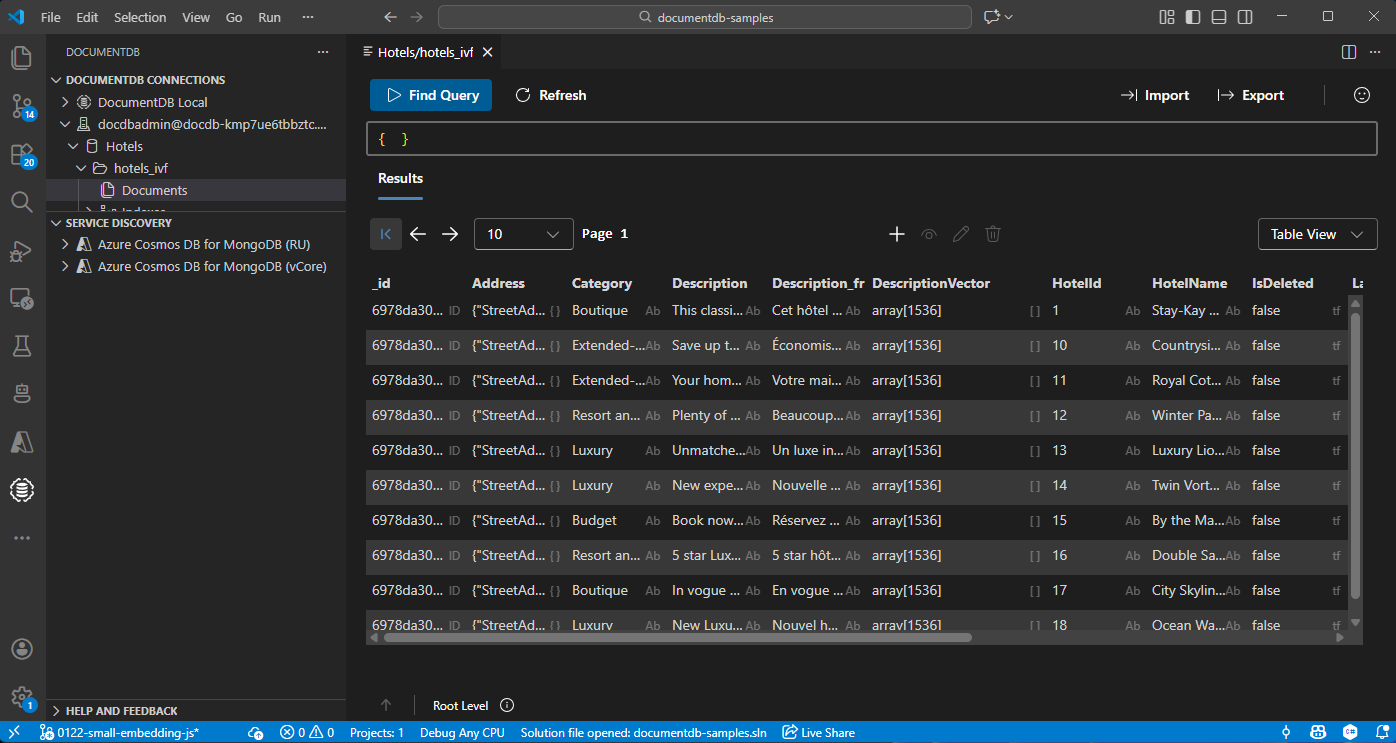
Menampilkan dan mengelola data di Visual Studio Code
Pilih ekstensi DocumentDB di Visual Studio Code untuk menyambungkan ke akun Azure DocumentDB Anda.
Lihat data dan indeks di database Hotel.
Membersihkan sumber daya
Hapus grup sumber daya, akun Azure DocumentDB, dan sumber daya Azure OpenAI saat Anda tidak memerlukannya untuk menghindari biaya tambahan.