Graphics.SmoothingMode Properti
Definisi
Penting
Beberapa informasi terkait produk prarilis yang dapat diubah secara signifikan sebelum dirilis. Microsoft tidak memberikan jaminan, tersirat maupun tersurat, sehubungan dengan informasi yang diberikan di sini.
Mendapatkan atau mengatur kualitas penyajian untuk ini Graphics.
public:
 property System::Drawing::Drawing2D::SmoothingMode SmoothingMode { System::Drawing::Drawing2D::SmoothingMode get(); void set(System::Drawing::Drawing2D::SmoothingMode value); };
public System.Drawing.Drawing2D.SmoothingMode SmoothingMode { get; set; }member this.SmoothingMode : System.Drawing.Drawing2D.SmoothingMode with get, setPublic Property SmoothingMode As SmoothingModeNilai Properti
Salah SmoothingMode satu nilai.
Contoh
Metode berikut menunjukkan efek pengaturan DashCapproperti , , DashPatterndan SmoothingMode . Output contoh ditampilkan dalam ilustrasi berikut.
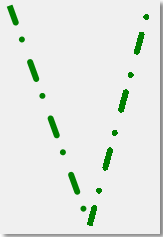
Contoh ini dirancang untuk digunakan dengan Windows Forms. Tempelkan kode ke dalam formulir dan panggil ShowPensAndSmoothingMode metode saat menangani peristiwa formulir Paint , meneruskan e sebagai PaintEventArgs.
private:
   void ShowPensAndSmoothingMode( PaintEventArgs^ e )
   {
      // Set the SmoothingMode property to smooth the line.
      e->Graphics->SmoothingMode = System::Drawing::Drawing2D::SmoothingMode::AntiAlias;

      // Create a new Pen object.
      Pen^ greenPen = gcnew Pen( Color::Green );

      // Set the width to 6.
      greenPen->Width = 6.0F;

      // Set the DashCap to round.
      greenPen->DashCap = System::Drawing::Drawing2D::DashCap::Round;

      // Create a custom dash pattern.
      array<Single>^temp0 = {4.0F,2.0F,1.0F,3.0F};
      greenPen->DashPattern = temp0;

      // Draw a line.
      e->Graphics->DrawLine( greenPen, 20.0F, 20.0F, 100.0F, 240.0F );

      // Change the SmoothingMode to none.
      e->Graphics->SmoothingMode = System::Drawing::Drawing2D::SmoothingMode::None;

      // Draw another line.
      e->Graphics->DrawLine( greenPen, 100.0F, 240.0F, 160.0F, 20.0F );

      // Dispose of the custom pen.
      delete greenPen;
   }
private void ShowPensAndSmoothingMode(PaintEventArgs e)
{

    // Set the SmoothingMode property to smooth the line.
    e.Graphics.SmoothingMode =
        System.Drawing.Drawing2D.SmoothingMode.AntiAlias;

    // Create a new Pen object.
    Pen greenPen = new Pen(Color.Green);

    // Set the width to 6.
    greenPen.Width = 6.0F;

    // Set the DashCap to round.
    greenPen.DashCap = System.Drawing.Drawing2D.DashCap.Round;

    // Create a custom dash pattern.
    greenPen.DashPattern = new float[]{4.0F, 2.0F, 1.0F, 3.0F};

    // Draw a line.
    e.Graphics.DrawLine(greenPen, 20.0F, 20.0F, 100.0F, 240.0F);

    // Change the SmoothingMode to none.
    e.Graphics.SmoothingMode =
        System.Drawing.Drawing2D.SmoothingMode.None;

    // Draw another line.
    e.Graphics.DrawLine(greenPen, 100.0F, 240.0F, 160.0F, 20.0F);

    // Dispose of the custom pen.
    greenPen.Dispose();
}
Private Sub ShowPensAndSmoothingMode(ByVal e As PaintEventArgs)

    ' Set the SmoothingMode property to smooth the line.
    e.Graphics.SmoothingMode = Drawing2D.SmoothingMode.AntiAlias

    ' Create a new Pen object.
    Dim greenPen As New Pen(Color.Green)

    ' Set the width to 6.
    greenPen.Width = 6.0F

    ' Set the DashCap to round.
    greenPen.DashCap = Drawing2D.DashCap.Round

    ' Create a custom dash pattern.
    greenPen.DashPattern = New Single() {4.0F, 2.0F, 1.0F, 3.0F}

    ' Draw a line.
    e.Graphics.DrawLine(greenPen, 20.0F, 20.0F, 100.0F, 240.0F)

    ' Change the SmoothingMode to none.
    e.Graphics.SmoothingMode = Drawing2D.SmoothingMode.None

    ' Draw another line.
    e.Graphics.DrawLine(greenPen, 100.0F, 240.0F, 160.0F, 20.0F)

    ' Dispose of the custom pen.
    greenPen.Dispose()
End Sub
Keterangan
Mode penghalusan menentukan apakah garis, kurva, dan tepi area yang diisi menggunakan smoothing (juga disebut antialias). Salah satu pengecualiannya adalah bahwa sikat gradien jalur tidak mematuhi mode smoothing. Area yang PathGradientBrush diisi menggunakan dirender dengan cara yang sama (alias) terlepas dari SmoothingMode properti .
