ContentControl.Content Properti
Definisi
Penting
Beberapa informasi terkait produk prarilis yang dapat diubah secara signifikan sebelum dirilis. Microsoft tidak memberikan jaminan, tersirat maupun tersurat, sehubungan dengan informasi yang diberikan di sini.
Mendapatkan atau mengatur konten .ContentControl
public:
 property System::Object ^ Content { System::Object ^ get(); void set(System::Object ^ value); };
[System.ComponentModel.Bindable(true)]
public object Content { get; set; }[<System.ComponentModel.Bindable(true)>]
member this.Content : obj with get, setPublic Property Content As ObjectNilai Properti
Objek yang berisi konten kontrol. Nilai defaultnya adalah null.
- Atribut
Contoh
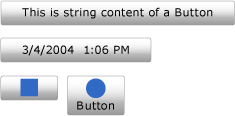
Contoh berikut menunjukkan cara membuat empat Button kontrol dengan Content diatur ke salah satu hal berikut ini:
Nota
Meskipun versi Extensible Application Markup Language (XAML) dari contoh dapat menggunakan <Button.Content> tag di sekitar konten setiap tombol, itu tidak diperlukan. Untuk informasi selengkapnya, lihat Gambaran Umum XAML (WPF).
<!--Create a Button with a string as its content.-->
<Button>This is string content of a Button</Button>

<!--Create a Button with a DateTime object as its content.-->
<Button xmlns:sys="clr-namespace:System;assembly=mscorlib">
  <sys:DateTime>2004/3/4 13:6:55</sys:DateTime>
</Button>

<!--Create a Button with a single UIElement as its content.-->
<Button>
  <Rectangle Height="40" Width="40" Fill="Blue"/>
</Button>

<!--Create a Button with a panel that contains multiple objects
as its content.-->
<Button>
  <StackPanel>
    <Ellipse Height="40" Width="40" Fill="Blue"/>
    <TextBlock TextAlignment="Center">Button</TextBlock>
  </StackPanel>
</Button>
// Create a Button with a string as its content.
Button stringContent = new Button();
stringContent.Content = "This is string content of a Button";

// Create a Button with a DateTime object as its content.
Button objectContent = new Button();
DateTime dateTime1 = new DateTime(2004, 3, 4, 13, 6, 55);

objectContent.Content = dateTime1;

// Create a Button with a single UIElement as its content.
Button uiElementContent = new Button();

Rectangle rect1 = new Rectangle();
rect1.Width = 40;
rect1.Height = 40;
rect1.Fill = Brushes.Blue;
uiElementContent.Content = rect1;

// Create a Button with a panel that contains multiple objects
// as its content.
Button panelContent = new Button();
StackPanel stackPanel1 = new StackPanel();
Ellipse ellipse1 = new Ellipse();
TextBlock textBlock1 = new TextBlock();

ellipse1.Width = 40;
ellipse1.Height = 40;
ellipse1.Fill = Brushes.Blue;

textBlock1.TextAlignment = TextAlignment.Center;
textBlock1.Text = "Button";

stackPanel1.Children.Add(ellipse1);
stackPanel1.Children.Add(textBlock1);

panelContent.Content = stackPanel1;
' Add a string to a button.
Dim stringContent As New Button()
stringContent.Content = "This is string content of a Button"

' Add a DateTime object to a button.
Dim objectContent As New Button()
Dim dateTime1 As New DateTime(2004, 3, 4, 13, 6, 55)

objectContent.Content = dateTime1

' Add a single UIElement to a button.
Dim uiElementContent As New Button()

Dim rect1 As New Rectangle()
rect1.Width = 40
rect1.Height = 40
rect1.Fill = Brushes.Blue
uiElementContent.Content = rect1

' Add a panel that contains multpile objects to a button.
Dim panelContent As New Button()
Dim stackPanel1 As New StackPanel()
Dim ellipse1 As New Ellipse()
Dim textBlock1 As New TextBlock()

ellipse1.Width = 40
ellipse1.Height = 40
ellipse1.Fill = Brushes.Blue

textBlock1.TextAlignment = TextAlignment.Center
textBlock1.Text = "Button"

stackPanel1.Children.Add(ellipse1)
stackPanel1.Children.Add(textBlock1)

panelContent.Content = stackPanel1
Ilustrasi berikut menunjukkan empat tombol yang dibuat dalam contoh sebelumnya.
Keterangan
Content Karena properti berjenis Object, tidak ada batasan pada apa yang dapat Anda masukkan ke dalam ContentControl. Content ditampilkan oleh ContentPresenter, yang ada di ControlTemplate dari ContentControl. Setiap ContentControl jenis dalam WPF memiliki ContentPresenter dalam defaultnya ControlTemplate. Untuk informasi selengkapnya tentang cara ContentPresenter menampilkan Content, lihat ContentPresenter.
Informasi Properti Dependensi
| Item | Nilai |
|---|---|
| Bidang pengidentifikasi | ContentProperty |
Properti metadata diatur ke true |
Tidak |
Penggunaan Atribut XAML
<object Content="content"/>
Penggunaan Elemen Properti XAML
<object> content</object>
Nilai XAML
Content Teks atau objek tunggal.
