TextBox.Typography Properti
Definisi
Penting
Beberapa informasi terkait produk prarilis yang dapat diubah secara signifikan sebelum dirilis. Microsoft tidak memberikan jaminan, tersirat maupun tersurat, sehubungan dengan informasi yang diberikan di sini.
Mendapatkan variasi tipografi yang saat ini efektif untuk konten teks kotak teks.
public:
 property System::Windows::Documents::Typography ^ Typography { System::Windows::Documents::Typography ^ get(); };
public System.Windows.Documents.Typography Typography { get; }member this.Typography : System.Windows.Documents.TypographyPublic ReadOnly Property Typography As TypographyNilai Properti
Objek Typography yang menentukan variasi tipografi yang saat ini efektif. Untuk daftar nilai tipografi default, lihat Typography.
Contoh
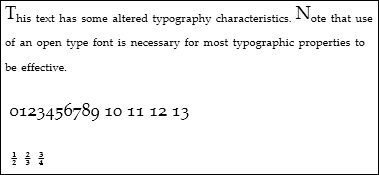
Contoh berikut menunjukkan cara mengatur atribut Typography, menggunakan Paragraph sebagai elemen contoh.
<Paragraph
  TextAlignment="Left"
  FontSize="18"
  FontFamily="Palatino Linotype"
  Typography.NumeralStyle="OldStyle"
  Typography.Fraction="Stacked"
  Typography.Variants="Inferior"
>
  <Run>
    This text has some altered typography characteristics.  Note
    that use of an open type font is necessary for most typographic
    properties to be effective.
  </Run>
  <LineBreak/><LineBreak/>
  <Run>
    0123456789 10 11 12 13
  </Run>
  <LineBreak/><LineBreak/>
  <Run>
    1/2 2/3 3/4
  </Run>
</Paragraph>
Gambar berikut menunjukkan bagaimana contoh ini ditampilkan.
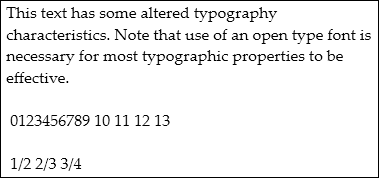
Sebaliknya, gambar berikut menunjukkan bagaimana contoh serupa dengan properti tipografi default ditampilkan.
Contoh berikut menunjukkan cara mengatur properti Typography secara terprogram.
Paragraph par = new Paragraph();

Run runText = new Run(
    "This text has some altered typography characteristics.  Note" +
    "that use of an open type font is necessary for most typographic" +
    "properties to be effective.");
Run runNumerals = new Run("0123456789 10 11 12 13");
Run runFractions = new Run("1/2 2/3 3/4");

par.Inlines.Add(runText);
par.Inlines.Add(new LineBreak());
par.Inlines.Add(new LineBreak());
par.Inlines.Add(runNumerals);
par.Inlines.Add(new LineBreak());
par.Inlines.Add(new LineBreak());
par.Inlines.Add(runFractions);

par.TextAlignment = TextAlignment.Left;
par.FontSize = 18;
par.FontFamily = new FontFamily("Palatino Linotype");

par.Typography.NumeralStyle = FontNumeralStyle.OldStyle;
par.Typography.Fraction = FontFraction.Stacked;
par.Typography.Variants = FontVariants.Inferior;
Dim par As New Paragraph()

Dim runText As New Run("This text has some altered typography characteristics.  Note" & "that use of an open type font is necessary for most typographic" & "properties to be effective.")
Dim runNumerals As New Run("0123456789 10 11 12 13")
Dim runFractions As New Run("1/2 2/3 3/4")

par.Inlines.Add(runText)
par.Inlines.Add(New LineBreak())
par.Inlines.Add(New LineBreak())
par.Inlines.Add(runNumerals)
par.Inlines.Add(New LineBreak())
par.Inlines.Add(New LineBreak())
par.Inlines.Add(runFractions)

par.TextAlignment = TextAlignment.Left
par.FontSize = 18
par.FontFamily = New FontFamily("Palatino Linotype")

par.Typography.NumeralStyle = FontNumeralStyle.OldStyle
par.Typography.Fraction = FontFraction.Stacked
par.Typography.Variants = FontVariants.Inferior
Keterangan
Properti Typography hanya berlaku untuk font OpenType. Varian tipografi tidak berpengaruh pada font yang tidak mendukung varian. Untuk informasi selengkapnya tentang topik ini, lihat Tipografi di WPF.
