BlockUIContainer.Child Properti
Definisi
Penting
Beberapa informasi terkait produk prarilis yang dapat diubah secara signifikan sebelum dirilis. Microsoft tidak memberikan jaminan, tersirat maupun tersurat, sehubungan dengan informasi yang diberikan di sini.
Mendapatkan atau mengatur yang dihosting UIElement oleh BlockUIContainer.
public:
 property System::Windows::UIElement ^ Child { System::Windows::UIElement ^ get(); void set(System::Windows::UIElement ^ value); };
public System.Windows.UIElement Child { get; set; }member this.Child : System.Windows.UIElement with get, setPublic Property Child As UIElementNilai Properti
Yang UIElement dihosting oleh BlockUIContainer.
Contoh
Contoh berikut menunjukkan cara menggunakan BlockUIContainer elemen untuk menghosting UIElement elemen dalam konten alur.
<FlowDocument ColumnWidth="400">
  <Section Background="GhostWhite">
    <Paragraph>
      A UIElement element may be embedded directly in flow content
      by enclosing it in a BlockUIContainer element.
    </Paragraph>
    <BlockUIContainer>
      <Button>Click me!</Button>
    </BlockUIContainer>
    <Paragraph>
      The BlockUIContainer element may host no more than one top-level
      UIElement.  However, other UIElements may be nested within the
      UIElement contained by an BlockUIContainer element.  For example,
      a StackPanel can be used to host multiple UIElement elements within
      a BlockUIContainer element.
    </Paragraph>
    <BlockUIContainer>
      <StackPanel>
        <Label Foreground="Blue">Choose a value:</Label>
        <ComboBox>
          <ComboBoxItem IsSelected="True">a</ComboBoxItem>
          <ComboBoxItem>b</ComboBoxItem>
          <ComboBoxItem>c</ComboBoxItem>
        </ComboBox>
        <Label Foreground ="Red">Choose a value:</Label>
        <StackPanel>
          <RadioButton>x</RadioButton>
          <RadioButton>y</RadioButton>
          <RadioButton>z</RadioButton>
        </StackPanel>
        <Label>Enter a value:</Label>
        <TextBox>
          A text editor embedded in flow content.
        </TextBox>
      </StackPanel>
    </BlockUIContainer>
  </Section>
</FlowDocument>
Gambar berikut menunjukkan bagaimana contoh ini ditampilkan.
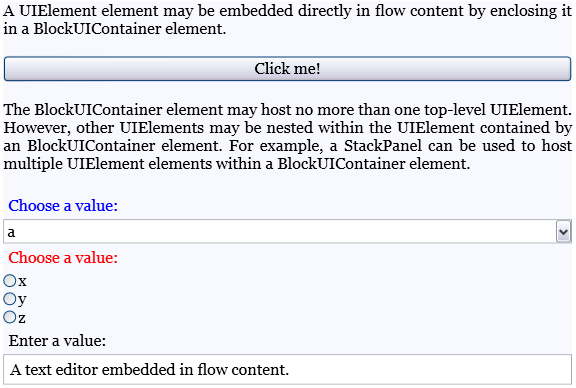
Contoh berikut menunjukkan cara menggunakan Child properti secara terprogram.
Section secx = new Section();
Paragraph par1 = new Paragraph(new Run(" Text to precede the button... "));
Paragraph par2 = new Paragraph(new Run(" Text to follow the button... "));

// Create a new button to be hosted in the section.
Button buttonx = new Button();
buttonx.Content = "Click me!";

// Create a new BlockUIContainer, and assign the button
// as the UI container's child.
BlockUIContainer uiCont = new BlockUIContainer();
uiCont.Child = buttonx;

// Add the text runs and UI container to the paragraph, in order.
secx.Blocks.Add(par1);
secx.Blocks.Add(uiCont);
secx.Blocks.Add(par2);
Dim secx As New Section()
Dim par1 As New Paragraph(New Run(" Text to precede the button... "))
Dim par2 As New Paragraph(New Run(" Text to follow the button... "))

' Create a new button to be hosted in the section.
Dim buttonx2 As New Button()
buttonx2.Content = "Click me!"

' Create a new BlockUIContainer, and assign the button
' as the UI container's child.
Dim uiCont2 As New BlockUIContainer()
uiCont2.Child = buttonx2

' Add the text runs and UI container to the paragraph, in order.
secx.Blocks.Add(par1)
secx.Blocks.Add(uiCont2)
secx.Blocks.Add(par2)
Keterangan
Dapat BlockUIContainer secara langsung menghosting tidak lebih dari satu UIElement anak. Namun, elemen anak yang BlockUIContainer dihosting oleh mungkin menghosting anak-anaknya sendiri.
Di XAML, membungkus UIElement dalam BlockUIContainer setara dengan pengaturan yang UIElement sebagai nilai Child properti.
