Span Konstruktor
Definisi
Penting
Beberapa informasi terkait produk prarilis yang dapat diubah secara signifikan sebelum dirilis. Microsoft tidak memberikan jaminan, tersirat maupun tersurat, sehubungan dengan informasi yang diberikan di sini.
Menginisialisasi instans baru kelas Span.
Overload
| Span() |
Menginisialisasi instans baru yang kosong dari kelas Span. |
| Span(Inline) |
Menginisialisasi instans baru kelas Span dengan objek Inline yang ditentukan sebagai konten awal. |
| Span(Inline, TextPointer) |
Menginisialisasi instans baru kelas Span, mengambil objek Inline tertentu sebagai konten awal Spanbaru , dan TextPointer yang menentukan posisi penyisipan untuk elemen Inline baru. |
| Span(TextPointer, TextPointer) |
Menginisialisasi instans baru kelas Span, mengambil dua objek TextPointer yang menunjukkan awal dan akhir pilihan konten yang akan dimuat Span baru. |
Span()
Menginisialisasi instans baru yang kosong dari kelas Span.
public:
 Span();
public Span ();Public Sub New ()Berlaku untuk
Span(Inline)
public:
 Span(System::Windows::Documents::Inline ^ childInline);
public Span (System.Windows.Documents.Inline childInline);new System.Windows.Documents.Span : System.Windows.Documents.Inline -> System.Windows.Documents.SpanPublic Sub New (childInline As Inline)Parameter
Contoh
Contoh berikut menunjukkan cara menggunakan konstruktor ini untuk membuat Rentang baru yang berisi Run.
// A child Inline element for the new Span element.
Run runx = new Run("The Run element derives from Inline, and is therefore" +
    "an acceptable child element for this new Span.");

// After this line executes, the new element "spanx"
// contains the specified Inline element, "runx".
Span spanx = new Span(runx);
' A child Inline element for the new Span element.
Dim runx1 As New Run("The Run element derives from Inline, and is therefore" & "an acceptable child element for this new Span.")

' After this line executes, the new element "spanx"
' contains the specified Inline element, "runx".
Dim spanx1 As New Span(runx1)
Berlaku untuk
Span(Inline, TextPointer)
Menginisialisasi instans baru kelas Span, mengambil objek Inline tertentu sebagai konten awal Spanbaru , dan TextPointer yang menentukan posisi penyisipan untuk elemen Inline baru.
public:
 Span(System::Windows::Documents::Inline ^ childInline, System::Windows::Documents::TextPointer ^ insertionPosition);
public Span (System.Windows.Documents.Inline childInline, System.Windows.Documents.TextPointer insertionPosition);new System.Windows.Documents.Span : System.Windows.Documents.Inline * System.Windows.Documents.TextPointer -> System.Windows.Documents.SpanPublic Sub New (childInline As Inline, insertionPosition As TextPointer)Parameter
- childInline
- Inline
Objek Inline yang menentukan konten awal Spanbaru . Parameter ini mungkin null, dalam hal ini tidak ada Inline yang dimasukkan.
- insertionPosition
- TextPointer
TextPointer yang menentukan posisi untuk menyisipkan elemen Span setelah dibuat, atau null tanpa penyisipan otomatis.
Contoh
Contoh berikut menunjukkan cara menggunakan konstruktor ini untuk membuat Span baru yang berisi Run yang disisipkan di awal Paragraph.
// A child Inline element for the new Span element.
Run runx = new Run("The Run element derives from Inline, and is therefore" +
    "an acceptable child element for this new Span.");

// An empty paragraph will serve as the container for the new Span element.
Paragraph parx = new Paragraph();

// After this line executes, the new element "spanx"
// contains the specified Inline element, "runx".  Also, "spanx" is
// inserted at the point indicated by the insertionPosition parameter,
// which in this case indicates the content start position in the Paragraph
// element "parx".
Span spanx = new Span(runx, parx.ContentStart);
' A child Inline element for the new Span element.
Dim runx2 As New Run("The Run element derives from Inline, and is therefore" & "an acceptable child element for this new Span.")

' An empty paragraph will serve as the container for the new Span element.
Dim parx2 As New Paragraph()

' After this line executes, the new element "spanx"
' contains the specified Inline element, "runx".  Also, "spanx" is
' inserted at the point indicated by the insertionPosition parameter,
' which in this case indicates the content start position in the Paragraph
' element "parx".
Dim spanx2 As New Span(runx2, parx2.ContentStart)
Berlaku untuk
Span(TextPointer, TextPointer)
Menginisialisasi instans baru kelas Span, mengambil dua objek TextPointer yang menunjukkan awal dan akhir pilihan konten yang akan dimuat Span baru.
public:
 Span(System::Windows::Documents::TextPointer ^ start, System::Windows::Documents::TextPointer ^ end);
public Span (System.Windows.Documents.TextPointer start, System.Windows.Documents.TextPointer end);new System.Windows.Documents.Span : System.Windows.Documents.TextPointer * System.Windows.Documents.TextPointer -> System.Windows.Documents.SpanPublic Sub New (start As TextPointer, end As TextPointer)Parameter
- start
- TextPointer
TextPointer yang menunjukkan awal pilihan konten yang akan dimuat Span baru.
- end
- TextPointer
TextPointer yang menunjukkan akhir pilihan konten yang akan dimuat Span baru.
Pengecualian
Dimunculkan ketika start atau end null.
Dimunculkan ketika start dan end tidak menyelesaikan berbagai konten yang cocok untuk penutup oleh elemen Span; misalnya, jika start dan end menunjukkan posisi dalam paragraf yang berbeda.
Contoh
Contoh berikut menunjukkan cara menggunakan konstruktor ini untuk membuat Span baru yang diterapkan ke rentang konten. Rentang konten ditentukan oleh objek TextPointer awal dan akhir yang ditentukan oleh konstruktor.
// Create a paragraph and three text runs to serve as example content.
Paragraph parx = new Paragraph();
Run run1 = new Run("Text run 1.");
Run run2 = new Run("Text run 2.");
Run run3 = new Run("Text run 3.");

// Add the three text runs to the paragraph, separated by linebreaks.
parx.Inlines.Add(run1);
parx.Inlines.Add(new LineBreak());
parx.Inlines.Add(run2);
parx.Inlines.Add(new LineBreak());
parx.Inlines.Add(run3);

// After this line executes, the selection of content
// indicated by the "start" and "end" parameters will be
// enclosed by the new Span.  In this case, the new Span
// will enclose the entire contents of the Paragraph "parx",
// which happens to contain three text runs and two linebreaks.
Span spanx = new Span(parx.ContentStart, parx.ContentEnd);

// Now, properties set on "spanx" will override default properties
// on elements contained by "spanx".  For example, setting
// these arbitrary display properties on "spanx" will affect
// the child text runs enclosed by "spanx".
spanx.Foreground = Brushes.Blue;
spanx.Background = Brushes.GhostWhite;
spanx.FontFamily = new FontFamily("Century Gothic");

// Non-default property values override any settings on the
// enclosing Span element.
run2.Foreground = Brushes.Red;
run2.Background = Brushes.AntiqueWhite;
run2.FontFamily = new FontFamily("Lucida Handwriting");
' Create a paragraph and three text runs to serve as example content.
Dim parx3 As New Paragraph()
Dim run1 As New Run("Text run 1.")
Dim run2 As New Run("Text run 2.")
Dim run3 As New Run("Text run 3.")

' Add the three text runs to the paragraph, separated by linebreaks.
parx3.Inlines.Add(run1)
parx3.Inlines.Add(New LineBreak())
parx3.Inlines.Add(run2)
parx3.Inlines.Add(New LineBreak())
parx3.Inlines.Add(run3)

' After this line executes, the selection of content
' indicated by the "start" and "end" parameters will be
' enclosed by the new Span.  In this case, the new Span
' will enclose the entire contents of the Paragraph "parx",
' which happens to contain three text runs and two linebreaks.
Dim spanx As New Span(parx3.ContentStart, parx3.ContentEnd)

' Now, properties set on "spanx" will override default properties
' on elements contained by "spanx".  For example, setting
' these arbitrary display properties on "spanx" will affect
' the child text runs enclosed by "spanx".
spanx.Foreground = Brushes.Blue
spanx.Background = Brushes.GhostWhite
spanx.FontFamily = New FontFamily("Century Gothic")

' Non-default property values override any settings on the
' enclosing Span element.
run2.Foreground = Brushes.Red
run2.Background = Brushes.AntiqueWhite
run2.FontFamily = New FontFamily("Lucida Handwriting")
Gambar berikut menunjukkan bagaimana contoh ini dirender dalam FlowDocument.
Cuplikan Layar 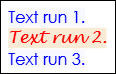
Keterangan
Konstruktor ini dimaksudkan untuk menginisialisasi elemen Span baru sehingga mencakup pilihan konten yang sudah ada sebelumnya.
