Catatan
Akses ke halaman ini memerlukan otorisasi. Anda dapat mencoba masuk atau mengubah direktori.
Akses ke halaman ini memerlukan otorisasi. Anda dapat mencoba mengubah direktori.
Anda bisa menggunakan kontrol RichEditBox untuk memasukkan dan mengedit dokumen teks kaya yang berisi teks yang diformat, hyperlink, gambar, persamaan matematika, dan konten kaya lainnya. Anda dapat membuat RichEditBox baca-saja dengan mengatur properti IsReadOnly-nya ke true.
Apakah ini kontrol yang tepat?
Gunakan RichEditBox untuk menampilkan dan mengedit file teks. Anda tidak menggunakan RichEditBox untuk mendapatkan input pengguna ke dalam aplikasi Anda dengan cara Anda menggunakan kotak input teks standar lainnya. Sebaliknya, Anda menggunakannya untuk bekerja dengan file teks yang terpisah dari aplikasi Anda. Anda biasanya menyimpan teks yang dimasukkan ke dalam RichEditBox ke file .rtf.
- Jika tujuan utama kotak teks multibaris adalah untuk membuat dokumen baca-saja (seperti entri blog atau konten pesan email), dan dokumen tersebut memerlukan teks kaya, gunakan blok teks kaya sebagai gantinya.
- Saat mengambil teks yang hanya akan digunakan dan tidak diputar ulang kepada pengguna, gunakan kontrol input teks biasa.
- Untuk semua skenario lainnya, gunakan kontrol input teks biasa.
Untuk informasi selengkapnya tentang memilih kontrol teks yang tepat, lihat artikel Kontrol teks .
Recommendations
- Saat Anda membuat kotak teks berformat, berikan tombol pengaturan gaya dan terapkan tindakannya.
- Gunakan font yang konsisten dengan gaya aplikasi Anda.
- Buat tinggi kontrol teks cukup tinggi untuk mengakomodasi entri umum.
- Jangan biarkan kontrol input teks Anda bertambah tinggi saat pengguna mengetik.
- Jangan gunakan kotak teks multibaris saat pengguna hanya memerlukan satu baris.
- Jangan gunakan kontrol teks kaya jika kontrol teks biasa memadai.
Examples
Kotak edit kaya ini memiliki dokumen teks kaya yang terbuka di dalamnya. Tombol pemformatan dan file bukan bagian dari kotak edit kaya fitur, tetapi Anda harus menyediakan setidaknya sekumpulan tombol penataan dasar dan melaksanakan fungsinya.
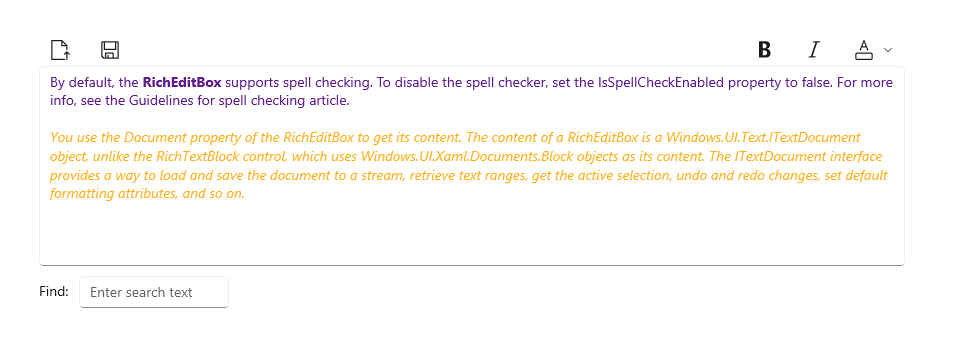
Membuat kotak teks berfitur lengkap
- API Penting:Kelas RichEditBox, properti Dokumen, properti IsReadOnly, properti IsSpellCheckEnabled

Aplikasi Galeri WinUI 3 mencakup contoh interaktif kontrol dan fitur WinUI. Dapatkan aplikasi dari Microsoft Store atau telusuri kode sumber pada GitHub.
Secara default, RichEditBox mendukung pemeriksaan ejaan. Untuk menonaktifkan pemeriksa ejaan, atur properti IsSpellCheckEnabled ke false. Untuk informasi selengkapnya, lihat artikel Panduan untuk pemeriksaan ejaan .
Anda menggunakan properti Dokumen dari RichEditBox untuk mendapatkan kontennya. Konten RichEditBox adalah objek ITextDocument , tidak seperti kontrol RichTextBlock, yang menggunakan objek Blokir sebagai kontennya. Antarmuka ITextDocument menyediakan cara untuk memuat dan menyimpan dokumen ke aliran, mengambil rentang teks, mendapatkan pilihan aktif, mengurungkan dan mengulang perubahan, mengatur atribut pemformatan default, dan sebagainya.
Contoh ini memperlihatkan cara mengedit, memuat, dan menyimpan file Format Teks Kaya (.rtf) di RichEditBox.
<RelativePanel Margin="20" HorizontalAlignment="Stretch">
    <RelativePanel.Resources>
        <Style TargetType="AppBarButton">
            <Setter Property="IsCompact" Value="True"/>
        </Style>
    </RelativePanel.Resources>
    <AppBarButton x:Name="openFileButton" Icon="OpenFile"
                  Click="OpenButton_Click" ToolTipService.ToolTip="Open file"/>
    <AppBarButton Icon="Save" Click="SaveButton_Click"
                  ToolTipService.ToolTip="Save file"
                  RelativePanel.RightOf="openFileButton" Margin="8,0,0,0"/>

    <AppBarButton Icon="Bold" Click="BoldButton_Click" ToolTipService.ToolTip="Bold"
                  RelativePanel.LeftOf="italicButton" Margin="0,0,8,0"/>
    <AppBarButton x:Name="italicButton" Icon="Italic" Click="ItalicButton_Click"
                  ToolTipService.ToolTip="Italic" RelativePanel.LeftOf="underlineButton" Margin="0,0,8,0"/>
    <AppBarButton x:Name="underlineButton" Icon="Underline" Click="UnderlineButton_Click"
                  ToolTipService.ToolTip="Underline" RelativePanel.AlignRightWithPanel="True"/>

    <RichEditBox x:Name="editor" Height="200" RelativePanel.Below="openFileButton"
                 RelativePanel.AlignLeftWithPanel="True" RelativePanel.AlignRightWithPanel="True"/>
</RelativePanel>
private async void OpenButton_Click(object sender, RoutedEventArgs e)
{
    // Open a text file.
    Windows.Storage.Pickers.FileOpenPicker open =
        new Windows.Storage.Pickers.FileOpenPicker();
    open.SuggestedStartLocation =
        Windows.Storage.Pickers.PickerLocationId.DocumentsLibrary;
    open.FileTypeFilter.Add(".rtf");

    Windows.Storage.StorageFile file = await open.PickSingleFileAsync();

    if (file != null)
    {
        try
        {
            Windows.Storage.Streams.IRandomAccessStream randAccStream =
        await file.OpenAsync(Windows.Storage.FileAccessMode.Read);

            // Load the file into the Document property of the RichEditBox.
            editor.Document.LoadFromStream(Microsoft.UI.Text.TextSetOptions.FormatRtf, randAccStream);
        }
        catch (Exception)
        {
            ContentDialog errorDialog = new ContentDialog()
            {
                Title = "File open error",
                Content = "Sorry, I couldn't open the file.",
                PrimaryButtonText = "Ok"
            };

            await errorDialog.ShowAsync();
        }
    }
}

private async void SaveButton_Click(object sender, RoutedEventArgs e)
{
    Windows.Storage.Pickers.FileSavePicker savePicker = new Windows.Storage.Pickers.FileSavePicker();
    savePicker.SuggestedStartLocation = Windows.Storage.Pickers.PickerLocationId.DocumentsLibrary;

    // Dropdown of file types the user can save the file as
    savePicker.FileTypeChoices.Add("Rich Text", new List<string>() { ".rtf" });

    // Default file name if the user does not type one in or select a file to replace
    savePicker.SuggestedFileName = "New Document";

    Windows.Storage.StorageFile file = await savePicker.PickSaveFileAsync();
    if (file != null)
    {
        // Prevent updates to the remote version of the file until we
        // finish making changes and call CompleteUpdatesAsync.
        Windows.Storage.CachedFileManager.DeferUpdates(file);
        // write to file
        Windows.Storage.Streams.IRandomAccessStream randAccStream =
            await file.OpenAsync(Windows.Storage.FileAccessMode.ReadWrite);

        editor.Document.SaveToStream(Microsoft.UI.Text.TextGetOptions.FormatRtf, randAccStream);

        // Let Windows know that we're finished changing the file so the
        // other app can update the remote version of the file.
        Windows.Storage.Provider.FileUpdateStatus status = await Windows.Storage.CachedFileManager.CompleteUpdatesAsync(file);
        if (status != Windows.Storage.Provider.FileUpdateStatus.Complete)
        {
            Windows.UI.Popups.MessageDialog errorBox =
                new Windows.UI.Popups.MessageDialog("File " + file.Name + " couldn't be saved.");
            await errorBox.ShowAsync();
        }
    }
}

private void BoldButton_Click(object sender, RoutedEventArgs e)
{
    Microsoft.UI.Text.ITextSelection selectedText = editor.Document.Selection;
    if (selectedText != null)
    {
        Microsoft.UI.Text.ITextCharacterFormat charFormatting = selectedText.CharacterFormat;
        charFormatting.Bold = Microsoft.UI.Text.FormatEffect.Toggle;
        selectedText.CharacterFormat = charFormatting;
    }
}

private void ItalicButton_Click(object sender, RoutedEventArgs e)
{
    Microsoft.UI.Text.ITextSelection selectedText = editor.Document.Selection;
    if (selectedText != null)
    {
        Microsoft.UI.Text.ITextCharacterFormat charFormatting = selectedText.CharacterFormat;
        charFormatting.Italic = Microsoft.UI.Text.FormatEffect.Toggle;
        selectedText.CharacterFormat = charFormatting;
    }
}

private void UnderlineButton_Click(object sender, RoutedEventArgs e)
{
    Microsoft.UI.Text.ITextSelection selectedText = editor.Document.Selection;
    if (selectedText != null)
    {
        Microsoft.UI.Text.ITextCharacterFormat charFormatting = selectedText.CharacterFormat;
        if (charFormatting.Underline == Microsoft.UI.Text.UnderlineType.None)
        {
            charFormatting.Underline = Microsoft.UI.Text.UnderlineType.Single;
        }
        else {
            charFormatting.Underline = Microsoft.UI.Text.UnderlineType.None;
        }
        selectedText.CharacterFormat = charFormatting;
    }
}
Menggunakan kotak edit kaya untuk persamaan matematika
RichEditBox dapat menampilkan dan mengedit persamaan matematika menggunakan UnicodeMath. Persamaan disimpan dan diambil dalam format MathML 3.0 .
Secara default, kontrol RichEditBox tidak menginterpretasikan input sebagai matematika. Untuk mengaktifkan mode matematika, panggil SetMathMode pada properti TextDocument, dengan meneruskan nilai RichEditMathMode.MathOnly (untuk menonaktifkan mode matematika, panggil SetMathMode dengan meneruskan nilai NoMath).
richEditBox.TextDocument.SetMathMode(Microsoft.UI.Text.RichEditMathMode.MathOnly);
Ini memungkinkan input UnicodeMath dikenali dan dikonversi secara otomatis ke MathML secara real time. Misalnya, memasukkan 4^2 dikonversi ke 42, dan 1/2 dikonversi ke 1/2. Lihat aplikasi Galeri WinUI 3 untuk contoh selengkapnya.
Untuk menyimpan konten matematika dari kotak edit kaya sebagai string MathML, panggil GetMathML.
richEditBox.TextDocument.GetMathML(out String mathML);
Untuk mengatur konten matematika dari kotak edit kaya, panggil SetMathML, meneruskan string MathML.
Pilih keyboard yang tepat untuk kontrol teks Anda
Untuk membantu pengguna memasukkan data menggunakan keyboard sentuh, atau Panel Input Lunak (SIP), Anda dapat mengatur cakupan input kontrol teks agar sesuai dengan jenis data yang diharapkan dimasukkan pengguna. Tata letak keyboard default biasanya sesuai untuk bekerja dengan dokumen teks kaya.
Untuk informasi selengkapnya tentang penggunaan cakupan input, lihat Gunakan cakupan input untuk mengubah keyboard sentuh.
Artikel terkait
- Pengaturan teks
- Panduan untuk pemeriksaan ejaan
- Panduan untuk input teks
- Kelas TextBox
- Kelas PasswordBox
Berkolaborasi dengan kami di GitHub
Sumber untuk konten ini dapat ditemukan di GitHub, yang juga dapat Anda gunakan untuk membuat dan meninjau masalah dan menarik permintaan. Untuk informasi selengkapnya, lihat panduan kontributor kami.

Windows developer