Nóta
Aðgangur að þessari síðu krefst heimildar. Þú getur prófað aðskrá þig inn eða breyta skráasöfnum.
Aðgangur að þessari síðu krefst heimildar. Þú getur prófað að breyta skráasöfnum.
Applies to: ✅ SQL analytics endpoint and Warehouse in Microsoft Fabric
In Microsoft Fabric, users access a SQL analytics endpoint or Warehouse through a Tabular Data Stream (TDS) endpoint. Modern web applications interact with a SQL Server TDS endpoint. Within Microsoft Fabric settings, this endpoint is labeled as the SQL connection string.
Tip
For a tutorial on connecting with common tools, see Connect to Fabric Data Warehouse.
Authentication to warehouses in Fabric
In Microsoft Fabric, the SQL connection string supports two types of authenticated users:
- Microsoft Entra ID user principals, or user identities
- Microsoft Entra ID service principals
For more information, see Microsoft Entra authentication as an alternative to SQL authentication in Microsoft Fabric.
The SQL connection string requires TCP port 1433 to be open. TCP 1433 is the standard SQL Server port number. Warehouse uses the Microsoft SQL Server Tabular Data Stream (TDS) protocol over TCP port 1433. In environments that use protocol-aware firewalls or application-layer inspection, configure and inspect SQL traffic as Microsoft SQL Server (MSSQL/TDS) traffic rather than HTTPS traffic.
Some firewalls distinguish between TCP port access and application protocol inspection. In these environments, allowing TCP port 1433 alone might not be sufficient if the firewall is configured to expect HTTPS traffic on that port.
The SQL connection string also respects the Warehouse or Lakehouse SQL analytics endpoint security model for data access. Users can access data for all objects to which they have permission.
For more information about security in the SQL analytics endpoint, see OneLake security for SQL analytics endpoints.
Best practices
Add retries to your applications and ETL jobs to make them more resilient. For more information, see the following documentation:
- Retry pattern - Azure Architecture Center
- Working with transient errors - Azure SQL Database
- Step 4: Connect resiliently to SQL with ADO.NET - ADO.NET Provider for SQL Server
- Step 4: Connect resiliently to SQL with PHP - PHP drivers for SQL Server
- Use service tags for firewall clearance, as described in the following section.
- You should provide the warehouse item name as the Initial Catalog or Database name when you connect. If you don't provide the
InitialCatalogconnection string property, your initial connection context will be to themasterwarehouse.
Allow Azure service tags through firewall
To enable connectivity through the firewall, you need to allow Power BI service tags and SQL service tags. For more information, see Power BI Service Tags and Service tags.
You can't use the Fully Qualified Domain Name (FQDN) of the TDS Endpoint alone.
Important
If your organization uses Azure Firewall application rules or similar protocol-aware firewalls, configure Warehouse traffic as MSSQL/TDS traffic. Configuring SQL traffic as HTTPS traffic on port 1433 can prevent successful connectivity even when network access to the port is allowed.
Firewall and application-layer inspection considerations
Some enterprise firewall solutions perform application-layer inspection in addition to traditional IP and port filtering.
When you configure firewall policies for Warehouse:
- Allow outbound TCP connectivity on port 1433.
- Ensure SQL traffic is treated as Microsoft SQL Server (MSSQL/TDS) traffic.
- Don't configure SQL connections to Warehouse as HTTPS traffic on port 1433.
- Validate connectivity after firewall policy changes are deployed.
Note
Customers using Azure Firewall application rules should configure SQL-aware filtering for SQL traffic. Azure Firewall supports MSSQL protocol handling and SQL FQDN filtering for SQL workloads.
FQDN-based firewall filtering
Organizations that restrict outbound access using fully qualified domain names (FQDNs) can use firewall rules that allow only approved SQL destinations.
For environments that use Azure Firewall:
- SQL-aware FQDN filtering is supported through MSSQL application rules.
- FQDN filtering can be used together with port 1433 restrictions to limit outbound SQL connectivity.
- Ensure all Warehouse endpoints documented in this article are included in the firewall allow list.
For implementation details, see Configure Azure Firewall application rules with SQL FQDNs.
Considerations and limitations
- SQL Authentication isn't supported.
- Multiple Active Result Sets (MARS) isn't supported for Microsoft Fabric Warehouse. MARS is disabled by default. If
MultipleActiveResultSetsis included in the connection string, remove it or set it to false. - If you receive error code 24804 with the message "Couldn't complete the operation due to a system update. Close out this connection, sign in again, and retry the operation" or error code 6005 with the message "SHUTDOWN is in progress. Execution fail against sql server. Please contact SQL Server team if you need further support.", it's due to temporary connection loss, likely because of a system deployment or reconfiguration. To resolve this issue, sign in again and retry. To learn how to build resiliency and retries in your application, see Best Practices.
- If you receive error code 6008 with the message "Workspace is temporarily unavailable. This may be due to system maintenance or an internal operation. Please reestablish your connection." this error indicates a temporary connection interruption. To resolve this issue, reestablish your connection, sign in again, and retry the operation. This condition is transient and doesn't indicate a failure in your query or application.
- Linked server connections from SQL Server aren't supported.
Connection behavior for InitialCatalog
In May 2026, Microsoft updated the connection behavior for Fabric Data Warehouse and SQL analytics endpoint to make the InitialCatalog connection string property optional. Currently, users connect to the master system database when the InitialCatalog property isn't provided. In Fabric Data Warehouse, you can only connect to the master database, you can't modify the master database, and you can't create, alter, or drop user objects in the master database.
You can use the USE Transact-SQL syntax to change your connection warehouse context once connected to master, and the DB_NAME() function to determine your current warehouse. For example:
SELECT DB_NAME(); --returns name of current warehouse context
GO
USE [ContosoWarehouse];
GO
SELECT DB_NAME(); --returns name of current warehouse context
GO
The following table outlines the updated connection behavior for Fabric Data Warehouse and SQL analytics endpoint when you specify or omit the InitialCatalog property in connection strings.
| Input Scenario | Prior to May 2026 | Current behavior |
|---|---|---|
| Existing warehouse name provided | Connects to the specified warehouse | No change - connects to the specified warehouse |
| Existing warehouse ID provided | Connects to the specified warehouse | No change - connects to the specified warehouse |
InitialCatalog property not provided |
Connects to a nondeterminant warehouse in the workspace | Connects to master |
InitialCatalog = master |
Connects to a nondeterminant warehouse in the workspace | Connects to master |
Warehouse in InitialCatalog property doesn't exist |
Connects to a nondeterminant warehouse in the workspace | Throws an error indicating no warehouse exists |
Error handling
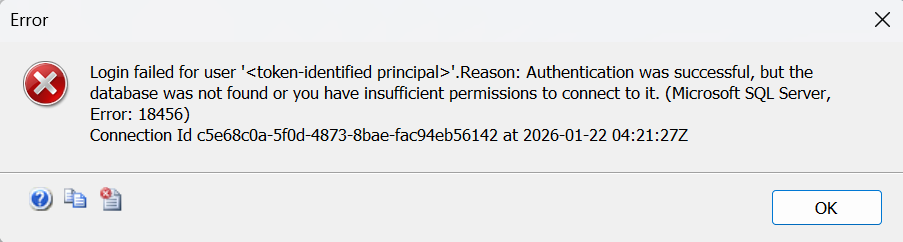
If no warehouses exist in the workspace and a connection is attempted without specifying a valid warehouse, users will see the following error: "Login failed for user '<token-identified principal>'. Reason: Authentication was successful, but the database was not found, or you have insufficient permissions to connect to it."
The following screenshot shows the error as it appears in SSMS when an invalid warehouse name is provided as the InitialCatalog: