Nota
L'accesso a questa pagina richiede l'autorizzazione. È possibile provare ad accedere o modificare le directory.
L'accesso a questa pagina richiede l'autorizzazione. È possibile provare a modificare le directory.
Le piattaforme Copilot Studio e Dynamics 365 for Customer Service differiscono leggermente nel modo in cui supportano i messaggi multimediali avanzati in base al canale e al tipo di messaggio multimediale avanzato. Questo articolo descrive come supportare i messaggi multimediali in Copilot Studio.
Recuperare il codice JSON dell'agente per Apple Messages for Business
- Nella mappa del sito dell'interfaccia di amministrazione del servizio Copilot selezionare Produttivitànell'esperienza di supporto.
- Nella pagina Produttività selezionare Gestisci per i messaggi avanzati.
- Dall'elenco di tutti i messaggi dell'elenco disponibili, seleziona un messaggio multimediale che desideri inviare alla conversazione.
- Per i messaggi avanzati di Apple Messages for Business, usa l'API Microsoft.Omnichannel.sendMessageToConversation per inviare file JSON.
Recupera il codice JSON dell'agente per i moduli della Live Chat, il codice JSON personalizzato della Live Chat e le risposte suggerite da WhatsApp
Nella mappa del sito dell'interfaccia di amministrazione del servizio Copilot selezionare Produttivitànell'esperienza di supporto.
Nella pagina Produttività selezionare Gestisci per i messaggi avanzati.
Trova il messaggio multimediale che desideri venga inviato da un agente e, se è disponibile un codice JSON, viene visualizzato nella colonna JSON per Copilot Studio . Seleziona Visualizza JSON e il tipo di canale specifico per copiare il JSON.
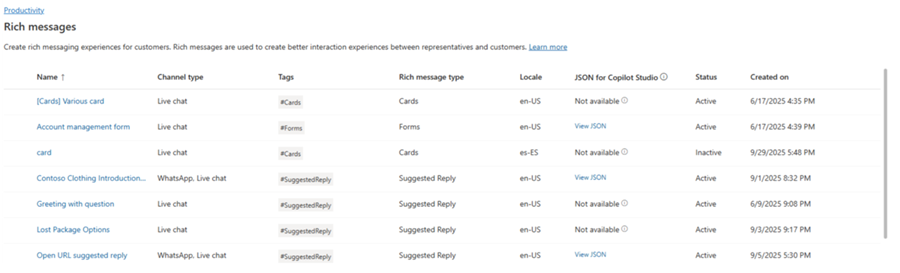
Per i modelli multimediali di Live Chat e WhatsApp, puoi incollare il codice JSON direttamente in un nodo della scheda adattiva in Copilot Studio.
Esempi JSON per messaggi avanzati per Apple Messages for Business
Questa sezione include esempi JSON per i tipi di messaggi avanzati disponibili nel canale Apple Messages for Business in Multicanale per Customer Service. Ulteriori informazioni: Gestire i messaggi avanzati
Annotazioni
Non è possibile inviare messaggi avanzati di tipo Moduli alle conversazioni.
Apple Pay
let applePayJSON = // <copy_and_paste_details_content>
applePayJSON.survey = { Questions: JSON.parse(applePayJSON.survey)[0].Questions, Answers: JSON.parse(applePayJSON.survey)[1].Answers };
applePayJSON.survey.Answers.AppleMessagesforBusinessJSON = JSON.parse(applePayJSON.survey.Answers.AppleMessagesforBusinessJSON);
applePayJSON.survey.Answers.AppleMessagesforBusinessJSON = JSON.stringify(applePayJSON.survey.Answers.AppleMessagesforBusinessJSON);
applePayJSON.survey = JSON.stringify(applePayJSON.survey);

// Can now send this payload using the API
Microsoft.Omnichannel.sendMessageToConversation(applePayJSON, false);

// Or take the JSON elsewhere for use in bringing your own logic
copy(applePayJSON);
Authentication
let authJSON = // <copy_and_paste_details_content>
authJSON.survey = { Questions: JSON.parse(authJSON.survey)[0].Questions, Answers: JSON.parse(authJSON.survey)[1].Answers };
authJSON.survey = JSON.stringify(authJSON.survey);

// Can now send this payload using the API
Microsoft.Omnichannel.sendMessageToConversation(authJSON, false);

// Or take the JSON elsewhere for use in bringing your own logic
copy(authJSON);
JSON personalizzato (applicazione iMessage)
let customJSON = // <copy_and_paste_details_content>
customJSON.survey = { Questions: JSON.parse(customJSON.survey)[0].Questions, Answers: JSON.parse(customJSON.survey)[1].Answers };
customJSON.survey.Answers.AppleMessagesforBusinessJSON = JSON.parse(customJSON.survey.Answers.AppleMessagesforBusinessJSON);
customJSON.survey.Answers.AppleMessagesforBusinessJSON = JSON.stringify(customJSON.survey.Answers.AppleMessagesforBusinessJSON);
customJSON.survey = JSON.stringify(customJSON.survey);

// Can now send this payload using the API
Microsoft.Omnichannel.sendMessageToConversation(customJSON, false);

// Or take the JSON elsewhere for use in bringing your own logic
copy(customJSON);
Selettore elenco
listPickerJSON = // <copy_and_paste_details_content>
listPickerJSON.survey = { Questions: JSON.parse(lpFromDetails.survey)[0].Questions, Answers: JSON.parse(listPickerJSON.survey)[1].Answers };
listPickerJSON.survey = JSON.stringify(listPickerJSON.survey);

// Can now send this payload using the API
Microsoft.Omnichannel.sendMessageToConversation(listPickerJSON, false);

// Or take the JSON elsewhere for use in bringing your own logic
copy(listPickerJSON);
Risposta suggerita
suggestedReplyJSON = // <copy_and_paste_details_content>
suggestedReplyJSON.survey = { Questions: JSON.parse(suggestedReplyJSON.survey)[0].Questions, Answers: JSON.parse(suggestedReplyJSON.survey)[1].Answers };
suggestedReplyJSON.survey = JSON.stringify(suggestedReplyJSON.survey);

// Can now send this payload using the API
Microsoft.Omnichannel.sendMessageToConversation(suggestedReplyJSON, false);

// Or take the JSON elsewhere for use in bringing your own logic
copy(suggestedReplyJSON);
Selezione ora
timePickerJSON = // <copy_and_paste_details_content>
timePickerJSON.survey = { Questions: JSON.parse(timePickerJSON.survey)[0].Questions, Answers: JSON.parse(timePickerJSON.survey)[1].Answers };
timePickerJSON.survey = JSON.stringify(timePickerJSON.survey);

// Can now send this payload using the API
Microsoft.Omnichannel.sendMessageToConversation(timePickerJSON, false);

// Or take the JSON elsewhere for use in bringing your own logic
copy(timePickerJSON);
Collegamento multimediale al video
videoRichLinkJSON = // <copy_and_paste_details_content>
videoRichLinkJSON.survey = { Questions: JSON.parse(videoRichLinkJSON.survey)[0].Questions, Answers: JSON.parse(videoRichLinkJSON.survey)[1].Answers };
timePickerJSON.survey = JSON.stringify(videoRichLinkJSON.survey);

// Can now send this payload using the API
Microsoft.Omnichannel.sendMessageToConversation(videoRichLinkJSON, false);

// Or take the JSON elsewhere for use in bringing your own logic
copy(videoRichLinkJSON);
Collegamento avanzato al sito web
websiteRichLinkJSON = // <copy_and_paste_details_content>
websiteRichLinkJSON.survey = { Questions: JSON.parse(websiteRichLinkJSON.survey)[0].Questions, Answers: JSON.parse(websiteRichLinkJSON.survey)[1].Answers };
timePickerJSON.survey = JSON.stringify(websiteRichLinkJSON.survey);

// Can now send this payload using the API
Microsoft.Omnichannel.sendMessageToConversation(websiteRichLinkJSON, false);

// Or take the JSON elsewhere for use in bringing your own logic
copy(websiteRichLinkJSON);
Configura gli agenti per l'invio di risposte suggerite e schede/caroselli in Live Chat
Copilot Studio supporta le risposte suggerite e le schede di base pronte all'uso. Per altre informazioni, vedere Inviare un messaggio - Microsoft Copilot Studio.
Annotazioni
Copilot Studio si riferisce alle risposte suggerite come risposte rapide.
Informazioni pertinenti
Informazioni di riferimento sull'API JavaScript dell'SDK per chat dal vivo
Informazioni di riferimento sull'API JavaScript multicanale
sendMessageToConversation