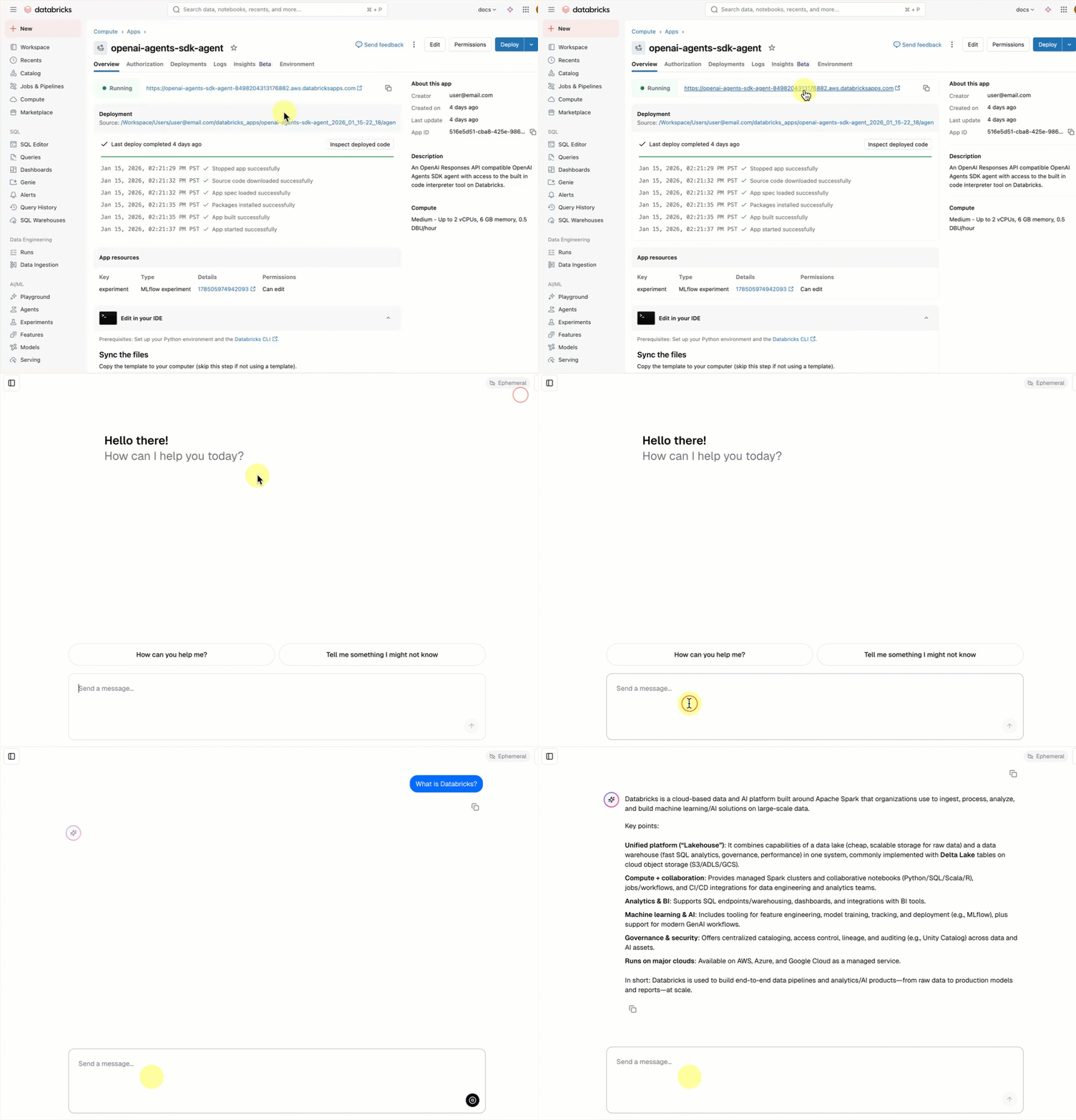
Mosaic AI Agent Framework を使用して最初の AI エージェントを構築します。 このチュートリアルでは、次のことを行います。
- Agent Framework を使用してエージェントを作成します。
- エージェントにツールを追加します。
- エージェントを Databricks モデルサービス エンドポイントにデプロイします。
エージェントとその他の Gen AI アプリの概念の概要については、「Gen AI アプリとは」を参照してください。
要求事項
ワークスペースでは、次の機能が有効になっている必要があります。
- Unity カタログ
- モザイク 人工知能 エージェント フレームワーク
- 基盤モデル (トークンごとの支払い、プロビジョニングされたスループット、または外部モデル)。 リージョンの可用性が制限された機能を参照してください
ノートブックの例
このノートブックには、最初の AI エージェントを作成してデプロイするために必要なすべてのコードが含まれています。 ノートブックを Azure Databricks ワークスペースにインポートして実行します。
モザイクAIエージェントデモ
エージェントを定義する
AI エージェントは、次の要素で構成されます。
- 意思決定を行うことができる大規模言語モデル (LLM)
- PYTHON コードの実行やデータのフェッチなど、テキストの生成以外にも LLM が使用できるツール
Databricks ノートブックで次のコードを実行して、簡単なツール呼び出しエージェントを定義します。
必要な Python パッケージをインストールします。
%pip install -U -qqqq mlflow databricks-openai databricks-agents" dbutils.library.restartPython()-
mlflow: エージェントの開発とエージェントのトレースに使用されます。 -
databricks-openai: Databricks でホストされる LLM に接続し、Unity カタログ ツールにアクセスするために使用されます。 -
databricks-agents: エージェントのパッケージ化とデプロイに使用されます。
-
エージェントを定義します。 このコード スニペットでは、次の処理が行われます。
- OpenAI クライアントを使用して、エンドポイントを提供する Databricks モデルに接続します。
-
autolog()を使用して MLflow トレースを有効にします。 これによりインストルメンテーションが追加され、クエリの送信時にエージェントが何を行うかを確認できます。 -
system.ai.python_execツールをエージェントに追加します。 この組み込みの Unity カタログ関数を使用すると、エージェントで Python コードを実行できます。 - MLflow ヘルパー関数 (
output_to_responses_items_stream、create_function_call_output_item) を使用して、ストリーミング LLM 出力を Responses API 互換形式に変換します。
import json import mlflow from databricks.sdk import WorkspaceClient from databricks_openai import UCFunctionToolkit, DatabricksFunctionClient # Import MLflow utilities for converting from chat completions to Responses API format from mlflow.types.responses import output_to_responses_items_stream, create_function_call_output_item # Enable automatic tracing for easier debugging mlflow.openai.autolog() # Get an OpenAI client configured to connect to Databricks model serving endpoints openai_client = WorkspaceClient().serving_endpoints.get_open_ai_client() # Load Databricks built-in tools (Python code interpreter) client = DatabricksFunctionClient() builtin_tools = UCFunctionToolkit(function_names=["system.ai.python_exec"], client=client).tools for tool in builtin_tools: del tool["function"]["strict"] def call_tool(tool_name, parameters): if tool_name == "system__ai__python_exec": return DatabricksFunctionClient().execute_function("system.ai.python_exec", parameters=parameters).value raise ValueError(f"Unknown tool: {tool_name}") def call_llm(prompt): for chunk in openai_client.chat.completions.create( model="databricks-claude-sonnet-4-5", messages=[{"role": "user", "content": prompt}], tools=builtin_tools, stream=True ): yield chunk.to_dict() def run_agent(prompt): """ Send a user prompt to the LLM, and yield LLM + tool call responses The LLM is allowed to call the code interpreter tool if needed, to respond to the user """ # Convert output into Responses API-compatible events for chunk in output_to_responses_items_stream(call_llm(prompt)): yield chunk.model_dump(exclude_none=True) # If the model executed a tool, call it and yield the tool call output in Responses API format if chunk.item.get('type') == 'function_call': tool_name = chunk.item["name"] tool_args = json.loads(chunk.item["arguments"]) tool_result = call_tool(tool_name, tool_args) yield {"type": "response.output_item.done", "item": create_function_call_output_item(call_id=chunk.item["call_id"], output=tool_result)}
エージェントをテストする
Python コードを実行する必要があるプロンプトでクエリを実行して、エージェントをテストします。
for output_chunk in run_agent("What is the square root of 429?"):
print(output_chunk)
LLM の出力に加えて、ノートブックに詳細なトレース情報が直接表示されます。 これらのトレースは、低速または失敗したエージェント呼び出しをデバッグするのに役立ちます。 これらのトレースは、 mlflow.openai.autolog() を使用して自動的に追加されました。
エージェントをデプロイする
エージェントが作成されたので、それをパッケージ化して Databricks サービス エンドポイントにデプロイできます。 他のユーザーと共有し、組み込みのチャット UI を使用してチャットすることで、デプロイされたエージェントに関するフィードバックの収集を開始します。
デプロイ用のエージェント コードを準備する
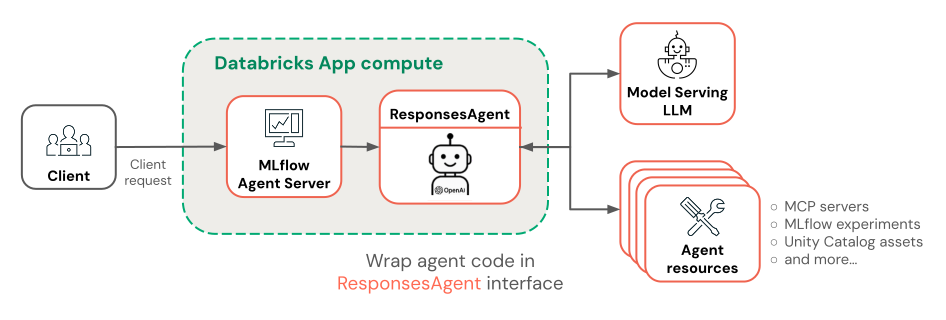
エージェント コードをデプロイ用に準備するには、MLflow の ResponsesAgent インターフェイスを使用してラップします。
ResponsesAgent インターフェイスは、Azure Databricks へのデプロイ用にエージェントをパッケージ化するための推奨される方法です。
ResponsesAgentインターフェイスを実装するには、predict_stream()(ストリーミング応答用) メソッドとpredict()(非ストリーミング要求の場合) の両方のメソッドを定義します。 基になるエージェント ロジックは既に Responses API と互換性のあるイベントを出力しているため、実装は簡単です。from mlflow.pyfunc import ResponsesAgent from mlflow.types.responses import ResponsesAgentRequest, ResponsesAgentResponse, ResponsesAgentStreamEvent class QuickstartAgent(ResponsesAgent): def predict_stream(self, request: ResponsesAgentRequest): # Extract the user's prompt from the request prompt = request.input[-1].content # Stream response items from our agent for chunk in run_agent(prompt): yield ResponsesAgentStreamEvent(**chunk) def predict(self, request: ResponsesAgentRequest) -> ResponsesAgentResponse: outputs = [ event.item for event in self.predict_stream(request) if event.type == "response.output_item.done" ] return ResponsesAgentResponse(output=outputs)ノートブックに次のコードを追加して、
ResponsesAgentクラスをテストします。from mlflow.types.responses import ResponsesAgentRequest AGENT = QuickstartAgent() # Create a ResponsesAgentRequest with input messages request = ResponsesAgentRequest( input=[ { "role": "user", "content": "What's the square root of 429?" } ] ) for event in AGENT.predict_stream(request): print(event)すべてのエージェント コードを 1 つのファイルに結合して、ログに記録してデプロイできるようにします。
- すべてのエージェント コードを 1 つのノートブック セルに統合します。
- セルの上部に、
%%writefile quickstart_agent.pyマジック コマンドを追加して、エージェントをファイルに保存します。 - セルの下部で、エージェント オブジェクトで
mlflow.models.set_model()を呼び出します。 これにより、予測を提供するときに使用するエージェント オブジェクトが MLflow に指示されます。 この手順では、エージェント コードへのエントリ ポイントを効果的に構成します。
ノートブック のセルは次のようになります。
%%writefile quickstart_agent.py
import json
from databricks.sdk import WorkspaceClient
from databricks_openai import UCFunctionToolkit, DatabricksFunctionClient
import mlflow
from mlflow.pyfunc import ResponsesAgent
from mlflow.types.responses import (
ResponsesAgentRequest,
ResponsesAgentResponse,
ResponsesAgentStreamEvent,
output_to_responses_items_stream,
create_function_call_output_item
)
# Enable automatic tracing for deployed agent
mlflow.openai.autolog()
# Get an OpenAI client configured to talk to Databricks model serving endpoints
openai_client = WorkspaceClient().serving_endpoints.get_open_ai_client()
# Load Databricks built-in tools (Python code interpreter)
client = DatabricksFunctionClient()
builtin_tools = UCFunctionToolkit(function_names=["system.ai.python_exec"], client=client).tools
for tool in builtin_tools:
del tool["function"]["strict"]
def call_tool(tool_name, parameters):
if tool_name == "system__ai__python_exec":
return DatabricksFunctionClient().execute_function("system.ai.python_exec", parameters=parameters).value
raise ValueError(f"Unknown tool: {tool_name}")
def call_llm(prompt):
for chunk in openai_client.chat.completions.create(
model="databricks-claude-sonnet-4-5",
messages=[{"role": "user", "content": prompt}],
tools=builtin_tools,
stream=True
):
yield chunk.to_dict()
def run_agent(prompt):
"""
Send a user prompt to the LLM, and yield LLM + tool call responses
The LLM is allowed to call the code interpreter tool if needed, to respond to the user
"""
# Convert output into Responses API-compatible events
for chunk in output_to_responses_items_stream(call_llm(prompt)):
yield chunk.model_dump(exclude_none=True)
# If the model executed a tool, call it and yield the tool call output in Responses API format
if chunk.item.get('type') == 'function_call':
tool_name = chunk.item["name"]
tool_args = json.loads(chunk.item["arguments"])
tool_result = call_tool(tool_name, tool_args)
yield {"type": "response.output_item.done", "item": create_function_call_output_item(call_id=chunk.item["call_id"], output=tool_result)}
class QuickstartAgent(ResponsesAgent):
def predict_stream(self, request: ResponsesAgentRequest):
# Extract the user's prompt from the request
prompt = request.input[-1].content
# Stream response items from our agent
for chunk in run_agent(prompt):
yield ResponsesAgentStreamEvent(**chunk)
def predict(self, request: ResponsesAgentRequest) -> ResponsesAgentResponse:
outputs = [
event.item
for event in self.predict_stream(request)
if event.type == "response.output_item.done"
]
return ResponsesAgentResponse(output=outputs)
AGENT = QuickstartAgent()
mlflow.models.set_model(AGENT)
エージェントをログに記録する
エージェントをログに記録し、Unity カタログに登録します。 これにより、エージェントとその依存関係がデプロイ用の 1 つの成果物にパッケージ化されます。
import mlflow
from mlflow.models.resources import DatabricksFunction, DatabricksServingEndpoint
from pkg_resources import get_distribution
# Change the catalog name ("main") and schema name ("default") to register the agent to a different location
registered_model_name = "main.default.quickstart_agent"
# Specify Databricks resources that the agent needs to access.
# This step lets Databricks automatically configure authentication
# so the agent can access these resources when it's deployed.
resources = [
DatabricksServingEndpoint(endpoint_name="databricks-claude-sonnet-4-5"),
DatabricksFunction(function_name="system.ai.python_exec"),
]
mlflow.set_registry_uri("databricks-uc")
logged_agent_info = mlflow.pyfunc.log_model(
artifact_path="agent",
python_model="quickstart_agent.py",
extra_pip_requirements=[f"databricks-connect=={get_distribution('databricks-connect').version}"],
resources=resources,
registered_model_name=registered_model_name
)
エージェントをデプロイする
登録済みエージェントをサービス エンドポイントにデプロイします。
from databricks import agents
deployment_info = agents.deploy(
model_name=registered_model_name,
model_version=logged_agent_info.registered_model_version,
scale_to_zero=True
)
エージェント エンドポイントが開始されたら、 AI Playground を使用してチャットしたり、 関係者と共有 してフィードバックを得ることができます。
次のステップ
目標に基づいて次に進む場所を選択します。
エージェントの品質を測定して改善する: エージェント評価のクイック スタートを参照してください。
より高度なエージェントを構築する: 非構造化データを使用して RAG を実行し、複数ターンの会話を処理し、エージェント評価を使用して品質を測定するエージェントを作成します。 「 チュートリアル: 取得エージェントをビルド、評価、デプロイする」を参照してください。
他のフレームワークを使用してエージェントを構築する方法について説明します。LangGraph、純粋な Python、OpenAI などの一般的なライブラリを使用してエージェントを構築する方法について説明します。 コードでの AI エージェントの作成を参照してください