ラスター地理空間データ 資産の SpatioTemporal Asset Catalog (STAC) 項目を作成する方法について説明します。 Microsoft プラネタリー コンピューター Pro GeoCatalog にアップロードされるすべての地理空間データ資産には、STAC 準拠項目が関連付けられている必要があります。
このガイドでは、次の操作を行います。
- PIP を使用して必要な Python ライブラリをインストールします。
- 提供された Python コードを使用して、GOES-18 データを表示および検査します。
- 正規表現を使用してファイル名からメタデータを抽出します。
-
rio-stacを使用して、Cloud-Optimized GeoTIFF ファイルから STAC 項目を作成します。 - ファイル名から抽出されたメタデータを使用して STAC 項目を拡張します。
- 親 STAC コレクションに STAC 項目を追加します。
- STAC カタログ、コレクション、および項目を検証して保存します。
- STAC 項目を Microsoft プラネタリー コンピューター Pro に追加します。
このチュートリアルでは、コード スニペットを使用して機能を示し、説明します。対話型ノートブック スタイルのエクスペリエンスでは、 このチュートリアルを Jupyter ノートブックとしてダウンロードします。
[前提条件]
このクイック スタートを完了するには、次のものが必要です。
- アクティブなサブスクリプションを持つ Azure アカウント。 このリンクを使用して 、無料でアカウントを作成します。
- Azure CLI: Azure CLI をインストールする
- バージョン 3.8 以上の Python 環境。
- MICROSOFT プラネタリー コンピューター Pro STAC の概要における STAC 標準とその実装に関する知識
STAC の主な機能
SpatioTemporal Asset Catalog (STAC) は、地理空間データを構造化および共有するためのオープン標準です。 地理空間資産を記述するための一般的な言語と形式が提供されるため、さまざまなプラットフォームやアプリケーションでこれらのリソースの検出、アクセス、使用が容易になります。 STAC 標準の主な機能を次に示します。
- 相互運用性: 標準化された JSON ベースのスキーマにより、ツールとシステム全体の統合と理解が容易になります。
- 拡張性: 特定のニーズに合わせたカスタム拡張機能を備えた柔軟なコア フィールド。
- 検出可能性: 一貫性のある構造により、地理空間資産の検索と検出が強化されます。
- アクセシビリティ: データ資産への直接リンクにより、シームレスな取得と統合が容易になります。
- 自動化: 標準化されたメタデータを使用した自動処理と分析を可能にします。
メタデータを標準化するための STAC の利点
- データ型間の整合性: 多様な地理空間データ型のための統合フレームワーク。
- コラボレーションの強化: 共通のメタデータ形式を使用して共有とコラボレーションを簡素化します。
- データ統合の強化: 複数のソースからのデータセットの統合を容易にします。
- 合理化されたデータ管理: 自動化されたツールにより、メタデータを管理するための手動作業が削減されます。
- 将来を見据える: 拡張可能な性質は、新しいデータ型とテクノロジに適応します。
Microsoft Planetary Computer Pro (MC Pro) は、STAC をコア インデックス作成標準として使用して、データ セット間の相互運用性を提供します。 このチュートリアルでは、共通のオープン ソース ライブラリを使用して STAC 項目を最初から作成する方法について説明します。
STAC 項目仕様では、STAC 項目の構築方法と、設定する必要がある必要な最小メタデータについて詳しく説明します。 STAC は柔軟な標準であり、ユーザーはメタデータの一部として含めるデータを決定できます。 STAC 項目を事前設定するメタデータは、サイドカー ファイル (.XML、JSON、.TXTなど) 内のデータ、またはファイル名などの場所にも含めることができます。 ユーザーは、含めるメタデータを決定するときに、将来検索して並べ替える必要がある可能性があるメタデータの種類を考慮する必要があります。
このチュートリアルでは、米国海洋大気庁 (NOAA) の静止運用環境衛星 R (GOES-R) 衛星の陸面温度 (LST) データセットからのクラウド最適化 GeoTIFF (COG) 画像データのサンプルを使用します。 このデータは、 COGファイルとして開いている惑星コンピュータに含まれていますが、STACメタデータがありません。 GOES サテライトは、多くのデータ製品を生成します。 詳細については、「 GOES-R シリーズ製品定義とユーザー ガイド」を参照してください。
このチュートリアルで使用するプロセスは、キー メタデータ フィールドが複数のオープン ソース ライブラリを使用して列挙される任意の種類のデータに対して一般化できます。
Python ライブラリをインストールする
まず、PIP を使用して必要な Python ライブラリをインストールします。
rasterio: このパッケージは、地理空間ラスター データの読み取りと書き込みに使用されます。 GeoTIFF などのラスター データ形式を操作するためのツールが用意されています。pystac: このパッケージは、STAC 標準の操作に使用されます。 STAC メタデータを作成、読み取り、操作するためのツールが用意されています。rio-stac: このパッケージは、ラスター データから STAC アイテムを作成するために、rasterioとpystacを統合します。 これにより、ラスター データセットの STAC メタデータを生成するプロセスが簡略化されます。matplotlib: このライブラリは、視覚化とプロットを作成するために使用されます。 地理空間データのコンテキストでは、ラスター イメージのレンダリングと表示に役立ちます。これにより、ユーザーは STAC メタデータを作成する前にデータを視覚的に検査できます。azure-storage-blob: この Azure Storage クライアント ライブラリは、Azure Blob Storage サービスへのアクセスを提供します。 これにより、クラウドに格納された地理空間データを直接操作できるため、ユーザーは最初にダウンロードすることなく、Azure BLOB コンテナーに格納されているファイルを読み取って操作できます。
!pip install rasterio pystac rio_stac matplotlib azure-storage-blob
コードの次のセクションでは、開いている惑星コンピューターからいくつかの GOES-18 データを表示します。 Microsoft では、GOES-R の Advanced Baseline Imager Level 2 Land Surface Temperature - CONUS データセットと、2023 年 208 日からの任意のファイルを使用しています。
# Import Necessary Libraries
import requests
from azure.storage.blob import ContainerClient
import matplotlib.pyplot as plt
from rasterio.io import MemoryFile
import os
from urllib.parse import urlparse

# Function to get the SAS token
def get_sas_token(endpoint):
    response = requests.get(endpoint)
    if response.status_code == 200:
        data = response.json()
        return data.get("token")
    else:
        raise Exception(f"Failed to get SAS token: {response.status_code} - {response.text}")

# Define Azure Blob Storage parameters
storage_account_name = "goeseuwest"
container_name = "noaa-goes-cogs"
blob_domain = f"https://{storage_account_name}.blob.core.windows.net"
sas_endpoint = f"https://planetarycomputer.microsoft.com/api/sas/v1/token/{storage_account_name}/{container_name}/"


# Get the SAS token
sas_token = get_sas_token(sas_endpoint)

# Construct the container URL with the SAS token
container_url = f"{blob_domain}/{container_name}?{sas_token}"

# Create a ContainerClient
container_client = ContainerClient.from_container_url(container_url)

# Define data you want, this can be changed for other datasets that are in storage in the open Planetary Computer
satellite = "goes-18"      # The specific GOES satellite (GOES-18, also known as GOES-West)
product = "ABI-L2-LSTC"    # The data product type (Advanced Baseline Imager Level 2 Land Surface Temperature - CONUS)
year = "2023"              # The year the data was collected
day_of_year = "208"        # The day of year (DOY) - day 208 corresponds to July 27, 2023

# Construct the directory path
directory_path = f"{satellite}/{product}/{year}/{day_of_year}/"

# Get just the first blob by using next() and limiting the iterator

first_blob = next(container_client.list_blobs(name_starts_with=directory_path))

# Function to read and display a .tif file from a URL
def display_tif_from_url(url, title):
    response = requests.get(url, stream=True)
    if response.status_code == 200:
        with MemoryFile(response.content) as memfile:
            with memfile.open() as dataset:
                plt.figure(figsize=(10, 10))
                plt.imshow(dataset.read(1), cmap='gray')
                plt.title(title)
                plt.colorbar()
                plt.show()
    else:
        raise Exception(f"Failed to read .tif file: {response.status_code} - {response.text}")

# Create the URL for the blob using the container_url components
file_url = f"{blob_domain}/{container_name}/{first_blob.name}?{sas_token}"

# Extract the filename safely from the URL without the SAS token
parsed_url = urlparse(file_url)
path = parsed_url.path  # Gets just the path portion of the URL
filename = os.path.basename(path)  # Get just the filename part

# Remove .tif extension if present
file_name = filename.replace('.tif', '')

print(f"Extracted File Name: {file_name}")

display_tif_from_url(file_url, file_name)
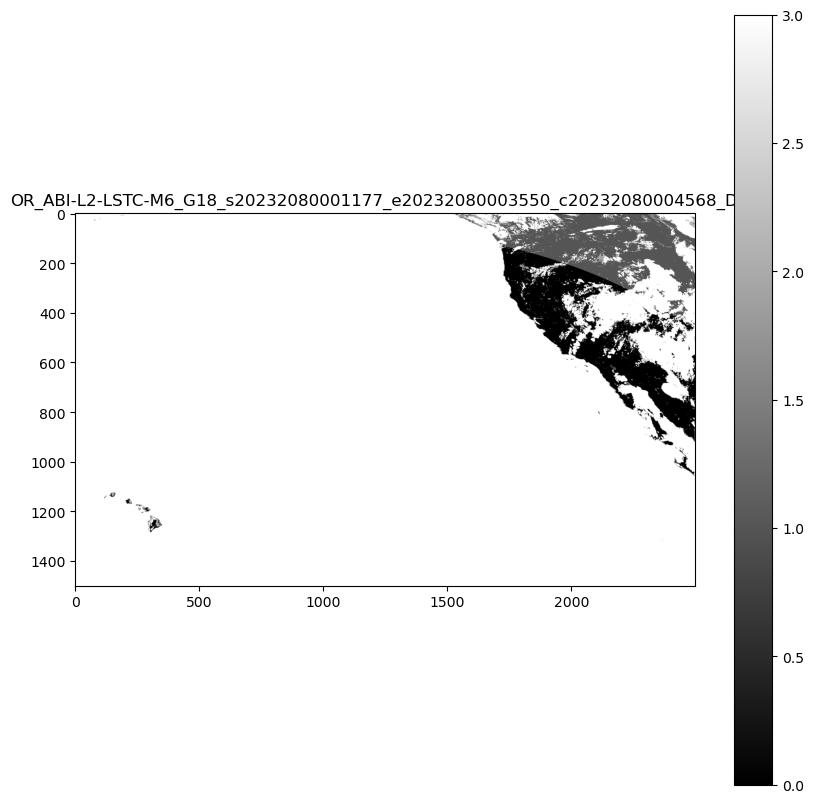
データとファイル名を見ると、STAC 項目の構築に必要なメタデータの重要な部分が既に確認できます。 ファイル名には、データをキャプチャしたサテライトと、いつキャプチャされたかに関する情報が含まれます。
サンプルの場合、ファイル名は製品ガイドに基づいて OR_ABI-L2-LSTC-M6_G18_s20232080101177_e20232080103550_c20232080104570_DQF です。これは次のことを意味します。
詳細なコンポーネント
| フィールド | 説明 | 目的 |
|---|---|---|
| OR | 運用システム環境 | データが収集されたシステム環境を指定します。 |
| ABI | Advanced Baseline Imager インストルメント | データのキャプチャに使用されるインストルメントを識別します |
| L2 | レベル 2 製品 (派生製品) | データが派生製品であり、生の観察から処理されることを示します |
| LSTC | 地表面温度(クリアスカイ)プロダクト | 明確な空の条件の下で地表温度に焦点を合わせる特定のプロダクトタイプを表す |
| M6 | モード 6 スキャン (フル ディスク スキャン) | 地球の完全なディスクをカバーするスキャン モードについて説明します |
| G18 | GOES-18 衛星 (GOES-Westとも呼ばれます) | データの収集元のサテライトを識別します |
観測時間の詳細
観測開始 (s20232080201177)-
| フィールド | 説明 | 目的 |
|---|---|---|
| Year | 2023 | 観測の年を指定します |
| Day of Year | 208 | 観測が開始された年の日を示します |
| Time | 02:01:17 UTC | 観測が UTC で開始された正確な時刻を提供します |
| 秒の 10 分の 1 | 7 | 観測の開始時刻に精度を加算します |
観測終了 (e20232080203550)-
| フィールド | 説明 | 目的 |
|---|---|---|
| Year | 2023 | 観測の年を指定します |
| Day of Year | 208 | 観測が終了した年の日を示します |
| Time | 02:03:55 UTC | 観測が UTC で終了した正確な時刻を指定します |
| 秒の 10 分の 1 | 0 | 観測の終了時刻に精度を加算します |
ファイル作成時刻 (c20232080204563)-
| フィールド | 説明 | 目的 |
|---|---|---|
| Year | 2023 | ファイルが作成された年を指定します |
| Day of Year | 208 | ファイルが作成された年の日を示します。 |
| Time | 02:04:56 UTC | ファイルが UTC で作成された正確な時刻を指定します |
| 秒の 10 分の 1 | 3 | ファイルの作成時間に精度を追加する |
追加情報:
| フィールド | 説明 | 目的 |
|---|---|---|
| DQF | 対応するデータの品質情報を示すデータ品質フラグ | データの品質に関する情報を提供します |
| .tif | ファイル拡張子 | データのファイル形式を示します |
次のコードでは、正規表現 (regex) を使用してファイル名からこのメタデータを抽出します。
import re
from datetime import datetime, timedelta

def extract_goes_metadata(filename):
    """
    Extracts key metadata from a NOAA GOES satellite filename using regular expressions.

    Args:
        filename (str): The filename to parse.

    Returns:
        dict: A dictionary containing the extracted metadata.
    """

    # Regular expression pattern to match the filename format
    pattern = re.compile(
        r"^(OR)_"  # System (OR)
        r"(ABI)-(L\d)-(LSTC)-(M\d)_"  # Instrument, Level, Product, Mode
        r"(G\d{2})_"  # Satellite (G18)
        r"s(\d{4})(\d{3})(\d{2})(\d{2})(\d{2})(\d)_"  # Start time
        r"e(\d{4})(\d{3})(\d{2})(\d{2})(\d{2})(\d)_"  # End time
        r"c(\d{4})(\d{3})(\d{2})(\d{2})(\d{2})(\d)_"  # Creation time
        r"([A-Z0-9]+)$"  # Data quality flag
    )

    match = pattern.match(filename)

    if not match:
        return None  # Or raise an exception if you prefer

    # Extract all fields from the regular expression match groups
    (
        system,          # Operational system environment
        instrument,      # Advanced Baseline Imager
        level,           # Product level (L2)
        product_type,    # Product type (LSTC - Land Surface Temperature)
        mode,            # Scanning mode (M6)
        satellite,       # Satellite identifier (G18)
        s_year, s_doy, s_hour, s_minute, s_second, s_tenth,  # Start time components
        e_year, e_doy, e_hour, e_minute, e_second, e_tenth,  # End time components
        c_year, c_doy, c_hour, c_minute, c_second, c_tenth,  # Creation time components
        data_quality_flag  # Quality flag indicator
    ) = match.groups()

    def parse_goes_time(year, doy, hour, minute, second, tenth):
        """Parses GOES time components into an ISO format string."""
        try:
            dt = datetime(int(year), 1, 1) + timedelta(
                days=int(doy) - 1,
                hours=int(hour),
                minutes=int(minute),
                seconds=int(second),
                microseconds=int(tenth) * 100000,
            )
            return dt
        except ValueError:
            return None

    # Parse the time components into datetime objects
    start_time = parse_goes_time(s_year, s_doy, s_hour, s_minute, s_second, s_tenth)
    end_time = parse_goes_time(e_year, e_doy, e_hour, e_minute, e_second, e_tenth)
    creation_time = parse_goes_time(c_year, c_doy, c_hour, c_minute, c_second, c_tenth)

    # Create a dictionary to organize all extracted metadata
    metadata = {
        "system": system,               # Operational system environment (e.g., "OR" for operational)
        "instrument": instrument,       # Instrument used to capture data (e.g., "ABI" for Advanced Baseline Imager)
        "level": level,                 # Processing level of the data (e.g., "L2" for Level 2)
        "product_type": product_type,   # Type of product (e.g., "LSTC" for Land Surface Temperature Clear Sky)
        "mode": mode,                   # Scanning mode (e.g., "M6" for Mode 6, full disk scan)
        "satellite": satellite,         # Satellite identifier (e.g., "G18" for GOES-18)
        "start_time": start_time,       # Observation start time as datetime object
        "end_time": end_time,           # Observation end time as datetime object
        "creation_time": creation_time, # File creation time as datetime object
        "data_quality_flag": data_quality_flag,  # Quality flag for the data (e.g., "DQF")
    }

    return metadata


# Example usage:
print(file_name)
metadata_from_filename = extract_goes_metadata(file_name)
print(metadata_from_filename)
OR_ABI-L2-LSTC-M6_G18_s20232080001177_e20232080003550_c20232080004568_DQF
{'system': 'OR', 'instrument': 'ABI', 'level': 'L2', 'product_type': 'LSTC', 'mode': 'M6', 'satellite': 'G18', 'start_time': datetime.datetime(2023, 7, 27, 0, 1, 17, 700000), 'end_time': datetime.datetime(2023, 7, 27, 0, 3, 55), 'creation_time': datetime.datetime(2023, 7, 27, 0, 4, 56, 800000), 'data_quality_flag': 'DQF'}
Cloud-Optimized GeoTIFF ファイルから STAC 項目を作成する
次のコード ブロックでは、 rio-stac ライブラリを使用して、Cloud-Optimized GeoTIFF (COG) からの STAC 項目の作成を自動化します。
COG ファイルをポイントすると、 rio-stac は、空間境界、プロジェクション情報、ラスター プロパティなどの重要なメタデータを自動的に抽出して、標準化された STAC 形式に整理します。 ライブラリは、GeoTIFF から埋め込まれた技術メタデータを読み取る複雑なタスクを処理し、次のような STAC 準拠フィールドに変換します。
- 幾何学
- 境界ボックス (bbox)
- プロジェクションの詳細
- ラスター特性
- STAC 拡張機能
この自動化により、有効な STAC アイテムを作成するために必要な手動作業が大幅に削減され、メタデータの一貫性が確保されます
注
GeoCatalog には、STAC 項目 ID とアセット キーで使用できる文字に制限があります。 ID に、 -、 _、 +、 (、 )、 .の文字が含まれていないことを確認します。 これらの文字をファイル名に置き換えたり、ファイル名から削除したりするために、 item_id 生成ロジックを変更することが必要になる場合があります。
from rio_stac import create_stac_item
from rasterio.io import MemoryFile
import json
from urllib.parse import urlparse, unquote

def create_stac_item_from_cog(url):
    """
    Create a basic STAC Item for GOES data using rio-stac with proper spatial handling

    Args:
        url (str): URL to the COG file

    Returns:
        pystac.Item: STAC Item with basic metadata and correct spatial information
    """

    # Extract the filename safely from the URL
    parsed_url = urlparse(url)
    path = parsed_url.path  # Gets just the path portion of the URL
    filename = os.path.basename(path)  # Get just the filename part

    # Remove .tif extension if present
    item_id = filename.replace('.tif', '')

    response = requests.get(url, stream=True)
    if response.status_code == 200:
        with MemoryFile(response.content) as memfile:
            with memfile.open() as dataset:
                # Create base STAC item from rasterio dataset calling create_stac_item from rio_stac
                stac_item = create_stac_item(
                    source=dataset,  # The rasterio dataset object representing the COG file
                    id=item_id,  # Generate a unique ID by extracting the filename without the .tif extension
                    asset_name='data',  # Name of the asset, indicating it contains the primary data
                    asset_href=url,  # URL to the COG file, used as the asset's location
                    with_proj=True,  # Include projection metadata (e.g., CRS, bounding box, etc.)
                    with_raster=True,  # Include raster-specific metadata (e.g., bands, resolution, etc.)
                    properties={
                        'datetime': None,  # Set datetime to None since explicit start/end times may be added later
                        # Add rasterio-specific metadata for the raster bands
                        'raster:bands': [
                            {
                                'nodata': dataset.nodata,  # Value representing no data in the raster
                                'data_type': dataset.dtypes[0],  # Data type of the raster (e.g., uint16)
                                'spatial_resolution': dataset.res[0]  # Spatial resolution of the raster in meters
                            }
                        ],
                        'file:size': len(response.content)  # Size of the file in bytes
                    },
                    extensions=[
                        'https://stac-extensions.github.io/file/v2.1.0/schema.json'  # Add the file extension schema for additional metadata
                    ]
                )

                return stac_item
    else:
        raise Exception(f"Failed to read .tif file: {response.status_code} - {response.text}")

# Example usage
sas_token = get_sas_token(sas_endpoint) # refresh the SAS token prior to creating STAC item
# Create file URL using the first_blob variable that's already defined
file_url = f"{blob_domain}/{container_name}/{first_blob.name}?{sas_token}"
# Create STAC item for the first blob
stac_item = create_stac_item_from_cog(file_url)

# Print the STAC item as JSON
print(json.dumps(stac_item.to_dict(), indent=2))
    {
      "type": "Feature",
      "stac_version": "1.0.0",
      "stac_extensions": [
        "https://stac-extensions.github.io/file/v2.1.0/schema.json",
        "https://stac-extensions.github.io/projection/v1.1.0/schema.json",
        "https://stac-extensions.github.io/raster/v1.1.0/schema.json"
      ],
      "id": "OR_ABI-L2-LSTC-M6_G18_s20232080001177_e20232080003550_c20232080004568_DQF",
      "geometry": {
        "type": "Polygon",
        "coordinates": [
          [
            [
              -161.57885623466754,
              14.795666555826678
            ],
            [
              -112.42114380921453,
              14.79566655500485
            ],
            [
              -89.5501123912648,
              53.52729778421186
            ],
            [
              175.5501122574517,
              53.52729779865781
            ],
            [
              -161.57885623466754,
              14.795666555826678
            ]
          ]
        ]
      },
      "bbox": [
        -161.57885623466754,
        14.79566655500485,
        175.5501122574517,
        53.52729779865781
      ],
      "properties": {
        "datetime": "2025-03-26T14:46:05.484602Z",
        "raster:bands": [
          {
            "nodata": 65535.0,
            "data_type": "uint16",
            "spatial_resolution": 2004.017315487541
          }
        ],
        "file:size": 118674,
        "proj:epsg": null,
        "proj:geometry": {
          "type": "Polygon",
          "coordinates": [
            [
              [
                -2505021.6463773525,
                1583173.791653181
              ],
              [
                2505021.6423414997,
                1583173.791653181
              ],
              [
                2505021.6423414997,
                4589199.764884492
              ],
              [
                -2505021.6463773525,
                4589199.764884492
              ],
              [
                -2505021.6463773525,
                1583173.791653181
              ]
            ]
          ]
        },
        "proj:bbox": [
          -2505021.6463773525,
          1583173.791653181,
          2505021.6423414997,
          4589199.764884492
        ],
        "proj:shape": [
          1500,
          2500
        ],
        "proj:transform": [
          2004.017315487541,
          0.0,
          -2505021.6463773525,
          0.0,
          -2004.017315487541,
          4589199.764884492,
          0.0,
          0.0,
          1.0
        ],
        "proj:wkt2": "PROJCS[\"unnamed\",GEOGCS[\"unknown\",DATUM[\"unnamed\",SPHEROID[\"Spheroid\",6378137,298.2572221]],PRIMEM[\"Greenwich\",0],UNIT[\"degree\",0.0174532925199433,AUTHORITY[\"EPSG\",\"9122\"]]],PROJECTION[\"Geostationary_Satellite\"],PARAMETER[\"central_meridian\",-137],PARAMETER[\"satellite_height\",35786023],PARAMETER[\"false_easting\",0],PARAMETER[\"false_northing\",0],UNIT[\"metre\",1,AUTHORITY[\"EPSG\",\"9001\"]],AXIS[\"Easting\",EAST],AXIS[\"Northing\",NORTH],EXTENSION[\"PROJ4\",\"+proj=geos +lon_0=-137 +h=35786023 +x_0=0 +y_0=0 +ellps=GRS80 +units=m +no_defs +sweep=x\"]]"
      },
      "links": [],
      "assets": {
        "data": {
          "href": "https://goeseuwest.blob.core.windows.net/noaa-goes-cogs/goes-18/ABI-L2-LSTC/2023/208/00/OR_ABI-L2-LSTC-M6_G18_s20232080001177_e20232080003550_c20232080004568_DQF.tif?st=2025-03-25T14%3A46%3A03Z&se=2025-03-26T15%3A31%3A03Z&sp=rl&sv=2024-05-04&sr=c&skoid=9c8ff44a-6a2c-4dfb-b298-1c9212f64d9a&sktid=72f988bf-86f1-41af-91ab-2d7cd011db47&skt=2025-03-26T12%3A41%3A49Z&ske=2025-04-02T12%3A41%3A49Z&sks=b&skv=2024-05-04&sig=BuMxN2NUTdrhzY7Dvpd/X4yfX8gnFpHOzANHQLkKE1k%3D",
          "type": "image/tiff; application=geotiff",
          "raster:bands": [
            {
              "data_type": "uint16",
              "scale": 1.0,
              "offset": 0.0,
              "sampling": "area",
              "nodata": 65535.0,
              "unit": "1",
              "statistics": {
                "mean": 2.780959413109756,
                "minimum": 0,
                "maximum": 3,
                "stddev": 0.710762086175375,
                "valid_percent": 100.0
              },
              "histogram": {
                "count": 11,
                "min": 0.0,
                "max": 3.0,
                "buckets": [
                  26655,
                  0,
                  0,
                  25243,
                  0,
                  0,
                  7492,
                  0,
                  0,
                  570370
                ]
              }
            }
          ],
          "roles": []
        }
      }
    }
rio-stac からの STAC 項目の JSON
rio-stac ライブラリは、GOES COG ファイルを読み取り、キー メタデータを自動的に抽出します。
さらに、含まれるメタデータの種類に基づいて、rio-stac は関連する STAC 拡張機能を追加しました。 STAC 拡張機能は、標準化されたドメイン固有のメタデータを追加することで、コア仕様を強化します。
- ファイル拡張子 は、サイズやチェックサムなどの重要なファイル メタデータを提供します。
- 投影拡張機能 は、座標系や境界ボックスを含む空間参照情報をキャプチャします。
- ラスター拡張機能 は、バンド情報や空間解像度など、ラスター データに固有のプロパティを標準化します。
次の表に、検出されたすべてのメタデータ rio-stac の説明を示します。
コア フィールド
| フィールド | 説明 | 目的 |
|---|---|---|
| 型 | 常に "特徴" | GeoJSON 機能として型を識別します。 |
| stac_version | "1.0.0" | STAC 標準バージョンを指定します |
| ID | 一意識別子 | サテライト、製品、時刻の情報が含まれています |
| stac_extensions | スキーマ URL の一覧 | 追加のメタデータ フィールドを定義します |
空間情報
| フィールド | 説明 | 目的 |
|---|---|---|
| geometry | GeoJSON ポリゴン | WGS84 座標でデータフットプリントを定義します |
| bbox | 境界ボックスの座標 | 迅速なフィルター処理のための単純な空間範囲を提供します |
| proj:geometry | プロジェクション固有の多角形 | ネイティブなプロジェクション座標のフットプリント |
| proj:bbox | ネイティブ プロジェクションの境界 | 衛星の座標系における空間範囲 |
| proj:形状 | [1500, 2500] | 画像のサイズ (ピクセル単位) |
| proj:transform | アフィン変換 | ピクセルを座標空間にマップする |
| proj:wkt2 | Well-Known Text | 完全なプロジェクション定義 |
| proj:epsg | null 値 | このマップ プロジェクションに標準の EPSG コードが存在しない |
テンポラルな情報
| フィールド | 説明 | 目的 |
|---|---|---|
| datetime | 作成タイムスタンプ | この STAC 項目が作成されたとき |
ラスター情報
| フィールド | 説明 | 目的 |
|---|---|---|
| raster:bands | バンド オブジェクトの配列 | ラスター データのプロパティについて説明します |
| → データ型 | "uint16" | ピクセル データ型 |
| → spatial_resolution | 2004.02m | 地中サンプル距離 |
| スケール/オフセット | 変換係数 | ピクセル値を物理単位に変換します (Kelvin) |
| → nodata | 65535.0 | データを表さない値 |
| →統計 | 統計の概要 | データ分散情報を提供します |
| → ヒストグラム | 値の分布 | データ分散を視覚化する |
資産情報
| フィールド | 説明 | 目的 |
|---|---|---|
| assets.data | メイン データ資産 | 実際のデータファイルを指す |
| → href | URL | Cloud-Optimized GeoTIFF の場所 |
| →の種類 | メディアの種類 | ファイル形式を識別します |
ファイル メタデータ
| フィールド | 説明 | 目的 |
|---|---|---|
| ファイルサイズ | 943,250 バイト | データ ファイルのサイズ |
ファイル名からのメタデータの追加
次に、ファイル名に見つかったデータを追加して、この STAC 項目のメタデータの入力を完了します。
注意すべき点の 1 つは、STAC アイテムのすべての datetime が ISO 8601 に準拠している必要がある点です。 PySTAC ライブラリには、データが正しく書式設定されていることを確認するdatetime_to_str関数があります。
import pystac

def enhance_stac_item_with_metadata(stac_item, metadata_from_filename):
    """
    Enhances a STAC Item with additional metadata from GOES filename.

    Args:
        stac_item (pystac.Item): Existing STAC Item created by rio-stac
        metadata_from_filename (dict): Metadata extracted from filename

    Returns:
        pystac.Item: Enhanced STAC Item
    """
    # Add satellite/sensor properties to the STAC item
    stac_item.properties.update({
        'platform': f"GOES-{metadata_from_filename['satellite'][1:]}",
        'instruments': [metadata_from_filename['instrument']],
        'constellation': 'GOES'
    })

    # Add temporal properties to the STAC item, use pystac to ensure time conforms to ISO 8601
    stac_item.datetime = None  # Clear the default datetime
    stac_item.properties.update({
        'start_datetime': pystac.utils.datetime_to_str(metadata_from_filename['start_time']),
        'end_datetime': pystac.utils.datetime_to_str(metadata_from_filename['end_time']),
        'created': pystac.utils.datetime_to_str(metadata_from_filename['creation_time'])
    })

    # Add GOES-specific properties to the STAC item
    stac_item.properties.update({
        'goes:system': metadata_from_filename['system'],
        'goes:level': metadata_from_filename['level'],
        'goes:product_type': metadata_from_filename['product_type'],
        'goes:mode': metadata_from_filename['mode'],
        'goes:processing_level': metadata_from_filename['level'],
        'goes:data_quality_flag': metadata_from_filename['data_quality_flag']
    })

    return stac_item


# Example usage in new cell
stac_item = enhance_stac_item_with_metadata(stac_item, metadata_from_filename)
print(json.dumps(stac_item.to_dict(), indent=2))
STAC 項目:
    {
      "type": "Feature",
      "stac_version": "1.0.0",
      "stac_extensions": [
        "https://stac-extensions.github.io/file/v2.1.0/schema.json",
        "https://stac-extensions.github.io/projection/v1.1.0/schema.json",
        "https://stac-extensions.github.io/raster/v1.1.0/schema.json"
      ],
      "id": "OR_ABI-L2-LSTC-M6_G18_s20232080001177_e20232080003550_c20232080004568_DQF",
      "geometry": {
        "type": "Polygon",
        "coordinates": [
          [
            [
              -161.57885623466754,
              14.795666555826678
            ],
            [
              -112.42114380921453,
              14.79566655500485
            ],
            [
              -89.5501123912648,
              53.52729778421186
            ],
            [
              175.5501122574517,
              53.52729779865781
            ],
            [
              -161.57885623466754,
              14.795666555826678
            ]
          ]
        ]
      },
      "bbox": [
        -161.57885623466754,
        14.79566655500485,
        175.5501122574517,
        53.52729779865781
      ],
      "properties": {
        "datetime": null,
        "raster:bands": [
          {
            "nodata": 65535.0,
            "data_type": "uint16",
            "spatial_resolution": 2004.017315487541
          }
        ],
        "file:size": 118674,
        "proj:epsg": null,
        "proj:geometry": {
          "type": "Polygon",
          "coordinates": [
            [
              [
                -2505021.6463773525,
                1583173.791653181
              ],
              [
                2505021.6423414997,
                1583173.791653181
              ],
              [
                2505021.6423414997,
                4589199.764884492
              ],
              [
                -2505021.6463773525,
                4589199.764884492
              ],
              [
                -2505021.6463773525,
                1583173.791653181
              ]
            ]
          ]
        },
        "proj:bbox": [
          -2505021.6463773525,
          1583173.791653181,
          2505021.6423414997,
          4589199.764884492
        ],
        "proj:shape": [
          1500,
          2500
        ],
        "proj:transform": [
          2004.017315487541,
          0.0,
          -2505021.6463773525,
          0.0,
          -2004.017315487541,
          4589199.764884492,
          0.0,
          0.0,
          1.0
        ],
        "proj:wkt2": "PROJCS[\"unnamed\",GEOGCS[\"unknown\",DATUM[\"unnamed\",SPHEROID[\"Spheroid\",6378137,298.2572221]],PRIMEM[\"Greenwich\",0],UNIT[\"degree\",0.0174532925199433,AUTHORITY[\"EPSG\",\"9122\"]]],PROJECTION[\"Geostationary_Satellite\"],PARAMETER[\"central_meridian\",-137],PARAMETER[\"satellite_height\",35786023],PARAMETER[\"false_easting\",0],PARAMETER[\"false_northing\",0],UNIT[\"metre\",1,AUTHORITY[\"EPSG\",\"9001\"]],AXIS[\"Easting\",EAST],AXIS[\"Northing\",NORTH],EXTENSION[\"PROJ4\",\"+proj=geos +lon_0=-137 +h=35786023 +x_0=0 +y_0=0 +ellps=GRS80 +units=m +no_defs +sweep=x\"]]",
        "platform": "GOES-18",
        "instruments": [
          "ABI"
        ],
        "constellation": "GOES",
        "start_datetime": "2023-07-27T00:01:17.700000Z",
        "end_datetime": "2023-07-27T00:03:55Z",
        "created": "2023-07-27T00:04:56.800000Z",
        "goes:system": "OR",
        "goes:level": "L2",
        "goes:product_type": "LSTC",
        "goes:mode": "M6",
        "goes:processing_level": "L2",
        "goes:data_quality_flag": "DQF"
      },
      "links": [],
      "assets": {
        "data": {
          "href": "https://goeseuwest.blob.core.windows.net/noaa-goes-cogs/goes-18/ABI-L2-LSTC/2023/208/00/OR_ABI-L2-LSTC-M6_G18_s20232080001177_e20232080003550_c20232080004568_DQF.tif?st=2025-03-25T14%3A46%3A03Z&se=2025-03-26T15%3A31%3A03Z&sp=rl&sv=2024-05-04&sr=c&skoid=9c8ff44a-6a2c-4dfb-b298-1c9212f64d9a&sktid=72f988bf-86f1-41af-91ab-2d7cd011db47&skt=2025-03-26T12%3A41%3A49Z&ske=2025-04-02T12%3A41%3A49Z&sks=b&skv=2024-05-04&sig=BuMxN2NUTdrhzY7Dvpd/X4yfX8gnFpHOzANHQLkKE1k%3D",
          "type": "image/tiff; application=geotiff",
          "raster:bands": [
            {
              "data_type": "uint16",
              "scale": 1.0,
              "offset": 0.0,
              "sampling": "area",
              "nodata": 65535.0,
              "unit": "1",
              "statistics": {
                "mean": 2.780959413109756,
                "minimum": 0,
                "maximum": 3,
                "stddev": 0.710762086175375,
                "valid_percent": 100.0
              },
              "histogram": {
                "count": 11,
                "min": 0.0,
                "max": 3.0,
                "buckets": [
                  26655,
                  0,
                  0,
                  25243,
                  0,
                  0,
                  7492,
                  0,
                  0,
                  570370
                ]
              }
            }
          ],
          "roles": []
        }
      }
    }
STAC 項目をコレクションに追加する
MC Pro では、すべての STAC アイテムに、取り込まれる予定の親 STAC コレクション ID への参照が必要です。 このチュートリアルでは、STAC コレクション ID はサテライトの名前とデータ製品です。
PySTAC を使用すると、ソース ファイルから収集されたメタデータの一部を簡単に使用して STAC コレクションのキー フィールドを設定し、組み込みの検証関数を使用できます。
次のコードでは、GOES データを格納する親 STAC コレクションを作成します。 次に、この情報を Microsoft プラネタリー コンピューター Pro STAC コレクションの作成に使用されるファイルに保存し、STAC 項目をプラネタリー コンピューター Pro に取り込みます。
# Define collection properties
collection_id = f"{satellite}-{product}"
collection_title = f"{satellite.upper()} {product} Collection"
collection_desc = f"Collection of {satellite} {product} Earth observation data"

# Create spatial extent
bbox = [-180, -60, 10, 60]  # placeholder, replace with actual data at a later date
spatial_extent = pystac.SpatialExtent([bbox])

# Create temporal extent, use current date time or replace with existing datetimes in stac_item
start_datetime = datetime.now()
if hasattr(metadata_from_filename, 'get'):
    if metadata_from_filename.get('start_time'):
        start_datetime = metadata_from_filename.get('start_time')

temporal_extent = pystac.TemporalExtent([[start_datetime, None]])
extent = pystac.Extent(spatial=spatial_extent, temporal=temporal_extent)

# Create the STAC Collection
collection = pystac.Collection(
    id=collection_id,
    description=collection_desc,
    extent=extent,
    title=collection_title,
    license="public-domain",
)

# Add keywords and provider
collection.keywords = ["GOES", "satellite", "weather", "NOAA", satellite, product]
collection.providers = [
    pystac.Provider(
        name="NOAA",
        roles=["producer", "licensor"],
        url="https://www.noaa.gov/"
    )
]

# Create output directories
output_dir = "stac_catalog"
collection_dir = os.path.join(output_dir, collection_id)
items_dir = os.path.join(collection_dir, "items")
os.makedirs(items_dir, exist_ok=True)

# Important: Save the collection first to generate proper file paths
collection_path = os.path.join(collection_dir, "collection.json")
collection.set_self_href(collection_path)

# Extract filename for the item
original_filename = first_blob.name.split('/')[-1]
base_filename = original_filename.replace('.tif', '')
item_path = os.path.join(items_dir, f"{base_filename}.json")

# Set the item's proper href
stac_item.set_self_href(item_path)

# Now associate the item with the collection (after setting hrefs)
collection.add_item(stac_item)

# Create a catalog to contain the collection
catalog = pystac.Catalog(
    id="goes-data-catalog",
    description="GOES Satellite Data Catalog",
    title="GOES Data"
)
catalog_path = os.path.join(output_dir, "catalog.json")
catalog.set_self_href(catalog_path)
catalog.add_child(collection)

# Validate the collection and contained items
print("Validating collection and items...")
try:
    collection.validate_all()
    print("✅ Collection and items validated successfully")

    # Save everything to disk
    catalog.normalize_and_save(catalog_path, pystac.CatalogType.SELF_CONTAINED)
    print(f"✅ STAC catalog saved at: {catalog_path}")
    print(f"✅ STAC collection saved at: {collection_path}")
    print(f"✅ STAC item saved at: {item_path}")

except Exception as e:
    print(f"❌ Validation error: {str(e)}")
Validating collection and items...
✅ Collection and items validated successfully
✅ STAC catalog saved at: stac_catalog/catalog.json
✅ STAC collection saved at: stac_catalog/goes-18-ABI-L2-LSTC/collection.json
✅ STAC item saved at: stac_catalog/goes-18-ABI-L2-LSTC/items/OR_ABI-L2-LSTC-M6_G18_s20232080001177_e20232080003550_c20232080004568_DQF.json
次のステップ
STAC 項目をいくつか作成したら、次は Microsoft プラネタリー コンピューター Pro にデータを取り込みます。
単一項目インジェストの場合:
一括インジェストの場合:
また、データに関するテンプレートを使用して自動化を強化する STAC Forgeツール も提供しています。