Azure の組み込みロールが組織の特定のニーズを満たさない場合は、独自のカスタム ロールを作成することができます。 このチュートリアルでは、Azure PowerShell を使用して、Reader Support Tickets というカスタム ロールを作成します。 このカスタム ロールを使用すると、ユーザーはサブスクリプションのコントロール プレーンにすべてを表示できるほか、サポート チケットを開くこともできます。
このチュートリアルでは、以下の内容を学習します。
- カスタム ロールの作成
- カスタム ロールの一覧表示
- カスタム ロールの更新
- カスタム ロールの削除
Azure サブスクリプションをお持ちでない場合は、開始する前に 無料アカウント を作成してください。
注
Azure を操作するには、Azure Az PowerShell モジュールを使用することをお勧めします。 作業を始めるには、「Azure PowerShell をインストールする」を参照してください。 Az PowerShell モジュールに移行する方法については、「AzureRM から Az への Azure PowerShell の移行」を参照してください。
前提条件
このチュートリアルを完了するには、次の要件があります。
- ユーザー アクセス管理者など、カスタム ロールを作成するためのアクセス許可
- Azure Cloud Shell または Azure PowerShell
Azure PowerShell へのサインイン
Azure PowerShell にサインインします。
カスタム ロールの作成
カスタム ロールを作成するには、組み込みのロールから始めて、そのロールを編集して新しいロールを作成するのが最も簡単です。
PowerShell で、Get-AzProviderOperation コマンドを使用して、Microsoft.Support リソース プロバイダーの操作の一覧を取得します。 アクセス許可の作成に使用できる操作を知るための参考にしてください。 「Azure リソース プロバイダー操作」でも、すべての操作の一覧をご覧いただけます。
Get-AzProviderOperation "Microsoft.Support/*" | FT Operation, Description -AutoSizeOperation Description --------- ----------- Microsoft.Support/register/action Registers to Support Resource Provider Microsoft.Support/supportTickets/read Gets Support Ticket details (including status, severity, contact ... Microsoft.Support/supportTickets/write Creates or Updates a Support Ticket. You can create a Support Tic...Get-AzRoleDefinition コマンドを使用して、閲覧者ロールを JSON 形式で出力します。
Get-AzRoleDefinition -Name "Reader" | ConvertTo-Json | Out-File C:\CustomRoles\ReaderSupportRole.jsonエディターで ReaderSupportRole.json ファイルを開きます。
この JSON 出力を次に示します。 各種のプロパティについては、Azure カスタム ロールに関するページを参照してください。
{
  "Name": "Reader",
  "Id": "acdd72a7-3385-48ef-bd42-f606fba81ae7",
  "IsCustom": false,
  "Description": "Lets you view everything, but not make any changes.",
  "Actions": [
    "*/read"
  ],
  "NotActions": [],
  "DataActions": [],
  "NotDataActions": [],
  "AssignableScopes": [
    "/"
  ]
}
JSON ファイルを編集して
"Microsoft.Support/*"プロパティにActionsアクションを追加します。 読み取りアクションの後に必ずコンマを含めてください。 このアクションによって、ユーザーがサポート チケットを作成できるようになります。Get-AzSubscription コマンドを使用して、サブスクリプションの ID を取得します。
Get-AzSubscriptionAssignableScopesに、"/subscriptions/00000000-0000-0000-0000-000000000000"形式でサブスクリプション ID を追加します。明示的にサブスクリプション ID を追加してください。それ以外の場合、サブスクリプションにロールをインポートできなくなります。
Idプロパティ行を削除し、IsCustomプロパティをtrueに変更します。NameプロパティとDescriptionプロパティを、それぞれ「リーダーサポートチケット」と「サブスクリプション内のすべてを表示し、サポートチケットを開くこともできます」に変更します。編集後の JSON ファイルは次のようになります。
{
  "Name": "Reader Support Tickets",
  "IsCustom": true,
  "Description": "View everything in the subscription and also open support tickets.",
  "Actions": [
    "*/read",
    "Microsoft.Support/*"
  ],
  "NotActions": [],
  "DataActions": [],
  "NotDataActions": [],
  "AssignableScopes": [
    "/subscriptions/00000000-0000-0000-0000-000000000000"
  ]
}
新しいカスタム ロールを作成するには、New-AzRoleDefinition コマンドを使用して、JSON ロール定義ファイルを指定します。
New-AzRoleDefinition -InputFile "C:\CustomRoles\ReaderSupportRole.json"Name : Reader Support Tickets Id : 22222222-2222-2222-2222-222222222222 IsCustom : True Description : View everything in the subscription and also open support tickets. Actions : {*/read, Microsoft.Support/*} NotActions : {} DataActions : {} NotDataActions : {} AssignableScopes : {/subscriptions/00000000-0000-0000-0000-000000000000}Azure portal で新しいカスタム ロールが利用できる状態となり、組み込みロールと同じように、ユーザー、グループ、またはサービス プリンシパルに割り当てることができます。
カスタム ロールの一覧表示
すべてのカスタム ロールを一覧表示するには、Get-AzRoleDefinition コマンドを使用します。
Get-AzRoleDefinition | ? {$_.IsCustom -eq $true} | FT Name, IsCustomName IsCustom ---- -------- Reader Support Tickets Trueカスタム ロールは、Azure portal で確認することもできます。
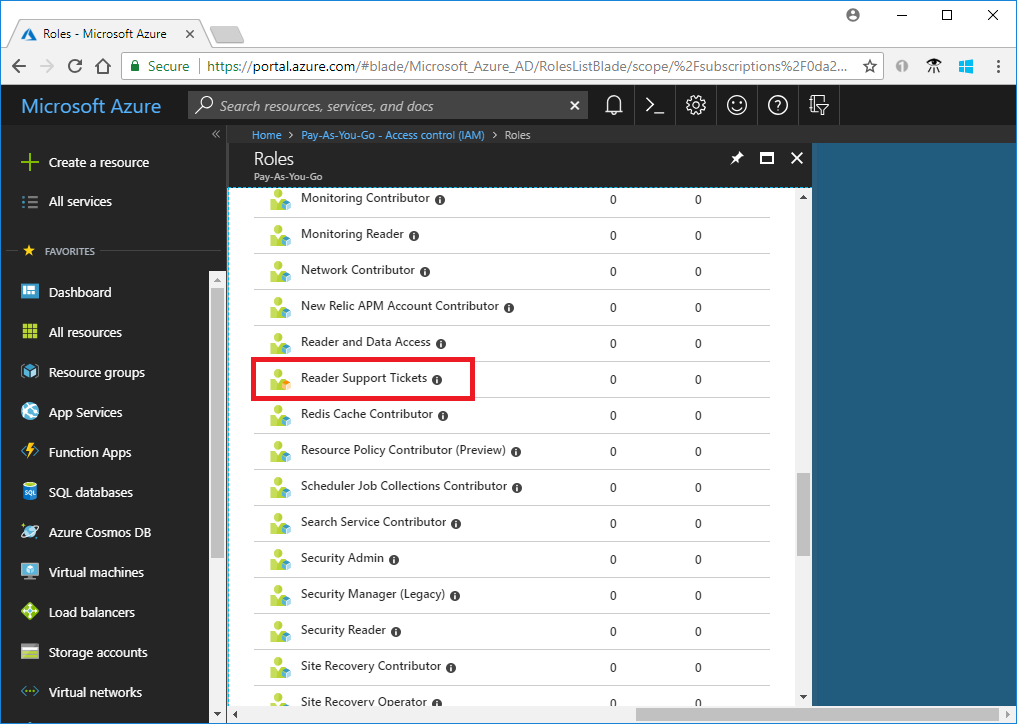
カスタム ロールの更新
カスタム ロールを更新するには、JSON ファイルを更新するか、または PSRoleDefinition オブジェクトを使用します。
JSON ファイルを更新するには、Get-AzRoleDefinition コマンドを使用して、カスタム ロールを JSON 形式で出力します。
Get-AzRoleDefinition -Name "Reader Support Tickets" | ConvertTo-Json | Out-File C:\CustomRoles\ReaderSupportRole2.jsonこのファイルをエディターで開きます。
Actionsで、リソース グループのデプロイを作成および管理するアクション"Microsoft.Resources/deployments/*"を追加します。更新後の JSON ファイルは次のようになります。
{
  "Name": "Reader Support Tickets",
  "Id": "22222222-2222-2222-2222-222222222222",
  "IsCustom": true,
  "Description": "View everything in the subscription and also open support tickets.",
  "Actions": [
    "*/read",
    "Microsoft.Support/*",
    "Microsoft.Resources/deployments/*"
  ],
  "NotActions": [],
  "DataActions": [],
  "NotDataActions": [],
  "AssignableScopes": [
    "/subscriptions/00000000-0000-0000-0000-000000000000"
  ]
}
カスタム ロールを更新するには、Set-AzRoleDefinition コマンドを使用して、更新済みの JSON ファイルを指定します。
Set-AzRoleDefinition -InputFile "C:\CustomRoles\ReaderSupportRole2.json"Name : Reader Support Tickets Id : 22222222-2222-2222-2222-222222222222 IsCustom : True Description : View everything in the subscription and also open support tickets. Actions : {*/read, Microsoft.Support/*, Microsoft.Resources/deployments/*} NotActions : {} DataActions : {} NotDataActions : {} AssignableScopes : {/subscriptions/00000000-0000-0000-0000-000000000000}PSRoleDefinitionオブジェクトを使用してカスタム ロールを更新するには、まず Get-AzRoleDefinition コマンドを使用してそのロールを取得します。$role = Get-AzRoleDefinition "Reader Support Tickets"Addメソッドを呼び出して、診断設定を読み取るアクションを追加します。$role.Actions.Add("Microsoft.Insights/diagnosticSettings/*/read")Set-AzRoleDefinition を使用してロールを更新します。
Set-AzRoleDefinition -Role $roleName : Reader Support Tickets Id : 22222222-2222-2222-2222-222222222222 IsCustom : True Description : View everything in the subscription and also open support tickets. Actions : {*/read, Microsoft.Support/*, Microsoft.Resources/deployments/*, Microsoft.Insights/diagnosticSettings/*/read} NotActions : {} DataActions : {} NotDataActions : {} AssignableScopes : {/subscriptions/00000000-0000-0000-0000-000000000000}
カスタム ロールの削除
Get-AzRoleDefinition コマンドを使用して、カスタム ロールの ID を取得します。
Get-AzRoleDefinition "Reader Support Tickets"Remove-AzRoleDefinition コマンドを使用し、ロール ID を指定して、カスタム ロールを削除します。
Remove-AzRoleDefinition -Id "22222222-2222-2222-2222-222222222222"Confirm Are you sure you want to remove role definition with id '22222222-2222-2222-2222-222222222222'. [Y] Yes [N] No [S] Suspend [?] Help (default is "Y"):確認を求められたら、「Y」と入力します。