Microsoft Security Copilotで対話型エージェントを作成するには、動的なタスクに焦点を当てた会話をサポートするようにエージェントを構成する必要があります。
この記事では、学習ページのパブリック ドキュメントを使用してSecurity Copilotを使用する方法をユーザーに教えることができる対話型エージェントMicrosoft Docs構築する方法に関するチュートリアルを提供します。 エンド ユーザーは、エージェントとのチャット機能を使用して エージェントと 対話します。 この機能を有効にするには、必要な属性をエージェント マニフェストに追加します。
対話型Security Copilot エージェントを構築する手順
エージェント マニフェストを構築するには、マニフェスト内の対話型エージェント エクスペリエンスに必要な属性を参照できます。 詳細については、「 エージェント マニフェスト」を参照してください。
エージェント マニフェストを構成し、対話型エージェントを構築する手順は次のとおりです。
手順 1: 対話型エージェント YAML の例
SecurityCopilotDocsAgent 対話型エージェント マニフェスト YAML のサンプルを次に示します。
Descriptor:
  Name: SecurityCopilotDocsAgent
  DisplayName: Security Copilot Docs Agent
  Description: >-
    Answers user questions about Microsoft Security Copilot by searching
    Microsoft Docs and returning relevant guidance.
  Icon: ''
AgentDefinitions:
  - Name: SecurityCopilotDocsAgent
    DisplayName: Security Copilot Docs Agent
    Description: >-
      Answers user questions about Microsoft Security Copilot by searching
      Microsoft Docs and returning relevant guidance.
    Publisher: Custom
    Product: SecurityCopilot
    RequiredSkillsets:
      - MCP.MSDocs
      - SecurityCopilotDocsAgent
    AgentSingleInstanceConstraint: None
    Triggers:
      - Name: Default
        DefaultPollPeriodSeconds: 0
        ProcessSkill: SecurityCopilotDocsAgent.SecurityCopilotDocsAgent
    PromptSkill: SecurityCopilotDocsAgent.SecurityCopilotDocsAgent  # Added for interactive agent experience
SkillGroups:
  - Format: Agent
    Skills:
      - Name: SecurityCopilotDocsAgent
        DisplayName: Security Copilot Docs Agent
        Description: Uses Microsoft Docs to answer questions about Security Copilot usage.
        Interfaces:
        - InteractiveAgent   # Added for interactive agent experience
        Inputs:
          - Name: UserRequest     # Input to the prompt skill (must always be named UserRequest)
            Description: The user's question about how to use Microsoft Security Copilot.
            DefaultValue: ''
            Required: true
        SuggestedPrompts:    # Starter prompts
        - Prompt: Show me areas in which Security Copilot can help me?
          Title: Security Copilot Overview
          Personas:
          - 3
          IsStarterAgent: true
        - Prompt: How do I build agents in Security Copilot?
          Title: Building Agents
          Personas:
          - 3
          IsStarterAgent: true
        - Prompt: How do I get details on a specific Defender incident?
          Title: Incident Knowledge
          Personas:
          - 3
          IsStarterAgent: true
        - Prompt: How do I execute a KQL query via Security Copilot?
          Title: KQL Query
          Personas:
          - 3
          IsStarterAgent: true
        - Prompt: Give me more details on the above   # Prompt suggestions
        - Prompt: Where do I get troubleshooting information
        - Prompt: My prompt is not giving the response I am seeking, how can I improve on it.
        - Prompt: What is a ProcessSkill in an Agent and show is it different from PromptSkill
        - Prompt: How do I import a custom plugin?
        - Prompt: Does Security Copilot support MCP?
        - Prompt: How do I build an API plugin?
        - Prompt: How do I build a promptbook?
        - Prompt: Can I run a Security Copilot prompt from LogicApp?
        - Prompt: Can I execute a Security Copilot agent from LogicApp?
        - Prompt: What is the purpose of a trigger in Agents?

        Settings:
          OrchestratorSkill: DefaultAgentOrchestrator
          Instructions: >
            # Mission You are an expert assistant for Microsoft Security
            Copilot. When a user asks a question about how to use Security
            Copilot, search Microsoft Docs for the most relevant and up-to-date
            guidance. Make sure to return data relevant to Microsoft Security Copilot specifically.

            # Data Handling Use the AskMsDocs skill to search Microsoft
            documentation for Security Copilot and related topics. Summarize the
            most relevant information and provide clear, actionable answers.

            # Workflow 1. Receive the user's question as input. 2. Call the
            AskMsDocs skill with the user's question. 3. Review the returned
            documentation results. 4. Summarize the key guidance and steps for
            the user. 5. If the answer is not found, state that no relevant
            documentation was found.

            # Output Provide a concise, accurate answer with references to
            Microsoft Docs where possible.
        ChildSkills:
          - microsoft_docs_search
手順 2: 対話型エージェントの計画
対話型エージェントは、エージェントとユーザーが何かを解決するためにガイド付きエクスペリエンスのために共同作業を行う必要がある場合に便利です。 対話型エージェントの目標と指示を明確にし、使用可能なツール (スキル) を指定し、ユーザー要求の処理方法を定義します。
手順 3: エージェントにプロンプト スキルを追加する
PromptSkill属性は、ユーザー要求に対処するために使用する目標、手順、機能を指定することで、ユーザー エクスペリエンスを定義します。 さまざまな種類のツール (スキル): AGENT (推奨)、GPT、KQL、API を参照できます。 さまざまなツールの種類の作成については、「 ツール」を参照してください。
エージェント マニフェストに
PromptSkill属性を追加します。 これにより、[ エージェントとチャット ] オプションが作成されます。PromptSkill は、
SkillsetName.SkillNameとして書式設定する必要があります。 次に、PromptSkill属性のエージェント マニフェストのサンプル セクションを示します。ここで、SkillsetName= SecurityCopilotDocsAgent (Descriptor.name)、SkillName= SecurityCopilotDocsAgent です。これは、Format: Agentスキルで定義されています。PromptSkill: SecurityCopilotDocsAgent.SecurityCopilotDocsAgentエージェント定義では、
AgentDefinitionが配置されているスキルセットの名前と、任意のChildSkillsのスキルセットを指定する必要があります。 [RequiredSkillsets] フィールドにそれらをすべて一覧表示します。エージェント スキル記述子に
Interfacesフィールドを含めます。 対話型エージェントの場合は、インターフェイスをInteractiveAgentに設定します。UserRequestは、PromptSkillへの入力として追加されます。
手順 4: 対話型エージェントにプロンプトを追加する
スターター プロンプト
スターター プロンプトはコンテキスト の設定に役立ち、対話型エージェント エクスペリエンスの先頭に表示されます。 エージェントが何を実行できるかをユーザーが理解し、期待値を設定するのに役立ちます。
スターター プロンプトを構成するには:
SuggestedPrompts属性は、IsStarterAgentフラグを持つ宣言に使用されます。Titleを定義し、プロンプトが配置されるPersonasを定義します。
次に、対話型エージェント エクスペリエンス内にのみ表示されるスターター プロンプトのエージェント マニフェストのサンプル セクションを示します。 プロンプトは、 ITAdmin のペルソナの種類が選択されている場合にのみ表示されます。
     SuggestedPrompts:
        - Prompt: Show me areas in which Security Copilot can help me?
          Title: Security Copilot Overview
          Personas:
          - 3
          IsStarterAgent: true
Persona 型 ID は次のとおりです。
| ID | ペルソナの種類 |
|---|---|
| 0 | CISO |
| 1 | SOC アナリスト |
| 2 | Threat Intel Analyst |
| 3 | ITAdmin |
| 4 | ID 管理 |
| 5 | データ セキュリティ 管理 |
| 6 | クラウド 管理 |
エージェント マニフェストの SecurityCopilotDocsAgentインターアクティブ エージェント セクションから、エージェント スキルには、異なるペルソナに割り当てられた 4 つのスターター プロンプトが表示されます。
次の図は、エージェントとの対話を開始することを選択できるスターター プロンプトを示しています。
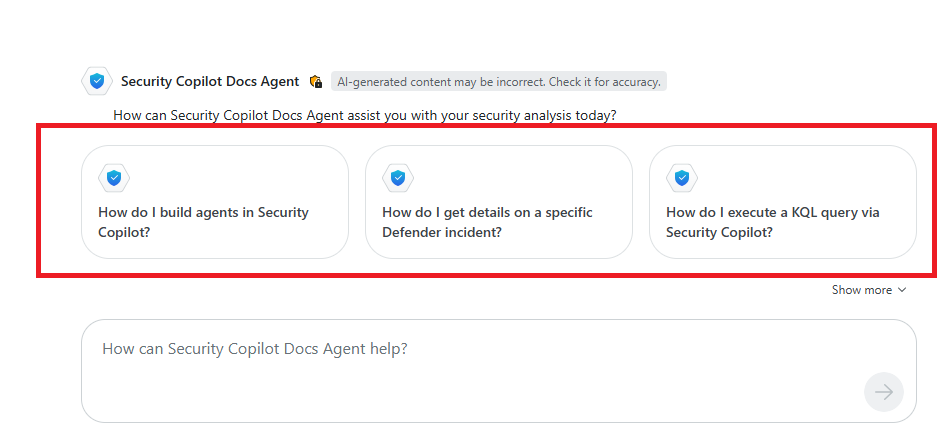
プロンプトの提案
プロンプト候補 は、プロンプトの出力が表示された後のフォローアップ プロンプトのキュレーションされた一覧です。 提案により、ユーザーはガイド付きエクスペリエンス内に留まるようにします。
プロンプトの候補を構成するには:
プロンプトは、
SuggestedPrompts属性を持つスキルの下に追加されます。-
IsStarterAgentプロンプトの提案Personas省略して、スターター プロンプトとして扱われないようにする必要があります。
-
SuggestedPrompts属性のすべてのプロンプトは、セッションのコンテキストに基づいてプロンプトを生成してランク付けします。 これらのプロンプトは、SuggestedPromptsを開始テンプレートとして使用して生成されます。プロンプトの候補は、チャットの会話を続行するための潜在的なプロンプトとして結果に表示されます。
プロンプト候補のいずれかを選択した場合は、送信する前にプロンプトを編集できます。
要求が実行され、応答が返されます。
注:
Orchestrator では、動的に生成されたプロンプト候補で必要なツールが有効になっているかどうかがチェックされません。 ツールが有効になっていないプロンプトが実行されると、エラーが表示されます。 関連するすべてのツールが有効になっており、構成されていることを確認します。
次の YAML は、エージェント マニフェストのサンプル セクションを示しています。ここで、 SecurityCopilotDocsAgent には、動的な推奨プロンプトを生成するためにテンプレートとして使用される 11 個の推奨プロンプトがあります。
        - Prompt: Give me more details on the above
        - Prompt: Where do I get troubleshooting information
        - Prompt: My prompt is not giving the response I am seeking, how can I improve on it.
        - Prompt: What is a ProcessSkill in an Agent and show is it different from PromptSkill
        - Prompt: How do I import a custom plugin?
        - Prompt: Does Security Copilot support MCP?
        - Prompt: How do I build an API plugin?
        - Prompt: How do I build a promptbook?
        - Prompt: Can I run a Security Copilot prompt from LogicApp?
        - Prompt: Can I execute a Security Copilot agent from LogicApp?
        - Prompt: What is the purpose of a trigger in Agents?
次の図は、プロンプトが処理され、その結果が返された後に生成されたプロンプト候補を示しています。
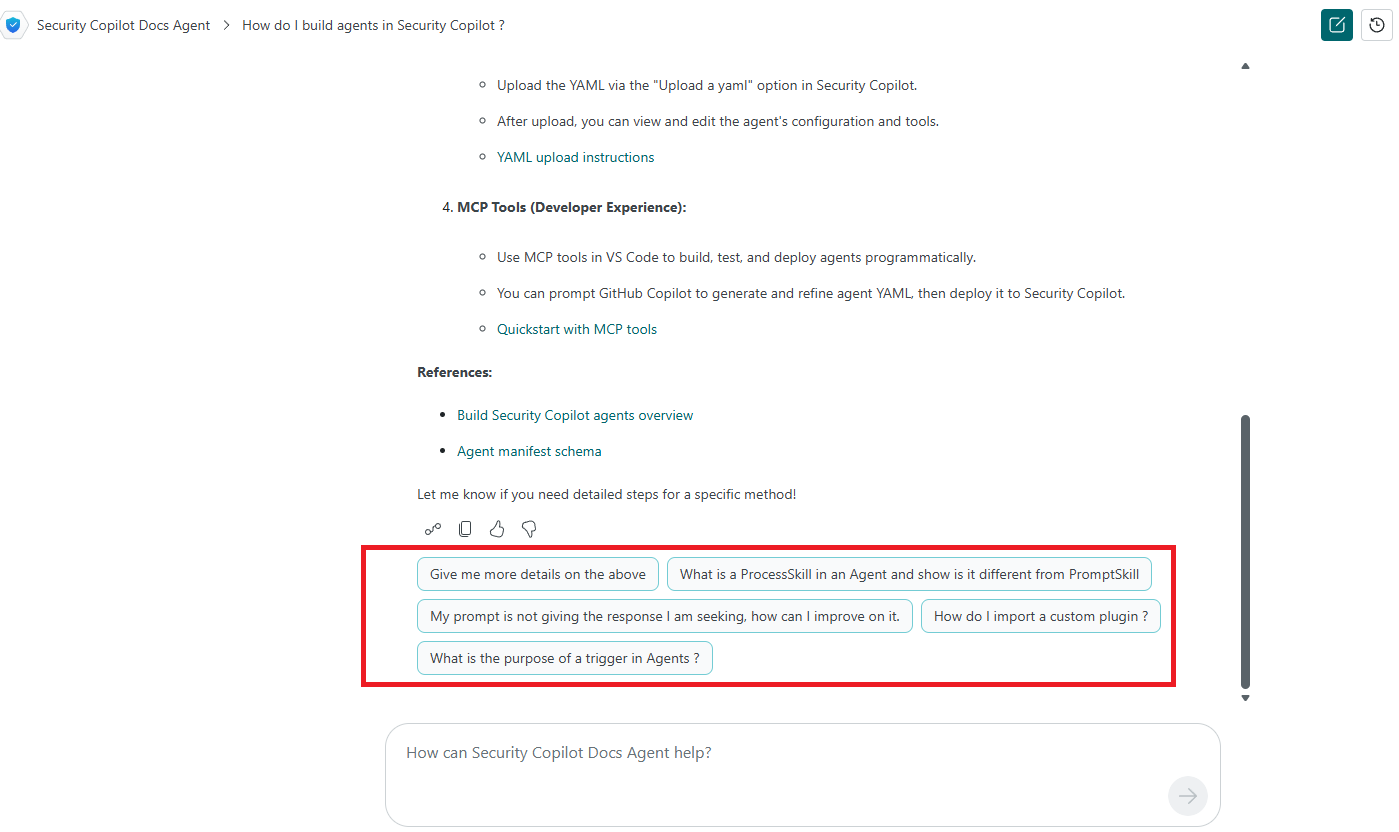
手順 5: エージェントの指示を指定する
Instructions は、エージェントの目標、要求とワークフローの処理方法、制限事項、結果の詳細を定義するための指示です。
YAML エージェントのサンプルから、エージェントに対して提供される詳細な Instructions を参照してください。
手順 6: 対話型エージェントの子スキルを構成する
子スキルは、結果を予測可能かつ包括的にするためにエージェントが適用できるツールと機能です。 ツール (スキル) は特定のタスクを実行し、その目的を達成するためにエージェントによって呼び出されます。
このサンプルでは、microsoft_docs_searchは、RequiredSkillsetsで定義MCP.MSDocs MCP プラグインです。
  ChildSkills:
        - microsoft_docs_search
手順 7: エージェント YAML ファイルをアップロードする
必要な属性を使用してエージェント YAML マニフェストを構成した後、エージェントとのチャット機能を使用できるように YAML をアップロードする必要があります。
- カスタム プラグインとして YAML をアップロードします。 アップロードの手順については、「 カスタム プラグインのアップロード」を参照してください。
対話型エージェントの既知の制限事項
対話型エージェントを実装するための既知の制限事項を次に示します。
対話型エージェントは、
UserRequestである必要がある入力を 1 つだけサポートします。ユーザーは、[ エージェントとのチャット ] を選択し、ID と同意を使用して認証することで、対話型チャットを設定できます。 これにより、他のユーザーが使用するエージェントは設定されません。適切なユーザーは、他のユーザーがこのエージェントを使用できるように Active Agents でエージェントを設定する必要があります。
エージェント メモリはチャット コンテキストに含まれません。
スターター プロンプトを検証する
スターター プロンプトの提案は次のとおりです。
プロンプトをスターター プロンプトとして定義する前に、新しいセッションの最初のプロンプトとしてプロンプトを実行し、エラーがないことを確認し、プロンプト出力が有効であることを確認します。
すべてのプロンプトがスターター プロンプトとして使用されるのに適しているわけではありません。 たとえば、前のコンテキストを必要とするプロンプトは、これらのプロンプトが正しく動作するために使用できるコンテキストがないため、スターター プロンプトには適していません。
次の手順
対話型エージェントとのチャットを開始します。 詳細については、「 エージェントとのチャット」を参照してください。