適用対象: SQL ServerAzure SQL データベースAzure SQL Managed InstanceAzure Synapse Analytics
SQL バインドに対する Azure Functions のサポートは、入力バインドと出力バインドのプレビューで利用できます。 SQL バインドを使用すると、Azure SQL データベースまたは SQL Server データベースを Azure Functions に簡単に接続できます。 Visual Studio Code の SQL バインド拡張機能は、SQL バインドを使用して Azure Functions を開発するプロセスを容易にし、 Visual Studio Code 拡張機能パック用の MSSQL 拡張機能 と共に自動的にインストールされます。
この記事では、Visual Studio Code 用の SQL バインド拡張機能を使用して、SQL バインドを持つ Azure 関数を作成する方法について説明します。
メモ
現在、SQL バインド拡張機能は C# の Azure 関数のみをサポートしています。 JavaScript と Python の Azure関数は SQL バインドをサポートしていますが、現時点では、SQL バインド拡張機能からはサポートされていません。
オブジェクト エクスプローラーから
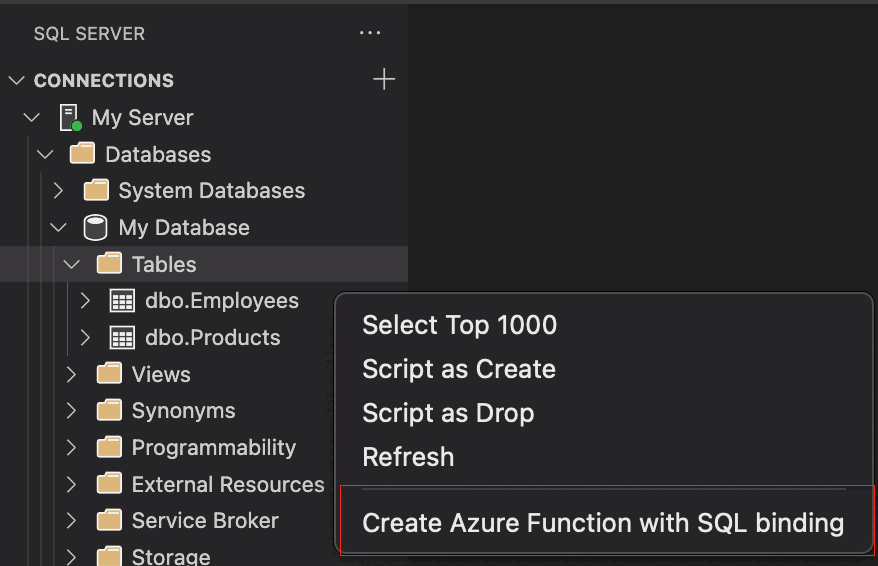
オブジェクト エクスプローラーで特定のテーブルまたはビューから Azure 関数を作成するには、SQL Server オブジェクト エクスプローラーで接続されているサーバーのテーブルまたはビューを右クリックし、[ SQL バインドを使用して Azure 関数を作成] を選択します。
Table Object Explorer コマンド:
オブジェクト エクスプローラーの表示コマンド:
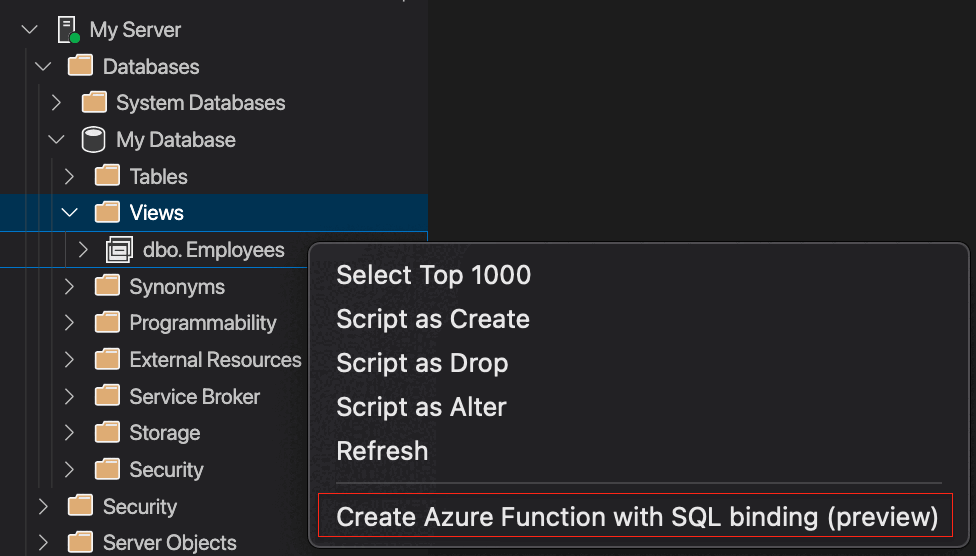
詳細については、 オブジェクト エクスプローラーを使用して Visual Studio Code の SQL バインド拡張機能を使用して Azure Functions を作成する方法に関するページを参照してください。
コマンド パレットから
SQL バインドを使用して新しい関数を作成するには、コマンド パレットから [MS SQL: CREATE Azure Function with SQL Binding]\(SQL バインドを使用して Azure 関数を作成 する\) コマンドを実行します。

詳細については、「コマンド パレットで Visual Studio Code の SQL バインド拡張機能を使って Azure 関数を作成する」を参照してください。
既存の Azure 関数内
既存の関数に SQL バインドを追加するには、エディターで C# Azure 関数を開きます。 次に、コマンド パレットから MS SQL: Add SQL Binding コマンドを実行します。

詳細については、「コマンド パレットで Visual Studio Code の SQL バインド拡張機能を使って Azure 関数を作成する」を参照してください。
SQL バインドを持つ Azure 関数用に生成されたコード
SQL 入力バインドを使用して Azure 関数用に生成されたコード:
using System;
using System.Collections.Generic;
using Microsoft.AspNetCore.Http;
using Microsoft.AspNetCore.Mvc;
using Microsoft.Azure.WebJobs;
using Microsoft.Azure.WebJobs.Extensions.Http;
using Microsoft.Extensions.Logging;

namespace Company.Function
{
    public static class dboEmployees
    {
        // Visit https://aka.ms/sqlbindingsinput to learn how to use this input binding
    [FunctionName("dboEmployees")]
        public static IActionResult Run(
            [HttpTrigger(AuthorizationLevel.Function, "get", Route = null)] HttpRequest req,
            [Sql("SELECT * FROM [dbo].[Employees]",
            CommandType = System.Data.CommandType.Text,
            ConnectionStringSetting = "SqlConnectionString")] IEnumerable<Object> result,
            ILogger log)
        {
            log.LogInformation("C# HTTP trigger with SQL Input Binding function processed a request.");

            return new OkObjectResult(result);
        }
    }
}
SQL 出力バインドを使用して Azure 関数用に生成されたコード:
using System;
using System.Threading.Tasks;
using Microsoft.AspNetCore.Http;
using Microsoft.AspNetCore.Mvc;
using Microsoft.Azure.WebJobs;
using Microsoft.Azure.WebJobs.Extensions.Http;
using Microsoft.Extensions.Logging;

namespace Company.Function
{
    public static class dboEmployees
    {
        // Visit [https://aka.ms/sqlbindingsoutput] to learn how to use this output binding
        [FunctionName("dboEmployees")]
        public static CreatedResult Run(
            [HttpTrigger(AuthorizationLevel.Function, "get", Route = "addtodoitem")] HttpRequest req,
            [Sql("[dbo].[Test2]", ConnectionStringSetting = "NewSQLConnectionString")] out ToDoItem output,
            ILogger log)
        {
            log.LogInformation("C# HTTP trigger with SQL Output Binding function processed a request.");

            output = new ToDoItem
            {
                Id = "1",
                Priority = 1,
                Description = "Hello World"
            };

            return new CreatedResult($"/api/addtodoitem", output);
        }
    }

    public class ToDoItem
    {
        public string Id { get; set; }
        public int Priority { get; set; }
        public string Description { get; set; }
    }
}